
1. Úvod
Welcome to the user manual for your Sony BRAVIA 2M2 Series 4K Ultra HD Smart LED Google TV, model K-55S25M2. This manual provides essential information for setting up, operating, and maintaining your television. Please read it thoroughly to ensure proper use and to maximize your viewzkušenosti.
The Sony BRAVIA 2M2 Series offers a stunning 4K Ultra HD display, powered by the 4K Processor X1, delivering exceptional picture quality with vibrant colors and sharp details. With Google TV, you gain access to a vast world of entertainment, personalized recommendations, and smart home integration. Enjoy immersive sound with Dolby Atmos and DTS:X, and seamless connectivity with multiple HDMI and USB ports, Wi-Fi, and Bluetooth.
2. Bezpečnostní informace
Before operating the television, please read all safety instructions carefully. Keep this manual for future reference.
- Zdroj napájení: Připojujte televizor pouze k určenému zdroji napájení.
- Větrání: Zajistěte dostatečné větrání kolem televizoru, abyste zabránili přehřátí. Neblokujte větrací otvory.
- Voda a vlhkost: Nevystavujte televizor dešti ani vlhkosti. Nepokládejte na televizor předměty naplněné tekutinami.
- Čištění: Před čištěním televizor odpojte ze zásuvky. Použijte měkký, suchý hadřík. Nepoužívejte tekuté ani aerosolové čisticí prostředky.
- Umístění: Place the TV on a stable, level surface or mount it securely to a wall. Avoid placing it in direct sunlight or near heat sources.
- Servis: Nepokoušejte se televizor opravovat sami. Veškerý servis svěřte kvalifikovanému servisnímu personálu.
3. Co je v krabici
Ověřte, zda jsou v balení přítomny všechny součásti:
- 1 x Sony BRAVIA LED TV Unit
- 1 x napájecí kabel
- 1 x Standard Remote Control
- 2 x AAA baterie
Poznámka: A tabletop stand is included for 43-inch, 50-inch, and 75-inch models. For other sizes, the Sony Service Team will provide either a free wall-mount bracket or a tabletop stand upon request during installation.
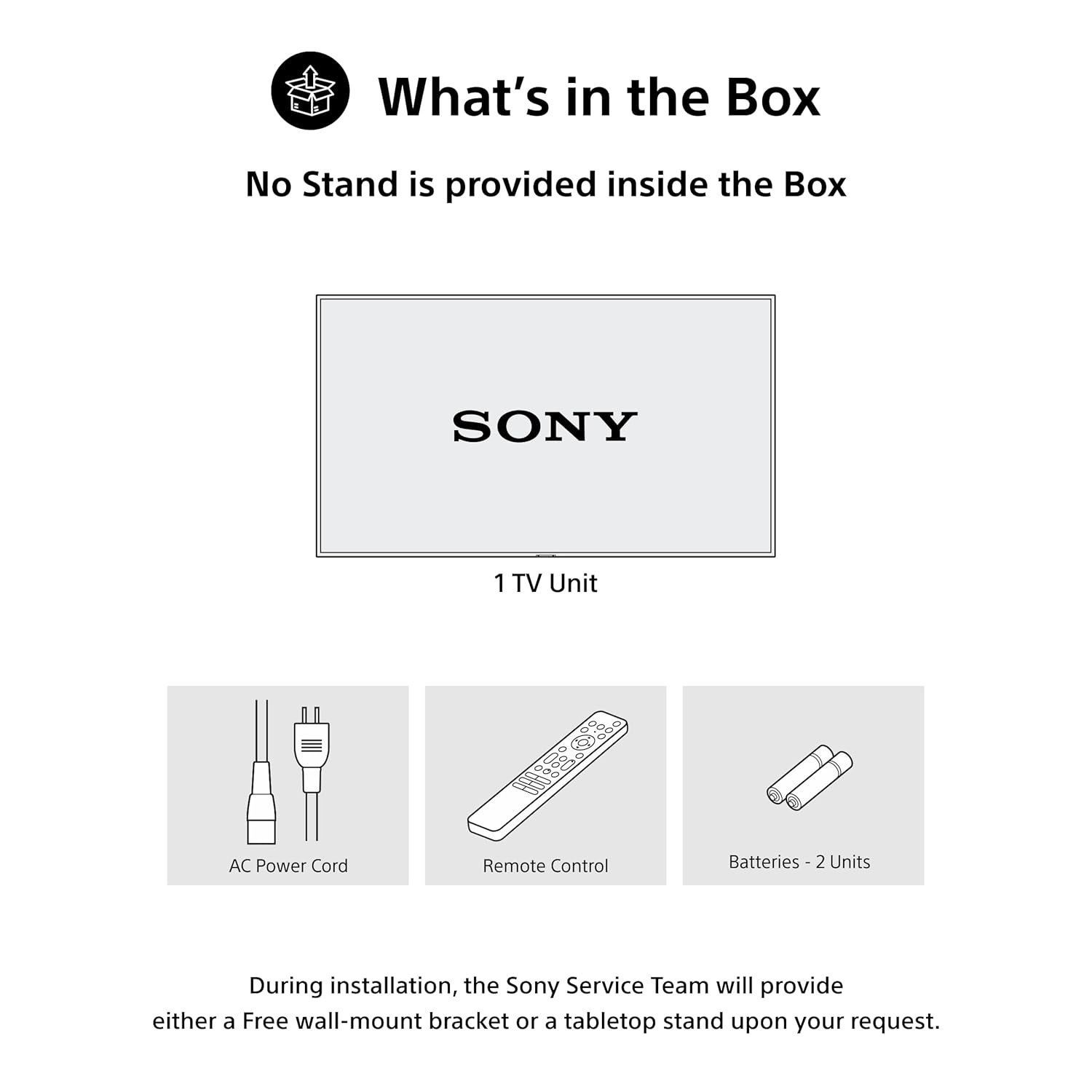
An illustration depicting the items included in the product packaging: one LED TV unit, one AC power cord, one standard remote control, and two AAA batteries. Note that the tabletop stand is provided separately by the service team upon request for certain sizes.
4. Fyzické nastavení
4.1 Možnosti montáže
Your Sony BRAVIA TV can be set up using either a tabletop stand or a wall mount. The VESA mount standard is 300 x 300 mm.

A diagram illustrating the physical dimensions of the 55-inch Sony BRAVIA 2 II television. The screen measures 55 inches (139 cm) diagonally, with a width of 122.7 cm (48.30 inches) and a height of 72.4 cm (28.50 inches). A tabletop stand is optional.
4.2 Připojení periferních zařízení
Connect your external devices to the appropriate ports on the back of your TV:
- HDMI porty (x4): Connect set-top boxes, Blu-ray players, gaming consoles, and other HDMI-compatible devices. HDMI 3 supports eARC/ARC for enhanced audio return.
- USB porty (x2): Connect USB storage devices for media playback or external hard drives.
- LAN port: Pro kabelové připojení k internetu.
- Anténní/kabelový vstup: Připojte anténu nebo kabelovou televizi.

A detailed image of the television's rear panel, illustrating the available connectivity ports: four HDMI inputs (one with eARC/ARC support), two USB ports, a LAN port for wired internet, and antenna/cable inputs.
5. Počáteční nastavení
After physically setting up your TV and connecting necessary peripherals, follow these steps for initial power-on and configuration:
- Connect the AC power cord to the TV and a power outlet.
- Stiskněte tlačítko napájení na dálkovém ovladači nebo na televizoru.
- Follow the on-screen instructions to select your language, country/region, and connect to your Wi-Fi network.
- Sign in with your Google account to access Google TV features and personalize your experience.
6. Ovládání vašeho televizoru
6.1 Konec produktuview Video
Toto video poskytuje komplexní přehledview of the Sony BRAVIA 2M2 Series 4K Ultra HD Smart LED Google TV, highlighting its key features, smart functionalities, and connectivity options.
6.2 Dálkové ovládání
The included remote control allows you to navigate the TV's interface, adjust settings, and access various features. It includes dedicated buttons for popular streaming services and voice control.

An image of the Sony BRAVIA Eco Remote, featuring clearly labeled buttons for power, menu navigation, voice search activation, and direct access to popular streaming services such as YouTube, Prime Video, Netflix, and Sony Pictures Core.
6.3 Rozhraní Google TV
Google TV organizes your favorite content from across your apps and subscriptions into one central hub. Enjoy personalized recommendations, create a Watchlist, and easily discover new movies and shows.

A view of the Sony BRAVIA 2 II's Google TV home screen, displaying a personalized selection of movies, TV shows, and applications like YouTube, Netflix, Prime Video, and Disney+, emphasizing ease of content discovery.
6.4 Voice Control (Google Assistant & Alexa)
Use your voice to quickly find content, control playback, adjust volume, and manage smart home devices. Simply press the Google Assistant button on your remote or pair with an Alexa device.

An image depicting a user interacting with the television using voice commands via the remote control, highlighting the ease of finding content and controlling the TV through voice search.

An image showing the Sony BRAVIA TV seamlessly integrated with an Alexa smart speaker, demonstrating how users can control TV functions like channels, power, and volume using voice commands through Alexa.
6.5 Odlévání a zrcadlení
Easily stream content from your mobile devices to your TV:
- Google Cast: Stream videos, photos, and apps from your Android devices.
- Apple AirPlay 2 a HomeKit: Stream content from your iPhone, iPad, or Mac, and integrate your TV into your Apple Home ecosystem.

A visual demonstrating the screen mirroring capabilities, where content from both an iOS device (via Apple AirPlay) and an Android device (via Google Cast) is wirelessly streamed and displayed on the Sony BRAVIA television.
6.6 Herní funkce
The BRAVIA 2M2 Series is designed to enhance your gaming experience:
- Herní menu: Access gaming-specific settings and adjustments for optimal performance.
- ALLM/eARC (HDMI 2.1 Compatible): Experience ultra-responsive gaming with minimal input lag.
- PlayStation 5 Features: Gaming devices are automatically detected for simplified setup and optimized settings.

A screenshot of the dedicated Game Menu on the Sony BRAVIA TV, providing quick access to gaming-specific settings such as motion blur reduction and audio equalizer adjustments for an optimized gaming experience.

An image of a person engaged in gaming on the Sony BRAVIA TV, emphasizing the benefits of HDMI 2.1, Auto Low Latency Mode (ALLM), and Enhanced Audio Return Channel (eARC) for ultra-responsive gameplay with minimal lag.

A child playing a PlayStation 5 game on the Sony BRAVIA TV, illustrating how the TV automatically detects gaming devices and optimizes settings for superior image quality, low input lag, and an enhanced gaming experience.
6.7 Sony Pictures Core
Access the Sony Pictures Core app to redeem movie credits and enjoy a curated selection of films, bringing cinematic brilliance directly to your home.

A screenshot of the Sony Pictures Core application on the TV, illustrating how users can redeem movie credits and access a curated library of films, enhancing the cinematic experience at home.
6.8 Aplikace BRAVIA Connect
Control your BRAVIA TV and BRAVIA Theater with the BRAVIA Connect app. Adjust volume, fine-tune settings, or check your setup directly from your smartphone.

A smartphone displaying the BRAVIA Connect App, which allows users to control their TV, adjust picture and sound settings, and check setup directly from their mobile device.
7. Kvalita obrazu a zvuku
7.1 4K Display Enhancements
- 4K procesor X1: Enhances lower-resolution content to near-4K clarity and minimizes noise.
- 4K X-Reality PRO: Upscales images to true 4K quality, enhancing detail and clarity.
- Live Color: Produkuje zářivé a realistické barvy.
- HDR10/HLG: Supports High Dynamic Range formats for vivid, detailed movies and games.

A visual representation of the Sony X1 4K Processor, depicted as a microchip on a circuit board, signifying its role in refining every scene for sharp and colorful picture quality.

A side-by-side comparison demonstrating the visual improvement offered by 4K X-Reality PRO. The left side shows a less detailed image from a conventional TV, while the right side displays the same scene with significantly enhanced clarity and detail on a 4K X-Reality PRO screen.

A visual comparison between Standard Dynamic Range (SDR) and High Dynamic Range (HDR) content. The HDR side exhibits a wider range of colors, deeper contrast, and more vivid details, particularly in bright and dark areas, delivering a more exciting viewing experience for movies and games.
7.2 MotionFlow XR 200
MotionFlow XR 200 technology ensures smooth and clear motion, allowing sports and movies to be seen with lifelike clarity by minimizing motion blur.

A side-by-side comparison illustrating the effect of Motionflow XR 200. The left image shows a blurred motorcycle rider on a conventional TV, while the right image displays the same rider with smooth, clear motion, enhancing the clarity of sports and movies.
7.3 Zvukové funkce
- 20 Watts Output (2ch Open Baffle Speaker): Poskytuje čistý a silný zvuk.
- Dolby Atmos a Dolby Audio: Provides immersive, multi-dimensional sound that fills the room.
- DTS:X: Offers an enlivening theatre-quality sound experience.
- Jasná fáze: Ensures precise and well-balanced audio by minimizing speaker resonance.
- Bluetooth (A2DP): Connect Bluetooth headphones for wire-free entertainment.

An illustration showing sound waves expanding from the television into a living room, representing the immersive surround sound experience provided by Dolby Atmos, which creates a multi-dimensional audio environment.

An image illustrating the DTS:X technology, which delivers an enlivening theatre-quality sound experience with remarkably realistic audio.

An image of a violin being played, accompanied by the 'Clear Phase' logo, symbolizing the technology's ability to deliver clear and precise audio, ensuring every sound is distinct and well-defined.

An image showing a person connecting Bluetooth headphones to the BRAVIA TV, enabling seamless, wire-free audio for private listening or enhanced sound.
8. Údržba
8.1 Power Consumption Management
The Eco Dashboard 2 feature helps you monitor and control your TV's power consumption. It includes a light sensor that automatically optimizes brightness to your room's ambient light, contributing to energy savings.

A display of the Eco Dashboard 2 interface, which provides real-time power consumption data and options for optimizing energy usage, such as power saving modes and automatic picture adjustment based on ambient light.
8.2 Durability (X-Protection PRO)
The TV is designed with X-Protection PRO, offering long-term protection against various environmental factors:
- Ochrana proti prachu: Helps prevent dust accumulation that can affect performance.
- Ochrana před bleskem: Shields the TV from lightning strikes.
- Přepěťová ochrana: Protects against power fluctuations and surges.
- Ochrana proti vlhkosti: Designed to withstand humid conditions.

An infographic illustrating the X-Protection PRO features, which provide enhanced durability and protection against environmental factors such as dust, lightning, power surges, and humidity, ensuring the TV's longevity.
9. Řešení problémů
Pokud narazíte na problémy s televizorem, postupujte podle následujících běžných kroků pro řešení problémů:
- Bez napájení: Zkontrolujte, zda je napájecí kabel bezpečně připojen a zda je zásuvka funkční.
- Žádný obraz/zvuk: Ověřte, zda je vybrán správný vstupní zdroj. Zkontrolujte všechna kabelová připojení.
- Dálkové ovládání nefunguje: Ujistěte se, že jsou baterie správně vloženy a nejsou vybité. Namiřte dálkový ovladač přímo na infračervený senzor televizoru.
- Problémy s připojením k síti: Restart your router and modem. Check Wi-Fi settings on the TV. For wired connections, ensure the LAN cable is properly connected.
- Problémy s kvalitou obrazu: Upravte nastavení obrazu (jas, kontrast, barvy). Ujistěte se, že zdroj obsahu je vysoké kvality.
- Problémy se zvukem: Check volume levels and mute settings. Ensure external audio systems are correctly connected and configured.
V případě podrobnějšího řešení problémů nebo přetrvávajících problémů se obraťte na zákaznickou podporu společnosti Sony.
10. Specifikace
| Funkce | Detail |
|---|---|
| Číslo modelu | K-55S25M2 |
| Velikost obrazovky | 55 Inches (139 Centimetres) |
| Technologie displeje | LED |
| Rezoluce | 4K Ultra HD (3840 2160 x XNUMX XNUMX) |
| Obnovovací frekvence | 60 Hertzů |
| Procesor | Procesor 4K X1 |
| Vylepšení obrazu | 4K X-Reality PRO, Live Color, HDR10, HLG, MotionFlow XR 200 |
| Zvukový výstup | 20 Watts (2ch Open Baffle Speaker) |
| Audio technologie | Dolby Atmos, Dolby Audio, DTS:X, Clear Phase |
| Operační systém | Google TV |
| Konektivita | 4 HDMI ports (HDMI 2.1 compatible with ALLM/eARC), 2 USB ports, Ethernet, Wi-Fi, Bluetooth 5.3 |
| Chytré funkce | Google Assistant, Google Cast, Apple AirPlay 2, Apple HomeKit, Alexa, Game Menu, Sony Pictures Core, Watchlist |
| Spotřeba energie | 150 Watts (Annual Energy Consumption: 186.76 kWh) |
| Rozměry (D x Š x V) | 8.2H x 122.7Š x 72.4V centimetrů |
| Hmotnost | 13200 gramů |
| Typ montáže | Wall Mount & Table Mount (VESA 300 x 300 mm) |
| Zahrnuté komponenty | 1 LED TV, 1 AC Power Cord, 1 Remote Control, 2 Batteries |
11. Záruka a podpora
Your Sony BRAVIA 2M2 Series TV comes with a 1letá komplexní záruka on the product from the date of purchase, provided by the brand. This includes the remote control for technical issues.
To avail warranty service, please retain your purchase invoice. For any assistance or to contact brand support, please use the following details:
- Péče o zákazníky č.: 080 6500 6500
- E-mail: Sonyindia.care@ap.sony.com
- Webmísto: Visit sonyindia.co.in for product recycling and further information.
Installation services are typically coordinated by Amazon with the brand within 48 hours of delivery. Please note that installation charges may apply in some cases, and scheduled delivery is available in select cities.