
Zavedení
This manual provides detailed instructions for the assembly, operation, and maintenance of your FLEXISPOT One-Piece Standing Desk with Rattan Drawers. Please read this manual thoroughly before installation and use to ensure proper function and safety. Keep this manual for future reference.

Image: The FLEXISPOT One-Piece Standing Desk in black with rattan drawers, featuring a monitor shelf and an integrated control panel.
Důležité bezpečnostní informace
Abyste předešli zranění nebo poškození produktu, dodržujte následující bezpečnostní pokyny:
- Vždy pečlivě dodržujte montážní návod.
- Udržujte děti a domácí zvířata mimo oblast montáže.
- Use appropriate tools and safety gear during assembly.
- Před obsluhou stolu se ujistěte, že jsou všechna připojení bezpečná.
- Do not overload the desk. The maximum weight capacity is 110 lbs.
- Během nastavování výšky držte ruce a předměty v dostatečné vzdálenosti od pohyblivých částí.
Obsah balení
Verify that all components are present before beginning assembly. The desk ships in two separate packages.
- Desktop with integrated monitor shelf and rattan drawers
- Desk frame and legs
- Ovládací panel
- Napájecí adaptér a kabely
- Montážní materiál (šrouby, vruty, nářadí)
- Uživatelská příručka

Image: A diagram illustrating the dimensions of the desk components and indicating that the product ships in two separate packages.
Montážní návod
Assembly typically takes approximately one hour. Refer to the separate detailed assembly guide included in your package for step-by-step instructions and diagrams. Ensure all fasteners are correctly identified and used in their designated locations.
- Vybalte všechny součásti a ověřte je podle seznamu obsahu balení.
- Připevněte nohy stolu k rámu pracovní desky pomocí dodaného spojovacího materiálu.
- Připojte kabely ovládacího panelu a motoru dle pokynů.
- Secure any cable management components.
- Place the desk in its desired location.
Nastavení
After assembly, connect the desk to a power source.
- Plug the power adapter into the desk's control box.
- Zapojte napájecí kabel do standardní elektrické zásuvky.
- The desk is now ready for initial use.
Návod k obsluze
Nastavení výšky
The desk features an electric motor system for smooth height transitions.
- Stiskněte tlačítko Šipka nahoru tlačítko pro zvednutí stolu.
- Stiskněte tlačítko Šipka dolů tlačítko pro spuštění stolu.
- The desk can adjust between 28.9 inches (minimum) and 46.5 inches (maximum).
- The motor operates quietly, typically below 50dB.

Image: The desk shown at its minimum (28.9") and maximum (46.5") adjustable heights.
Předvolby paměti
Program up to three preferred height settings for quick adjustments.
- Nastavte si stůl do požadované výšky.
- Stiskněte tlačítko M button, then press one of the numbered preset buttons (1, 2nebo 3) do 3 sekund pro uložení aktuální výšky.
- To recall a saved height, simply press the corresponding numbered preset button.

Obrázek: Detailní záběr view of the desk's control panel, highlighting the up/down arrows and memory preset buttons.
Police monitoru
The integrated monitor shelf is designed to elevate screens to an ergonomic eye level.
- Place your monitor(s) on the shelf to reduce neck and back strain.
- This helps maintain proper posture during extended work sessions.

Image: Visual comparison of poor posture versus ergonomic sitting and standing postures facilitated by the adjustable desk.
Rattan Drawers
The desk includes both sliding-door desktop compartments and an under-desk drawer for organized storage.
- Use the desktop compartments (47.2"x8.7"x5.5") for easy access to frequently used items.
- The under-desk drawer (23.6"x11.8"x3.9") provides discreet storage for documents or books.
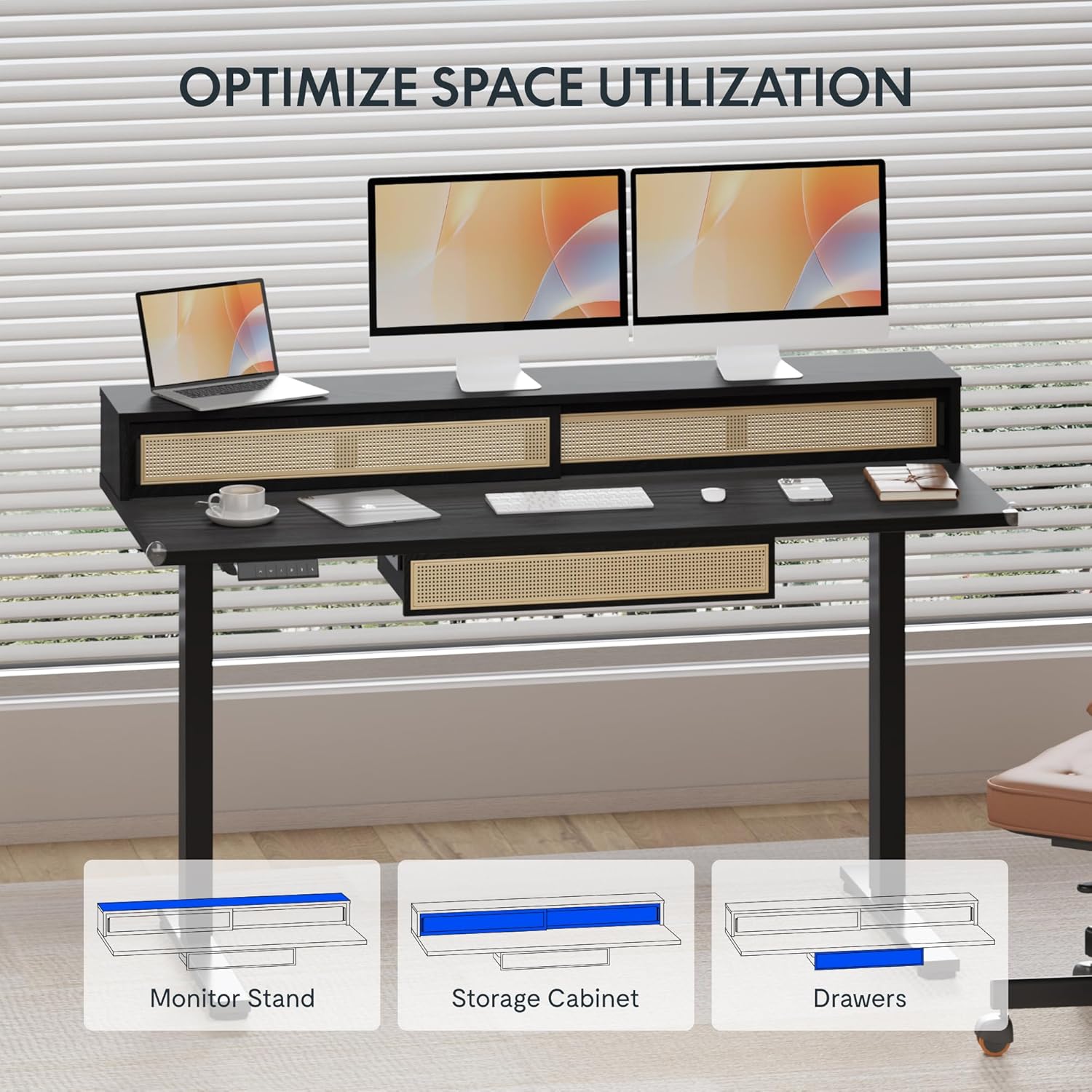
Image: An illustration demonstrating the various storage options, including the monitor stand, storage cabinet, and drawers, for optimal space utilization.
Údržba
Pravidelná údržba zajistí dlouhou životnost a optimální výkon vašeho stolu.
- Čištění: Otřete povrch stolu měkkým hadříkemamp tkanina. Vyhněte se abrazivním čisticím prostředkům nebo agresivním chemikáliím, které mohou poškodit povrch.
- Inspekce: Pravidelně kontrolujte všechny šrouby a vruty, zda jsou pevně utažené. V případě potřeby je dotáhněte.
- Správa kabelů: Ujistěte se, že kabely jsou úhledně uspořádány a nepřekážejí při pohybu stolu.
Odstraňování problémů
Pokud narazíte na problémy se stolem, podívejte se na následující běžná řešení:
| Problém | Možná příčina | Řešení |
|---|---|---|
| Stůl se nehýbe ani nereaguje na ovládací prvky. | Power connection issue, cable disconnected, motor error. | Check power cord connection to outlet and desk. Ensure all motor cables are securely connected. Unplug and replug the power for 10 seconds to reset. |
| Stůl se pohybuje nerovnoměrně nebo vydává neobvyklé zvuky. | Nerovnoměrné zatížení, uvolněné spoje, ucpání. | Ensure weight is evenly distributed. Check for any obstructions under the desk. Verify all assembly screws are tight. |
| Předvolby paměti nefungují. | Předvolby nebyly správně uloženy. | Re-save the desired height settings by pressing 'M' then the preset number within 3 seconds. |
Specifikace
| Funkce | Detail |
|---|---|
| Značka | FLEXISPOT |
| Rozměry produktu (D x Š x V) | 23.6"D x 47.2"W x 29"H (at lowest point) |
| Barva | Černý |
| Základní materiál | Legovaná ocel |
| Typ horního materiálu | Dřevo |
| Minimální výška | 28.9 palce |
| Maximální výška | 46.5 palce |
| Počet zásuvek | 1 (under-desk) |
| Enclosed Shelves | 2 (sliding-door desktop compartments) |
| Speciální funkce | Corded electric height adjustment, Memory Presets |
| Požadovaná montáž | Ano |
Záruka a podpora
FLEXISPOT provides comprehensive warranty coverage for your standing desk:
- Frame and Motor: 5-year coverage.
- Elektronika: 2-year coverage.
This warranty ensures lasting security for your workspace investment. For customer support, technical assistance, or warranty claims, please refer to the contact information provided in your product packaging or visit the official FLEXISPOT webmísto.