
FLEXISPOT Q4
FLEXISPOT Q4 One-Piece Standing Desk User Manual
Model: Q4
1. Úvod
Thank you for choosing the FLEXISPOT Q4 One-Piece Standing Desk. This manual provides essential information for the safe assembly, operation, and maintenance of your new adjustable height desk. Please read these instructions carefully before use and retain them for future reference.
Bezpečnostní informace
- Před montáží se ujistěte, že jsou všechny součásti přítomny a nepoškozené.
- Během provozu držte děti a domácí zvířata v dostatečné vzdálenosti od stolu.
- Nepřetěžujte stůl. Maximální nosnost naleznete ve specifikacích.
- Neumisťujte tekutiny přímo na ovládací panel nebo do blízkosti elektrických součástí.
- Před čištěním nebo údržbou odpojte napájení.
- Tento stůl je určen pouze pro vnitřní použití.
2. Obsah balení a součásti
The FLEXISPOT Q4 Standing Desk is shipped in two separate packages. Please verify all parts are included before beginning assembly.
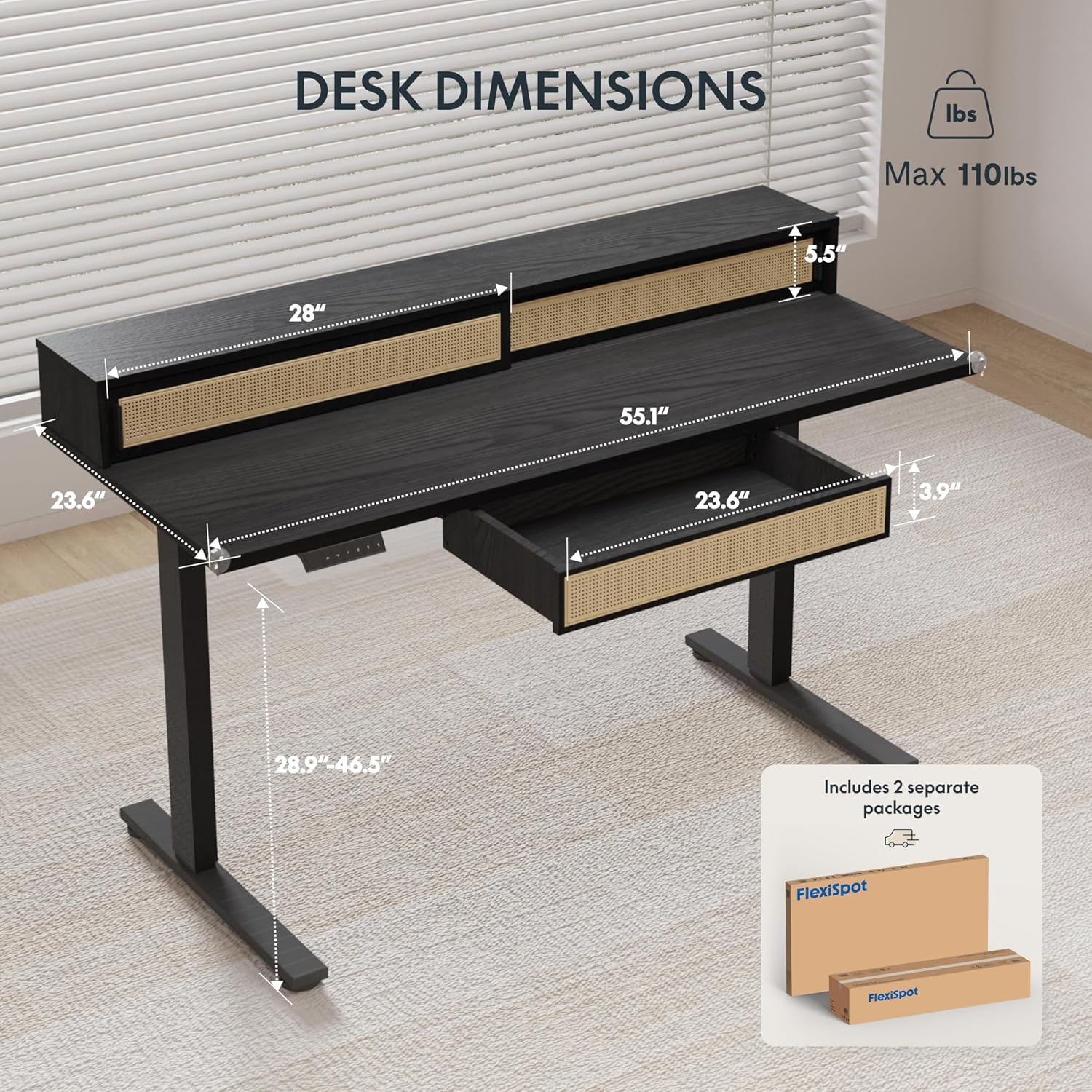
Figure 2.1: Desk dimensions and indication of two separate packages for shipping.
Hlavní komponenty:
- Desktop with integrated monitor shelf and sliding compartments
- Under-desk drawer
- Nohy stolu (2)
- Podložky na nohy (2)
- Ovládací panel
- Napájecí adaptér a kabely
- Montážní materiál (šrouby, vruty, nářadí)
3. Montážní návod
Assembly typically requires two people due to the size and weight of the desk components. Follow the steps below carefully.
Sestavení krok za krokem:
- Rozbalte komponenty: Opatrně vyjměte všechny díly z obalu. Položte je na měkký, čistý povrch, abyste zabránili poškrábání.
- Připevnění nohou stolu: Secure the desk legs to the desktop frame using the provided hardware. Ensure all connections are tight and stable.
- Instalace opěrek nohou: Attach the foot pads to the bottom of the desk legs.
- Montáž ovládacího panelu: Secure the control panel to the underside of the desktop in the designated area.
- Připojit kabely: Connect the motor cables from the legs to the control box, and then connect the control panel cable to the control box. Finally, connect the power adapter to the control box and plug it into a power outlet.
- Install Under-Desk Drawer: Slide the under-desk drawer into its designated slot beneath the desktop.
- Správa kabelů: Utilize the integrated cable management features to organize power and data cables for a tidy workspace.

Figure 3.1: Fully assembled FLEXISPOT Q4 Standing Desk, showcasinjeho design a funkčnost.

Obrázek 3.2: Detail view of the stable desk frame, highlighting the reinforced structure and junction zone.
4. Návod k obsluze
The FLEXISPOT Q4 desk features an electric height adjustment system with a smart control panel.
Funkce ovládacího panelu:

Figure 4.1: The smart control panel, illustrating buttons for up/down movement and height memory presets.
- Šipky nahoru/dolů (▲ / ▼): Stiskněte a podržte pro nastavení výšky stolu nahoru nebo dolů. Uvolněte tlačítko pro zastavení v požadované výšce.
- Memory Presets (1, 2, T, Person Icon): The desk allows you to save preferred heights for quick adjustments.
- To save a height: Adjust the desk to your desired height, then press and hold one of the preset buttons (1, 2, T, or Person Icon) until you hear a beep or see a confirmation on the display (if available).
- To use a saved height: Simply press the corresponding preset button once, and the desk will automatically move to the saved height.
Rozsah nastavení výšky:
The desk smoothly transitions between a minimum height of 28.9 inches and a maximum height of 46.5 inches.

Figure 4.2: Visual representation of the desk's adjustable height range, from minimum to maximum settings.
5. Klíčové vlastnosti
Spacious Storage System
The desk integrates a comprehensive storage system, including sliding-door desktop compartments (55.1"×8.7"×5.5") and a dedicated under-desk drawer (23.6"×11.8"×3.9"). These dual storage solutions are designed to keep your essentials accessible and maximize workspace organization.
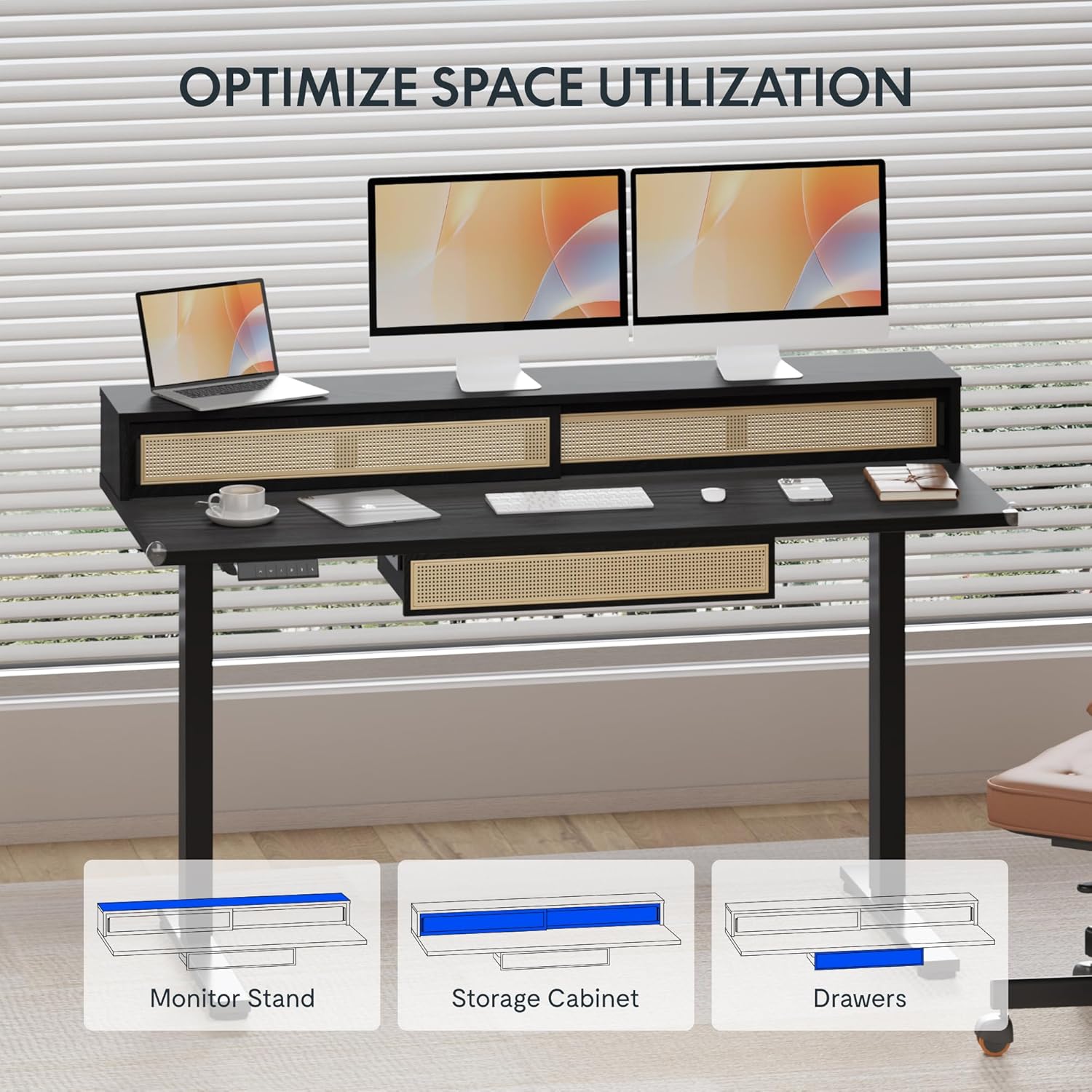
Figure 5.1: Illustration of the desk's integrated storage options, including the monitor stand, storage cabinet, and drawers.
Elegant Rattan Design
The desk features a premium woven rattan texture that enhances interior aesthetics. The seamless desktop design eliminates weak joints, and the scratch-resistant surface is designed to resist daily wear, warping, and stains, maintaining its appearance over time.

Obrázek 5.2: Detailní view of the desk's rattan design, metal handles, and corner protectors.
Integrated Monitor Shelf
An ergonomically designed monitor shelf elevates screens to eye level, which can help reduce neck strain and back discomfort. This feature promotes proper posture alignment during extended work sessions, whether sitting or standing.
Quiet Electric Height Adjustment
The desk is equipped with a silent motor system (operating at less than 50dB) for smooth transitions between sitting and standing positions. Programmable presets allow for quick adjustments, accommodating multiple users or varying work scenarios.
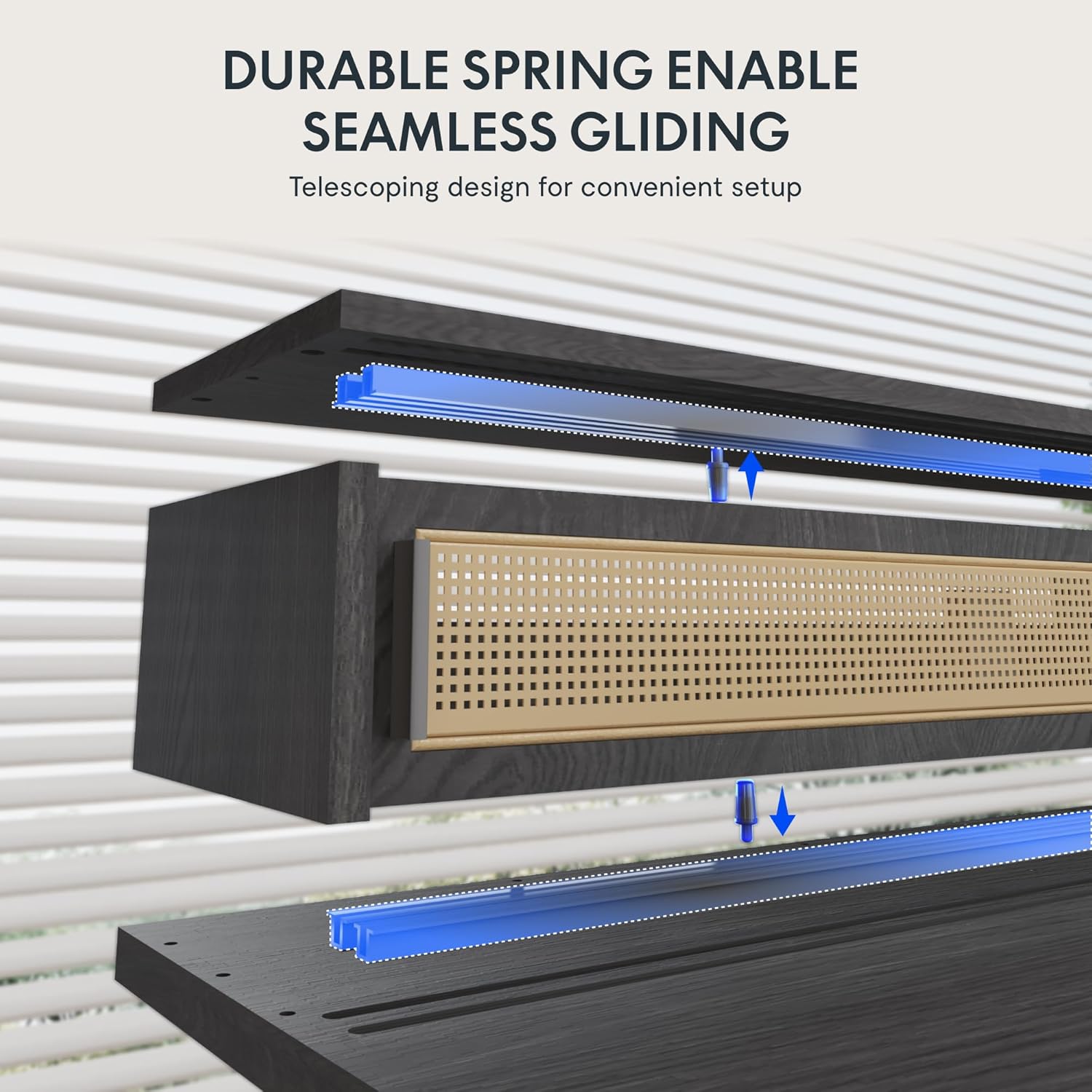
Figure 5.3: Illustration of the durable spring mechanism enabling seamless gliding of desk components.
6. Údržba
Regular maintenance ensures the longevity and optimal performance of your FLEXISPOT Q4 Standing Desk.
- Čištění: Otřete pracovní plochu a rám měkkým hadříkemamp tkanina. Vyhněte se abrazivním čisticím prostředkům nebo agresivním chemikáliím, které mohou poškodit povrch.
- Správa kabelů: Periodically check and reorganize cables to prevent tangles and ensure smooth operation.
- Kontrola upevňovacích prvků: Occasionally inspect all screws and bolts to ensure they remain tight. Retighten if necessary.
- Péče o motor: The electric motor system is designed for maintenance-free operation. Do not attempt to open or lubricate motor components.
7. Řešení problémů
If you encounter issues with your FLEXISPOT Q4 Standing Desk, refer to the following common solutions:
| Problém | Možná příčina | Řešení |
|---|---|---|
| Stůl se nehýbe | Power cable disconnected, motor cable loose, overload. | Check all cable connections. Ensure the desk is plugged into a working outlet. Reduce weight on the desk. |
| Nerovnoměrné nastavení výšky | Obstruction, uneven weight distribution. | Clear any obstructions. Redistribute weight evenly on the desktop. Perform a reset if necessary (refer to control panel instructions). |
| Ovládací panel nereaguje | Volné připojení, problém s napájením. | Check the control panel cable connection to the control box. Ensure main power is connected. |
| Desk stops mid-movement | Safety feature activated (anti-collision), motor overheating. | Remove any obstruction. Allow the motor to cool down for 20 minutes before attempting to operate again. |
Pokud problém přetrvává i po vyzkoušení těchto řešení, kontaktujte zákaznickou podporu FLEXISPOT.
8. Specifikace
| Funkce | Detail |
|---|---|
| Model | Q4 |
| Rozměry produktu (D x Š x V) | 23.6" x 55.1" x 29" (minimální výška) |
| Minimální výška | 28.9 palce |
| Maximální výška | 46.5 palce |
| Typ horního materiálu | Dřevo |
| Základní materiál | Legovaná ocel |
| Barva | Černý |
| Možnosti úložiště | 1 sliding-door compartment, 1 under-desk drawer |
| Počet zásuvek | 1 |
| Počet Polic | 1 (Monitor Shelf) |
| Montáž Vyžadována | Ano |
| UPC | 840460464574 |
9. Záruka a podpora
Záruční ochrana:
The FLEXISPOT Q4 Standing Desk is backed by a comprehensive warranty to ensure your investment security:
- Dvouleté krytí: Applies to the desk frame and motor components.
- Dvouleté krytí: Applies to all electronic components.
This warranty covers manufacturing defects and ensures lasting performance under normal use conditions.
Zákaznická podpora:
For any questions, assistance with assembly, troubleshooting, or warranty claims, please contact FLEXISPOT customer support through the official website or your purchase platform. Please have your model number (Q4) and proof of purchase ready when contacting support.
Ask a question about this manual
Ask about setup, troubleshooting, compatibility, parts, safety, or missing instructions. Manuals+ will review the question and use this page’s manual context to help answer it.