
Zavedení
This manual provides detailed instructions for the setup, operation, maintenance, and troubleshooting of your ATTACK SHARK X82 PRO HE Magnetic Gaming Keyboard. Designed for high-performance gaming, this keyboard features advanced magnetic switches, a rapid trigger system, and versatile connectivity options. Please read this manual thoroughly to ensure optimal performance and longevity of your device.

Image: The ATTACK SHARK X82 PRO HE Magnetic Gaming Keyboard in its Comic color variant, showcasing its compact layout and RGB lighting.
Vlastnosti produktu
- Ultra-Fast 8000Hz Polling Rate: Achieves a 0.1ms response time with a 128K scan rate for competitive gaming.
- Magnetic Hall Effect Switches: Features custom-designed "Magnetic Crystal" switches, compatible with N-pole-down magnetic switches for customization. Includes precision-tuned stabilizers and factory-lubed components.
- Adjustable Actuation Rapid Trigger: Offers fully customizable RT activation points from 0.1–3.4mm with 0.01mm trigger precision and dual zero dead zones.
- Robustní kvalita provedení: Constructed with a top-mount structure and aluminum positioning plate for enhanced typing consistency and stability. Incorporates dual-layer PORON sandwich foam for improved acoustics.
- Tri-Mode Wireless Connectivity: Supports 2.4GHz wireless, Bluetooth, and wired USB-C connections.
- Baterie s dlouhou výdrží: Vybaven baterií s kapacitou 5000 mAh pro delší bezdrátové používání.
- C01Ultra Aviation Cable: Provides stable data transmission and fast charging in wired mode, featuring magnetic shielding.
- Full RGB Customization: Offers 16.8 million colors, dynamic lighting modes, and custom light strips.
- Odolné krytky kláves: Comes with factory original-profile PBT keycaps, including 5-side sublimated "Manga" edition keycaps.
- Cloud-Based Driver: Web-based software for easy setup of lighting, macros, actuation points, and game profiles without installation.

Obrázek: Overview of the ATTACK SHARK X82 PRO HE keyboard highlighting its key features such as 75% layout, magnetic switches, tri-mode connection, QMK web driver, PBT keycaps, 16.8M RGB lighting, and 8KHz polling rate.
Nastavení
1. Rozbalení a obsah
Opatrně otevřete obal výrobku. Ujistěte se, že jsou přítomny všechny součásti:
- Magnetická herní klávesnice ATTACK SHARK X82 PRO HE
- USB Type-C to Type-A Cable (C01Ultra Aviation Cable)
- Klíčenka a stahovák spínačů
- 2.4GHz Wireless Dongle (often stored in a compartment on the keyboard)

Image: The C01Ultra RGB Coiled Keyboard Cable, a Type-C to USB-A HyperSpeed line with 8KHz return rate, included with the keyboard.
2. Počáteční připojení
The keyboard supports three connection modes: wired, 2.4GHz wireless, and Bluetooth.
- Kabelový režim: Connect the provided USB Type-C cable to the keyboard and your computer's USB-A port. The keyboard will automatically switch to wired mode and begin charging.
- Bezdrátový režim 2.4 GHz: Locate the 2.4GHz wireless dongle (usually stored in a slot on the keyboard's underside). Plug the dongle into an available USB-A port on your computer. Switch the keyboard's mode selector to 2.4G. The keyboard should connect automatically.
- Režim Bluetooth: Switch the keyboard's mode selector to BT. On your computer or device, search for Bluetooth devices and select "ATTACK SHARK X82 PRO HE" to pair.

Image: The ATTACK SHARK X82 PRO HE keyboard displaying its tri-mode connectivity options (Bluetooth, 2.4G Wireless, Wired) and compatibility with various devices including Windows, Mac, gaming consoles, laptops, PCs, smartphones, and tablets.
Návod k obsluze
Základní použití
Once connected, the keyboard functions as a standard QWERTY keyboard. The 75% layout provides essential keys while maintaining a compact form factor.
Function Key Combinations (FN)
The keyboard features an FN key for accessing secondary functions and controlling RGB lighting. Specific combinations may vary, but common functions include:
- FN + \|: Přepnout světelný režim
- FN + Enter: Přepnout barvu světla
- FN + šipka nahoru: Zvyšte jas podsvícení
- FN + šipka dolů: Snižte jas podsvícení
- FN + šipka doleva: Snižte rychlost podsvícení
- FN + šipka vpravo: Zvyšte rychlost podsvícení
- FN + Kapitálky: Přepnout režim světelné lišty
- FN + A: Přepnout barvu světelné lišty
- FN + X: Přepnout barvu světla
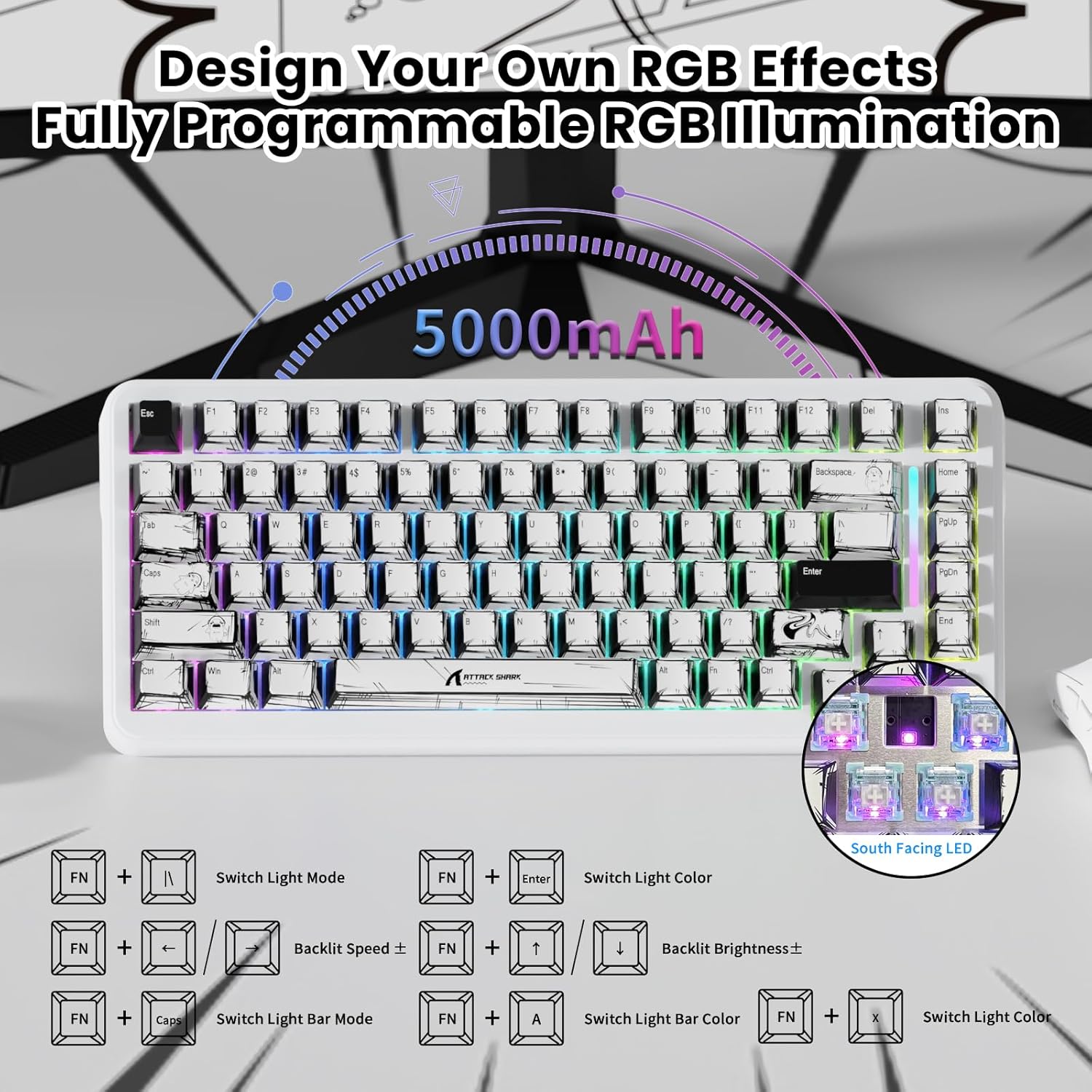
Image: The ATTACK SHARK X82 PRO HE keyboard illustrating various FN key combinations to control RGB lighting effects, brightness, and speed.
Režimy připojení
The X82 PRO HE offers flexible connectivity to suit various setups:
- Kabelové (USB-C): Provides the most stable connection with an 8000Hz polling rate for minimal latency. Ideal for competitive gaming.
- Bezdrátové připojení 2.4 GHz: Utilizes a dedicated USB dongle for a low-latency wireless experience, suitable for gaming without cables.
- Bluetooth: Connects to a wide range of devices (laptops, tablets, smartphones) for general use.
To switch between modes, use the physical switch located on the keyboard. The keyboard is compatible with Windows and Mac operating systems. For PS4/Xbox connections, an external converter may be required.
Video: Demonstrates the Hall Effect Rapid Trigger Keyboard with 0.01mm Precision, showcasing its responsiveness and customization for gaming.
Customization (Software & RGB)
Cloud-Based Driver
The X82 PRO HE utilizes a web-based cloud driver for comprehensive customization. No software installation is required. Simply connect your keyboard and access the driver via a web prohlížeč na:
- Adjust RGB lighting effects and colors.
- Set macros for complex commands.
- Fine-tune actuation points for individual keys (0.1-3.4mm).
- Configure game modes and user profiles.

Image: The software interface for the ATTACK SHARK X82 PRO HE, showing options to tailor your gaming setup, including DKS, Snap Tap, and Zero Deadzone settings.
RGB osvětlení
Beyond FN key combinations, the cloud driver allows for advanced RGB customization, including per-key effects and dynamic lighting modes. The keyboard features 16.8 million colors and custom light strips for a personalized aesthetic.
Video: A demonstration of the customizable RGB lighting on the magnetic keyboard, suitable for various gaming genres like FPS, MOBA, and MMO.
Údržba
Čištění
Pro zachování vzhledu a funkčnosti klávesnice:
- K otření povrchu klávesnice použijte měkký, suchý hadřík.
- Pro odstranění prachu a nečistot mezi klávesami použijte stlačený vzduch.
- Vyhněte se používání agresivních chemikálií nebo abrazivních materiálů.
Výměna kláves a spínačů
The included keycap and switch puller can be used to remove keycaps and magnetic switches for cleaning or replacement. Exercise caution to avoid damaging the switches or PCB.
Odstraňování problémů
| Problém | Možné řešení |
|---|---|
| Klávesnice nereaguje | Check cable connection (wired mode), ensure dongle is properly inserted (2.4GHz mode), or re-pair via Bluetooth. Ensure keyboard is charged. |
| RGB podsvícení nefunguje | Verify FN key combinations or check settings in the cloud-based driver. |
| Klávesy se neregistrují nebo se píší dvakrát | Clean under keycaps. If issue persists, check actuation settings in the cloud driver. Consider updating keyboard firmware if available. |
| Bezdrátové připojení nestabilní | Ensure no interference from other wireless devices. Move closer to the receiver/device. |
For further assistance, refer to the official ATTACK SHARK support resources.
Specifikace
| Funkce | Detail |
|---|---|
| Model | X82 PRO HE |
| Míra hlasování | 8000Hz (Wired), 1000Hz (2.4GHz/Bluetooth) |
| Spínače | Magnetic Hall Effect Switches |
| Rozsah ovládání | 0.1mm – 3.4mm (Adjustable) |
| Konektivita | Tri-Mode (USB-C Wired, 2.4GHz Wireless, Bluetooth) |
| Kapacita baterie | 5000 XNUMX mAh |
| Klíčenky | PBT Double Shot, Manga Graffiti Design |
| Rozložení | 75 % (83 klíčů) |
| RGB osvětlení | 16.8 Million Colors, Customizable Effects |
| Kompatibilní zařízení | Počítač, notebook, herní konzole, chytrý telefon, tablet |
| Materiál | Hliník (polohovací deska) |
| Hmotnost položky | 2.77 libry |
| Rozměry balení | 14.48 x 7.6 x 2.13 palce |
Záruka a podpora
Informace o záruce a technickou podporu získáte na oficiálních stránkách ATTACK SHARK. webnebo se obraťte na jejich zákaznický servis. Uschovejte si účtenku jako doklad o koupi pro případné reklamace.