
ATTACK SHARK X82 PRO HE
ATTACK SHARK X82 PRO HE Gaming Keyboard User Manual
Wireless Rapid Trigger RGB Mechanical Gaming Keyboard
1. Konec produktuview
The ATTACK SHARK X82 PRO HE is a high-performance 75% layout mechanical gaming keyboard designed for competitive gaming and efficient daily use. It features Hall Effect magnetic switches, rapid trigger technology, adjustable actuation points, and versatile tri-mode connectivity (wired, 2.4GHz wireless, and Bluetooth). With an 8000Hz polling rate and a 5000mAh battery, it delivers ultra-low latency and extended usage.
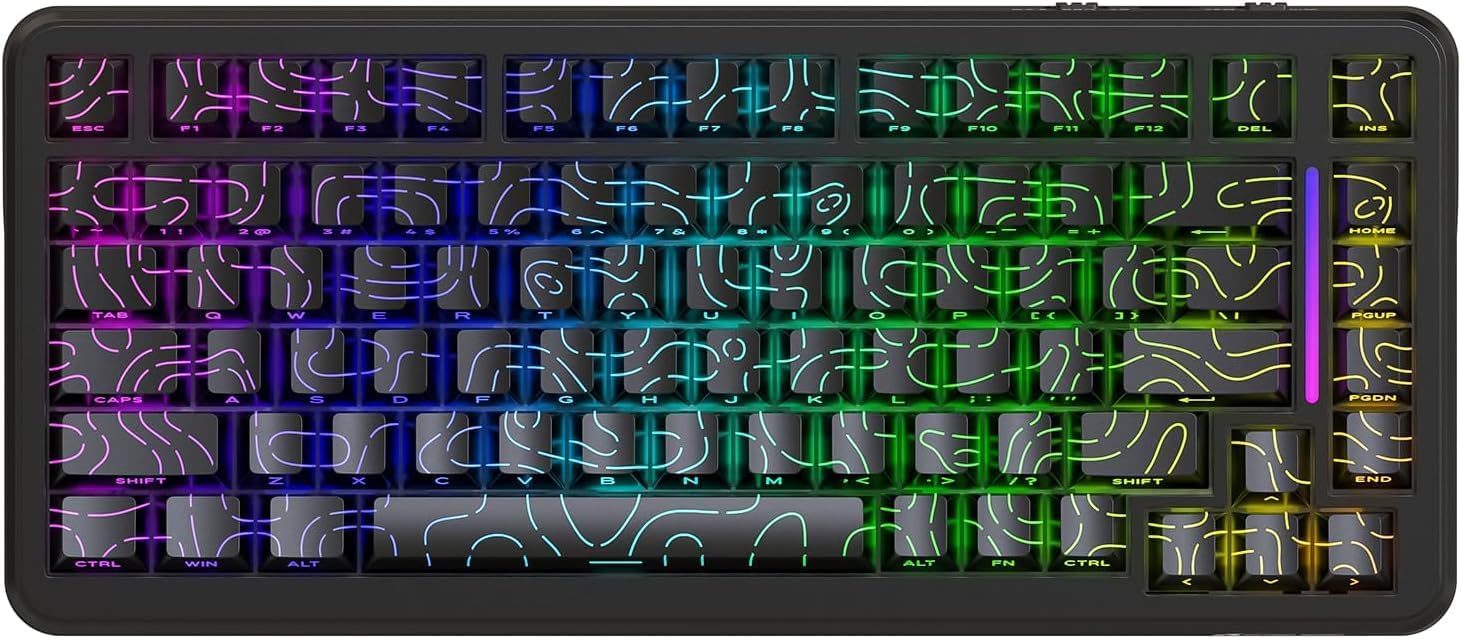
Obrázek 1: Přední strana view of the ATTACK SHARK X82 PRO HE Gaming Keyboard, showcasing its RGB lighting and compact 75% layout.

Figure 2: Visual summary of key features including 75% TKL layout, magnetic switches, web driver, tri-mode connectivity, long battery life, full RGB, 8000Hz polling rate, and low latency.
2. Nastavení a připojení
The X82 PRO HE keyboard offers three versatile connection methods:
2.1. Drátové připojení (USB-C)
Connect the provided USB-C cable from the keyboard to an available USB port on your computer. The keyboard will be automatically recognized and ready for use. This mode supports the full 8000Hz polling rate.
2.2. Bezdrátové připojení 2.4 GHz
- Vyhledejte 2.4GHz USB přijímač, který je obvykle uložen v přihrádce na klávesnici.
- Zapojte USB přijímač do volného USB portu na vašem počítači.
- Switch the keyboard to 2.4GHz wireless mode. Refer to the keyboard's physical switch or key combination for mode selection (e.g., FN + R.).
- Klávesnice by se měla automaticky spárovat s přijímačem.
2.3. Připojení Bluetooth 5.0
- Switch the keyboard to Bluetooth mode. Refer to the keyboard's physical switch or key combination for mode selection (e.g., FN + Q/W/E for different Bluetooth profiles).
- Na svém zařízení (počítači, telefonu, tabletu) povolte Bluetooth a vyhledejte nová zařízení.
- Select "ATTACK SHARK X82 PRO HE" from the list of available devices to pair.
- Dokončete proces párování podle pokynů na obrazovce.

Figure 3: Illustration of the three connectivity modes: USB-C wired, 2.4GHz wireless, and Bluetooth, with corresponding key combinations for switching.
2.4. Počáteční nabíjení
Before first use, it is recommended to fully charge the keyboard using the provided USB-C cable. The 5000mAh battery provides extended usage time.
3. Provozní režimy a funkce
3.1. Rychlost dotazování a latence
The X82 PRO HE supports an 8000Hz polling rate in wired mode, ensuring ultra-low latency of 0.1ms and a 128K scanning rate. This provides immediate response to keystrokes, crucial for competitive gaming. In 2.4GHz wireless mode, the polling rate is 1000Hz.

Figure 4: Visual representation of the 8000Hz polling rate in wired mode and 1000Hz in wireless mode, highlighting the ultra-low latency.
3.2. Hall Effect Magnetic Switches
Equipped with self-developed Hall Effect magnetic switches, the keyboard offers 0.01mm actuation precision. These switches are hot-swappable, allowing for easy replacement with other N-pole downward magnetic switches.
3.3. Rychlé spouštění a nastavitelné ovládání
Rapid Trigger (RT) technology allows keys to register actuation and reset based on movement distance rather than a fixed point, enabling faster repeated inputs. The adjustable actuation point feature allows users to customize the key travel distance required for a keystroke to register, from 0.1mm to 3.4mm, providing personalized responsiveness.

Figure 5: Diagram illustrating the difference between a regular switch and a rapid trigger switch, emphasizing improved accuracy and zero dead zone for gaming.

Obrázek 6: Detailní view of the magnetic switch and its specifications, including actuation range and operation force, highlighting the adjustable actuation point.
3.4. Ovládání RGB osvětlení
The keyboard features south-facing RGB lighting with over 20 dynamic backlight effects and side-bar effects, offering 16.8 million colors. Use the following key combinations to control the lighting:
- FN + \|: Přepnutí režimu osvětlení
- FN + A: Switch light bar color
- FN + ↑: Jas podsvícení +
- FN + ↓: Backlight brightness -
- FN + ←: Backlight speed -
- FN + →: Backlight speed +
- FN + Enter: Switch light color
- FN + Kapičky: Switch light bar mode

Figure 7: Visual guide to the full RGB light effects and the key combinations for controlling various lighting parameters.
3.5. WIN and Mac Compatibility
The keyboard supports one-key switching between Windows and Mac operating systems, enhancing versatility for different user environments.
4. Přizpůsobení a software
The ATTACK SHARK X82 PRO HE keyboard offers extensive customization options through its web-based software. This allows users to fine-tune various settings to match their preferences and optimize performance for different applications.
4.1. Přístup k Web Řidič
To access the customization software, navigate to qmk.top ve vašem web browser. This network-driven platform provides a comprehensive interface for managing your keyboard settings.
4.2. Funkce přizpůsobení
- Nastavení rychlého spouštění (RT): Adjust the sensitivity and behavior of the rapid trigger function for individual keys.
- SOCD (Simultánní opačné kardinální směry): Configure how simultaneous opposing inputs are handled, useful for fighting games.
- Pokročilé funkce: Utilize features like DKS (Dynamic Keystroke), MT (Macro Toggle), and TGL (Toggle) for complex key behaviors.
- Key Remapping and Macros: Freely remap any key and create custom macros for automated sequences of commands.
- Deadzones: Define deadzones for key actuation to prevent accidental inputs.
- Přizpůsobení osvětlení: Personalize RGB lighting effects, colors, and patterns beyond the onboard controls.
- Profiles: Create and save unlimited profiles for different games, work applications, or user preferences, allowing quick switching between configurations.

Figure 8: Interface of the web-based driver, showing options for rapid trigger settings, key personalization, and RGB lighting control.
5. Údržba
Proper maintenance ensures the longevity and optimal performance of your ATTACK SHARK X82 PRO HE keyboard.
5.1. Čištění
- Generální úklid: Použijte měkký hadřík, který nepouští vlákna dampKlávesy a rám klávesnice otřete vodou nebo jemným čisticím roztokem. Zabraňte nadměrné vlhkosti.
- Odstranění prachu: Pomocí stlačeného vzduchu odstraňte prach a nečistoty z prostoru mezi klávesami a spínači.
- Čištění kláves: For deeper cleaning, keycaps can be carefully removed. Use a keycap puller to avoid damage. Clean keycaps with mild soap and water, then ensure they are completely dry before reattaching.
5.2. Přepínače vyměnitelné za provozu
The X82 PRO HE features hot-swappable Hall Effect magnetic switches. This allows for easy replacement or customization of switches without soldering. Use a switch puller to carefully remove switches. Ensure replacement switches are compatible N-pole downward magnetic switches.

Figure 9: Close-up of the Doubleshot PBT keycaps, highlighting their contour design and OEM profile, which are durable and easy to clean.
6. Řešení problémů
If you encounter issues with your ATTACK SHARK X82 PRO HE keyboard, refer to the following common solutions:
| Problém | Možná příčina | Řešení |
|---|---|---|
| Klávesnice nereaguje (kabelová) | Volné připojení kabelu, vadný USB port. | Ujistěte se, že je kabel USB-C bezpečně připojen. Zkuste jiný port USB nebo kabel. |
| 2.4GHz Wireless not connecting | Receiver not plugged in, keyboard in wrong mode, low battery. | Ensure receiver is plugged in. Switch keyboard to 2.4GHz mode (FN + R.). Charge the keyboard. |
| Bluetooth není párování | Keyboard not in pairing mode, device Bluetooth off, interference. | Switch keyboard to Bluetooth mode (FN + Q/W/E). Ensure device Bluetooth is on. Try re-pairing. |
| RGB lighting not working/incorrect | Incorrect lighting mode, software settings override. | Přepínejte mezi režimy osvětlení pomocí FN + \|. Check lighting settings in the web řidič (qmk.top). |
| Klávesy se neregistrují nebo se píší dvakrát | Switch issue, software calibration needed. | Ensure switches are properly seated. Calibrate actuation points and deadzones using the web řidič. |
| Keyboard feels unstable (uneven feet) | Manufacturing variance. | If the issue persists and affects usability, contact customer support. |
For advanced troubleshooting or issues not listed here, please refer to the official ATTACK SHARK support resources or the web-based customization software.
7. Specifikace
| Funkce | Detail |
|---|---|
| Model | ATTACK SHARK X82 PRO HE |
| Rozložení | 75 % (83 klíčů) |
| Typ přepínače | Hall Effect Magnetic Switches (Hot-swappable) |
| Konektivita | Kabelové USB-C, bezdrátové 2.4 GHz, Bluetooth 5.0 |
| Míra hlasování | 8000Hz (Wired), 1000Hz (2.4GHz Wireless) |
| Latence | 0.1 ms (kabelové) |
| Přesnost ovládání | 0.01 mm |
| Rozsah ovládání | 0.1 mm - 3.4 mm (nastavitelné) |
| Kapacita baterie | 5000 XNUMX mAh |
| Klíčenky | Doubleshot PBT (Contour Design) |
| Podsvícení | Full RGB (South-facing, 20+ effects, 16.8M colors) |
| N-Key Rollover | Úplné převrácení N-Key |
| Konstrukce | Top Mounted, Aluminum Alloy Positioning Plate, Dual-layer PORON foam |
| Software | Web-based Driver (qmk.top) |
| Kompatibilita operačního systému | Windows, macOS |
| Hmotnost položky | 1.16 kg |
| Rozměry balení | 36.79 x 19.3 x 5.3 cm |
8. Záruka a podpora
For warranty information, technical support, or service inquiries, please contact ATTACK SHARK customer support through their official webnebo prodejce, od kterého jste produkt zakoupili. Uschovejte si doklad o koupi pro případ reklamace.
Oficiální Webmísto: Obchod ATTACK SHARK na Amazonu
Ask a question about this manual
Ask about setup, troubleshooting, compatibility, parts, safety, or missing instructions. Manuals+ will review the question and use this page’s manual context to help answer it.