
Pisichen 21.5INTS-White-NEW
Pisichen 21.5-Inch Touchscreen Monitor User Manual
Model: 21.5INTS-White-NEW
Zavedení
This user manual provides comprehensive instructions for the setup, operation, maintenance, and troubleshooting of your Pisichen 21.5-Inch Touchscreen Monitor. Please read this manual thoroughly before using the product to ensure proper functionality and to prevent damage.
The Pisichen 21.5-inch touch monitor is designed to enhance your work efficiency and provide an interactive experience with its responsive 10-point capacitive touchscreen. It features a Full HD 1920x1080 resolution display, built-in speakers, and versatile connectivity options including HDMI, VGA, and USB for touch functionality.
Klíčové vlastnosti
- Sensitive 10-Point Capacitive Touchscreen: Offers seamless and responsive interaction, allowing direct engagement with content and simultaneous multi-finger input.
- Stunning FHD 1080P Display: A 21.5-inch Full HD (1920x1080) resolution screen with a 1000:1 contrast ratio, 250cd/㎡ brightness, 170° viewing angle, and 60Hz refresh rate for clear and smooth visuals. Includes low-blue-light and eye-care technology.
- Široká kompatibilita zařízení: Equipped with USB2.0 (for touch), HDMI, VGA, and DC ports for easy connection to PCs, laptops, PS3/4, and gaming consoles.
- Všestranné režimy zobrazení: Supports duplicate, extend, and second-screen modes to enhance productivity and workspace.
- Built-in Speakers and VESA Mounting: Integrated speakers provide audio, and the 75x75mm VESA mount allows for flexible installation options.
Obsah balení
Před zahájením instalace se prosím ujistěte, že balení obsahuje všechny položky.

The package includes the Pisichen 21.5-inch touchscreen monitor, a user manual, an HDMI cable, a USB cable, and a power adapter, ensuring it is ready for immediate use.
- Pisichen 21.5-Inch Touchscreen Monitor
- Napájecí adaptér
- HDMI kabel
- USB Cable (for touch function)
- Uživatelská příručka
Pokyny pro nastavení
1. Připojení monitoru
The monitor offers various connection options to suit your needs. Ensure all connections are secure before powering on the device.

Detailní view of the monitor's input/output ports, including HDMI, VGA, headphone, DC power, and USB 2.0 touch ports.
- Připojení napájení: Connect the provided power adapter to the DC power port on the monitor and then plug it into a wall outlet.
- Připojení videa (HDMI): Use the HDMI cable to connect the monitor's HDMI port to the HDMI output port on your computer, laptop, or gaming console.
- Video Connection (VGA): Alternatively, use a VGA cable to connect the monitor's VGA port to the VGA output port on your computer or laptop.
- Touch Function Connection: To enable the touch function, connect the included USB cable from the monitor's USB 2.0 touch port to an available USB port on your computer. This step is crucial for touch signal transmission.
- Zvukový výstup (volitelný): If you prefer external audio, you can connect headphones or external speakers to the headphone jack. The monitor also has built-in speakers.
2. Možnosti montáže
The Pisichen monitor supports both desktop placement and VESA wall mounting for flexible setup.
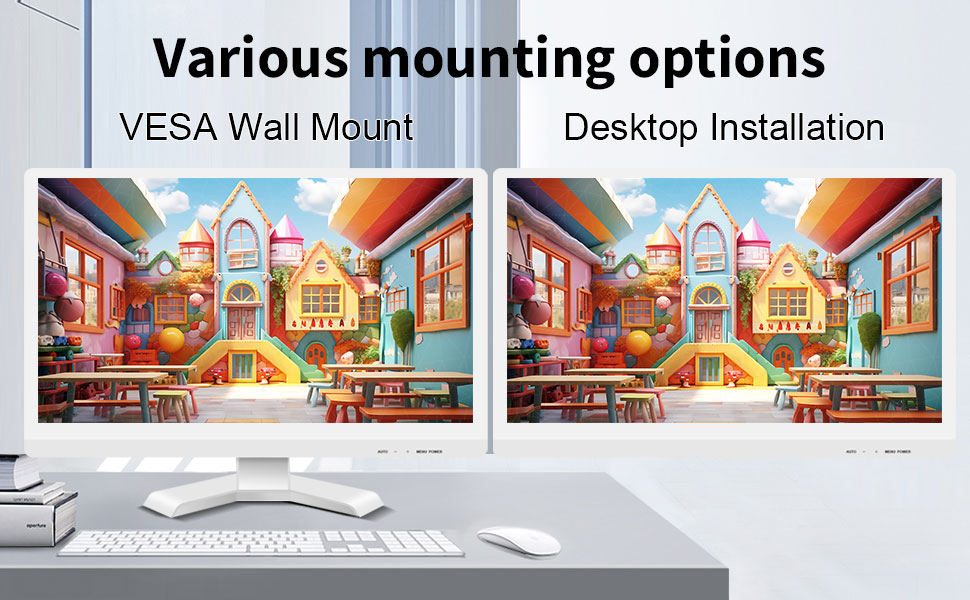
The monitor can be set up on a desktop stand or mounted on a wall using a VESA compatible bracket.
- Instalace na plochu: Attach the provided stand to the monitor base and place it on a stable, flat surface.
- Držák na stěnu VESA: The monitor features a 75x75mm VESA mounting pattern. Use a compatible VESA bracket (not included) to mount the monitor on a wall or an adjustable arm. Ensure the mount can support the monitor's weight (9.88 pounds).

Zadní view of the monitor highlighting the VESA 75x75mm mounting pattern and overall dimensions.
Návod k obsluze
1. Zapnutí/vypnutí
Locate the power button on the monitor. Press it to turn the monitor on or off. The power indicator light will illuminate when the monitor is on.
2. Using the Touchscreen Function
Once the USB cable is connected to your computer, the 10-point capacitive touch function will be active. You can interact with the screen using your fingers or a passive capacitive stylus.

The monitor supports direct touch interaction for intuitive control.
- Jediný dotyk: Ekvivalent kliknutí myší.
- Klepnutí a podržení: Ekvivalent kliknutí pravým tlačítkem myši.
- Táhnout: Move items by touching and dragging.
- Přiblížení/zvětšení prsty: Pro přiblížení nebo oddálení obsahu použijte dva prsty.
- Vícedotykový: The monitor supports up to 10 simultaneous touch points, enabling collaborative work or complex gestures.

The 10-point multi-touch feature allows for multiple users or complex interactions simultaneously.
Důležitá poznámka: The touch functionality is disabled on Mac OS, iPad OS, and iOS. This monitor only supports passive capacitive styluses.
3. Režimy zobrazení
Monitor podporuje různé režimy zobrazení při připojení k počítači:
- Duplicitní režim: Displays the same content on both your primary screen and the Pisichen monitor.
- Rozšířený režim: Rozšíří pracovní plochu na obě obrazovky a poskytne vám tak více pracovního prostoru.
- Režim pouze druhé obrazovky: Displays content only on the Pisichen monitor, turning off your primary screen.
You can typically switch between these modes through your operating system's display settings (e.g., Windows Display Settings).
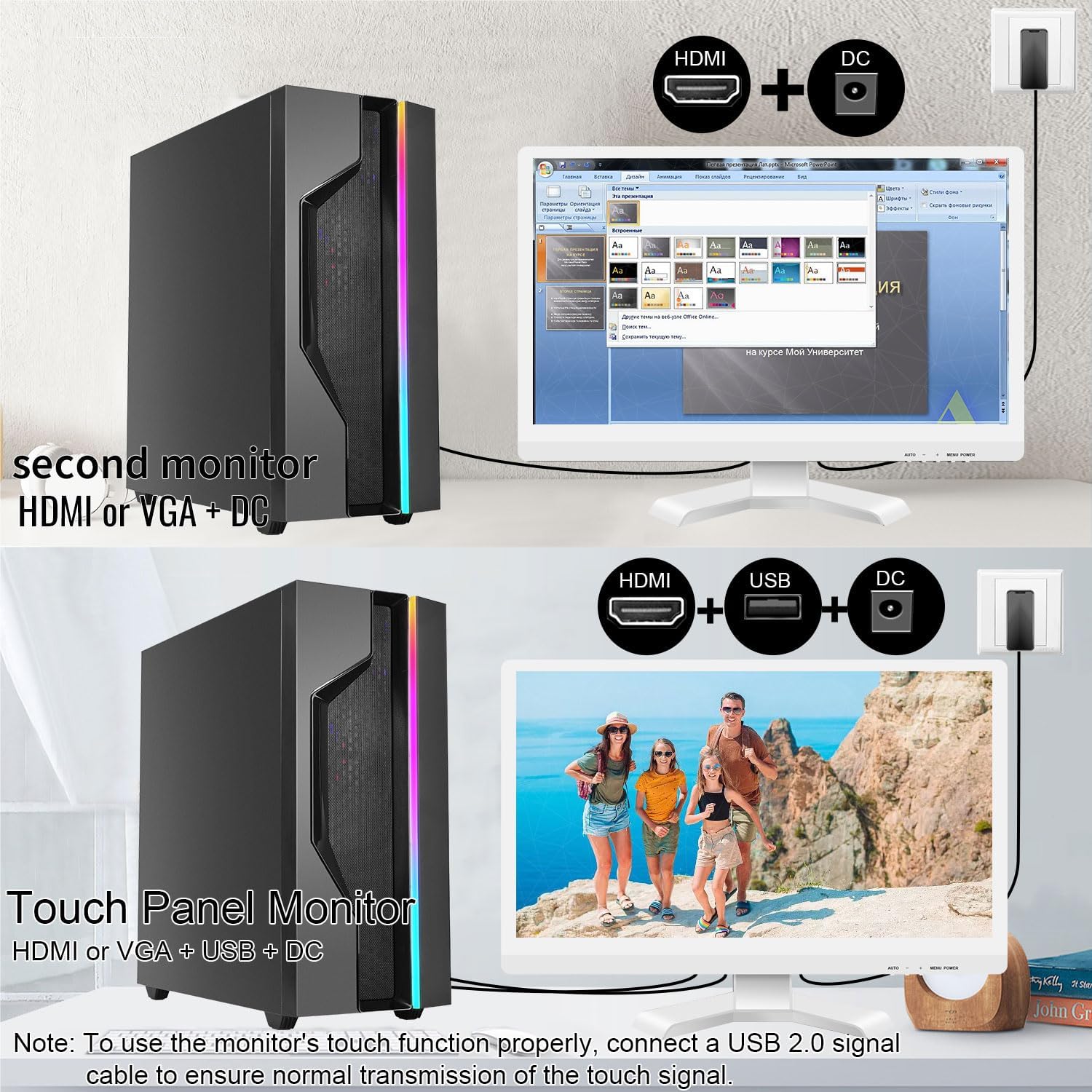
Illustrations of connecting the monitor as a secondary display or as a touch-enabled display.
4. Nabídka na obrazovce (OSD).
The monitor features an OSD menu for adjusting display settings. Use the buttons located on the monitor's frame (usually on the bottom right) to navigate and select options.
- Tlačítko nabídky: Otevře nabídku OSD.
- Tlačítka nahoru/dolů: Procházejte možnostmi nabídky.
- Tlačítko Enter/Select: Potvrzuje výběr nebo vstupuje do podnabídky.
- Tlačítko Konec: Ukončí aktuální nabídku nebo OSD.
Common OSD settings include brightness, contrast, color temperature, input source selection, and aspect ratio.
Údržba a péče
- Čištění obrazovky:
Always power off the monitor and unplug it before cleaning. Use a soft, lint-free cloth lightly dampened with water or a non-abrasive, monitor-specific cleaning solution. Do not spray liquid directly onto the screen. Avoid using alcohol, ammonia, or abrasive cleaners, as they can damage the screen surface.
- Čištění Casing:
Otřete monitor casing with a soft, dry cloth. If necessary, a slightly damp Lze použít hadřík, ale dbejte na to, aby se do větracích otvorů ani portů nedostala vlhkost.
- Skladování:
When not in use for extended periods, store the monitor in a cool, dry place, away from direct sunlight and extreme temperatures. If possible, use the original packaging for protection.
- Větrání:
Ensure the monitor's ventilation openings are not blocked. Proper airflow is essential to prevent overheating.
- Zacházení:
Handle the monitor with care. Avoid dropping it or subjecting it to strong impacts. Do not place heavy objects on top of the monitor.
Odstraňování problémů
| Problém | Možná příčina | Řešení |
|---|---|---|
| Na obrazovce není žádný obraz |
|
|
| Dotykový displej nereaguje |
|
|
| Obraz je rozmazaný nebo zkreslený |
|
|
| Žádný zvuk z vestavěných reproduktorů |
|
|
Specifikace
| Číslo modelu | 21.5INTS-White-NEW |
| Velikost obrazovky | 21.5 palce |
| Rezoluce | 1920 x 1080 pixelů (FHD 1080p) |
| Poměr stran | 16:9 |
| Jas | 250 Candela (cd/㎡) |
| Kontrastní poměr | 1000:1 |
| Viewúhel | 170° |
| Obnovovací frekvence | 60 Hz |
| Dotyková technologie | 10bodový kapacitní dotyk |
| Vstupní porty | HDMI, VGA, USB 2.0 (for touch), DC Power |
| Zvuk | Vestavěné reproduktory, konektor pro sluchátka |
| Kompatibilita s montáží VESA | 75x75mm |
| Rozměry produktu (D x Š x V) | 0.78 x 20.4 x 14.9 palce |
| Hmotnost položky | 9.88 libry |
| Výrobce | Shenzhen Konowa Electronics Co., LTD |
| Země původu | Čína |
Záruka a podpora
For warranty information and technical support, please refer to the official Pisichen website or contact their customer service directly. Details are typically provided on the product packaging or the manufacturer's official support channels.
Můžete navštívit Pisichen Store on Amazon for more product information and potential support contacts.
Ask a question about this manual
Ask about setup, troubleshooting, compatibility, parts, safety, or missing instructions. Manuals+ will review the question and use this page’s manual context to help answer it.