
Zavedení
Thank you for choosing the PowerLocus MoonFly Hybrid Noise Cancelling Wireless Headphones. This manual provides detailed instructions for setting up, operating, and maintaining your headphones to ensure optimal performance and longevity. Please read this manual carefully before use.
Obsah balení
Ujistěte se, že máte v balení všechny níže uvedené položky:
- 1x PowerLocus MoonFly Hybrid Noise Cancelling Wireless Headphones
- 1x 3.5mm AUX kabel
- 1x nabíjecí kabel USB-C
- 1x EVA Hard Carrying Case
- 1x Uživatelská příručka (tento dokument)
- 1x International PowerLocus Warranty Card

Image: Contents of the PowerLocus MoonFly headphone package, including the headphones, hard case, USB-C charging cable, and 3.5mm AUX audio cable.
Konec produktuview
The PowerLocus MoonFly headphones feature an ergonomic design with intuitive controls for a seamless audio experience. Familiarize yourself with the various components:
- Vypínač: Používá se k zapnutí/vypnutí a párování.
- Tlačítka hlasitosti (+/-): Adjusts volume, also used for track control.
- Tlačítko ANC: Toggles Active Noise Cancelling and Transparency Mode.
- Port USB-C: Pro nabíjení sluchátek.
- 3.5mm audio jack: Pro kabelové připojení.
- Mikrofon: Pro hovory a hlasové příkazy.

Obrázek: Detailní záběr view of the headphone earcup, highlighting its Hi-Fi stereo sound capabilities and ventilation system designed for optimal audio performance and balanced air pressure.
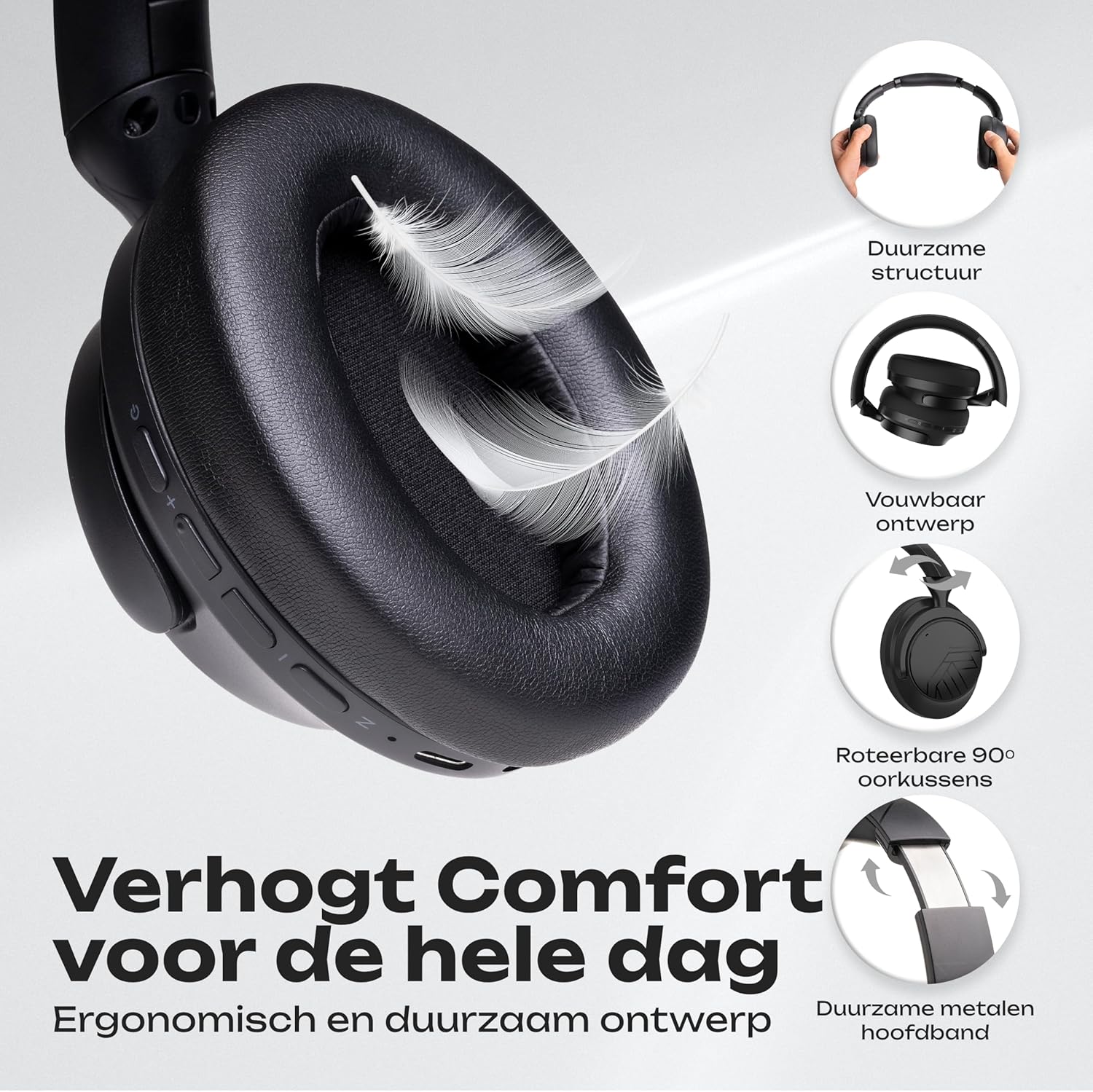
Image: An illustration detailing the comfort features of the headphones, including their durable structure, foldable design, 90-degree rotatable earcups, and a robust metal headband for extended wear.
Nabíjení sluchátek
Before first use, fully charge your MoonFly headphones. A full charge takes approximately 2 hours.
- Connect the small end of the USB-C charging cable to the USB-C port on the headphone earcup.
- Connect the larger end of the USB-C cable to a USB power source (e.g., computer USB port, wall adapter, power bank).
- LED indikátor na sluchátkách bude ukazovat stav nabíjení. Po plném nabití obvykle zhasne nebo změní barvu.
With USB-C fast charging, a 5-minute charge can provide up to 6 hours of playtime. A full charge offers over 70 hours of playtime in non-ANC mode.

Obrázek: Představení sluchátekasing key features such as over 70 hours of wireless usage, the availability of a 3.5mm Aux Mode, rapid USB-C charging, and Bluetooth 5.4 connectivity.
Zapnutí/vypnutí
- Zapnutí: Stiskněte a podržte tlačítko napájení přibližně 3 sekundy, dokud se nerozsvítí LED indikátor.
- Vypnutí: Stiskněte a podržte tlačítko napájení přibližně 3 sekund, dokud nezhasne LED indikátor.
Párování pomocí Bluetooth
The MoonFly headphones offer easy one-click pairing and universal compatibility with various Bluetooth-enabled devices.
- Vstupte do režimu párování: With the headphones powered off, press and hold the Power button for about 5-7 seconds until the LED indicator flashes red and blue alternately. This indicates the headphones are in pairing mode.
- Povolte Bluetooth na svém zařízení: Go to the Bluetooth settings on your smartphone, tablet, laptop, or other Bluetooth-enabled device.
- Select 'PowerLocus MoonFly': In the list of available devices, select 'PowerLocus MoonFly'.
- Potvrdit připojení: Once connected, the LED indicator on the headphones will typically show a solid blue light or flash blue slowly.
The headphones can connect to 2 devices simultaneously, allowing for seamless switching between audio sources.

Image: The headphones demonstrating simultaneous Bluetooth connection to both a laptop and a smartphone, highlighting their multi-device connectivity and universal compatibility with iOS, Android, Windows, Mac, and other Bluetooth devices.
Aktivní potlačení hluku (ANC) a režim průhlednosti
The MoonFly headphones feature three levels of noise reduction to enhance your listening experience:
- Active Noise Cancelling (ANC) ON: Blocks out external noise, ideal for travel or noisy environments.
- Pasivní potlačení hluku: Achieved through the physical design of the earcups, providing a basic level of sound isolation.
- Režim průhlednosti: Allows ambient sounds to pass through, keeping you aware of your surroundings while still enjoying your audio.
Stiskněte příslušné tlačítko Tlačítko ANC on the earcup to cycle through these modes.

Image: A man wearing the headphones on an airplane, illustrating the effectiveness of the noise-cancelling feature, which blocks 95% of external noise. The image also highlights the three available noise reduction modes: Active Noise Cancelling ON, Passive Noise Cancelling, and Transparency Mode.
Drátový režim (AUX)
If the headphone battery is depleted or you prefer a wired connection, use the included 3.5mm AUX cable.
- Plug one end of the 3.5mm AUX cable into the audio jack on the headphones.
- Druhý konec zapojte do 3.5mm audio výstupu vašeho zařízení.
The headphones will function as passive wired headphones. Note that ANC functionality may be limited or unavailable in wired mode if the battery is completely drained.
Uskutečňování hovorů
The built-in ENC (Environmental Noise Cancellation) microphone allows for clear calls.
- Přijmout/ukončit hovor: Stiskněte jednou tlačítko Napájení.
- Odmítnout hovor: Stiskněte a podržte tlačítko Napájení po dobu 2 sekund.
- Znovu vytočit poslední číslo: Dvakrát stiskněte tlačítko napájení.

Image: A collage illustrating various usage scenarios for the headphones, including comfortable use for travel, perfect for daily listening, equipped with an excellent microphone for online meetings, and suitable for gaming.
Péče a údržba
To ensure the longevity and optimal performance of your PowerLocus MoonFly headphones, follow these care guidelines:
- Čištění: K čištění náušníků a hlavového mostu používejte měkký, suchý hadřík. Nepoužívejte agresivní chemikálie ani abrazivní materiály.
- Skladování: When not in use, store the headphones in the provided EVA hard carrying case to protect them from dust, scratches, and impacts. The foldable design makes them compact for storage.
- Vyhněte se extrémním podmínkám: Nevystavujte sluchátka extrémním teplotám, vlhkosti ani přímému slunečnímu záření.
- Voděodolnost: The headphones are rated as waterproof. However, avoid submerging them in water or exposing them to heavy rain for extended periods.
- Péče o kabely: Handle the charging and AUX cables gently to prevent damage.

Image: The foldable headphones and their premium hard carrying case neatly packed inside a suitcase, illustrating their portable design and ease of storage for travel.
Odstraňování problémů
If you encounter any issues with your headphones, refer to the following common solutions:
| Problém | Možné řešení |
|---|---|
| Sluchátka se nezapnou | Ujistěte se, že jsou sluchátka plně nabitá. Připojte je ke zdroji napájení pomocí kabelu USB-C. |
| Nelze spárovat přes Bluetooth | Make sure the headphones are in pairing mode (LED flashing red/blue). Disable and re-enable Bluetooth on your device. Move closer to the headphones. |
| Žádný zvuk nebo nízká hlasitost | Check the volume levels on both the headphones and your connected device. Ensure the headphones are properly paired or the AUX cable is fully inserted. |
| ANC nefunguje efektivně | Ensure ANC mode is activated using the ANC button. Check that the earcups form a good seal around your ears. |
| Mikrofon nefunguje | Ensure the headphones are connected via Bluetooth. Check your device's audio input settings to confirm the MoonFly microphone is selected. |
If the issue persists, please contact PowerLocus customer support for further assistance.
Specifikace
| Funkce | Detail |
|---|---|
| Název modelu | MoonFly |
| Verze Bluetooth | 5.4 |
| Bezdrátové Dosah | Až 20 metrů (65 stop) |
| Battery Life (Non-ANC) | Až 70 hodin |
| Doba nabíjení | Přibližně 2 hodiny (USB-C) |
| Velikost zvukového ovladače | 40 mm dynamický ovladač |
| Frekvenční odezva | 20Hz - 20,000Hz |
| Impedance | 32 Ohmy |
| Citlivost | 100 dB |
| Kontrola hluku | Hybridní potlačení hluku |
| Mikrofon | Vestavěný mikrofon ENC |
| Konektivita | Bezdrátové (Bluetooth), Kabelové (3.5mm AUX) |
| Umístění uší | Over-Ear |
| Materiál | Plastic and Leather |
| Hmotnost | 246 gramů |
| Úroveň odolnosti proti vodě | Vodotěsný |
Záruka a podpora
PowerLocus poskytuje 2-letá záruka for the MoonFly headphones, covering manufacturing defects and ensuring peace of mind. Additionally, a 30-day money-back period is offered.
For any questions, technical support, or warranty claims, please contact PowerLocus customer service. Refer to the included International PowerLocus Warranty Card for contact details and specific terms and conditions.
Our customer service team is dedicated to providing excellent and friendly support whenever you need assistance.