
Zavedení
This manual provides essential instructions for the installation, operation, maintenance, and troubleshooting of your ZOTAC Gaming GeForce RTX 5080 Solid Core graphics card. Designed for high-performance gaming, this card features the NVIDIA Blackwell architecture, DLSS 4, and advanced IceStorm 3.0 cooling. Please read this manual carefully before installation and use to ensure optimal performance and longevity of your product.
Nastavení a instalace
Proper installation is crucial for the functionality and stability of your graphics card. Follow these steps carefully:
- Připravte si systém: Power off your computer and unplug all power cables from the wall outlet. Open your computer case.
- Vyhledejte slot PCIe: Najděte na základní desce dostupný slot PCI Express x16. Odstraňte všechny kryty rozšiřujících slotů, které brání instalaci.
- Nainstalujte grafickou kartu: Carefully align the graphics card with the PCIe x16 slot. Press down firmly and evenly until the card is fully seated in the slot. Ensure the retention clip on the PCIe slot locks into place.
- Zabezpečte kartu: Pomocí šroubů připevněte grafickou kartu k držáku rozšiřujícího slotu skříně počítače.
- Připojení napájecích kabelů: Connect the necessary PCIe power cables from your power supply unit (PSU) to the graphics card's power connectors. This model requires sufficient power input for stable operation. Ensure all connectors are securely attached.
- Install GPU Support Stand: Utilize the bundled GPU support stand to prevent sag and provide additional stability for the graphics card. Adjust its height to properly support the card.
- Zavřete skříň a připojte periferie: Close your computer case, reconnect all power cables, and connect your display cables (HDMI or DisplayPort) to the graphics card's output ports.
- Zapnutí a instalace ovladačů: Power on your computer. Once the operating system loads, download and install the latest NVIDIA drivers for your GeForce RTX 5080 from the official NVIDIA webmísto.

Přední view of the ZOTAC Gaming GeForce RTX 5080 Solid Core graphics card, showcasing its triple-fan IceStorm 3.0 Advanced Cooling system.

Strana view of the graphics card, illustrating the power connectors and the robust design.
Návod k obsluze
Once installed and drivers are updated, your graphics card is ready for use. Here are some operational guidelines:
- Aktualizace ovladačů: Regularly check for and install the latest NVIDIA GeForce drivers to ensure optimal performance, compatibility, and access to new features.
- Připojení displeje: The card supports up to four displays simultaneously via 3 x DisplayPort 2.1b and 1 x HDMI 2.1b outputs. Connect your monitors to these ports.
- Nastavení více displejů: Configure your display settings within your operating system or through the NVIDIA Control Panel for extended desktop, duplicate displays, or surround gaming.
- ZOTAC FireStorm Utility: Download and install the ZOTAC FireStorm utility from the ZOTAC website. This software allows you to monitor GPU performance, adjust fan speeds (Active Fan Control), and customize the Spectra RGB lighting.
- Hry a aplikace: Ensure your games and applications are configured to utilize the ZOTAC Gaming GeForce RTX 5080 for the best performance.
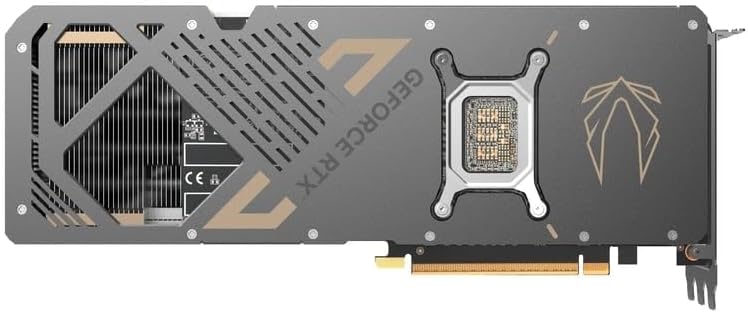
Zadní view of the graphics card, showing the metal backplate and structural reinforcement.
Údržba
Regular maintenance helps ensure optimal performance and extends the lifespan of your graphics card:
- Odstranění prachu: Periodically clean the fans and heatsink of the graphics card using compressed air. Ensure the PC is powered off and unplugged before cleaning. Hold the fan blades gently to prevent them from spinning rapidly during cleaning.
- Proud vzduchu: Maintain good airflow within your PC case. Ensure case fans are properly oriented and there are no obstructions to air intake or exhaust.
- Monitorování teploty: Use monitoring software (e.g., ZOTAC FireStorm) to keep an eye on GPU temperatures during heavy loads. Excessive temperatures can indicate poor airflow or dust buildup.
- Ovládání ventilátoru: The IceStorm 3.0 cooling system features Freeze Fan Stop (fans stop at low temperatures for silent operation) and Active Fan Control (individual fan speed adjustment). Ensure these features are operating correctly or adjust them as needed via the FireStorm utility.
Odstraňování problémů
Pokud narazíte na problémy s grafickou kartou, zvažte následující kroky pro řešení problémů:
- Žádný výstup na displej:
- Ujistěte se, že jsou kabely displeje bezpečně připojeny ke grafické kartě i monitoru.
- Ověřte, zda je správně nastaven vstupní zdroj monitoru.
- Check that the graphics card is fully seated in the PCIe slot and all power connectors are firmly attached.
- Pokud je to možné, vyzkoušejte s jiným kabelem displeje nebo monitorem.
- Problémy s ovladači:
- Proveďte čistou instalaci nejnovějších ovladačů NVIDIA. Před instalací nových ovladačů odstraňte staré ovladače pomocí odinstalačního programu Display Driver Uninstaller (DDU) v nouzovém režimu.
- Ujistěte se, že máte aktuální operační systém.
- Přehřátí/Pokles výkonu:
- Check GPU temperatures using monitoring software.
- Clean dust from the graphics card heatsink and fans.
- Zajistěte dostatečné proudění vzduchu uvnitř skříně počítače.
- Verify that case fans are functioning correctly.
- Nestabilita/pády systému:
- Ujistěte se, že váš napájecí zdroj (PSU) splňuje doporučené požadavky natage pro grafickou kartu a váš systém.
- Check for any loose connections inside the PC.
- Pokud přetaktujete, vraťte se k výchozímu nastavení a zkontrolujte stabilitu.
Specifikace
Key technical specifications for the ZOTAC Gaming GeForce RTX 5080 Solid Core graphics card:
| Funkce | Detail |
|---|---|
| Grafický koprocesor | NVIDIA GeForce RTX 5080 |
| Značka | ZOTAC |
| Velikost grafické paměti RAM | 16 GB GDDR7 |
| Video výstupní rozhraní | 3x DisplayPort 2.1b, 1x HDMI 2.1b |
| Rozhraní grafické karty | PCI-Express x16 (PCIe 5.0) |
| Rychlost paměti | 30 Gbps |
| Řada GPU | NVIDIA RTX 50 Series |
| Maximální rozlišení | 7680x4320 (8K Ready) |
| Rozměry (D x Š) | 11.95"D x 2.19"Š |
| Číslo modelu | ZT-B50800D2-10P |
| Hmotnost položky | 1480 gramů |
| Chladicí systém | IceStorm 3.0 Advanced Cooling (3 x 90mm BladeLink Fans, Steam Chamber, Composite Heatpipes, Pass-Thru Airflow) |
| Vlastnosti | DLSS 4, Freeze Fan Stop, Active Fan Control, Spectra RGB Lighting, Metal Backplate, Reinforced Frame Structure, Bundled GPU Support Stand |
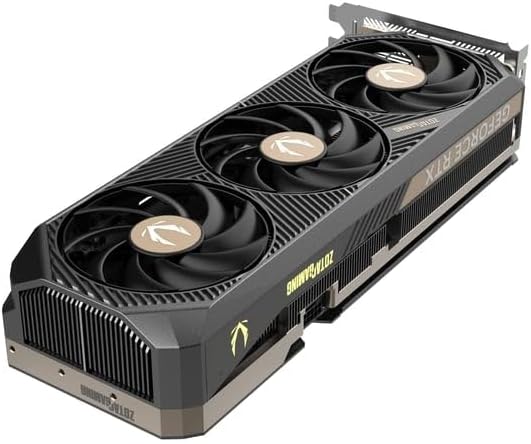
Úhlové view of the graphics card, highlighting the fan design and side profile.
Informace o záruce
ZOTAC offers an extended warranty for its products. Your ZOTAC Gaming GeForce RTX 5080 Solid Core graphics card may be eligible for a 5letá prodloužená záruka. Registration is required to activate this extended warranty. Please visit the official ZOTAC website for detailed terms, conditions, and the registration process.

Image indicating the availability of a 5-year extended warranty from ZOTAC. Registration is required.
Podpora a kontakt
For further assistance, technical support, or warranty claims, please contact ZOTAC directly:
- Výrobce: ZOTAC Technology Limited
- Adresa: 19/F, SHATIN GALLERIA, 18-24 Shan Mei St, Fo Tan, Hong Kong
- Webmísto: Navštivte oficiální web ZOTAC website for support resources, driver downloads, FAQs, and contact information.