
Zavedení
Thank you for choosing the Ledwood ACCESS130 Portable HiFi Speaker. This manual provides essential information for the safe and efficient operation of your device. The ACCESS130 is a versatile portable speaker featuring dynamic RGB LED effects, Bluetooth 5.3 connectivity, USB input, and a karaoke function with an included wireless microphone. It is designed to deliver a powerful audio experience for various occasions.
Bezpečnostní informace
- Před použitím produktu si pečlivě přečtěte všechny pokyny.
- Nevystavujte reproduktor vodě ani nadměrné vlhkosti. Tento produkt není vodotěsný.
- Uchovávejte reproduktor mimo dosah zdrojů tepla, přímého slunečního záření a hořlavých materiálů.
- Nepokoušejte se zařízení rozebírat, opravovat ani upravovat. Veškerý servis svěřte kvalifikovanému personálu.
- Používejte pouze dodaný nabíjecí kabel USB-C.
- Vyhněte se dlouhodobému poslechu při vysoké hlasitosti, abyste předešli poškození sluchu.
- Uchovávejte mimo dosah dětí.
Obsah balení
Zkontrolujte prosím balení, zda neobsahuje následující položky:
- Ledwood ACCESS130 Portable HiFi Speaker
- Nabíjecí kabel USB-C
- Bezdrátový mikrofon
- Nosný popruh
Konec produktuview
Familiarize yourself with the components and controls of your Ledwood ACCESS130 speaker.
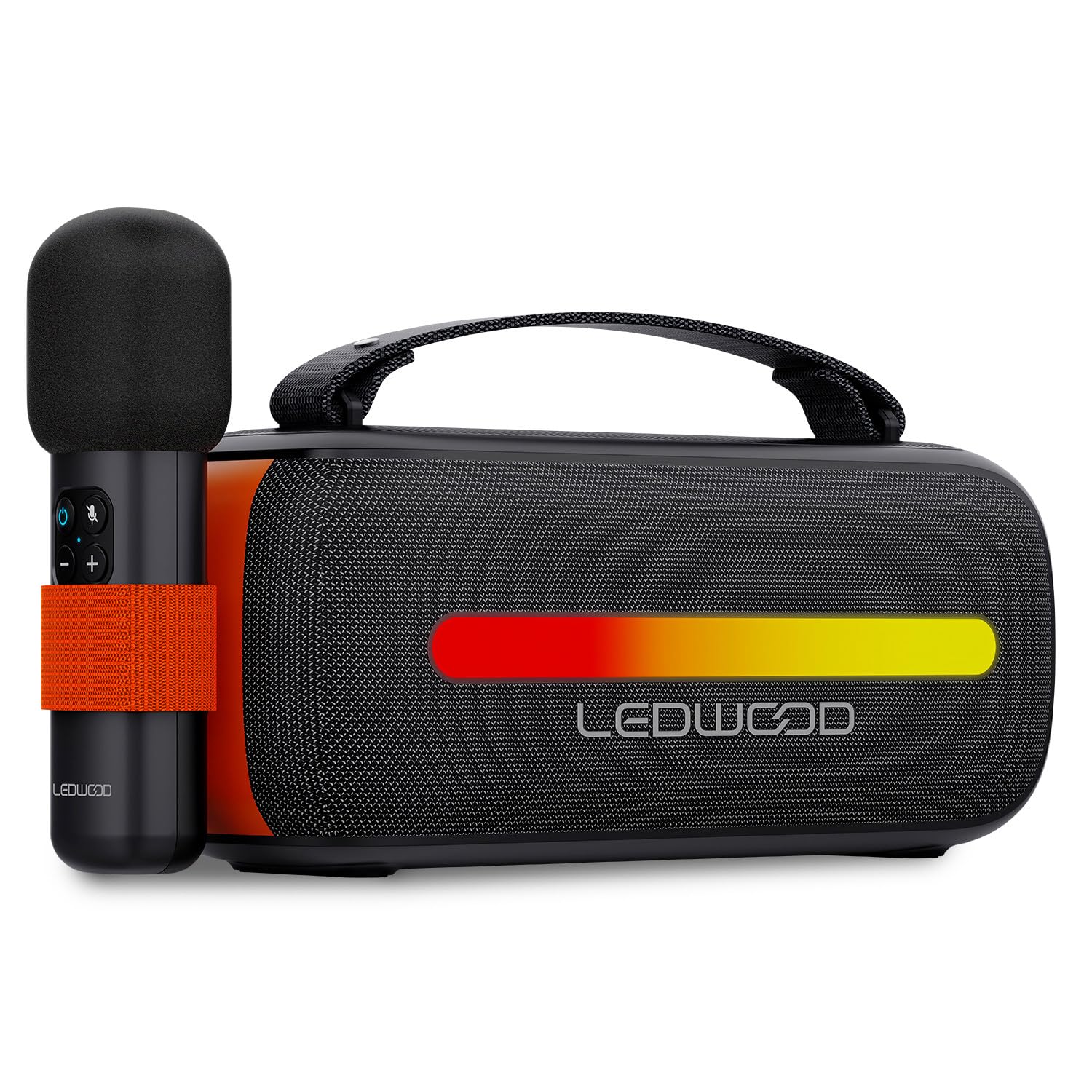
Image: The Ledwood ACCESS130 portable speaker shown with its wireless microphone attached to the side. The speaker features a black mesh grille and an illuminated LED strip on the front.
Ovládací prvky a porty

Obrázek: Pohled shora dolů view of the Ledwood ACCESS130 speaker, highlighting the control panel with buttons for power, volume, mode, and LED effects. Icons for LED colors, microphone, karaoke function, USB-C, and wireless connection are also visible.
- Vypínač: Stiskněte a podržte pro zapnutí/vypnutí reproduktoru.
- Tlačítko režimu (M): Press to switch between Bluetooth, USB, and other input modes.
- Zvýšení hlasitosti (+): Zvyšte hlasitost.
- Snížit hlasitost (-): Snížit hlasitost.
- Tlačítko Přehrát/Pozastavit: Přehrát nebo pozastavit přehrávání zvuku.
- LED Effect Button: Cycle through different LED lighting modes or turn them off.
- Port USB-C: Pro nabíjení reproduktoru.
- Port USB-A: Pro přehrávání zvuku z USB.
Nastavení
1. Nabíjení reproduktoru
- Připojte dodaný nabíjecí kabel USB-C k portu USB-C reproduktoru.
- Druhý konec kabelu připojte ke kompatibilnímu napájecímu adaptéru USB (není součástí balení) nebo k portu USB počítače.
- The LED indicator will show charging status. A full charge takes approximately [Charging Time - not specified in input, omit if not available].
2. Zapnutí/vypnutí
- Pro zapnutí stiskněte a podržte tlačítko napájení, dokud se reproduktor neaktivuje.
- Chcete-li reproduktor vypnout, znovu stiskněte a podržte tlačítko napájení, dokud se nevypne.
3. Párování Bluetooth
- Ensure the speaker is powered on and in Bluetooth mode (indicated by a flashing Bluetooth LED). If not, press the 'M' (Mode) button to switch to Bluetooth mode.
- Na smartphonu, tabletu nebo počítači povolte Bluetooth a vyhledejte dostupná zařízení.
- Select "Ledwood ACCESS130" from the list of devices.
- Once paired, the Bluetooth LED will stop flashing and remain solid, indicating a successful connection.
4. Connecting the Wireless Microphone
- Ensure the wireless microphone is charged and powered on.
- The microphone should automatically connect to the speaker when both are powered on and within range.
- Test the microphone by speaking into it to confirm audio output from the speaker.
Provozní
1. Přehrávání přes Bluetooth
- Po úspěšném spárování Bluetooth otevřete hudební aplikaci na připojeném zařízení.
- Start playing audio. The sound will be transmitted wirelessly to the ACCESS130 speaker.
- Use the volume buttons on the speaker or your connected device to adjust the audio level.
- Press the Play/Pause button on the speaker to control playback.
2. Přehrávání z USB
- Vložte USB flash disk obsahující zvuk files (e.g., MP3) into the speaker's USB-A port.
- Press the 'M' (Mode) button to switch to USB mode.
- Reproduktor automaticky začne přehrávat zvuk z USB disku.
- Use the speaker's controls to adjust volume and navigate tracks.
3. Funkce karaoke
- Ensure the wireless microphone is connected to the speaker as described in the Setup section.
- Play your desired instrumental track via Bluetooth or USB.
- Mluvte nebo zpívejte do mikrofonu. Váš hlas bude amplified through the speaker, mixing with the music.
4. LED světelné efekty
- Press the LED Effect button to cycle through various dynamic RGB lighting modes.
- Continue pressing the button to select your preferred lighting effect or to turn the LEDs off.
Údržba
- Čištění: K čištění povrchu reproduktoru používejte měkký, suchý hadřík. Nepoužívejte abrazivní čisticí prostředky ani rozpouštědla.
- Skladování: Pokud reproduktor delší dobu nepoužíváte, skladujte jej na chladném a suchém místě mimo dosah přímého slunečního záření a extrémních teplot.
- Péče o baterie: Chcete-li prodloužit životnost baterie, reproduktor před prvním použitím plně nabijte a pokud jej nepoužíváte pravidelně, nabijte jej alespoň jednou za tři měsíce. Nevystavujte baterii úplnému vybití.
Odstraňování problémů
| Problém | Možná příčina | Řešení |
|---|---|---|
| Reproduktor se nezapne. | Slabá baterie. | Nabijte reproduktor pomocí dodaného kabelu USB-C. |
| Žádné připojení Bluetooth. | Speaker not in pairing mode; device out of range; previously connected device. | Ensure speaker is in Bluetooth pairing mode. Move device closer. Disconnect from other devices. |
| Žádný zvuk z mikrofonu. | Microphone not powered on; microphone not paired. | Ensure microphone is charged and powered on. Check if it automatically connects. |
| Přehrávání z USB nefunguje. | Nesprávný režim; nepodporováno file formát; poškozený USB disk. | Press 'M' button to select USB mode. Ensure fileJsou MP3. Zkuste jiný USB disk. |
| LED světla nefungují. | LED effects turned off. | Press the LED Effect button to cycle through modes. |
Specifikace
| Název modelu: | PŘÍSTUP130 |
| Značka: | Ledwood |
| Typ reproduktoru: | přenosný reproduktor |
| Maximální výstupní výkon reproduktoru: | 130 wattů (12 W RMS) |
| Režim výstupu zvuku: | Stereo |
| Technologie bezdrátové komunikace: | Bluetooth 5.3 |
| Maximální výkon Bluetooth: | -6 až 4 dBm |
| Poměr signál-šum: | ≥80 dB |
| Zdroj napájení: | Napájení z baterie |
| Baterie: | 3.7V - 3600mAh |
| Total Playtime (50% volume): | 6 hodiny 30 minut |
| Způsob ovládání: | Application, Touch |
| Spojení: | Bluetooth 5.3, USB-A |
| Rozměry (V x H x D): | 12.04 cm x 9.9 cm x 26.1 cm |
| Hmotnost: | 1 kg |
| Vodotěsný: | Žádný |
| Zahrnuté komponenty: | USB-C charging cable, Wireless microphone, Carrying strap |
Záruka a podpora
For warranty information or technical support, please refer to the documentation provided at the time of purchase or contact your retailer. You may also visit the official Ledwood webstránky pro další pomoc.