
DigiLand DigiLand-S10
DigiLand Android Tablet S10 User Manual
Model: DigiLand-S10
1. Úvod
This manual provides essential information for the proper use and maintenance of your DigiLand Android Tablet S10. Please read it thoroughly before operating the device to ensure optimal performance and longevity. The DigiLand S10 is a 10.1-inch Android 14 tablet designed for versatile use, featuring an Octa-Core processor, ample memory, and a high-definition display.
2. Bezpečnostní informace
- Nevystavujte tablet extrémním teplotám, přímému slunečnímu záření ani vysoké vlhkosti.
- Zabraňte pádu tabletu na zem nebo jeho vystavení silným nárazům.
- Use only the original charger and accessories provided with the tablet.
- Nepokoušejte se tablet rozebírat ani opravovat sami. Obraťte se na kvalifikovaný servisní personál.
- Tabletu uchovávejte mimo dosah vody a jiných tekutin.
- Tablet a jeho baterii zlikvidujte zodpovědně v souladu s místními předpisy.
3. Obsah balení
Po otevření balíku se prosím ujistěte, že jsou všechny níže uvedené položky přítomny a v dobrém stavu:
- DigiLand Android Tablet S10 (Blue)
- Nabíjecí kabel USB typu C.
- Napájecí adaptér
- Rychlý průvodce

Figure 3.1: Items included in the DigiLand Tablet S10 package. This image displays the tablet itself, its packaging box, a USB Type-C charging cable, a power adapter, and a quick start guide, ensuring users can confirm all components are present.
4. Konec produktuview
The DigiLand S10 tablet features a sleek design with essential ports and controls for user convenience.
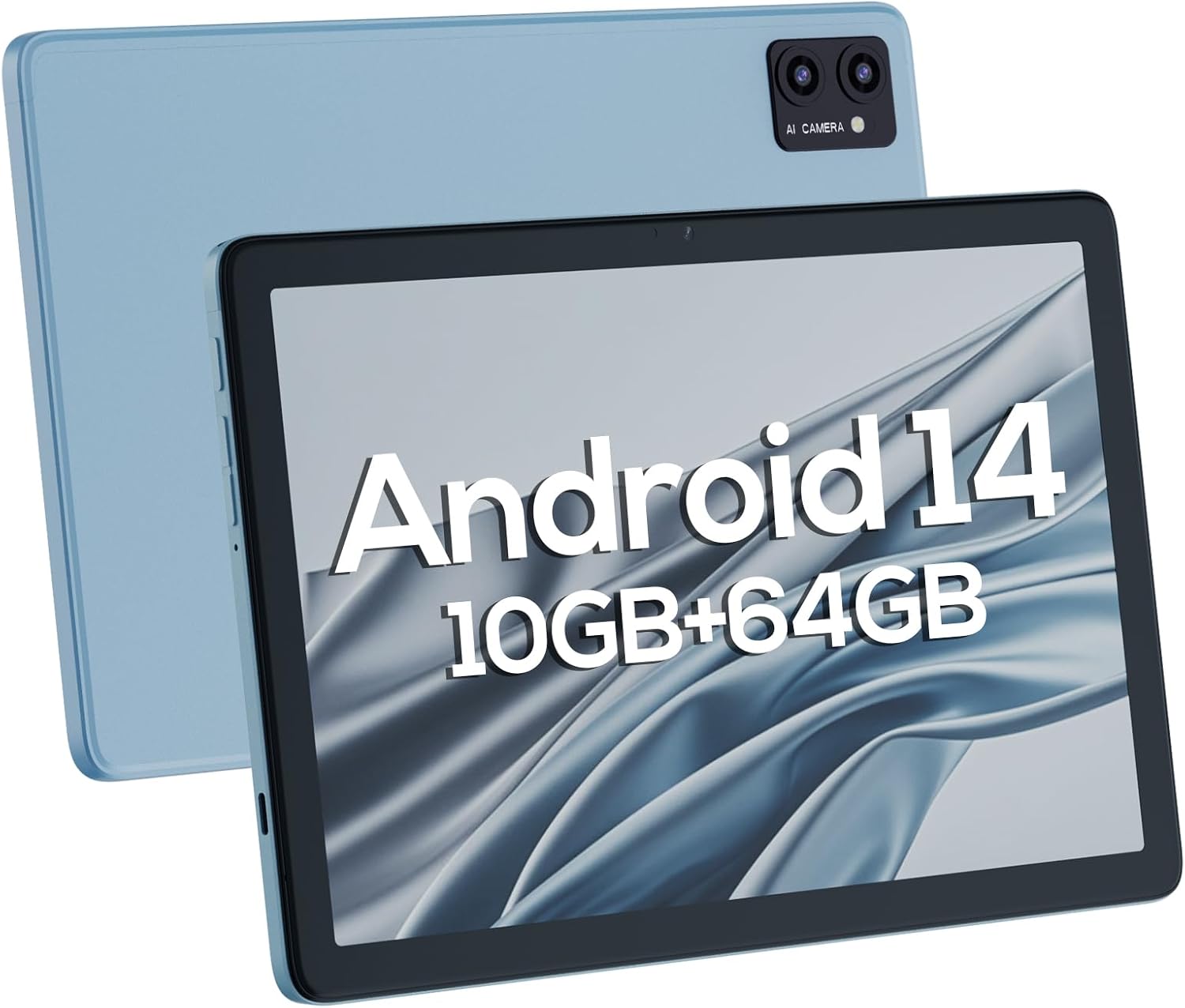
Obrázek 4.1: Přední a zadní část views of the DigiLand Android Tablet S10. The image highlights the tablet's 10.1-inch display on the front and the dual camera module on the blue-colored back panel.
Klíčové komponenty:
- 10.1palcový IPS HD displej: Provides vibrant visuals with 800x1280 resolution.
- Přední fotoaparát (5MP): Located on the front bezel, suitable for video calls and selfies.
- Zadní fotoaparát (8MP): Located on the back, for capturing photos and videos.
- Vypínač: Used to turn the tablet on/off or put it to sleep/wake.
- Tlačítka hlasitosti: Upravte hlasitost zvuku.
- Port USB Type-C: Pro nabíjení a přenos dat.
- 3.5mm konektor pro sluchátka: Pro připojení drátových sluchátek.
- Slot pro microSD kartu: Pro rozšíření úložiště až na 256 GB.
- Duální reproduktory: Poskytněte zvukový výstup.
5. Nastavení
5.1 Počáteční nabíjení
Before first use, fully charge your tablet. Connect the USB Type-C cable to the tablet's charging port and the power adapter to a wall outlet. The battery indicator on the screen will show charging status. A full charge typically takes several hours.
5.2 Zapnutí/vypnutí
- Zapnutí: Press and hold the Power button until the DigiLand logo appears.
- Vypnutí: Stiskněte a podržte tlačítko Napájení, dokud se nezobrazí nabídka vypnutí. Vyberte „Vypnout“ a potvrďte.
- Spánek/probuzení: Krátce stiskněte tlačítko Napájení.
5.3 Průvodce počátečním nastavením
Upon first power-on, the Android 14 setup wizard will guide you through basic configurations:
- Vyberte svůj jazyk.
- Připojte se k síti Wi-Fi.
- Přihlaste se pomocí svého účtu Google nebo si vytvořte nový.
- Review a přijměte obchodní podmínky.
- Nastavte zámek obrazovky (PIN, vzorec nebo heslo).
- Nakonfigurujte další nastavení podle pokynů.
5.4 Rozšíření úložiště
The tablet supports MicroSD cards up to 256GB for additional storage. Locate the MicroSD card slot (often near the headphone jack or power button, as shown in Figure 4.1) and insert the card gently until it clicks into place. You may need to format the card via the tablet's settings for optimal use.
6. Ovládání tabletu
6.1 Základní navigace
- Domovská obrazovka: Hlavní obrazovka, kde máte přístup k aplikacím a widgetům.
- Zásuvka aplikace: Přejeďte prstem nahoru z domovské obrazovky na view všechny nainstalované aplikace.
- Panel oznámení: Přejetím prstem dolů od horního okraje obrazovky získáte přístup k oznámením a rychlému nastavení.
- Nedávné aplikace: Tap the square navigation button (or swipe up and hold from the bottom if using gestures) to see recently opened applications.
6.2 Připojení k Wi-Fi a Bluetooth
- Wi-Fi: Přejít na Nastavení > Síť a internet > Wi-Fi. Turn Wi-Fi on and select your desired network. Enter the password if required.
- Bluetooth: Přejít na Nastavení> Připojená zařízení> Předvolby připojení> BluetoothZapněte Bluetooth a spárujte zařízení s dostupnými zařízeními.
6.3 Používání kamer
Tablet je vybaven 5MP předním fotoaparátem a 8MP zadním fotoaparátem.
- Otevřete aplikaci Fotoaparát.
- Klepnutím na ikonu přepínače fotoaparátu přepínáte mezi předním a zadním fotoaparátem.
- Klepnutím na tlačítko spouště pořídíte fotografii nebo spustíte/zastavíte nahrávání videa.

Figure 6.1: Visual representation of the tablet's camera capabilities, showing sample images captured by both the 5MP front and 8MP rear cameras.
6.4 Správa baterie
Baterie s kapacitou 6000 mAh umožňuje delší používání. Optimalizace výdrže baterie:
- Snižte jas obrazovky.
- Vypněte Wi-Fi a Bluetooth, když je nepoužíváte.
- Zavřete nepoužívané aplikace běžící na pozadí.
- V Nastavení povolte režim úspory baterie.

Figure 6.2: Battery performance details for the DigiLand Tablet S10. This graphic illustrates the 6000mAh battery capacity and provides estimated usage durations for various activities like video playback (9 hours), music (14 hours), and browsing (15 hours).
7. Údržba
- Čištění: K čištění obrazovky a těla používejte měkký hadřík, který nepouští vlákna. Nepoužívejte abrazivní čisticí prostředky.
- Aktualizace softwaru: Pravidelně kontrolujte a instalujte aktualizace systému, abyste zajistili optimální výkon a zabezpečení. Přejděte na Nastavení > Systém > Aktualizace systému.
- Správa úložiště: Pravidelně mazejte mezipaměť, odstraňujte nepotřebné filea odinstalujte nepoužívané aplikace, abyste uvolnili místo v úložišti.
- Záložní data: Pravidelně zálohujte důležitá data do cloudové služby nebo na externí úložné zařízení, abyste předešli jejich ztrátě.
8. Řešení problémů
| Problém | Možné řešení |
|---|---|
| Tablet se nezapne | Ujistěte se, že je baterie nabitá. Stiskněte a podržte tlačítko napájení po dobu 10–15 sekund pro vynucení restartu. |
| Pomalý výkon | Close unused apps, clear cache, restart the tablet. Consider a factory reset if issues persist (backup data first). |
| Problémy s připojením Wi-Fi | Restartujte tablet a router. Zapomeňte na síť a znovu se připojte. Ujistěte se, že je povolena Wi-Fi. |
| Aplikace padají | Clear app cache/data (Settings > Apps), update the app, or reinstall it. |
| Obrazovka nereaguje | Force restart the tablet. If issue persists, contact support. |
9. Specifikace
Below are the detailed technical specifications for the DigiLand Android Tablet S10:
| Funkce | Detail |
|---|---|
| Značka | DigiLand |
| Název modelu | DigiLand-S10 |
| Operační systém | Android 14 |
| Velikost obrazovky | 10.1 palce |
| Rozlišení obrazovky | 800 x 1280 (IPS HD Display) |
| Procesor | A523, Octa core, Cortex A55@1.8 GHz, 22nm |
| BERAN | 10GB (4+6GB) |
| Interní úložiště | 64 GB |
| Rozšiřitelné úložiště | Up to 256GB via TF card (MicroSD) |
| Přední kamera | 5 MP |
| Zadní kamera | 8 MP |
| Kapacita baterie | 6000 XNUMX mAh |
| Konektivita | Wi-Fi (2.4G+5G), Bluetooth 5.0, USB Type-C, 3.5mm Headphone Jack |
| Rozměry (DxŠxV) | 7 x 4 x 0.5 palce |
| Hmotnost položky | 2.42 libry (cca 510 g) |
| Barva | Modrý |

Obrázek 9.1: Přesview of the DigiLand Tablet S10's core specifications. This graphic highlights features such as Android 14, MTK Helio A523 Octa-Core Processor, 10GB RAM, 64GB ROM (expandable to 256GB), 10.1-inch HD display, 6000mAh battery, 5MP front camera, 8MP rear camera, 510g weight, and 8.8mm thickness.
10. Záruka a podpora
10.1 Informace o záruce
DigiLand products typically come with a limited manufacturer's warranty. Please refer to the warranty card included in your product packaging or visit the official DigiLand website for detailed terms and conditions regarding warranty coverage, duration, and limitations. Keep your proof of purchase for warranty claims.
10.2 Zákaznická podpora
For technical assistance, troubleshooting, or any inquiries regarding your DigiLand Android Tablet S10, please contact DigiLand customer support. Contact information can usually be found in the Quick Start Guide or on the official DigiLand website. When contacting support, please have your product model (DigiLand-S10) and purchase details ready.
Thank you for choosing DigiLand. We hope you enjoy your new tablet!
Ask a question about this manual
Ask about setup, troubleshooting, compatibility, parts, safety, or missing instructions. Manuals+ will review the question and use this page’s manual context to help answer it.