
1. Úvod
This manual provides detailed instructions for the setup, operation, maintenance, and troubleshooting of your NEOSMAY KC12-F Fanless Industrial Mini PC. Please read this manual thoroughly before using the device to ensure proper functionality and longevity.
2. Konec produktuview
The NEOSMAY KC12-F is a high-performance fanless industrial mini PC designed for various applications requiring robust and silent operation. It features an Intel 12th Gen Core i5-1240P processor, ample memory and storage, and extensive connectivity options.
Klíčové vlastnosti:
- Procesor: Intel 12th Gen Core i5-1240P (12 Cores, 16 Threads, up to 4.4 GHz)
- Grafika: Grafika Intel Iris Xe
- Paměť: 16 GB DDR4 RAM (dvoukanálová, rozšiřitelná až na 64 GB)
- Skladování: 512GB M.2 2280 NVME SSD (expandable, supports M.2 SATA SSD)
- Síť: Dual 2.5 Gigabit Ethernet, WiFi 6, Bluetooth 5.2
- Výstup displeje: Supports 4K 60Hz Quad Display via 2x HDMI 2.0, 1x DP 1.4, 1x Full Function Type-C
- Porty: USB 3.2 x 4, USB 2.0 x 4, Full Function Type-C (20Gbps), RS485 COM, RS232 COM, Audio/MIC Jack
- Design: Fanless aluminum shell with S-shaped copper sheet for efficient heat dissipation.
Rozložení portu:

Obrázek 2.1: Přední a zadní View of the NEOSMAY KC12-F Mini PC. The front panel includes power button, USB 3.2, USB 2.0, Type-C, and audio jacks. The rear panel features DC input, dual 2.5Gbe Ethernet, HDMI, DisplayPort, additional USB ports, and COM ports.
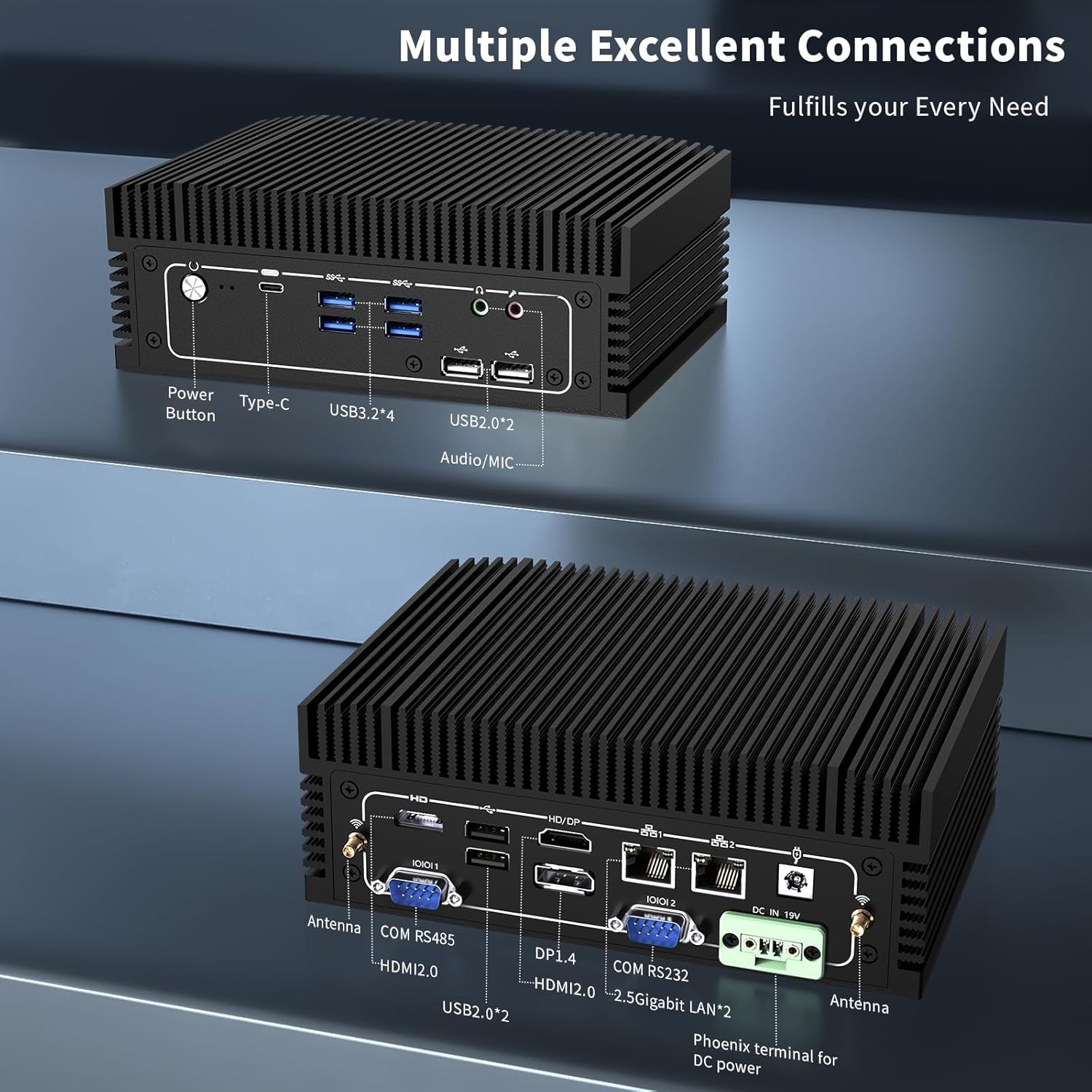
Obrázek 2.2: Detailní view of the front and rear ports. The front includes a power button, Type-C port, 4x USB 3.2 ports, 2x USB 2.0 ports, and an Audio/MIC Jack. The rear includes 2x HDMI 2.0, 1x DP 1.4, 2x 2.5 Gigabit LAN, 2x USB 2.0, COM RS485, COM RS232, DC IN 19V, and antenna connectors.
3. Pokyny k nastavení
3.1 Obsah balení
Než budete pokračovat, ujistěte se, že balení obsahuje všechny položky:

Obrázek 3.1: Contents of the NEOSMAY KC12-F Mini PC package. Includes the Mini PC unit, power adapter, power cord, Wi-Fi antennas, VESA mount bracket, and screws.
- NEOSMAY KC12-F Mini PC Unit
- Napájecí adaptér (19V DC)
- Napájecí kabel
- Wi-Fi antény
- VESA Mount Bracket and Screws
3.2 Počáteční připojení
- Připojení displeje: Connect your monitor(s) to the Mini PC using HDMI, DisplayPort, or Type-C cables. The device supports up to four displays simultaneously.
- Připojení periferií: Zapojte klávesnici, myš a další zařízení USB do dostupných portů USB.
- Připojit síť: For a wired connection, connect an Ethernet cable to one of the 2.5 Gigabit LAN ports. For wireless, screw in the provided Wi-Fi antennas to the antenna connectors on the rear panel.
- Připojte napájení: Connect the power adapter to the DC IN 19V port on the Mini PC, then plug the power cord into an electrical outlet.
4. Návod k obsluze
4.1 Zapnutí/vypnutí
- Zapnutí: Press the power button located on the front panel of the Mini PC. The power indicator light will illuminate.
- Vypnout: To shut down the system, use the operating system's shutdown function. Alternatively, press and hold the power button for 5-7 seconds to force a shutdown (not recommended for regular use).
4.2 Konfigurace displeje
The Mini PC supports up to four independent 4K@60Hz displays. After connecting multiple monitors, you may need to configure the display settings within your operating system (e.g., Windows Display Settings) to extend or duplicate your desktop.

Obrázek 4.1: Illustration of the Mini PC supporting a quad 4K display setup, demonstrating its capability for multi-monitor environments.
5. Údržba
5.1 Čištění
- Před čištěním se ujistěte, že je Mini PC vypnutý a odpojený od sítě.
- Use a soft, dry cloth to wipe the exterior. For stubborn marks, a slightly damp Lze použít hadřík a poté suchý hadřík.
- Vyhněte se používání agresivních chemikálií, rozpouštědel nebo abrazivních čisticích prostředků.
- As this is a fanless design, there are no internal fans to clean. However, ensure the heat sink fins are free from dust accumulation to maintain optimal thermal performance. Use compressed air if necessary.
5.2 Skladování a životní prostředí
- Mini PC skladujte na chladném a suchém místě mimo dosah přímého slunečního záření a extrémních teplot.
- Avoid placing the device in areas with high humidity or excessive dust.
- Ensure adequate airflow around the device, especially around the heat sink fins, even though it is fanless.

Obrázek 5.1: Diagram illustrating the fanless aluminum case design and S-shaped copper sheet for efficient heat dissipation, ensuring stable operation.
6. Řešení problémů
This section addresses common issues you might encounter with your Mini PC.
6.1 Bez napájení
- Zkontrolujte připojení napájení: Ensure the power adapter is securely connected to both the Mini PC and the electrical outlet. Verify the outlet is functional.
- Napájecí adaptér: Confirm the power adapter is the correct one supplied with the Mini PC.
6.2 Žádný výstup na displej
- Připojení monitoru: Ensure the display cable (HDMI, DP, Type-C) is securely connected to both the Mini PC and the monitor.
- Vstup monitoru: Verify your monitor is set to the correct input source (e.g., HDMI 1, DisplayPort).
- Zkuste jiný port/kabel: Test with a different display port on the Mini PC or a different cable if available.
- Funkce monitoru: Test your monitor with another device to ensure it is working correctly.
6.3 Problémy s připojením k síti
- Kabelové připojení: Check the Ethernet cable connection. Ensure the router/modem is working.
- Bezdrátové připojení: Ensure Wi-Fi antennas are securely attached. Verify Wi-Fi is enabled in the operating system and you are connected to the correct network with the correct password.
- Problémy s ovladači: Ensure network drivers are properly installed and updated.
6.4 Problémy s výkonem systému
- Přehřívání: Although fanless, ensure the Mini PC is in a well-ventilated area and its heat sink fins are not obstructed.
- Software: Close unnecessary applications. Check for malware or viruses.
- Skladování: Ensure the SSD is not critically full.
7. Specifikace
| Funkce | Specifikace |
|---|---|
| Značka | NEOSMAY |
| Číslo modelu | KC12-F |
| Procesor | Intel 12th Gen Core i5-1240P (12 Cores, 16 Threads, up to 4.4 GHz) |
| Grafický koprocesor | Grafická karta Intel Iris Xe (integrovaná) |
| BERAN | 16GB DDR4 (2x 8GB SODIMM, 3200MHz), expandable up to 64GB |
| Pevný disk | 512GB M.2 2280 NVME SSD (PCIE x 4), expandable |
| Maximální rozlišení obrazovky | 3840 x 2160 (4K) |
| Zobrazení výstupů | 2x HDMI 2.0, 1x DP 1.4, 1x Full Function Type-C (supports 4K@60Hz quad display) |
| USB porty | 4x USB 3.2, 4x USB 2.0 |
| Síť | 2x 2.5 Gigabit Ethernet (Intel I226-V chip), WiFi 6, Bluetooth 5.2 |
| Jiné porty | RS485 COM, RS232 COM, Audio/MIC Jack |
| Operační systém | OS (Pre-installed Windows 11 Pro may vary by configuration) |
| Vstup napájení | 19V DC |
| Hmotnost položky | 5.28 libry |
| Rozměry balení | 7.28 x 5.02 x 2.64 palce |
8. Záruka a podpora
NEOSMAY provides comprehensive support for its products. For technical assistance, warranty claims, or general inquiries, please use the contact information below.

Obrázek 8.1: NEOSMAY Sales and Support contact details, including email and telephone number.
- E-mail: info@newsmaytech.com
- Telephone (CN): +86-0755-89456786 (Mon-Sat 9:00-18:00 GMT)
- Online chat: Log into your Amazon account, navigate to 'Your Orders', and select 'Ask Product Question'.
- Dostupnost služby: 7 days a week, 24 hours a day support is available.
Uschovejte si prosím doklad o koupi pro účely záruky.