
1. Úvod
Thank you for choosing the Ortis WiFi Sump Pump Controller. This device provides real-time water level monitoring, failure alerts, and overload protection for your sump, submersible, or utility pumps. With the Genilife App, you can remotely monitor and control your pump system, ensuring your basement remains dry and preventing costly water damage.
2. Vlastnosti produktu
- Smart Remote Pump Control: Monitor and control your sump pump from anywhere using the Genilife App. Manage water intake, drainage, water levels, and operating modes directly from your smartphone.
- Prevent Costly Pump Failures: Real-time monitoring and instant alerts for potential issues such as dry running, clogs, and breakdowns help protect your pump and extend its lifespan.
- Basement Flood Protection: Receive immediate alerts for power outages and pump failures, ensuring your sump system operates reliably to prevent basement flooding and water damage.
- Long-Lasting Hi-Lo Sensors: Equipped with corrosion-resistant 304 stainless steel sensors for precise water level detection. These durable sensors have no moving parts, reducing wear and tear for up to 10 years of reliable operation.
- Wide Compatibility & Easy Setup: Compatible with most pumps up to 2HP/20A and suitable for various sump pits. Installation is quick and straightforward, requiring no plumbing modifications.
3. Bezpečnostní informace
- Před instalací nebo údržbou vždy odpojte napájení.
- Ujistěte se, že je elektrická zásuvka řádně uzemněna.
- Neobsluhujte zařízení mokrýma rukama.
- Keep the controller and sensors away from children.
- Do not immerse the controller unit in water. The sensors are designed for water contact, but the main unit is not.
- Ujistěte se, že jsou všechny spoje bezpečné, abyste předešli nebezpečí úrazu elektrickým proudem.
4. Obsah balení
The Ortis WiFi Sump Pump Controller package includes:
- Ortis WiFi Sump Pump Controller (Model KJ-066)
- Dual Hi-Lo Water Level Sensors (16 ft cable length each)
- Power Cable (1.3 ft)
- Mounting Hardware (screws, adhesive hook)
- Uživatelská příručka
5. Nastavení
5.1 Instalace ovladače
The controller can be installed using two methods:
- Šroubová montáž: Use the provided screws to secure the controller to a wall or suitable surface near your sump pit.
- Adhesive Hook Mounting: Attach the adhesive hook to a clean, dry surface and hang the controller. Ensure the surface can support the controller's weight.

This diagram illustrates the installation of the controller in a sump pit, highlighting its 3-in-1 functionality: traditional mechanical switch, intelligent networking alarm, and pump overload monitoring, with real-time notifications on a smartphone.
5.2 Umístění snímače
The dual Hi-Lo sensors are crucial for accurate water level detection. They are designed to detect water levels within a 1/2 inch to 20 inch range.
- Position the sensors in your sump pit or water tank according to your desired high and low water levels.
- The 'Hi' sensor determines the upper water limit, and the 'Lo' sensor determines the lower water limit.
- Ensure the sensors are securely fastened and their cables are routed safely to avoid interference with pump operation.

The durable 304 stainless steel Hi-Lo sensors detect water levels within a 1/2 inch to 20 inch range, ensuring precise pump activation and deactivation.
5.3 Připojení napájení
- Plug your sump pump's power cord into the outlet on the Ortis controller.
- Plug the Ortis controller's power cord into a standard 110 VAC grounded outlet.
5.4 App Setup and WiFi Connection
- Stáhněte si Genilife App z obchodu s aplikacemi vašeho chytrého telefonu (iOS nebo Android).
- Zaregistrujte si účet nebo se přihlaste, pokud jej již máte.
- Follow the in-app instructions to add your Ortis WiFi Sump Pump Controller. This typically involves putting the device into pairing mode and connecting it to your home's 2.4GHz WiFi network.
- Once connected, you will see your device listed in the app and can begin monitoring.
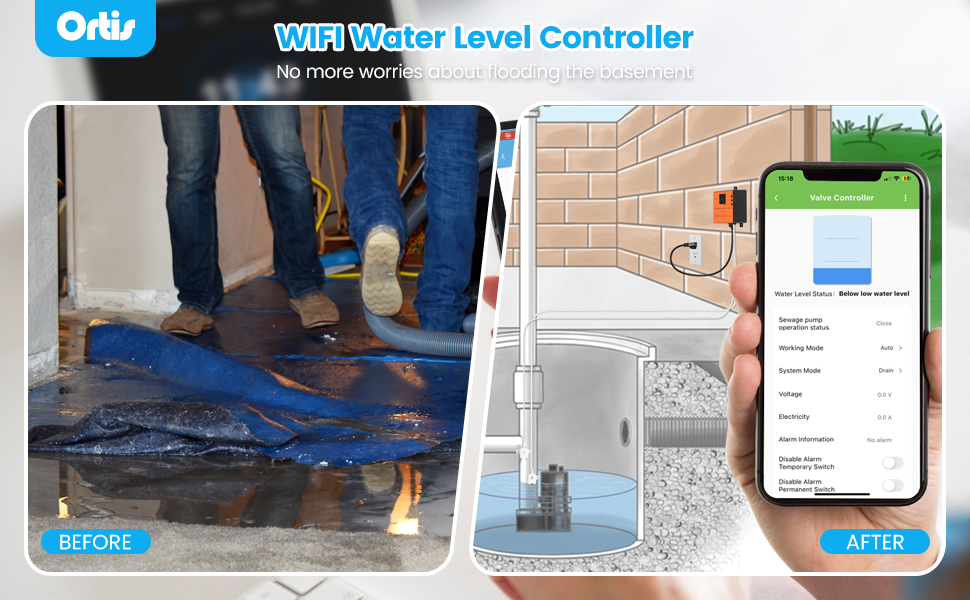
The Ortis WiFi Sump Pump Controller, shown with its mobile application interface, allows for remote monitoring and control of your sump pump system.
6. Návod k obsluze
6.1 Ovládací panel Overview
The controller features a manual switch with AUTO, OFF, and ON positions, along with a Mute button for alarms.
- AUTO: The pump operates automatically based on water levels detected by the Hi-Lo sensors and the selected mode in the app.
- OFF: The pump is turned off.
- NA: The pump runs continuously, overriding sensor input. Use with caution.
- Ztlumit: Press to silence audible alarms.
6.2 Genilife App Control
The Genilife App provides comprehensive control and monitoring capabilities:
- Water Level Status: View real-time water levels (e.g., Below low water level, Between high and low water levels, Above high water level).
- Pracovní režim: Select between 'Drain Mode' (for drainage, such as sewage pits) and 'Water Mode' (for water replenishment, such as fish tanks).
- Systémový režim: Adjust the system's operational mode.
- svtage & Electricity: Monitor the current voltage and electricity consumption of the pump.
- Informace o alarmu: View active alarms and alerts.
- Disable Alarm Temporary/Permanent Switch: Control alarm notifications.

The Genilife mobile application provides a user-friendly interface to monitor water levels, pump status, and adjust settings from anywhere.
6.3 Understanding Sensor Operation

These illustrations explain how the Hi-Lo sensors work: in drain mode (sewage pit), the pump turns off when water is below the Lo sensor and on when it reaches the Hi sensor. In water mode (fish tank), the pump turns on when water is below Lo and off when it reaches Hi.
6.4 Nastavení upozornění
Configure your preferred alarm notification methods within the Genilife App to ensure you receive critical alerts promptly.

The Genilife app allows users to select preferred notification methods, including message center alerts, SMS reminders, and telephone reminders, to stay informed about pump status.
7. Údržba
- Pravidelné čištění senzoru: Although the sensors are made of corrosion-resistant stainless steel, it is recommended to periodically inspect and clean them to ensure accurate water level detection. Remove any debris or buildup that may affect their performance.
- Kontrola kabelů: Regularly check the sensor and power cables for any signs of wear, damage, or fraying. Replace if necessary.
- Řídicí jednotka: Keep the controller unit clean and dry. Avoid exposing it to extreme temperatures or direct sunlight for prolonged periods.
- Test funkčnosti: Periodically test the system by manually raising the water level to trigger the pump, or by using the app's test functions, to ensure it is operating correctly.
8. Řešení problémů
| Problém | Možná příčina | Řešení |
|---|---|---|
| Ovladač se nezapíná | Žádné napájení ze zásuvky; uvolněné připojení | Check power outlet with another device; ensure controller power cable is securely plugged in. |
| Pump not activating/deactivating | Sensors are dirty or improperly placed; controller in OFF or ON mode; pump malfunction | Clean sensors and verify placement; set controller to AUTO mode; check pump for issues. |
| Žádné WiFi připojení | Incorrect WiFi password; out of range; 5GHz network used | Verify WiFi password; move controller closer to router; ensure you are connecting to a 2.4GHz network. |
| Žádná oznámení aplikací | App notification settings disabled; phone settings blocking notifications | Check Genilife App notification settings; verify phone's system notification settings for the app. |
| Pump overload alert | Pump drawing too much current; pump blockage | Inspect pump for blockages or mechanical issues; ensure pump is within controller's rated capacity (max 2HP/20A). |
9. Specifikace
| Funkce | Specifikace |
|---|---|
| Značka | Ortis |
| Číslo modelu | KJ-066 |
| Barva | Pomerančový |
| Materiál | Plastic (Controller), 304 Stainless Steel (Sensors) |
| Rozměry produktu (D x Š x V) | 3.9 cm x 1.6 cm x 3.3 cm |
| Zdroj napájení | Elektrický kabel |
| Vstupní objemtage | 110 VAC |
| Výstupní objemtage/Aktuální | 110 VAC, 15A |
| Max Compatible Pump Horsepower | 2 koňské síly |
| Rozsah detekce senzoru | 1/2" až 20" |
| Konektivita | 2.4GHz WiFi |
10. Záruka a podpora
For warranty information or technical support, please contact Ortis customer service through the contact details provided on the product packaging or the official Ortis website. Please have your model number (KJ-066) and purchase information ready when contacting support.