
1. Úvod
The ANBERNIC RG34XXSP is a portable retro handheld game console designed for an immersive gaming experience. Featuring a flip design, a 3.4-inch IPS screen, and a powerful H700 quad-core processor, it supports a wide range of classic game formats. This manual provides essential information for setting up, operating, and maintaining your device.
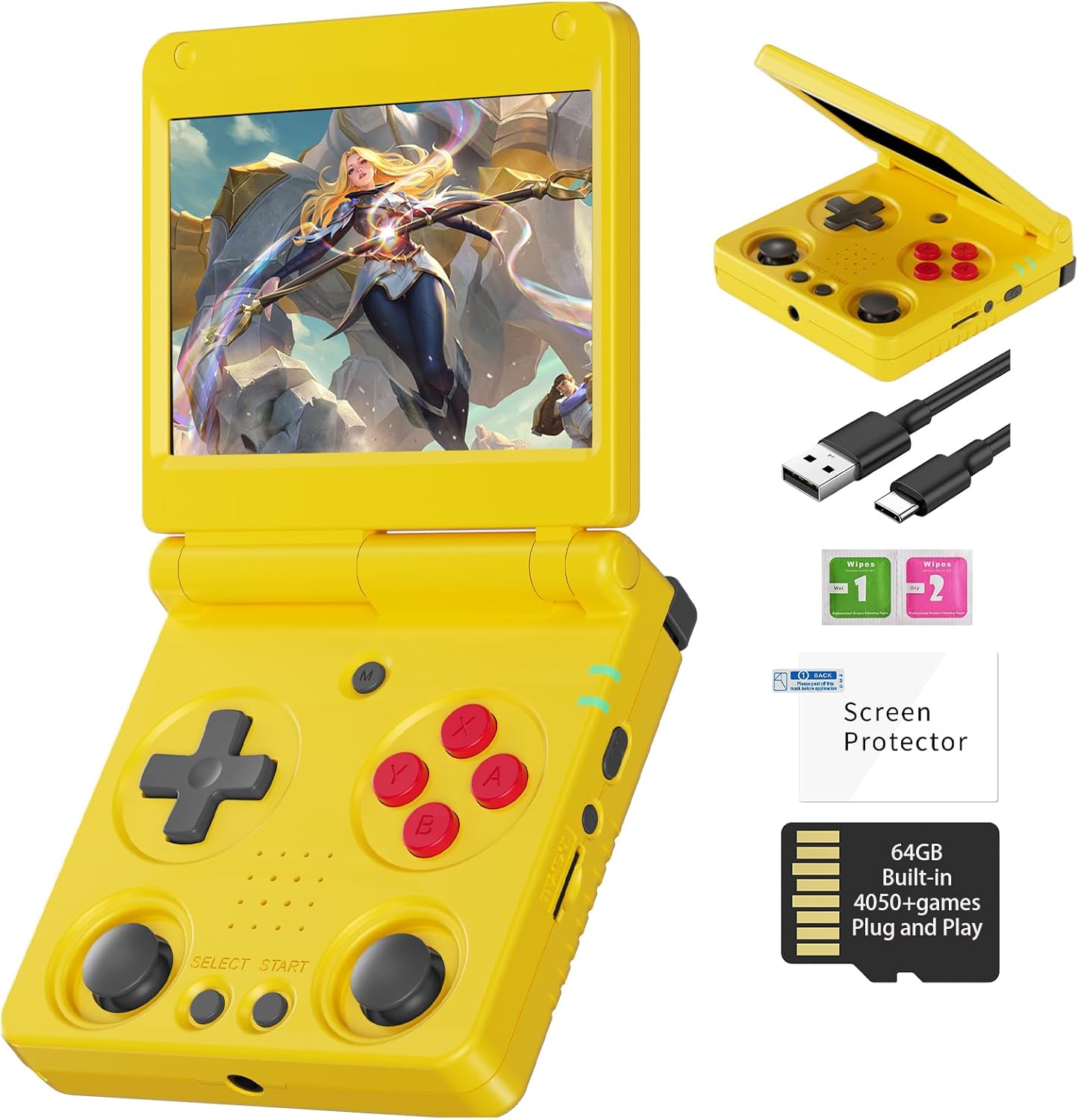
Image 1.1: The ANBERNIC RG34XXSP Retro Handheld Game Console in yellow.
2. Bezpečnostní informace
- Udržujte zařízení mimo dosah vody a vlhkosti.
- Vyhněte se extrémním teplotám a přímému slunečnímu záření.
- Nepokoušejte se zařízení sami rozebírat nebo opravovat. Požádejte o pomoc zákaznickou podporu.
- Use only the provided charging cable or a certified USB Type-C charger.
- Uchovávejte mimo dosah malých dětí kvůli malým částem.
- Prolonged use at high volume may cause hearing damage.
3. Obsah balení
Ověřte, zda jsou v balení přítomny všechny položky:
- RG34XXSP Game Console
- USB nabíjecí kabel
- Ochrana obrazovky
- Uživatelská příručka
- Dárková krabička

Image 3.1: Included accessories with the RG34XXSP console.
4. Uspořádání zařízení
Familiarize yourself with the buttons, ports, and features of your RG34XXSP console.
Image 4.1: Detailed diagram of the RG34XXSP console layout.
- D-Pad: Směrový vstup pro navigaci a hraní.
- Herní klávesy (A, B, X, Y): Tlačítka primárních akcí.
- Levý/pravý joysticky: Analog input for movement and camera control in supported games.
- Tlačítka SELECT/START: Game-specific functions, menu navigation.
- Tlačítko MENU: Accesses the console's main menu or in-game options.
- Vypínač: Zapíná/vypíná konzoli.
- Kontrolka: Zobrazuje stav napájení a nabíjení.
- TF1/INT. Slot: Main TF card slot for system and games.
- TF2/EXT. Slot: Secondary TF card slot for additional storage.
- Tlačítka VOL+/-: Upravuje hlasitost.
- OTG/USB port: For connecting external devices or charging.
- Port HDMI: Connects to a TV or external display.
- Ramenní knoflíky L1/L2/R1/R2: Additional action buttons, typically used for triggers or modifiers.
5. Nastavení
- Unpack the Console: Carefully remove the RG34XXSP console and all accessories from its packaging.
- Nabíjení konzole: Connect the provided USB Type-C cable to the console's charging port and a compatible USB power adapter (not included). Charge the console until the battery indicator shows full. The 3300mAh Li-Polymer battery provides approximately 7-8 hours of gameplay on a full charge.
- Vložení TF karty: The console comes with a 64GB TF card pre-installed in the TF1/INT. slot. This card contains the operating system and pre-loaded games. If you wish to expand storage, insert an additional TF card (up to 512GB) into the TF2/EXT. slot.
- Zapnutí: Open the console by flipping the upper cover. The magnetic suction function will hold it open. Press and hold the Power Key until the screen illuminates.
- Initial Navigation: Upon startup, use the D-Pad or joysticks to navigate the main menu. Press the 'A' button to select options and 'B' to go back.
6. Návod k obsluze
6.1 Základní obsluha
- Zapnutí/vypnutí: Press and hold the Power Key to turn the console on or off.
- Režim spánku: Closing the console's lid will activate sleep mode, thanks to the built-in Hall switch chip. Opening the lid will resume operation.
- Nastavení hlasitosti: Use the VOL+/- buttons on the side of the console.
- Navigace v nabídce: Use the D-Pad or joysticks to move through menu options. Press 'A' to confirm, 'B' to cancel or go back.
6.2 Hraní her
- From the main menu, navigate to the desired emulator or game list.
- Select a game using the 'A' button.
- Once the game loads, use the D-Pad, joysticks, and game keys (A, B, X, Y, L1, L2, R1, R2) to play. Refer to the game's specific controls if available.
- To exit a game or access in-game options, press the MENU button.
6.3 In-Game Menu Shortcuts
The RG34XXSP supports various in-game shortcuts for enhanced control:
- Menu: Accesses the in-game menu.
- Menu + R2: Rychle vpřed.
- Menu + L2: Slow Motion.
- Menu + R1: Save State.
- Menu + L1: Load State.
- Menu + Y: Display Frame Rate.
- Menu + B: Snímek obrazovky.
- Menu + X: Pauza.
- Menu + START: Quit Game.
- Menu + VOL+: Adjust Brightness.
- Menu + Left/Right Direction: Select Save State Slot.
7. Hospodaření s lovem
The RG34XXSP supports over 30 game formats. You can add more games by transferring compatible ROM files to the TF card. The console supports dual card slots and TF card expansion up to 512GB.
7.1 Přidávání her
- Vypněte konzolu.
- Carefully remove the TF card (TF1/INT. or TF2/EXT.) from its slot.
- Insert the TF card into a computer's card reader.
- Locate the appropriate emulator folder (e.g., 'GBA', 'PS1', 'PSP') on the TF card.
- Copy your game ROM files into the respective folders. Ensure the ROMs are in compatible formats.
- Safely eject the TF card from your computer and reinsert it into the console.
- Power on the console. The new games should now appear in the corresponding emulator's game list.
The console is compatible with third-party software like RixeIHK, which allows for one-click game downloads and management.

Image 7.1: Supported game formats and console models.
8. Konektivita
The RG34XXSP offers multiple connectivity options for enhanced gaming and entertainment.
8.1 Wi-Fi a Bluetooth
- Wi-Fi (2.4G/5G 802.11a/b/g/n/ac): Connect to a wireless network for online multiplayer games, streaming, and system updates.
- Bluetooth (Bluetooth 4.2): Connect wireless controllers or other Bluetooth-enabled accessories.
8.2" TV výstup (HDMI)
Connect your RG34XXSP to a TV or monitor using an HDMI cable (not included) for a larger screen gaming experience. This mode is ideal for family gatherings or parties.

Image 8.1: RG34XXSP connected to a TV for screen casting.
8.3 Externí ovladače
The console supports 2.4G wireless controllers and wired controllers, as well as Bluetooth controllers, for versatile gameplay options.
9. Údržba
- Čištění: K čištění vnější strany konzole používejte měkký, suchý hadřík. Nepoužívejte tekuté čisticí prostředky ani abrazivní materiály.
- Péče o obrazovku: Apply the included screen protector to prevent scratches. Clean the screen with a microfiber cloth.
- Skladování: When not in use, close the console's lid to protect the screen. Store in a cool, dry place away from direct sunlight.
- Baterie: To prolong battery life, avoid fully discharging the battery frequently. Charge regularly, even if not in active use.
10. Řešení problémů
- Konzole se nezapíná: Ensure the battery is charged. Connect the charger and try again. If the issue persists, perform a hard reset by pressing the reset button (if available) or holding the power button for an extended period.
- Hry se nenačítají: Verify that the TF card is properly inserted. Check if the game ROM file is in a supported format and placed in the correct emulator folder.
- Problémy s obrazovkou (blikání, žádný obraz): Ensure the console is fully open and the screen connection is stable. If connected to a TV, check the HDMI cable and TV input.
- Problémy se zvukem: Check the volume level using the VOL+/- buttons. Ensure headphones are properly connected if in use.
- Ovládací prvky nereagují: Restart the console. If using external controllers, ensure they are properly paired via Bluetooth or connected via USB.
11. Specifikace
| Funkce | Detail |
|---|---|
| Číslo modelu | RG34XXSP |
| Rozměry | 3.45 cm D x 2.49 cm Š x 0.71 cm V |
| Hmotnost | 0.28 kilogramů (9.9 uncí) |
| Velikost obrazovky | 3.4 Inches IPS Full Viewing Angle, OCA Full Lamination |
| Rozlišení obrazovky | 720*480 |
| CPU | H700 Čtyřjádrový ARM Cortex-A53, 1.5 GHz |
| GPU | Dvoujádrový G31 MP2 |
| BERAN | LPDDR4 2GB |
| Skladování | 64GB TF/MicroSD (expandable up to 512GB) |
| Operační systém | Linux 64-bit |
| Wi-Fi | 2.4G/5G 802.11a/b/g/n/ac |
| Bluetooth | Bluetooth 4.2 |
| Baterie | 3300mAh Li-Polymer, up to 8 hours battery life |
| Nabíjení | USB Type-C (5V/1.5A, supports C2C charger) |
| Konektivita | HDMI Output, USB OTG |
| Typ ovladače | Joystick, D-Pad, Buttons |
| Materiál | Plast |
| Doporučený věk | 15 let a více |
12. Oficiální video produktu
Video 12.1: Oficiální video s produktemasing the ANBERNIC RG34XXSP handheld gaming console and its features.
13. Záruka a podpora
For warranty information, technical support, or service inquiries, please refer to the warranty card included in your package or contact the retailer where you purchased the product. You may also visit the official ANBERNIC webweb pro další pomoc a aktualizované zdroje podpory.
Uschovejte si prosím doklad o koupi pro případné reklamace.