
Zavedení
This manual provides detailed instructions for the installation, operation, and maintenance of your SMONET M9 WiFi Smart Deadbolt with Handle. Please read this manual thoroughly before installation and use to ensure proper function and security. Keep this manual for future reference.
Konec produktuview
Klíčové vlastnosti
- Připojení Wi-Fi a Bluetooth: Remote unlocking and real-time operation logs.
- Více způsobů odblokování: Fingerprint, App control, Anti-peep code, Key Fobs, Traditional Keys, Auto Lock, Remote control, Alexa voice control.
- Fast Unlock: Fingerprint or IC card unlock in 0.5 seconds.
- Customizable Auto-Lock: Adjustable timing from 5 to 900 seconds.
- Nouzové napájení: USB-C charge port for backup power.
- Integrace chytré domácnosti: Compatible with Alexa (Hub included).
- Správa přístupu: Create permanent, one-time, or temporary passwords for guests.
Zahrnuté komponenty
The SMONET M9 package includes the following items:
- Sestava vnějšího zámku
- Montáž vnitřního zámku
- Rukojeť
- Západkový mechanismus
- Pojistné šrouby
- Klíčenky (2)
- Traditional Keys
- Uživatelská příručka (tento dokument)
- Diagram template for installation
- Montážní deska

Image: Complete SMONET M9 WiFi Smart Deadbolt set with handle, including exterior and interior units, latch, key fobs, and keys.
Nastavení
1. Kontrola před instalací
Before beginning installation, verify your door dimensions and compatibility. No extra drilling is typically required for standard doors.

Image: Diagram illustrating door hole diameter, backset, minimum distance, and bore distance requirements for installation. Also shows compatibility with latch holes and single cylinder doors.
2. Mechanická instalace
- Nainstalujte západku do okraje dveří.
- Attach the exterior lock assembly and handleset, ensuring proper alignment.
- Secure the interior mounting plate.
- Připojte kabel z venkovní jednotky k vnitřní jednotce.
- Mount the interior lock assembly and handleset.
- Insert batteries into the interior unit.
Refer to the included diagram template for precise measurements and step-by-step visual guidance during installation. A simple screwdriver is the only tool typically needed.
3. App Setup and Initial Programming
Download the 'Next Lock' application from your device's app store (App Store/Play Store). Follow the in-app instructions to pair your SMONET M9 lock via Bluetooth and then connect it to your home WiFi network using the included Hub. Once connected, you can program fingerprints, user codes, and key fobs through the app.

Image: A user interacting with the mobile application to manage the smart door lock, demonstrating app control functionality.
Návod k obsluze
Metody odemykání
- Odemknutí otisků prstů: Place your registered fingerprint on the sensor. The lock will unlock in approximately 0.5 seconds.
- Kód klávesnice: Zadejte naprogramovaný přístupový kód na klávesnici.
- Anti-Peep Code: To prevent others from seeing your code, you can enter random digits before and after your actual passcode. For exampPokud je váš kód 123456, můžete zadat 987123456321.
- Klíčenka: Present the registered key fob to the designated area on the lock.
- Tradiční klíč: Použijte fyzický klíč jako zálohu.
- Mobilní aplikace: Use the 'Next Lock' app to remotely unlock the door.
- Hlasové ovládání Alexa: With the included Hub connected, you can use Alexa voice commands to unlock the door. (e.g., "Alexa, unlock the front door").

Image: A family in a kitchen setting, demonstrating the use of Alexa voice commands to unlock the smart door lock.
Metody zamykání
- Automatický zámek: The lock will automatically engage after a set period (default or customized between 5-900 seconds).
- Zámek jedním dotykem: Press the '#' button on the keypad or use the app to manually lock the door.

Image: A woman carrying groceries, illustrating the convenience of the auto-lock feature which engages after a set time (5-900 seconds).
Remote Access and Guest Management
The 'Next Lock' app allows you to generate permanent, one-time, or temporary passcodes for guests, delivery personnel, or service providers. You can also monitor real-time unlock records and manage access from anywhere.
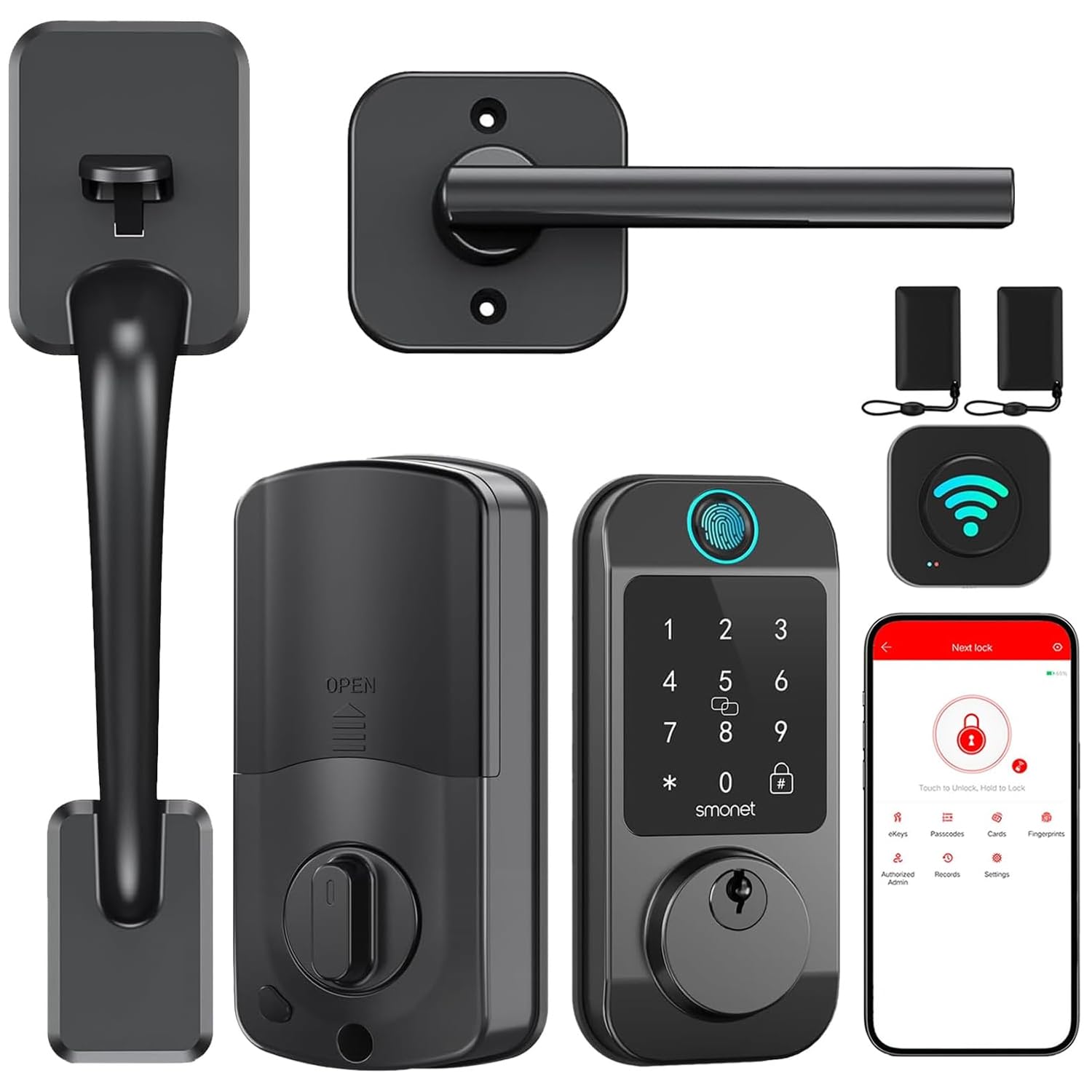
Image: A man receiving a one-time password on his phone, demonstrating the remote unlock feature for guests without distance limitations.
Údržba
Správa baterie
The SMONET M9 lock is designed for long battery life. Monitor the real-time battery status through the 'Next Lock' app. When batteries are low, the lock will provide a low battery warning. In case of complete battery depletion, an emergency USB-C port is available on the exterior unit for temporary power using a power bank.

Image: Close-up of the SMONET M9 smart lock highlighting the Type C emergency charging port and a graphic indicating real-time battery status.
Čištění
Wipe the lock's exterior surfaces with a soft, damp hadříkem. Nepoužívejte abrazivní čisticí prostředky ani rozpouštědla, protože by mohly poškodit povrchovou úpravu a elektronické součástky.
Odstraňování problémů
If you encounter issues with your SMONET M9 smart deadbolt, consider the following common solutions:
- Zámek nereaguje: Check battery levels. If low, replace batteries or use the emergency USB-C port.
- Otisk prstu nebyl rozpoznán: Ujistěte se, že máte prst čistý a suchý. Pokud problémy přetrvávají, otisk prstu znovu zaregistrujte.
- Klávesnice nefunguje: Verify the passcode is correct. Ensure the keypad is clean and free from debris.
- Problémy s připojením aplikace: Ensure your phone's Bluetooth is on and the lock is within range. Check your WiFi connection and ensure the Hub is properly configured and connected to the internet.
- Automatické zamykání se neaktivuje: Check the auto-lock settings in the app to ensure it is enabled and the timing is set correctly.
- Zámek se zdá být tuhý: Ensure all screws are tightened correctly and the lock is properly aligned with the door frame. Avoid over-tightening.
For further assistance, refer to the support information provided in the Warranty and Support section.
Specifikace
| Funkce | Detail |
|---|---|
| Značka | SMONET |
| Číslo modelu | M9 |
| Typ zámku | Biometric, Deadbolt |
| Speciální funkce | Automatické zamykání, otisk prstu, odemknutí pomocí přívěsku, odemknutí heslem |
| Kontrolní metoda | Aplikace, dotyk, hlas |
| Protokol připojení | Bluetooth, WiFi |
| Kompatibilita Smart Home | Smart Home Compatible (Alexa) |
| Materiál | Kov |
| Rozměry položky (D x Š x V) | 14 x 10 x 3 palce |
| Barva | Černý |
| Počet jednotek | 1.0 Počet |
Záruka a podpora
SMONET offers a 30-day purchase policy and a one-year quality assurance for the M9 WiFi Smart Deadbolt. If you experience any issues or require assistance, please contact SMONET customer service. Our professional customer service team is available to ensure your satisfaction and resolve any concerns promptly.
For support, please visit the official SMONET webwebu nebo se obraťte na prodejce, u kterého jste produkt zakoupili.