
1. Úvod
This manual provides detailed instructions for the setup, operation, and maintenance of your FREEWOLF M75 Wireless Dual-Mode Keyboard. Please read this manual thoroughly before using the product to ensure proper functionality and longevity.

Image 1.1: The FREEWOLF M75 Wireless Dual-Mode Keyboard, showcasing its compact layout and gradient keycaps.
2. Obsah balení
Před zahájením instalace se prosím ujistěte, že balení obsahuje všechny položky:
- FREEWOLF M75 Keyboard x 1
- Kabel USB-C x 1
- 2.4GHz Wireless Receiver x 1
- Návod k použití x 1

Image 2.1: Contents of the FREEWOLF M75 keyboard package, including the keyboard, USB-C cable, 2.4GHz receiver, and user manual.
3. Pokyny k nastavení
3.1 Nabíjení klávesnice
The M75 keyboard is equipped with a 2000mAh rechargeable battery. For optimal performance, fully charge the keyboard before first use.
- Connect the supplied USB-C cable to the keyboard's charging port.
- Connect the other end of the USB-C cable to a USB power source (e.g., computer USB port, wall adapter).
- The OLED display will indicate charging status. A full charge provides approximately 150 hours of use with the backlight off, or 24 hours with the backlight on.

Image 3.1: Visual representation of the M75 keyboard's 2000mAh battery, highlighting its estimated usage duration with and without backlighting.
3.2 Připojení klávesnice
The M75 keyboard supports dual-mode connectivity: 2.4GHz wireless and Bluetooth 5.1/5.2.

Image 3.2: The M75 keyboard demonstrating its dual-mode connection capabilities, supporting 2.4GHz wireless and Bluetooth for various devices.
3.2.1 Bezdrátové připojení 2.4 GHz
- Locate the 2.4GHz wireless receiver in the package.
- Plug the 2.4GHz receiver into an available USB port on your computer or compatible device.
- Turn on the keyboard using the switch located on the right side.
- The keyboard will automatically connect to the receiver. The OLED display will show the 2.4G connection status.
3.2.2 Připojení Bluetooth
The M75 keyboard supports up to two Bluetooth devices (BT1 and BT2).
- Turn on the keyboard using the switch on the right side.
- Stiskněte a podržte Fn klíč a BT1 or BT2 key (usually located on the right side near the OLED display) for 3-5 seconds until the indicator light flashes, indicating pairing mode.
- On your device (Windows PC, MacBook, Linux system, tablet, or smartphone), navigate to Bluetooth settings and search for new devices.
- Select "FREEWOLF M75" from the list of available devices to pair.
- Once connected, the OLED display will show the corresponding Bluetooth connection status (BT1 or BT2).
- To switch between connected Bluetooth devices, short press Fn + BT1 or Fn + BT2.
4. Návod k obsluze
4.1 Multi-functional Knob and OLED Display
The M75 keyboard features a multi-functional knob and an OLED display for enhanced control and information.

Obrázek 4.1: Detail view of the M75 keyboard's multi-functional knob and OLED display, detailing their functions and indicators.
- Funkčnost knoflíku:
- Rotate left/right: Adjusts system volume.
- Press down: Play/Pause media.
- Press down for 5 seconds: Adjusts backlight brightness.
- OLED displej: Shows real-time information including battery level, current connection mode (2.4G, BT1, BT2), charging status, and low battery warnings.
4.2 ovládání podsvícení
The M75 keyboard features rainbow backlighting.
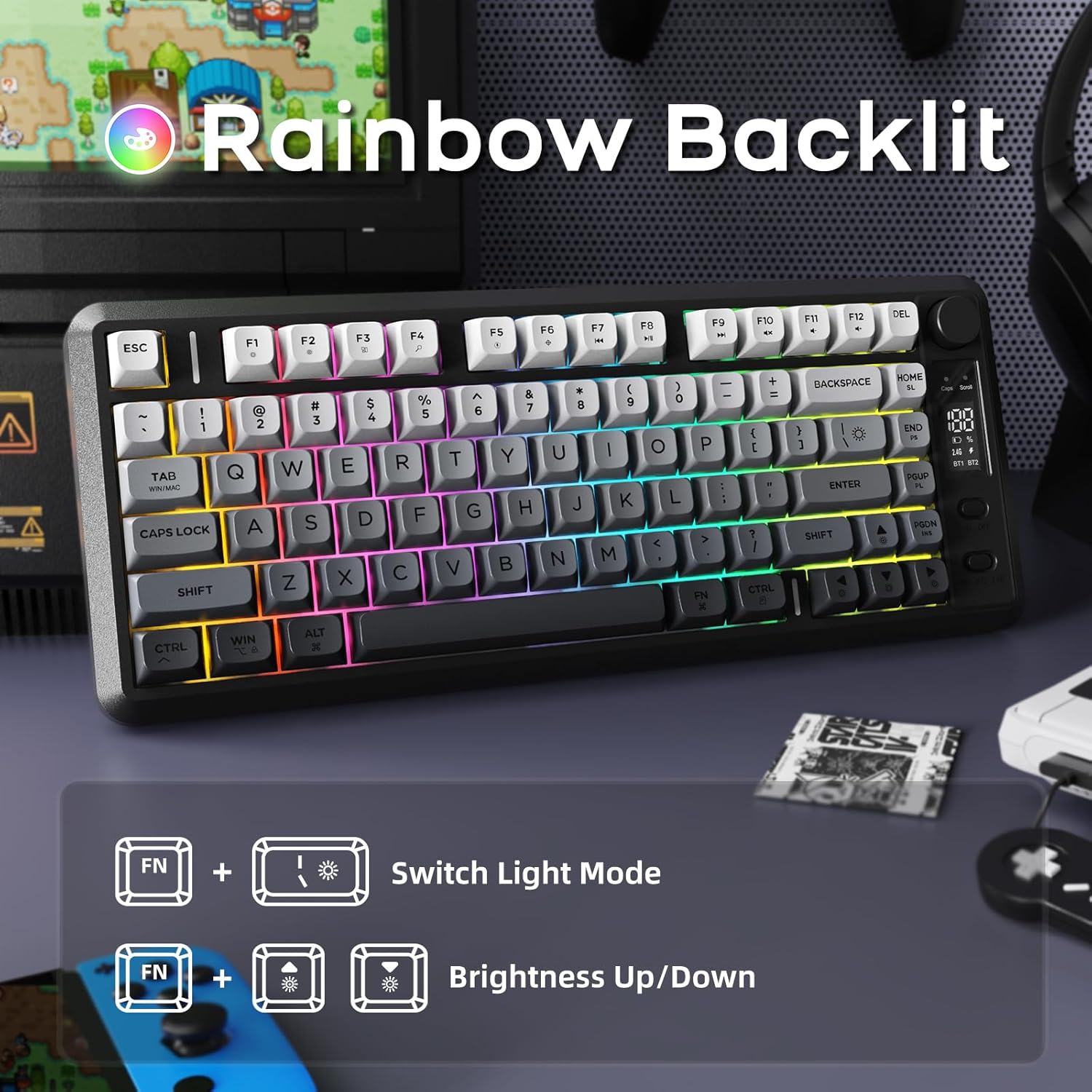
Image 4.2: Instructions for controlling the M75 keyboard's rainbow backlight, showing key combinations for mode switching and brightness adjustment.
- Stiskněte Fn + I: Switches between different backlight modes.
- Stiskněte Fn + ↑ (Up Arrow): Increases backlight brightness.
- Stiskněte Fn + ↓ (Down Arrow): Decreases backlight brightness.
Note: The keycaps are opaque, meaning the light illuminates around the keys, not through the legends.
4.3 Ochrana proti ghostingu
The M75 keyboard features 26-key rollover technology, ensuring that multiple simultaneous key presses are registered accurately without conflicts. This is particularly beneficial for gaming and fast typing.

Image 4.3: Illustration of the M75 keyboard's 26-key anti-ghosting feature, highlighting its compact 75% layout.
5. Údržba
5.1 Čištění klávesnice
Pro zachování vzhledu a funkčnosti klávesnice:
- Před čištěním odpojte klávesnici od všech zdrojů napájení a zařízení.
- Použijte měkký hadřík, který nepouští vlákna dampKlávesy a povrch otřete vodou nebo jemným čisticím roztokem.
- Vyhněte se používání agresivních chemikálií, abrazivních materiálů nebo nadměrné vlhkosti.
- Pro odstranění prachu a nečistot mezi klávesami použijte stlačený vzduch.
5.2 Péče o baterii
Chcete -li prodloužit životnost baterie:
- Vyhněte se častému úplnému vybíjení baterie.
- Pokud klávesnici delší dobu nepoužíváte, skladujte ji na chladném a suchém místě.
- Pokud klávesnice nebudete delší dobu používat, nabijte ji před uskladněním přibližně na 50 %.
6. Řešení problémů
If you encounter issues with your FREEWOLF M75 keyboard, refer to the following common solutions:
| Problém | Možná příčina | Řešení |
|---|---|---|
| Keyboard not connecting via 2.4GHz | Receiver not plugged in, keyboard off, low battery, interference. | Ensure receiver is securely plugged in. Turn keyboard on. Charge keyboard. Try a different USB port. |
| Klávesnice se nepřipojuje přes Bluetooth | Keyboard not in pairing mode, device Bluetooth off, already connected to another device, low battery. | Ensure keyboard is in pairing mode (Fn+BT1/BT2 long press). Enable Bluetooth on your device. Disconnect from other devices. Charge keyboard. |
| Podsvícení nefunguje nebo je slabé | Podsvícení vypnuté, jas nastavený na minimum, slabá baterie. | Press Fn+I to cycle modes. Press Fn+↑ to increase brightness. Charge keyboard. |
| Keys not responding or ghosting | Low battery, software issue, physical obstruction. | Charge keyboard. Restart your computer. Clean under keycaps. |
| OLED displej nezobrazuje informace | Keyboard off, low battery, display issue. | Ensure keyboard is on and charged. If issue persists, contact support. |
| Rychlé vybíjení baterie | Backlight constantly on at high brightness, frequent use. | Reduce backlight brightness or turn it off when not needed. Ensure keyboard is fully charged. |
7. Specifikace
| Funkce | Detail |
|---|---|
| Značka | SVOBODNÝ VLK |
| Model | M75 |
| Technologie připojení | 2.4G Wireless, Bluetooth 5.1/5.2 |
| Popis klávesnice | Membrane, Wireless |
| Materiál kláves | Polybutylen tereftalát (PBT) |
| Speciální funkce | Backlit, Ergonomic, Rechargeable, Silent, Volume Roller, OLED Display, Anti-Ghosting |
| Kapacita baterie | 2000 XNUMX mAh |
| Odhadovaná životnost baterie | 150 hours (backlight off), 24 hours (backlight on) |
| Kompatibilní zařízení | Laptop, PC, Tablet (Windows, MacBook, Linux) |
| Hmotnost položky | 1.65 libry |
| Rozměry balení | 15.75 x 6.02 x 1.89 palce |
8. Záruka a podpora
Informace o záruce a technickou podporu naleznete v dokumentaci dodané s vaším nákupem nebo se obraťte přímo na výrobce. Uschovejte si doklad o koupi pro případ reklamace.
Manufacturer: FREEWOLF