
1. Konec produktuview
The DOOGEE Tab A9 is a 10.1-inch Android 15 tablet designed for versatile use, from productivity to entertainment. It features a quad-core processor, ample memory, and a high-capacity battery, complemented by a suite of accessories for enhanced functionality.
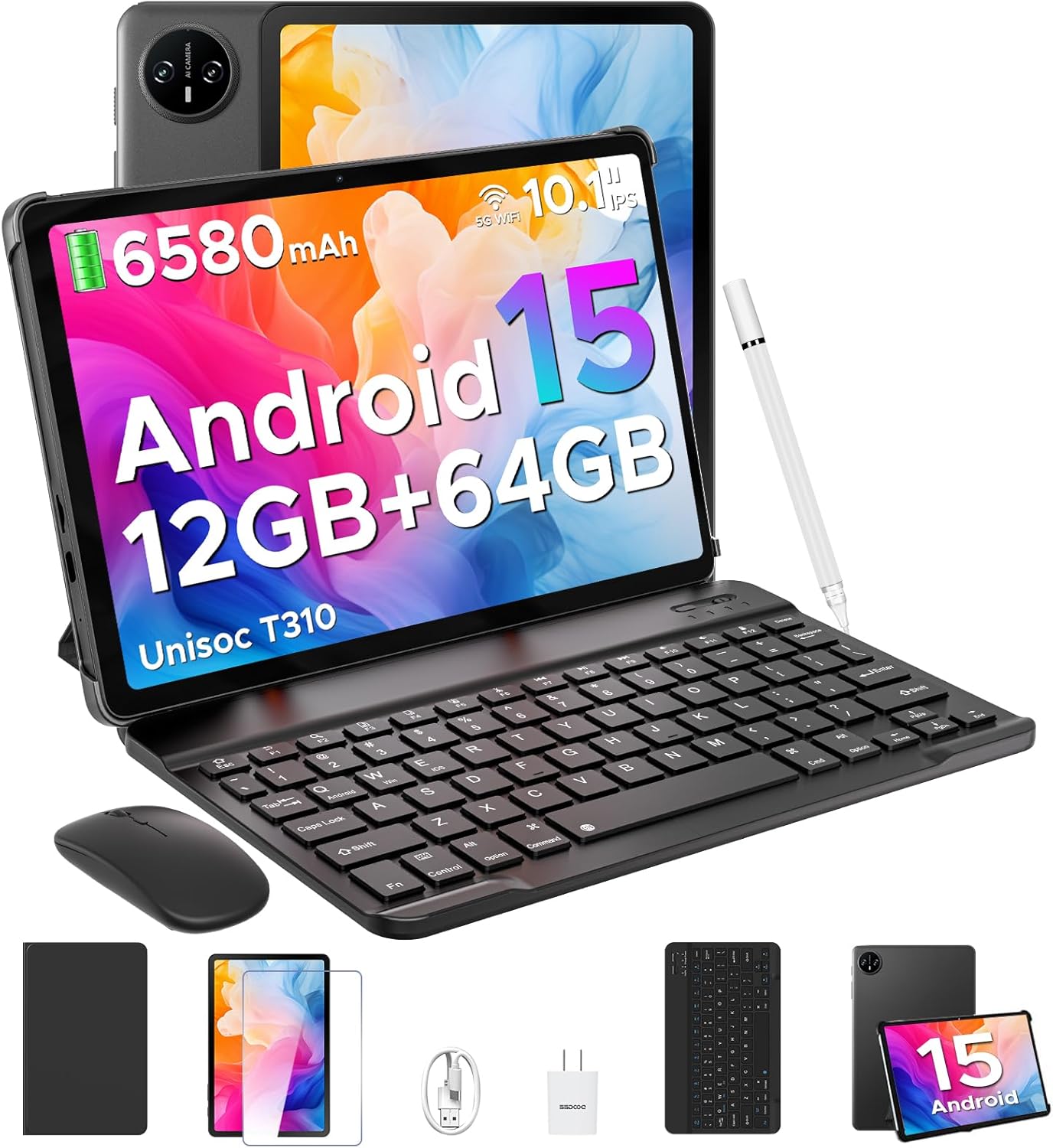
Image 1.1: DOOGEE Tab A9 tablet with its complete accessory kit.
Klíčové vlastnosti:
- Operační systém: Android 15 for enhanced performance and privacy.
- Procesor: Unisoc T310 Quad-Core, 2.0GHz.
- Paměť a úložiště: 12GB RAM (3GB physical + 9GB virtual) and 64GB internal storage, expandable up to 2TB via microSD.
- Zobrazit: 10.1-inch IPS HD (1280x800) touchscreen.
- Baterie: 6580 mAh pro delší používání.
- Kamery: 8MP zadní fotoaparát a 5MP přední fotoaparát.
- Konektivita: 2.4G/5G Dual-band WiFi, Bluetooth 5.0.
- Zabezpečení: Odemknutí obličejem.
- Zvuk: Dva reproduktory a 3.5mm jack pro sluchátka.
2. Co je zahrnuto
Your DOOGEE Tab A9 package includes the following items:

Image 2.1: Contents of the DOOGEE Tab A9 package.
- DOOGEE Tab A9 Tablet
- Bluetooth klávesnice
- myš Bluetooth
- Stylus Pen
- Ochrana obrazovky
- Ochranné pouzdro
- Nabíječka
- Kabel USB typu C
- Uživatelská příručka
3. Nastavení
3.1 Počáteční nabíjení
Before first use, fully charge your tablet using the provided charger and USB Type-C cable. Connect the cable to the tablet's charging port and the charger to a power outlet. The battery indicator on the screen will show charging status.
3.2 Zapnutí/vypnutí
- Zapnutí: Press and hold the Power button (located on the side of the tablet) until the DOOGEE logo appears.
- Vypnutí: Stiskněte a podržte tlačítko Napájení a poté z možností zobrazených na obrazovce vyberte možnost „Vypnout“.
- Restartovat: Stiskněte a podržte tlačítko napájení a poté z možností vyberte „Restartovat“.
3.3 Připojení příslušenství (klávesnice a myš)
The included keyboard and mouse connect via Bluetooth:
- Ujistěte se, že je klávesnice/myš nabitá a zapnutá.
- Na tabletu přejděte na Nastavení > Připojená zařízení > Bluetooth.
- Zapněte Bluetooth a vyhledejte dostupná zařízení.
- Select the keyboard or mouse from the list and follow any on-screen pairing instructions.
3.4 Vložení karty MicroSD
To expand storage, insert a microSD card (up to 2TB, sold separately):
- Vyhledejte slot pro kartu SIM/microSD na boku tabletu.
- K otevření zásuvky použijte dodaný nástroj pro vysunutí SIM karty.
- Place the microSD card into the designated slot on the tray.
- Opatrně vložte zásobník zpět do tabletu.
4. Návod k obsluze
Systém 4.1 Android 15
Your DOOGEE Tab A9 runs on Android 15, offering improved app launch speeds, system smoothness, and enhanced privacy controls. Explore the intuitive interface and customize settings to your preference.
Video 4.1: Konecview of the DOOGEE Tab A9 tablet's features, including its display, speakers, and connectivity.

Image 4.1: The Android 15 system logo, highlighting its intelligent, seamless, and secure features.
4.2 Nastavení zobrazení
The 10.1-inch IPS HD display offers clear visuals. You can adjust display settings for comfort:
- Režim péče o zrak: Reduces blue light to minimize eye strain. Activate it in Settings > Display > Eye Care Mode.
- Tmavý režim: Changes the system theme to a darker palette, ideal for low-light environments. Activate it in Settings > Display > Dark Mode.

Image 4.2: Visual representation of the tablet's 10.1-inch IPS HD display and its key specifications.
4.3 Použití kamery
Capture photos and videos with the tablet's cameras:
- Zadní fotoaparát (8MP): Suitable for general photography.
- Přední fotoaparát (5MP): Ideální pro videohovory a selfie.
Open the Camera app from the home screen or app drawer to start. Tap the shutter button to take a photo or switch to video mode to record.

Obrázek 4.3: Příkladampméně fotografií pořízených 8MP hlavním fotoaparátem.

Image 4.4: The 5MP front camera is suitable for clear video calls.
4.4 Zvukové funkce
The tablet is equipped with dual speakers for clear audio output and a 3.5mm audio jack for private listening with headphones.

Image 4.5: Illustration of the tablet's dual speaker system for enhanced audio.
4.5 Konektivita
- Wi-Fi: Supports 2.4G and 5G dual-band Wi-Fi for stable and fast internet access. Connect via Nastavení > Síť a internet > Wi-Fi.
- Bluetooth 5.0: For connecting wireless peripherals like headphones, speakers, and the included keyboard and mouse. Manage connections in Nastavení > Připojená zařízení > Bluetooth.

Image 4.6: Features of the tablet's WiFi 5 connectivity.
4.6 Odemknutí obličejem
For convenient and secure access, set up Face Unlock:
- Přejít na Nastavení > Zabezpečení a soukromí > Odemknutí obličejem.
- Registrujte svůj obličej podle pokynů na obrazovce.
- Ensure you are in a well-lit area during registration for optimal performance.

Image 4.7: The tablet's facial recognition unlock feature in action.
4.7 Multitasking s rozdělenou obrazovkou
Utilize the split-screen feature to run two apps simultaneously:
- Otevřete první aplikaci.
- Přejetím prstem od spodní části obrazovky nahoru a podržením zobrazíte nedávno používané aplikace.
- Klepněte na ikonu aplikace v horní části karty první aplikace a vyberte možnost „Rozdělit obrazovku“.
- Vyberte druhou aplikaci z posledních aplikací nebo ze zásuvky aplikací, která vyplní druhou polovinu obrazovky.

Image 4.8: Demonstrating efficient split-screen multitasking on the tablet.
4.8 Výkon a úložiště
The Unisoc T310 Quad-Core processor and 12GB RAM (3GB physical + 9GB virtual) ensure smooth operation for daily tasks and multitasking. The 64GB internal storage provides space for essential apps and files, with expandable storage up to 2TB via microSD card.
Video 4.2: Highlights of the DOOGEE Tab A9's processor, RAM, and storage capabilities.

Image 4.9: Visual representation of the Unisoc T310 Quad-Core processor.

Image 4.10: Illustrates the tablet's memory and storage capacity, including expandable memory.
4.9 Životnost baterie
The 6580mAh battery, combined with smart battery management, provides all-day usage. Actual battery life may vary based on usage patterns and settings.

Image 4.11: Details on the 6580mAh battery capacity and estimated usage times.
5. Údržba
- Aktualizace softwaru: Pravidelně kontrolujte a instalujte aktualizace systému, abyste zajistili optimální výkon a zabezpečení. Přejděte na Nastavení > Systém > Aktualizace systému.
- Čištění: K čištění obrazovky a těla tabletu používejte měkký hadřík, který nepouští vlákna. Nepoužívejte abrazivní materiály ani agresivní chemikálie.
- Péče o baterie: To prolong battery life, avoid extreme temperatures and do not let the battery fully discharge frequently.
- Správa úložiště: Pravidelně odstraňujte nepotřebné files and apps to maintain system speed.
6. Řešení problémů
Běžné problémy a jejich řešení naleznete v tabulce níže:
| Problém | Možné řešení |
|---|---|
| Tablet se nezapne | Ujistěte se, že je baterie nabitá. Připojte nabíječku a zkuste to znovu. Pokud zařízení nereaguje, stiskněte a podržte tlačítko napájení po dobu 10–15 sekund, abyste vynutili restart. |
| Problémy s připojením Wi-Fi | Restart the tablet and your Wi-Fi router. Check Wi-Fi settings to ensure the correct network is selected and the password is entered correctly. |
| Zařízení Bluetooth se nespáruje | Ensure the Bluetooth device is in pairing mode and within range. Restart both the tablet and the Bluetooth device. Check tablet's Bluetooth settings. |
| Pomalý výkon | Zavřete nepoužívané aplikace. Vymažte mezipaměť a dočasné files. Consider uninstalling rarely used apps. Perform a system update if available. |
| Obrazovka nereaguje | Restartujte tablet. Pokud problém přetrvává, ujistěte se, že je obrazovka čistá a bez nečistot. |
7. Specifikace
| Funkce | Detail |
|---|---|
| Název modelu | Záložka A9 |
| Operační systém | Android 15 |
| Procesor | Unisoc T310 čtyřjádrový, 2 GHz |
| BERAN | 12 GB (3 GB fyzické + 9 GB virtuální) |
| Interní úložiště | 64 GB |
| Rozšiřitelné úložiště | Až 2 TB přes kartu MicroSD |
| Velikost obrazovky | 10.1 palce |
| Rozlišení obrazovky | 1280 x 800 pixelů (IPS HD) |
| Zadní kamera | 8 MP |
| Přední kamera | 5 MP |
| Kapacita baterie | 6580 XNUMX mAh |
| Bezdrátový typ | 802.11ac, 802.11b, 802.11g, 802.11n (2.4G/5G WiFi) |
| Bluetooth | Bluetooth 5.0 |
| Rozměry (DxŠxV) | 9.54 x 6.33 x 0.38 palce |
| Hmotnost položky | 1.12 libry |
8. Záruka a podpora
Your DOOGEE Tab A9 tablet comes with a 2-letá záruka a doživotní technickou podporu. For any questions, issues, or support needs, please contact DOOGEE customer service. Refer to the warranty card included in your package for specific terms and conditions.