
FULODE V18
FULODE V18 Digital Mixer User Manual
Professional 8-Channel Compact Audio Mixing Console
Model: V18
Konec produktuview
The FULODE V18 Digital Mixer is a versatile 8-channel compact audio mixing console designed for a wide range of applications, including live performances, studio recording, podcasting, and DJing. It features 16 built-in DSP effects, a professional 6-band EQ, USB connectivity, Bluetooth, and PC debugging capabilities, offering comprehensive sound control and flexibility.
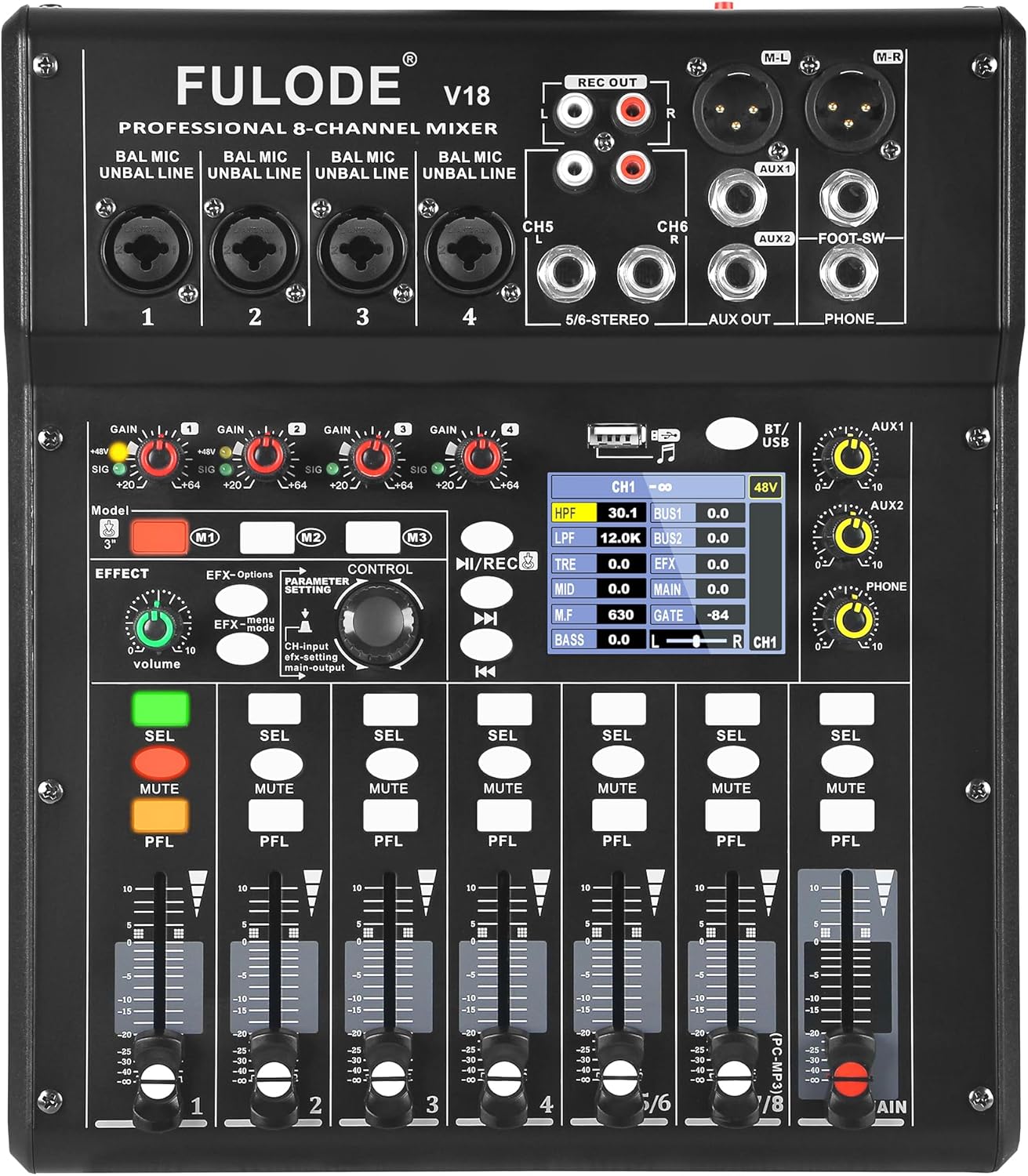
Obrázek 1: Přední strana view of the FULODE V18 Digital Mixer, showcasinjeho ovládací prvky a displej.
Klíčové vlastnosti:
- 16 DSP efektů: Customizable sound with adjustable parameters for precise audio shaping.
- 4-Band EQ per Channel + 6-Band Master EQ: Advanced tone shaping with High-Pass Filter (HPF) and Low-Pass Filter (LPF) for clear highs, rich mids, and solid lows.
- USB Mixer with PC Tuning Software: Connect to a computer for precise sound tuning and real-time parameter control, with 3 recallable custom presets.
- Bluetooth Streaming & USB/MP3 Playback: Supports Bluetooth 5.0 for wireless streaming and direct music playback from USB flash drives.
- Optický vstup: High-fidelity, interference-free digital audio signal input.
- 48V fantomové napájení: Independent phantom power on channels 1 & 2 for condenser microphones.
- Channel Mute & Footswitch Control: Dedicated mute buttons per channel and footswitch support for hands-free effect switching.
Průvodce nastavením
Follow these steps for initial setup of your FULODE V18 Digital Mixer:
- Rozbalení: Carefully remove all components from the packaging. Verify that all items listed in the "What's Included" section are present.
- Připojení napájení: Connect the provided power adapter to the DC 12V/5A input on the rear panel of the mixer. Plug the adapter into a suitable power outlet.
- Zapnutí: Press the "POWER ON" button located on the rear panel to turn on the mixer. The 2.8" TFT display will illuminate, showing the welcome screen.
- Vstupní připojení:
- Microphones/Line Inputs (Channels 1-4): Use XLR or 1/4" TRS cables to connect microphones or line-level instruments to the respective input jacks.
- Stereo Inputs (Channels 5/6 - 7/8): Use 1/4" TRS or RCA cables for stereo line-level devices.
- Optický vstup: Connect digital audio sources via the optical input for high-fidelity sound.
- Výstupní připojení:
- Main Output (M-L/M-R): Connect to your main PA system or studio monitors using XLR cables.
- AUX výstupy (AUX1/AUX2): Connect to external effects processors or monitor systems.
- Headphone Output (PHONE): Připojte sluchátka pro monitoring.
- REC OUT: Connect to a recording device using RCA cables.

Figure 2: Product dimensions and included accessories, including USB cable, optical cable, and power line.
Video 1: Overview of the FULODE V18 Digital Mixer's features and connectivity, including power-on sequence and various input/output options. This video demonstrates the physical connections and initial boot-up of the device.
Návod k obsluze
Channel Controls and EQ
Each input channel (1-8) features individual gain control, a 4-band equalizer, and a channel fader for precise level adjustment. The main output also includes a powerful 6-band EQ for overall sound shaping.
- Gain Control: Adjust the input sensitivity for each channel to prevent clipping or ensure sufficient signal.
- 4-Band Channel EQ: Use the dedicated knobs to adjust High-Pass Filter (HPF), Low-Pass Filter (LPF), Treble, Mid, and Bass frequencies for individual channels.
- Fadery kanálu: Control the volume level of each channel sent to the main mix.
- Tlačítko ztlumení: Instantly silence a channel.
- Tlačítko PFL (Poslouchání před faderem): Allows you to monitor the channel's signal before the fader, useful for setting gain levels.

Figure 3: Visual representation of the 4-band professional EQ, Pro-Grade HPF/LPF, Multi-Bus Routing, and Smart Noise Gate features.
DSP Effects and Presets
The V18 mixer includes 16 professional DSP effect presets. You can select and adjust parameters for each effect to customize your sound.
- Effect Knob: Rotate to select from the 16 built-in effects.
- Nastavení parametrů: Use the control knob to adjust specific parameters of the selected effect, such as delay time or reverb decay.
- Preset Mode Shortcut (M1, M2, M3): Save up to 3 customized presets for quick recall during performances or recording sessions.
- Ovládání nožním spínačem: Connect an optional footswitch to the "FOOT-SW" jack for hands-free effect switching, ideal for solo performers.

Figure 4: The mixer's display showing the selection and adjustment of 16 built-in effect presets.
USB a Bluetooth připojení
The mixer offers versatile playback options via USB and Bluetooth.
- USB přehrávání: Vložte USB flash disk do USB portu pro přehrávání MP3 files directly. Use the transport controls (play/pause, next/previous) on the mixer to navigate tracks.
- Bluetooth streamování: Activate Bluetooth on the mixer and pair with your mobile device (phone, tablet, or MP3 player) to stream audio wirelessly.
- PC Debugging/Tuning: Connect the mixer to your computer via the USB 2.0 port. Use the dedicated PC tuning software for ultra-precise sound adjustments and real-time parameter control.

Figure 5: Illustration of the built-in Bluetooth feature for wireless audio streaming.

Obrázek 6: Přesview of versatile audio inputs including USB drive, USB 2.0 for computer connection, and optical input.
Figure 7: The mixer connected to a computer, demonstrating the PC tuning software for precise adjustments and recallable modes.
Fantomová síla
Channels 1 and 2 provide independent 48V phantom power, essential for operating condenser microphones. Activate phantom power only when using condenser microphones that require it. Ensure other devices are disconnected or phantom power is off before connecting non-phantom powered equipment to avoid damage.

Figure 8: The 48V phantom power switch and channel mute button, crucial for microphone compatibility and live control.
Údržba
Proper maintenance ensures the longevity and optimal performance of your FULODE V18 Digital Mixer:
- Čištění: K otření povrchu mixéru použijte měkký, suchý hadřík. V případě odolných nečistot použijte lehceamp Lze použít hadřík a poté suchý hadřík. Nepoužívejte abrazivní čisticí prostředky, rozpouštědla ani vosky.
- Ochrana proti prachu: Pokud mixážní pult nepoužíváte, zakryjte jej, abyste zabránili hromadění prachu, zejména kolem faderů a knoflíků.
- Podmínky prostředí: Operate and store the mixer in a dry environment, away from direct sunlight, extreme temperatures, and high humidity.
- Správa kabelů: Ujistěte se, že kabely jsou úhledně uspořádané a nejsou napjaté, aby nedošlo k poškození konektorů a portů.
Odstraňování problémů
This section addresses common issues you might encounter with your FULODE V18 Digital Mixer:
| Problém | Možná příčina | Řešení |
|---|---|---|
| Z hlavního mixu není slyšet žádný zvuk. |
|
|
| Zkreslený zvuk. |
|
|
| Bluetooth se nepřipojuje. |
|
|
| Mikrofon nefunguje (kondenzátorový mikrofon). |
|
|
Specifikace
| Funkce | Detail |
|---|---|
| Značka | FULODE |
| Číslo modelu | V18 |
| Počet kanálů | 8 |
| DSP efekty | 16 built-in, adjustable parameters |
| Vyrovnání | 4-Band EQ per channel, 6-Band Master EQ, HPF/LPF filters |
| Technologie připojení | Bluetooth 5.0, USB 2.0, Optical Input |
| Fantomová síla | 48V (independent on channels 1 & 2) |
| Zobrazit | 2.8" TFT Display |
| Zdroj napájení | Elektrický kabel |
| svtage | 110 voltů (AC) |
| Hmotnost položky | 5.69 libry |
| Rozměry produktu | 11.45 x 9.72 x 2.59 palce (29.1 x 24.7 x 6.6 cm) |
Záruka a podpora
FULODE is committed to your satisfaction. This mixer is packed with advanced features to meet professional audio needs. If you have any questions about setup, functions, or performance, our dedicated support team is always ready to help. Please contact us anytime for assistance.
For support, please refer to the contact information provided with your product packaging or visit the official FULODE webmísto.
Ask a question about this manual
Ask about setup, troubleshooting, compatibility, parts, safety, or missing instructions. Manuals+ will review the question and use this page’s manual context to help answer it.