
Zavedení
Thank you for choosing the TECKNET TK-BS001 Bluetooth Shower Speaker. This manual provides essential information for the safe and efficient operation of your device. Please read it thoroughly before use and retain it for future reference.
Co je v krabici
- 1 Bluetooth reproduktor
- 1 nabíjecí kabel USB (typu C)
- Rychlý průvodce
- 36měsíční záruční list
Konec produktuview & Řízení
Familiarize yourself with the speaker's components and controls for optimal use.

Obrázek: Přední strana view of the TECKNET Bluetooth Shower Speaker, highlighting the speaker grille, LED display, and control buttons.
Ovládací tlačítka:
- Tlačítko napájení (ZAP/VYP): Press and hold for 3 seconds to turn the speaker on/off. Short press to play/pause music.
- Tlačítka hlasitosti +/-: Short press to adjust volume up/down. Press and hold for 2 seconds to skip to the next/previous track.
- Světlo tlačítko: Short press to cycle through lighting effects. Press and hold for 2 seconds to turn lights on/off.
- Ovládání hovorů: Short press Power Button to answer/end a call. Press and hold Power Button for 2 seconds to reject a call.
- Správa Bluetooth: Press and hold Volume + & Volume - for 3 seconds to clear BT pairing record.
- Link Speakers (M Button): Short press Speaker Link Button on one speaker to link/unlink two speakers for Dual Speaker Mode.
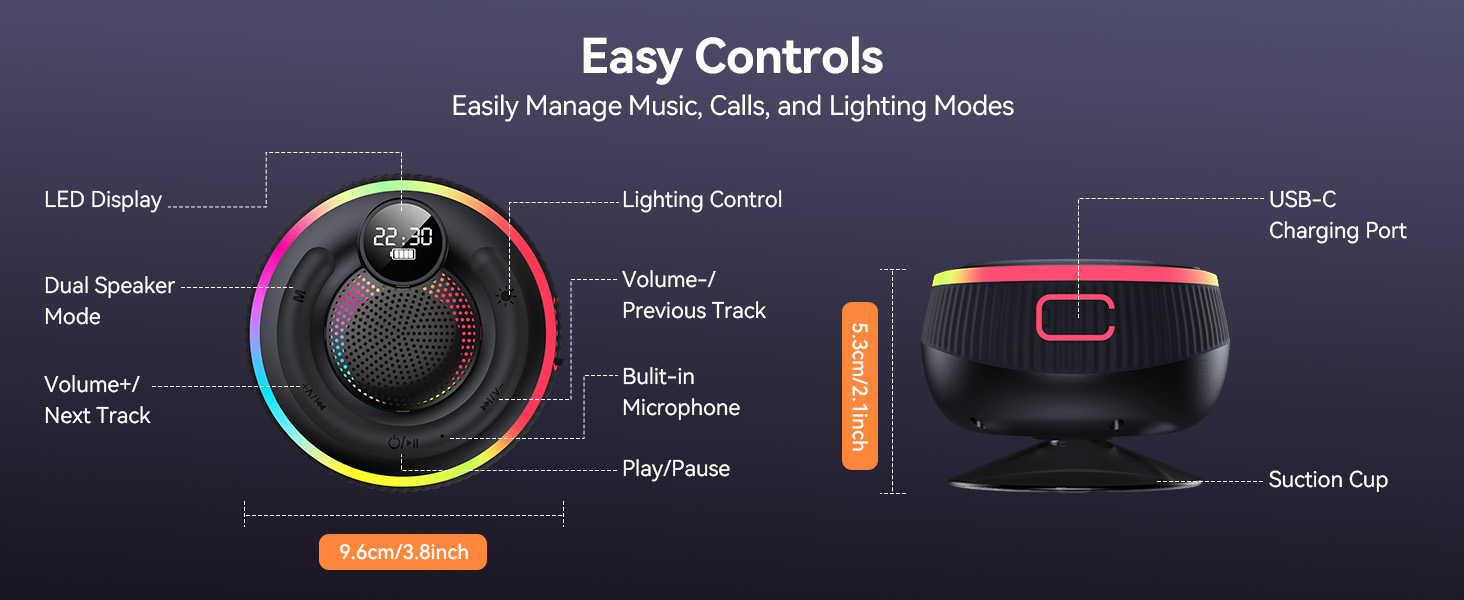
Image: Detailed diagram showing the layout of control buttons, LED display, USB-C charging port, and suction cup, along with product dimensions.
Nastavení a párování
Počáteční nastavení:
- Nabijte reproduktor: Before first use, fully charge the speaker using the provided USB-C cable. The LED display will show battery status.
- Zapnout: Press and hold the Power Button for 3 seconds. The speaker will power on and enter Bluetooth pairing mode.
Bluetooth párování:
- Ensure the speaker is in pairing mode (indicated by flashing lights).
- Na svém zařízení (chytrý telefon, tablet, notebook) povolte Bluetooth a vyhledejte dostupná zařízení.
- Select "TK-BS001" from the list to connect. A voice prompt will confirm successful pairing.
- The speaker will auto-reconnect to the last paired device within 5 minutes when powered on.

Image: A smartphone screen showing the speaker "TK-BS001" available for Bluetooth connection, with the speaker nearby.
Dual Speaker Mode (TWS Stereo):
To achieve 360° TWS Stereo Sound, you can link two TK-BS001 speakers together.
- Ensure both speakers are powered on and disconnected from any devices.
- Short press the Speaker Link Button (M button) on one speaker.
- The speakers will automatically link. A voice prompt "Connected to the box" will confirm successful linking.
- Pair either speaker with your device via Bluetooth. Both speakers will now play audio in stereo.
Video: Official TECKNET video demonstrating the Bluetooth Shower Speaker's features, including TWS pairing and RGB lighting.
Návod k obsluze
Přehrávání hudby:
- Once paired, start playing music from your connected device.
- Use the Power Button for play/pause.
- Use Volume +/- buttons for volume adjustment and track skipping.
RGB osvětlení:
The speaker features 7 vibrant colors and 6 lighting modes to enhance your audio experience.
- Short press the Light Button to cycle through different lighting effects.
- Press and hold the Light Button for 2 seconds to turn the lights on or off.

Image: Close-up of the TECKNET Bluetooth Shower Speaker showcasinjeho zářivými RGB světelnými efekty.
Hands-free volání:
With the built-in microphone, you can answer calls directly from the speaker.
- When a call comes in, short press the Power Button to answer.
- To end a call, short press the Power Button again.
- To reject a call, press and hold the Power Button for 2 seconds.
Údržba a péče
Waterproof Features (IPX7):
The speaker is IPX7 waterproof, meaning it can withstand immersion in water up to 1 meter for 30 minutes. It is designed for use in showers, by pools, and at beaches.
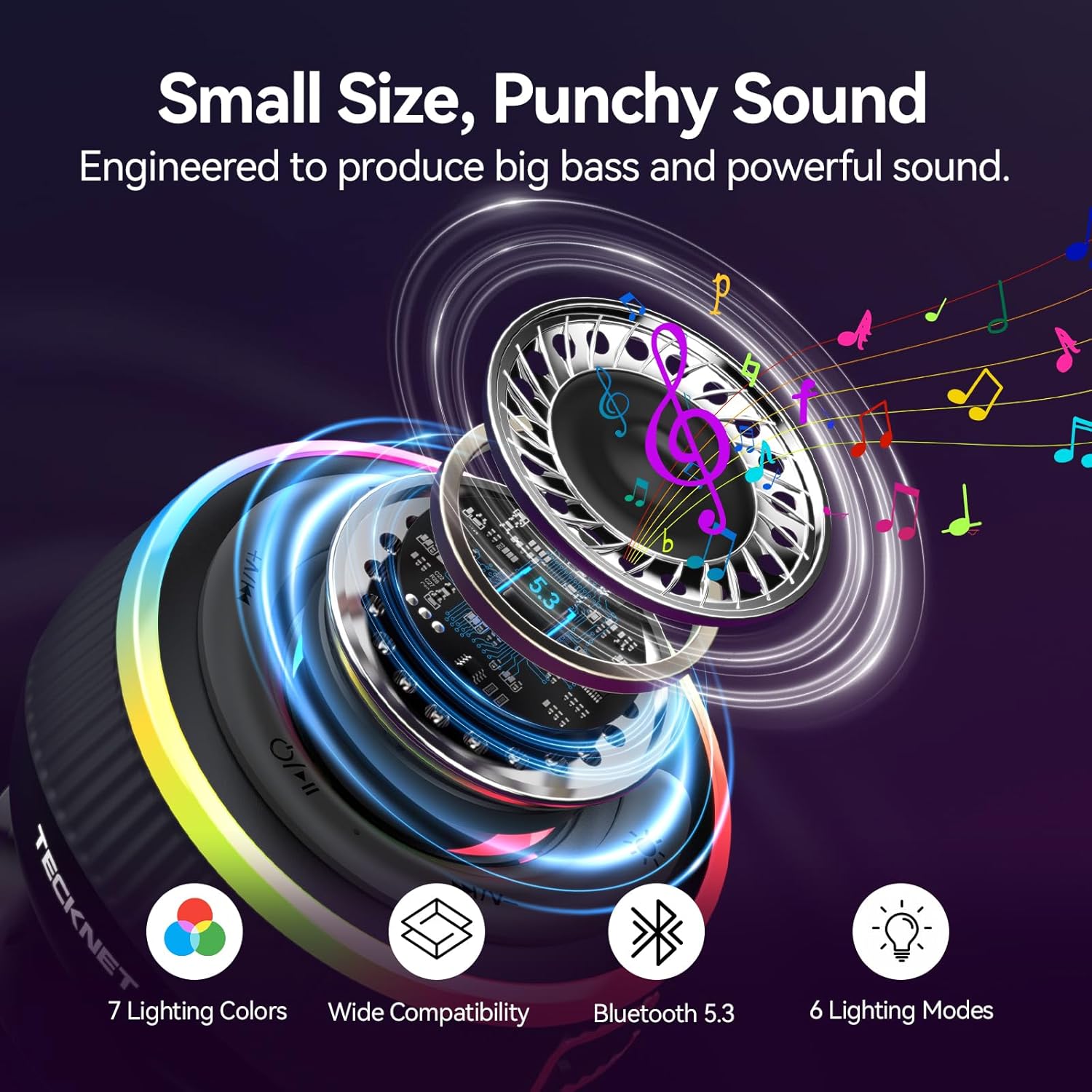
Image: The TECKNET speaker being directly sprayed with water, illustrating its IPX7 waterproof capability.
Suction Cup Usage:
The strong suction cup allows for versatile placement on smooth, non-porous surfaces.
- Kompatibilní povrchy: Glass (shower doors, mirrors), glossy tiles, polished marble.
- Avoid Surfaces: Textured, porous, or flexible surfaces such as frosted/etched glass, rough stone/concrete, wallpaper or painted drywall, wood (unless varnished).
- Aplikace: Clean the surface with a mild detergent or alcohol wipe to remove dirt, oils, or soap residue. Ensure the surface is completely dry before attachment. Press the suction cup firmly against the surface for 10-15 seconds to create a vacuum seal. Gently pull the speaker to confirm it's securely attached.
- Tipy na údržbu: Reattach the suction cup every 2-3 weeks to maintain adhesion, especially in humid environments. If detached, clean both the suction cup and surface, then reapply with stronger pressure.

Image: The TECKNET speaker securely mounted on a tiled shower wall using its suction cup.
Obecná péče:
- Keep away from children under 3 years (small parts risk).
- Not submersible - do not place underwater.
- Avoid direct showerhead flow (position speaker 1m/3ft from showerhead).
- Dry charging port before plugging in (water droplets may cause corrosion).
- Charge only in well-ventilated spaces.
- Avoid direct sunlight, saunas, or near heaters.
- Immediately unplug if error occurs.
- Never disassemble - no user-serviceable parts inside.
- Maintain >20cm distance from pacemakers (BT radio waves interference).
- Prolonged exposure to high volume (>85dB) may cause hearing damage.
Průvodce řešením problémů
| Problém | Řešení |
|---|---|
| Problémy s napájením: Won't turn on | Charge for 30 minutes before retry. |
| BT Issues: Can't find "TK-BS001" | 1. Ensure speaker is turned on. 2. Keep device within 1m (3ft) of speaker, away from WiFi routers. |
| BT Issues: Časté odpojování | 1. Forget "TK-BS001" in your device's BT settings and re-pair. 2. Update your phone's OS. |
| Audio & Hardware: No sound despite pairing | 1. Press Volume + button to increase volume. 2. Check phone's media volume. |
| Audio & Hardware: Suction cup loses grip | 1. Wipe both surface and cup with rubbing alcohol. 2. Press firmly for 15 seconds (apply strong pressure). |
| Audio & Hardware: Červená LED bliká každé 5 sekundy | Low battery - charge immediately. |
| Water-Related Issues: Speaker stops after water contact | 1. Power off immediately. 2. Dry with microfiber cloth. 3. Wait 24hrs before reuse. |
| Water-Related Issues: Tlumený zvuk | Remove water from speaker grille (tilt at 45° to drain). |
Specifikace
| Funkce | Detail |
|---|---|
| Značka | TECNET |
| Číslo modelu | TK-BS001 |
| Technologie připojení | Bluetooth 5.3 |
| Dosah Bluetooth | Až 49 stop (15 m) |
| Úroveň odolnosti proti vodě | IPX7 Vodotěsný |
| Maximální výstupní výkon reproduktoru | 5 wattů |
| Režim zvukového výstupu | Stereo (s TWS) |
| Kapacita baterie | 1000 XNUMX mAh |
| Průměrná životnost baterie | 10-12 Hours (50% volume) |
| Doba nabíjení baterie | 2.5-3 Hours (via USB-C) |
| Další funkce | RGB Lighting Effects (7 colors, 6 modes), Built-in Mic, Strong Suction Cup, LED Time & Battery Display |
| Rozměry položky | 9.6 cm H x 9.6 cm Š x 5.3 cm V (přibližně 3.8 cm x 3.8 cm x 2.1 cm) |
| Hmotnost položky | 0.67 lbs (approx. 8 Ounces) |
| Materiál pouzdra | Acrylonitrile Butadiene Styrene (ABS), Metal, Silicone |
Záruka a podpora
The TECKNET TK-BS001 Bluetooth Shower Speaker comes with a 36 Months Limited Manufacturer Warranty (Registered Only).
If you encounter any problems in using the product, please feel free to contact our professional customer service team for assistance.