
1. Úvod
Thank you for choosing the VOKSUN Wireless Weather Station. This device provides accurate indoor and outdoor temperature and humidity readings, along with a 12-hour weather forecast, comfort indicator, alarm clock, calendar, time, and moon phase display. Please read this manual carefully before use to ensure proper operation and to maximize the product's lifespan.

Image 1.1: The VOKSUN Wireless Weather Station main unit and its accompanying outdoor sensor.
2. Konec produktuview
2.1 Hlavní vlastnosti
- Monitorování vnitřní a venkovní teploty a vlhkosti
- 12-Hour Weather Forecast based on atmospheric pressure changes
- Comfort Indicator (Humid, Good, Dry)
- Budík s funkcí odložení buzení
- Calendar and Time Display
- Moon Phase Display and Tide Indicator
- DCF Radio Controlled Clock for automatic time synchronization
- Adjustable Backlight with 4 brightness levels
- Supports up to 3 remote outdoor sensors (one included)
- Two Power Supply Methods: DC adapter or AA batteries

Image 2.1: Visual representation of the weather station's key functions, including temperature, calendar, weather forecast, moon phase, alarms, humidity, sunrise/sunset times, alerts, comfort index, and atmospheric pressure.
2.2 Komponenty
Balíček obsahuje:
- 1 x VOKSUN Wireless Weather Station (Main Unit)
- 1 x Bezdrátový venkovní senzor
- 1 x DC napájecí adaptér
- 1 x Uživatelská příručka
2.3 Main Unit and Sensor Layout

Image 2.2: Detailed diagram showing the labeled parts of the main unit's LCD display (A) and back panel (B).
Part A - Positive LCD Display:
- Ikona venkovního bezdrátového kanálu a příjmu
- Vnitřní teplota
- Vnitřní vlhkost
- Indikátor vnitřního komfortu
- Čas
- Měsíc a datum
- Týden
- Předpověď počasí
- Venkovní teplota
- Atmosférický tlak
- Venkovní vlhkost
- Histogram of historical pressure trends
- Outdoor comfort indicator
- Čas východu slunce
- Měsíční fáze
- Vybrané město
- Hladina přílivu
- Čas západu slunce
Part B - Back Button and Power:
- "/zZ" Touch field
- Podpěrný rám
- Přihrádka na baterie
- Otvor na zavěšení
- "▼" Button
- "▲/☀" Button
- "▲" Button
- "◎" Button
- """ Button
- "DC" Button
- Napájecí zásuvka
- Výstup USB nabíječky

Image 2.3: Detailed diagram showing the labeled parts of the wireless remote sensor (C).
Part C - Wireless Remote Sensor:
- LCD display - Temperature
- LCD display - Humidity
- LED vysílací signál
- "° C / ° Ftlačítko "
- "TXtlačítko "
- "CHANNEL 1 or 2 or 3" switch
- Přihrádka na baterie
3. Nastavení
3.1 Napájení zařízení
The weather station main unit and the outdoor sensor can be powered in two ways:
- Hlavní jednotka: Use the included DC power adapter for continuous backlight, or 2 x AA batteries (not included) for temporary backlight (15 seconds after touch).
- Venkovní senzor: Vyžaduje 2 baterií AA (nejsou součástí balení).
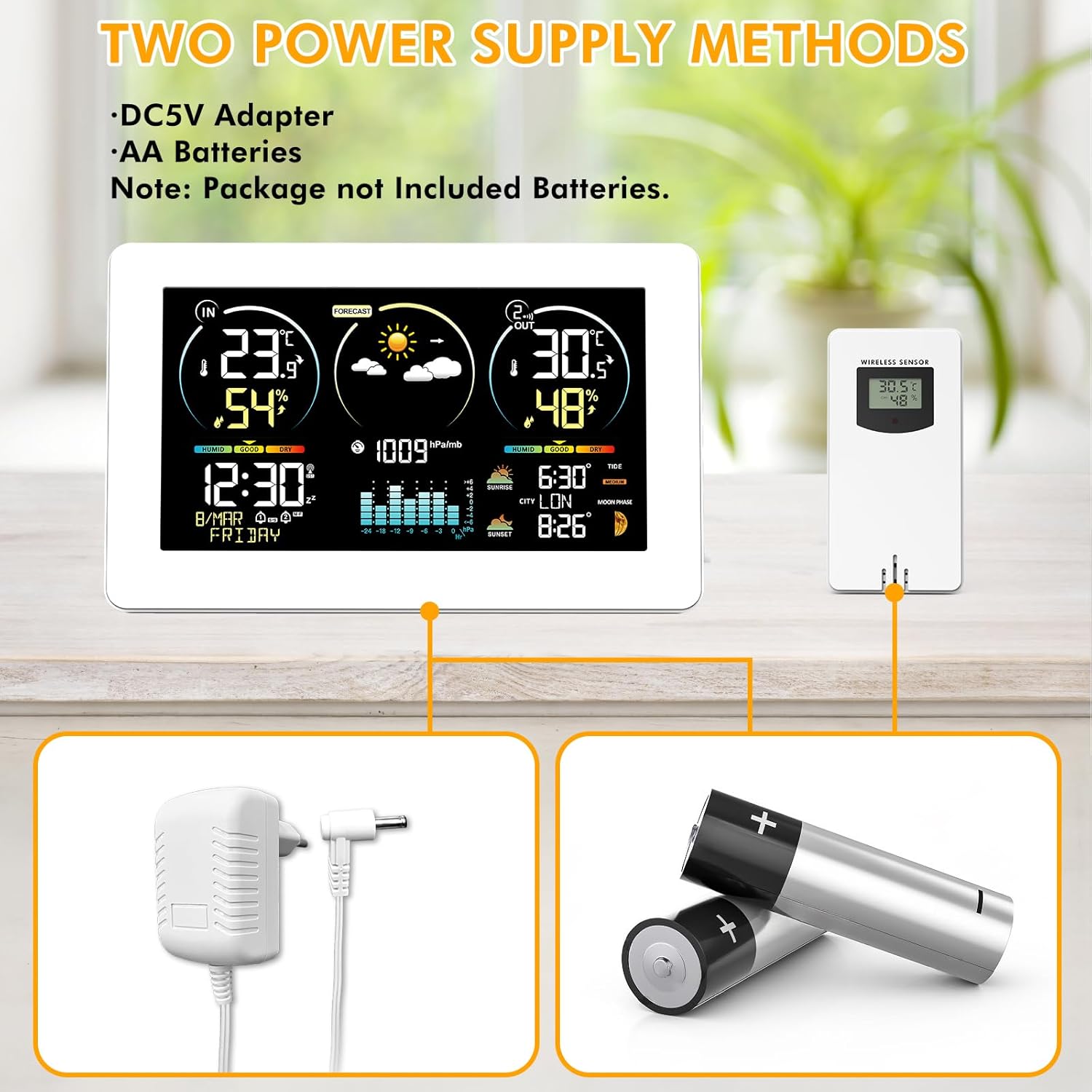
Image 3.1: Illustration of the two power supply methods: DC5V adapter for the main unit and AA batteries for both the main unit and the wireless sensor.
Kroky instalace:
- Insert 2 x AA batteries into the outdoor sensor, ensuring correct polarity. Select a channel (1, 2, or 3) using the switch inside the battery compartment.
- Insert 2 x AA batteries into the main unit (optional, for backup power) or connect the DC power adapter to the main unit.
- The main unit will automatically search for the outdoor sensor signal. The outdoor temperature and humidity should appear on the main unit's display within a few minutes.
3.2 Umístění snímače
Place the outdoor sensor in a shaded, dry location away from direct sunlight and precipitation to ensure accurate readings. The wireless sensors have a transmission range of 200ft/60m in open spaces.

Obrázek 3.2: Příkladamples of suitable locations for the outdoor sensor, such as under an eave, near a window, or in a garden shed, demonstrating its 60m/200ft transmission range.
3.3 Umístění hlavní jednotky
The main unit can be placed on a desk using its integrated stand or mounted on a wall using the hanging hole on the back.

Image 3.3: The weather station can be conveniently placed on a desk or mounted on a wall.
4. Návod k obsluze
4.1 Automatic Time Synchronization (DCF)
The weather station features a DCF radio-controlled clock function. It automatically synchronizes the time daily or upon power-up to ensure accuracy. The DST (Daylight Saving Time) function is also supported.

Image 4.1: The weather station automatically synchronizes its clock with the radio signal, ensuring precise timekeeping across various regions.
If the DCF signal is weak in your location, you can disable this function and set the time manually.
4.2 Ruční nastavení času a data
Refer to the detailed instructions in the included paper manual for specific button presses to manually set the time, date, and other parameters.
4.3 Předpověď počasí
The weather station calculates 12-hour weather forecasts based on outdoor sensor data and atmospheric pressure changes. During initial use, the device requires a 7-day learning and calibration period for accurate personalized forecasts.

Image 4.2: The weather station displays various weather conditions, including sunny, partly cloudy, cloudy, rainy, stormy, and snowy.
4.4 Indikátor komfortu
The comfort indicator provides a quick reference to the indoor environmental comfort level based on humidity:
- SCHNOUT: Vlhkost 1-35% RH
- DOBRÝ: Vlhkost 35-44% RH
- POHODLÍ: Vlhkost 45-65% RH
- MOKRÉ: Vlhkost 66-80% RH
- TO WET: Vlhkost 80-99% RH

Image 4.3: The comfort indicator provides an easy-to-read display of current indoor comfort conditions.
4.5 Budík
The weather station includes two independent alarms that can be set for weekdays, weekends, or both. A snooze function is available, adjustable from 5 to 60 minutes.

Image 4.4: The dual alarm feature allows for flexible scheduling, ensuring you wake up on time.
4.6 Moon Phases and Tide Indicator
The display shows 12 different moon phases and 3 types of tide phases based on the programmed calendar.

Image 4.5: The weather station provides detailed moon phase information and a tide level indicator.
4.7 City Selection for Sunrise/Sunset Times
Press the "City" button on the side of the weather station to enter city selection mode. Sunrise and sunset times will be automatically calculated and displayed based on your selected city's location, time zone, and current time.

Image 4.6: Manually select your city to display accurate sunrise and sunset times.
5. Údržba
- Vyčistěte displej a casinměkkým, suchým hadříkem. Nepoužívejte abrazivní čisticí prostředky ani rozpouštědla.
- Ensure the outdoor sensor is kept dry and protected from extreme weather conditions.
- Vyměňte baterie v obou jednotkách, jakmile se na displeji zobrazí indikátor slabé baterie.
- Pokud nebudete přístroj delší dobu používat, vyjměte baterie, abyste zabránili jejich vytečení.
6. Řešení problémů
| Problém | Možná příčina | Řešení |
|---|---|---|
| Žádné měření venkovní teploty/vlhkosti | Senzor není spárovaný nebo je mimo dosah; slabá baterie senzoru. | Ensure sensor is within 60m/200ft of the main unit. Press the TX button on the sensor. Replace sensor batteries. Re-pair by removing batteries from both units, then reinserting into sensor first, then main unit. |
| Nepřesná teplota/vlhkost | Sensor exposed to direct sunlight or moisture; ventilation issues. | Relocate the outdoor sensor to a shaded, dry area. Ensure proper air circulation around both units. |
| Čas se nesynchronizuje (DCF) | Weak DCF signal; interference. | Move the main unit to a location with better signal reception (e.g., near a window). If signal remains weak, disable DCF and set time manually. |
| Display backlight turns off quickly | Unit is running on batteries. | This is normal behavior to conserve battery power. For continuous backlight, use the DC power adapter. |
7. Specifikace
- Číslo modelu položky: 3378YC
- Značka: VOKSUN
- Typ displeje: Barevný displej
- Technologie připojení: Bezdrátový
- Technologie senzoru: Bezdrátový
- Zdroj napájení: AC/DC Adapter or Battery (2 x AA for main unit, 2 x AA for sensor)
- Přesnost teploty: ±1 °C
- Rozsah vnitřní teploty: -9.9 °C až +50 °C
- Rozsah venkovních teplot: -50 °C (-58 °F) až +70 °C (+158 °F)
- Humidity Range (Indoor & Outdoor): 20% RH až 95% RH
- Bezdrátový dosah: 60m / 200ft (open space)
- Zahrnuté komponenty: Návod k použití
- Rozměry balení: 22.7 x 15.5 x 7.4 cm; 600 gramů
- Baterie v ceně ?: Žádný
8. Záruka a podpora
Informace o záruce a technickou podporu získáte na kontaktních údajích uvedených při nákupu nebo na oficiálních webových stránkách VOKSUN. webwebu. Uschovejte si účtenku jako doklad o koupi.