
1. Konec produktuview
The JUSTONE A1 is an 11.3-inch portable touch screen designed to bring wireless CarPlay and Android Auto functionality to your vehicle. It features an in-Cell fully laminated display, 1920x720 resolution, and supports up to 60 frames per second for a smooth user experience. Control is available via the capacitive touchscreen or a wireless button knob. It also includes a BT Display Only Mode for audio streaming and offers multiple mounting options.
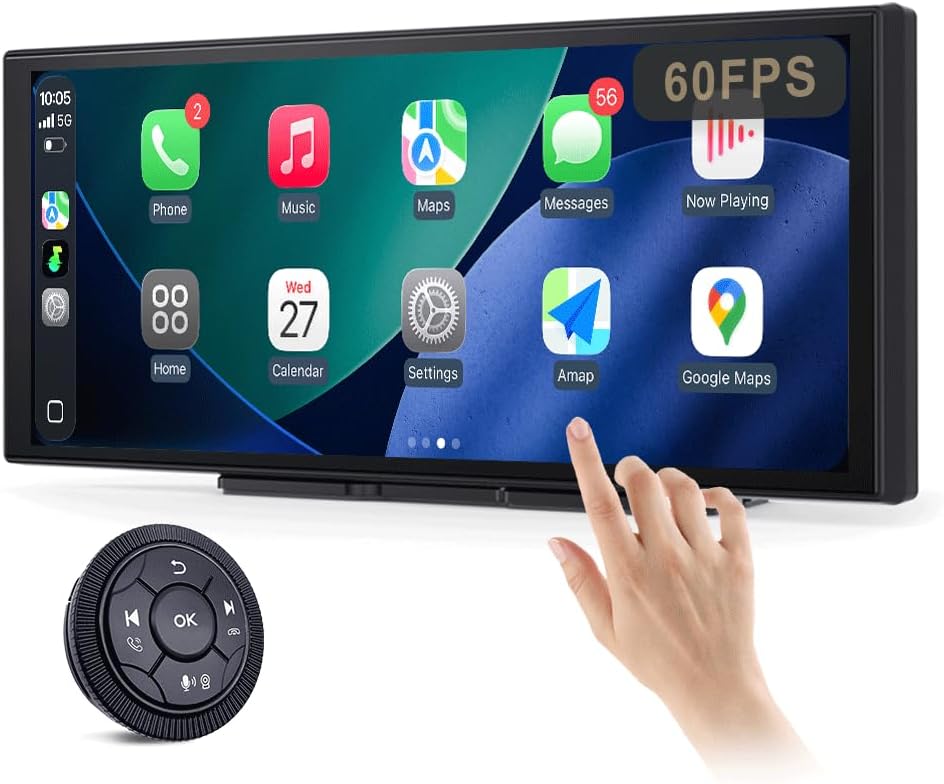
Figure 1: JUSTONE A1 Portable Touch Screen with CarPlay interface and wireless control knob.
2. Obsah balení
Ověřte, zda jsou všechny níže uvedené položky součástí balení. Pokud některé položky chybí nebo jsou poškozené, kontaktujte zákaznickou podporu.

Figure 2: Included accessories for the JUSTONE A1.
- Screen Host
- 4 Clip Bracket
- Oboustranná páska
- Držák přísavky
- Control Button (Wireless Knob)
- Napájecí adaptér do auta
- Ball Shaped Bracket Converter
- TYPE-C Power Cable
- Audio kabel AUX
- Base for Suction Cup
- Camera Input Cable (Camera optional)
- Uživatelská příručka
3. Nastavení
3.1 Možnosti montáže
The JUSTONE A1 offers two primary mounting methods to suit various vehicle dashboards. Ensure the screen is securely mounted and does not obstruct your view silnice.

Obrázek 3: Přamples of suction cup and dashboard mounting.
- 4-Clip Vertical Base: Use this bracket to rest the bottom of the screen directly on your dashboard. Secure it with the provided double-sided tape for stability.
- 17mm Ball-Joint Extendable Arm Mount (Suction Cup Bracket): This option allows for more flexible positioning, typically on the windshield or a smooth dashboard surface. Ensure the suction cup is firmly attached.
Poznámka: Always ensure the chosen mounting location complies with local traffic laws regarding windshield obstructions.
3.2 Připojení napájení
- Connect the TYPE-C Power Cable to the screen host.
- Plug the Car Power Adapter into your vehicle's 12V power outlet (cigarette lighter socket).
- The screen will power on automatically when the vehicle's ignition is turned on.
3.3 Initial Wireless Connection (CarPlay/Android Auto)
- Ujistěte se, že je na vašem smartphonu povoleno Bluetooth a Wi-Fi.
- On the JUSTONE A1 screen, select either 'CarPlay' or 'Android Auto' from the main menu.
- Postupujte podle pokynů na obrazovce a spárujte telefon přes Bluetooth.
- Once Bluetooth is paired, the system will automatically establish a Wi-Fi connection for wireless CarPlay or Android Auto.
- The device is designed to auto-connect to your paired phone when you start your car after the initial setup.
4. Návod k obsluze
4.1 Funkce displeje

Figure 4: Display features including 11.3-inch size and in-cell full lamination.
- 11.3" In-Cell Full-Laminated Display: Provides a premium look and feel, appearing darker when off compared to standard lamination. The actual panel size is approximately 10.5" x 4.13".
- 1920x720 Resolution: Delivers clear and sharp visuals.
- Obnovovací frekvence 60Hz: Ensures smoother performance, especially for CarPlay.
4.2 Metody řízení
The device offers two ways to interact with its interface:

Figure 5: Touchscreen and wireless knob control options.
- Capacitive Touchscreen: Directly interact with the display by touching icons and swiping.
- Wireless Button Knob: For safer operation while driving, especially if the screen is difficult to reach. This knob allows navigation, volume control, and other functions without direct screen interaction.
4.3 Funkce připojení

Figure 6: Supported phone connectivity options.
- Bezdrátové CarPlay: Access navigation, music, messages, and more from your iPhone.
- Bezdrátové Android Auto: Access navigation, music, and communication features from your Android phone.
- AirPlay: Mirror content from your Apple devices.
- MiraCast: Mirror content from compatible Android devices.
4.4 Režimy zvukového výstupu
The JUSTONE A1 supports multiple ways to output audio to your vehicle's sound system:
- BT Display Only Mode: When your phone is connected to the JUSTONE A1, audio streams directly from your phone to your vehicle's built-in Bluetooth audio system. This requires your vehicle to have its own Bluetooth audio input.
- AUX výstup: Connect the provided AUX Audio Cable from the JUSTONE A1 to your vehicle's AUX input port.
- FM vysílač: The device can transmit audio via an FM frequency. Tune your car radio to the same frequency set on the JUSTONE A1.
4.5 Automatic Day/Night Mode

Figure 7: Automatic brightness adjustment for day and night conditions.
The built-in light sensor automatically detects ambient light conditions and switches between dark and light themes, adjusting screen brightness for optimal visibility and glare resistance during both day and night driving.
5. Údržba
- Čištění: K čištění obrazovky použijte měkký hadřík, který nepouští vlákna. V případě odolných šmouh lehceampOtřete hadřík vodou nebo čisticím prostředkem vhodným pro obrazovky. Vyhněte se agresivním chemikáliím nebo abrazivním materiálům.
- Teplota: Nevystavujte zařízení extrémním teplotám, ať už horkým nebo nízkým, po delší dobu.
- Skladování: Pokud budete zařízení skladovat delší dobu, odpojte jej od napájení a uložte jej na chladném a suchém místě.
- Kabely: Regularly check power and audio cables for any signs of wear or damage. Replace if necessary.
6. Řešení problémů
- Zařízení se nezapne:
- Ensure the car power adapter is securely plugged into the vehicle's 12V outlet and the TYPE-C cable is firmly connected to the screen.
- Check if the vehicle's 12V outlet is receiving power (e.g., by testing with another device).
- Wireless CarPlay/Android Auto fails to connect:
- Verify Bluetooth and Wi-Fi are enabled on your smartphone.
- Ensure your phone is not connected to another CarPlay/Android Auto device.
- Zkuste zařízení zapomenout v nastavení Bluetooth v telefonu a znovu ho spárovat.
- Restart both your phone and the JUSTONE A1 device.
- Žádný audio výstup:
- If using BT Display Only Mode, ensure your phone is connected to your car's native Bluetooth audio system.
- If using AUX, check that the AUX cable is properly connected to both the JUSTONE A1 and your car's AUX input, and your car's audio source is set to AUX.
- If using FM transmitter, ensure the frequency on the JUSTONE A1 matches your car radio's frequency and there is no strong interference on that frequency.
- Check the volume levels on both the JUSTONE A1 and your car's audio system.
- Obrazovka nereaguje nebo zamrzá:
- Disconnect the power cable from the JUSTONE A1 for 10 seconds, then reconnect it to perform a restart.
- Wireless control knob is not working:
- Ensure the knob's battery is not depleted. Replace if necessary.
- Re-pair the knob with the main unit if it has become disconnected.
7. Specifikace
| Funkce | Specifikace |
|---|---|
| Název modelu | A1 |
| Značka | JUSTONE |
| Velikost displeje | 11.3 Inches (10.5" x 4.13" actual panel) |
| Typ zobrazení | In-Cell Full-Laminated Touch Screen |
| Rezoluce | 1920x720 |
| Obnovovací frekvence | Up to 60Hz (for CarPlay) |
| Technologie připojení | Bluetooth, Wi-Fi (for Wireless CarPlay/Android Auto) |
| Režim zvukového výstupu | BT Display Only, AUX, FM Transmitter |
| Ovládací rozhraní | Touchscreen, Wireless Button Knob |
| Typ montáže | Panel Mount (4-clip vertical base), Dashboard Mount (17mm ball-joint extendable arm) |
| Speciální funkce | Portable, Auto Day/Night Mode (Light Sensor) |
| Hmotnost položky | 14.8 unce (420 gramů) |
| Rozměry balení | 12.01 x 5.51 x 3.98 palce |
8. Záruka a podpora
8.1 Informace o záruce
The JUSTONE A1 portable touch screen comes with a jednoletá záruka výrobce od data nákupu. Tato záruka se vztahuje na vady materiálu a zpracování při běžném používání. Nevztahuje se na škody způsobené nesprávným použitím, nehodami, neoprávněnými úpravami nebo nesprávnou instalací.
Uschovejte si prosím doklad o koupi pro uplatnění záruky.
8.2 Zákaznická podpora
For technical assistance, troubleshooting, or warranty inquiries, please contact JUSTONE customer support through the retailer's platform where the product was purchased or visit the official JUSTONE webstránky pro kontaktní informace.
Než budete kontaktovat podporu, mějte prosím připravený model produktu (A1) a podrobnosti o nákupu.