
1. Přesview
The VAIO SX-R Laptop is a high-performance portable computer designed for productivity and creative tasks. It features an Intel Core Ultra 7 processor, a vibrant 14-inch WQXGA touch display, ample memory, and fast storage, all running on Windows 11 Pro.

Figure 1: VAIO SX-R Laptop, open view.
2. Vlastnosti produktu
- Procesor Intel Core Ultra 7: Equipped with 16 cores and AI-enhanced performance for speed and intelligent task management.
- 14" WQXGA Touch Display (2560x1600): High-resolution screen with wide color gamut and touch capability.
- 32GB LPDDR5 RAM: Provides superior multitasking capabilities with instant responsiveness.
- 1TB PCIe NVMe SSD: Offers massive storage with ultra-fast read/write speeds.
- Windows 11 Pro: Includes enterprise-grade security and productivity features.
- IR Camera & Fingerprint Reader: Enhanced security and convenient login options.
- Carbon Fiber Chassis: Lehká a odolná konstrukce.
- Water Resistant Keyboard: Designed to withstand accidental spills.

Figure 2: Key features of the VAIO SX-R Laptop.
3. Fyzický overview
3.1 Porty a konektory
The VAIO SX-R Laptop is equipped with a variety of ports for connectivity. Refer to the diagram below for port locations and types.
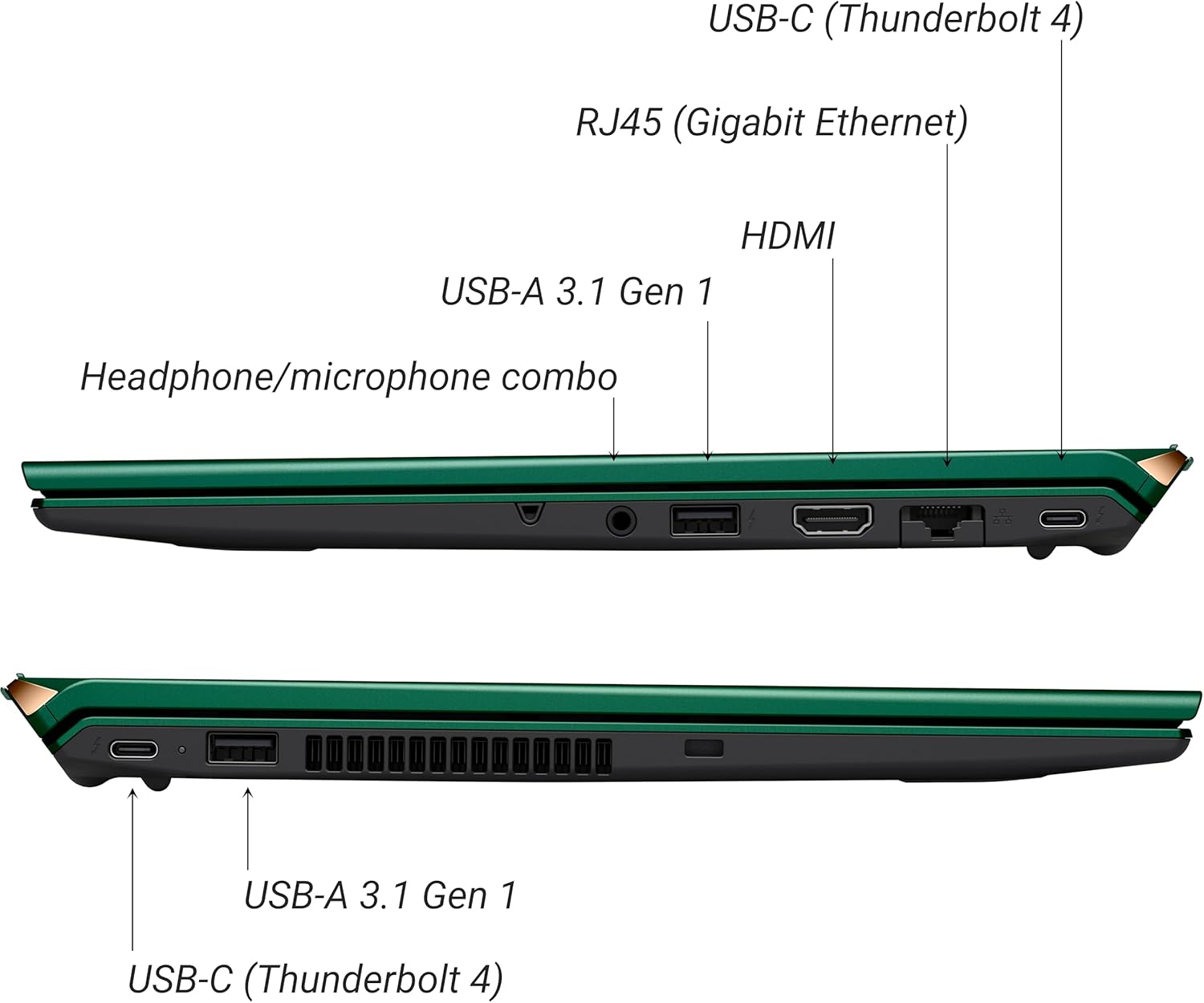
Obrázek 3: Strana view of VAIO SX-R Laptop ports.
- USB-C (Thunderbolt 4): Vysokorychlostní přenos dat, video výstup a napájení.
- RJ45 (gigabitový Ethernet): Pro kabelová síťová připojení.
- HDMI: Pro připojení k externím displejům.
- USB-A 3.1 Gen 1: Pro připojení USB zařízení.
- Kombinovaný konektor pro sluchátka/mikrofon: Pro audio vstup a výstup.
3.2 Klávesnice a touchpad
The laptop features a full-sized keyboard and a responsive touchpad for navigation and input.

Obrázek 4: Rozložení klávesnice a touchpadu.
4. Nastavení
4.1 První zapnutí
- Unpack the VAIO SX-R laptop and all accessories.
- Připojte napájecí adaptér k nabíjecímu portu notebooku a poté do elektrické zásuvky.
- Open the laptop lid. The system may power on automatically or you may need to press the power button located on the top right of the keyboard.
- Postupujte podle pokynů na obrazovce a dokončete nastavení systému Windows 11 Pro, včetně jazyka, regionu, síťového připojení a vytvoření uživatelského účtu.
4.2 Připojení k síti
- Wi-Fi: During initial setup or via Windows settings, select your preferred Wi-Fi network and enter the password. The VAIO SX-R supports Wi-Fi 7 for fast and stable wireless connectivity.
- Kabelové (Ethernet): Connect an Ethernet cable from your router or modem to the RJ45 port on the laptop.
5. Návod k obsluze
5.1 Zapnutí/vypnutí a režim spánku
- Zapnutí: Open the lid or press the power button.
- Vypnout: Klikněte na tlačítko Start a poté na Napájení > Vypnout.
- Spát: Zavřete víko nebo klikněte na tlačítko Start a poté na Napájení > Režim spánku.
5.2 Using the Touch Display
The 14-inch WQXGA display supports touch input. You can interact with the screen using gestures similar to a tablet or smartphone.
5.3 IR Camera and Fingerprint Reader
For enhanced security and convenience, the laptop includes an IR camera for Windows Hello face recognition and a fingerprint reader.
- Windows Hello Face Recognition: Configure this feature in Windows Settings > Accounts > Sign-in options. The IR camera will recognize your face to unlock the device.
- Čtečka otisků prstů: Set up your fingerprint in Windows Settings > Accounts > Sign-in options for quick and secure access.
6. Údržba
6.1 Obecná péče
- Uchovávejte notebook v čistém a suchém prostředí.
- Nevystavujte notebook extrémním teplotám nebo přímému slunečnímu záření.
- Nepokládejte na notebook těžké předměty.
6.2 Čištění
- K čištění obrazovky a vnějšího povrchu použijte měkký hadřík, který nepouští vlákna.
- Na odolné šmouhy lehceamphadřík vodou nebo roztokem na čištění obrazovky.
- Nestříkejte čisticí prostředky přímo na notebook.
6.3 Péče o baterii
- Chcete-li prodloužit životnost baterie, vyvarujte se častého úplného vybíjení.
- Pokud notebook delší dobu nepoužíváte, skladujte jej částečně nabitý (kolem 50 %).
7. Řešení problémů
7.1 Problémy s napájením
- Notebook se nezapíná: Ujistěte se, že je napájecí adaptér bezpečně připojen a zásuvka je funkční. Zkuste jinou zásuvku.
- Baterie se nenabíjí: Zkontrolujte napájecí adaptér a kabel, zda nejsou poškozené. Ujistěte se, že je nabíjecí port čistý.
7.2 Problémy se zobrazením
- Žádný displej: Připojte externí monitor a zkontrolujte, zda je problém s interním displejem notebooku.
- Dotyková obrazovka nereaguje: Restartujte notebook. Ujistěte se, že ovladače grafické karty jsou aktuální.
7.3 Problémy s připojením
- Žádné Wi-Fi připojení: Check if Wi-Fi is enabled in Windows settings. Restart your router. Update wireless drivers.
- Bluetooth nefunguje: Ensure Bluetooth is enabled and your device is discoverable.
8. Specifikace
| Funkce | Detail |
|---|---|
| Název modelu | VAIO SX-R (VJS4R1X0811G) |
| Procesor | Intel Core Ultra 7 (16-Core, AI-Boosted) |
| Operační systém | Windows 11 Pro |
| Zobrazit | 14 Inches WQXGA Touch (2560x1600) |
| BERAN | 32GB LPDDR5 |
| Skladování | 1TB PCIe NVMe SSD |
| Grafika | Integrovaná grafika Intel Arc |
| Bezdrátové připojení | 802.11ax (Wi-Fi 7), Bluetooth |
| Porty | USB-C (Thunderbolt 4) x2, USB-A 3.1 Gen 1 x3, HDMI x1, RJ45 (Gigabit Ethernet) x1, Headphone/microphone combo x1 |
| Fotoaparát | IR Camera (Windows Hello compatible) |
| Bezpečnostní funkce | Fingerprint Reader, IR Camera |
| Životnost baterie | Až 10 hodin (průměr) |
| Hmotnost | 3.1 libry |
| Rozměry (DxŠxV) | 14.2 x 15 x 3.3 palce |
9. Durability and Testing
VAIO laptops are engineered with Japanese precision and undergo rigorous quality control to ensure reliability and performance. This includes various tests to withstand daily use.
9.1 Manufacturing and Quality Assurance
Video 1: VAIO Manufacturing and Durability Testing. This video demonstrates the quality control processes and durability tests performed on VAIO laptops, including keystroke testing, dust testing, LCD screen pressure testing, and opening/closure testing.
9.2 Key Durability Features
- Water Resistant Keyboard: The keyboard is designed to resist damage from accidental liquid spills.
- Odolnost obrazovky: The display undergoes pressure testing to ensure resilience.
- Pádový test: The laptop is tested to withstand drops from up to 3 feet.

Figure 5: Water resistant keyboard testing.

Figure 6: Screen durability test in progress.

Figure 7: 3-foot drop test for VAIO laptops.
10. Záruka a podpora
Your VAIO SX-R Laptop comes with a standard manufacturer's warranty. For specific warranty terms and conditions, please refer to the documentation included with your product or visit the official VAIO support webmísto.
For technical support, troubleshooting assistance, or service requests, please contact VAIO customer support. Information regarding support channels can be found on the VAIO webna webu nebo v obalu vašeho produktu.
Protection plans are available for purchase to extend coverage beyond the standard warranty. Options include 2-Year and 4-Year Protection Plans, as well as a Complete Protect + Norton 360 monthly plan.