
1. Úvod
This manual provides detailed instructions for the installation, operation, and maintenance of your EWIND 5-Port Gigabit Ethernet Switch. This unmanaged network switch is designed to expand your wired network capacity with ease, offering high-speed connectivity for multiple devices.
2. Konec produktuview
The EWIND 5-Port Gigabit Ethernet Switch (Model: EW-S1605CGU) is a compact, fanless device featuring five 10/100/1000Mbps auto-sensing RJ45 ports. It supports Auto MDI/MDIX and IEEE 802.3az energy-efficient standards. The durable metal casing ensures quiet operation and efficient heat dissipation.
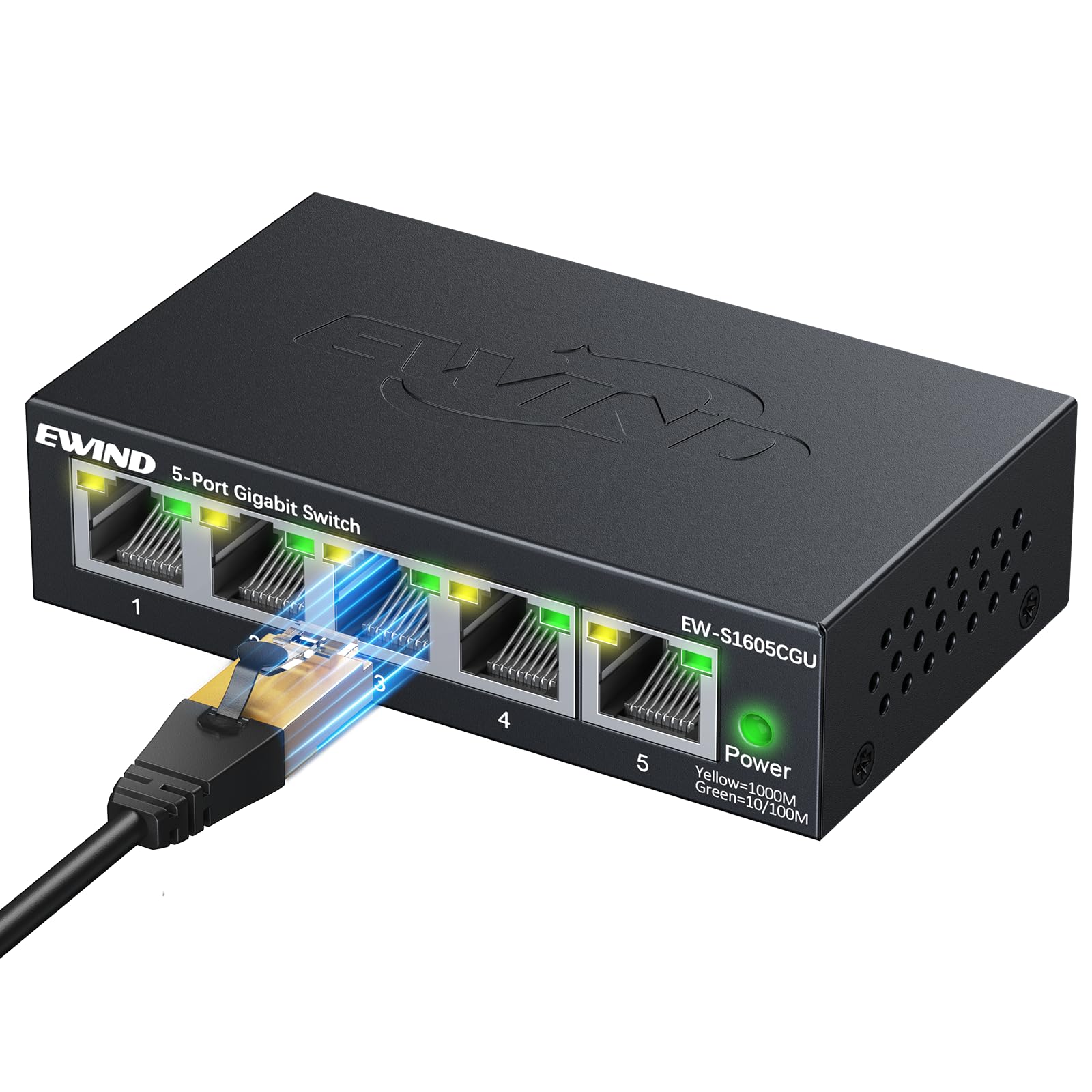
Obrázek 1: Přední strana view of the EWIND 5-Port Gigabit Ethernet Switch, showing five RJ45 ports and a power indicator.
3. Klíčové vlastnosti
- Provoz typu „plug & play“: No configuration required. Simply connect your devices for instant gigabit networking.
- Dual-Color LED Indicators: Each port features a dual-color LED to quickly distinguish between 100Mbps (Green) and 1000Mbps (Yellow) port statuses.
- Gigabit High-Speed Connectivity: Provides 10/100/1000Mbps speeds for reliable data transmission.
- VLAN Isolation: Supports VLAN isolation for enhanced network segmentation and security.
- Energetická účinnost: IEEE 802.3az compliant, dynamically adjusting power usage for energy savings.
- Silent, Fanless Design: Graphene nano-coating and honeycomb structure ensure quiet operation and efficient heat dissipation.
- Odolný kov Casing: Encased in a precision CNC-cut metal chassis for long-lasting durability.
- Flexibilní instalace: Supports desktop placement and wall mounting.
4. Obsah balení
Ověřte, zda váš balíček obsahuje následující položky:
- 1 x EWIND 5-Port Gigabit Ethernet Switch
- 1 x napájecí adaptér
- 1 x Průvodce rychlou instalací
Video 1: Unboxing the EWIND 5-Port Gigabit Ethernet Switch, showing the compact size and included accessories. (Note: Actual video URL not provided in JSON, placeholder used.)
5. Nastavení a instalace
5.1 Připojení napájecího adaptéru
- Connect the provided power adapter to the DC 5V/1A port on the switch.
- Plug the power adapter into a standard electrical outlet. The Power LED on the switch will illuminate, indicating it is receiving power.
Video 2: Demonstrating how to connect the power adapter to the EWIND switch. (Note: Actual video URL not provided in JSON, placeholder used.)
5.2 Připojení síťových zařízení
- Connect an Ethernet cable from your router or modem to any of the five RJ45 ports on the EWIND switch. This port will act as your uplink.
- Connect Ethernet cables from your network devices (e.g., computers, gaming consoles, smart TVs, NAS) to the remaining RJ45 ports on the switch.
- The corresponding LED indicators for each connected port will light up, indicating an active connection.

Figure 2: The EWIND switch connected to various devices like a TV, game console, computer, security camera, and NAS, illustrating network expansion.
Video 3: A user connecting multiple Ethernet cables to the EWIND 5-Port Gigabit Ethernet Switch, demonstrating its plug-and-play functionality. (Note: Actual video URL not provided in JSON, placeholder used.)
5.3 Montáž na stěnu
The switch features mounting slots on its underside for wall installation. Use appropriate screws (not included) to secure the switch to a wall or other flat surface.

Figure 3: Underside of the switch showing keyhole slots for wall mounting.
6. Návod k obsluze
6.1 LED indikátory
The EWIND switch uses dual-color LEDs for each port to indicate connection speed:
- Žluté světlo: Indicates a 1000Mbps (Gigabit) connection.
- Zelené světlo: Indicates a 10/100Mbps connection.
- Žádné světlo: Indicates no active connection or no device is powered on.

Obrázek 4: Detail view of the switch's LED indicators, showing yellow for 1000M and green for 10/100M connections.
6.2 VLAN Isolation (Optional)
The switch supports VLAN isolation. If enabled, this feature segments network traffic, enhancing security and performance by isolating devices from each other. Refer to the Quick Installation Guide for specific instructions on enabling or disabling VLAN isolation, if applicable to your model.

Figure 5: Visual representation of VLAN isolation, showing how the EWIND switch can create a secure network by segmenting traffic.
7. Specifikace
| Funkce | Detail |
|---|---|
| Značka | EWIND |
| Model | EW-S1605CGU |
| Počet portů | 5 |
| Typ rozhraní | 5 10/100/1000Mbps, Auto-Negotiation, Auto-MDI/MDIX Ports, RJ45 |
| Rychlost přenosu dat | 1000 megabitů za sekundu |
| Materiál pouzdra | Kov |
| svtage | 5 voltů |
| Aktuální hodnocení | 1 Amps |
| Hodnocení vyšší teploty | 40 stupňů Celsia |
| Hmotnost položky | 8.1 unce |
| Rozměry balení | 4.61 x 4.13 x 1.14 palce |
| Kompatibilní zařízení | Camera, Computers, Servers, Printers, Network-attached Storage Devices, Smart Devices, Network Set-Top Boxes, Gaming Consoles, Routers |
8. Řešení problémů
- Bez LED diody napájení: Ujistěte se, že je napájecí adaptér bezpečně připojen k přepínači i k funkční elektrické zásuvce.
- Kontrolka LED bez spojení/aktivity:
- Ověřte, zda je ethernetový kabel bezpečně připojen k portu přepínače i k síťovému zařízení.
- Check if the connected network device is powered on and functioning correctly.
- Try using a different Ethernet cable to rule out cable issues.
- Ensure the cable type is compatible (Cat5e or higher recommended for Gigabit speeds).
- Slow Connection Speed (Green LED instead of Yellow for Gigabit device):
- Confirm that both the connected device and the Ethernet cable support Gigabit speeds.
- Replace the Ethernet cable with a known good Cat5e/Cat6/Cat7/Cat8 cable.
- Ensure the device's network adapter is configured for Gigabit speed (if configurable).
- VLAN Isolation Issues: If you are experiencing unexpected network segmentation, check the VLAN switch setting on the device (if applicable to your model).
9. Záruka a podpora
EWIND is committed to providing high-quality products and customer satisfaction. Your purchase includes:
- Lifetime Protection: Covers both installation and any accidental issues.
- Profesionální podpora 24/7: Access to 1-on-1 professional support for any queries or assistance.
For further assistance, please refer to the contact information provided in your Quick Installation Guide or visit the official EWIND webmísto.