
1. Úvod
Thank you for choosing the PELONIS 40-Inch Tower Fan. This oscillating fan features an innovative washable design, providing 2000 CFM airflow at 28ft/s, 4 speeds, 2 modes, and 90° oscillation with a quiet 23dB operation. This manual provides important information for the safe and efficient use of your new tower fan. Please read it thoroughly before operation and retain it for future reference.

Figure 1: PELONIS 40-Inch Tower Fan (Model PSFZ40DR5ALG)
2. Důležité bezpečnostní pokyny
Při používání elektrických spotřebičů je třeba vždy dodržovat základní opatření, aby se snížilo riziko požáru, úrazu elektrickým proudem a zranění osob, včetně následujících:
- Před použitím tohoto ventilátoru si přečtěte všechny pokyny.
- Používejte tento ventilátor pouze tak, jak je popsáno v tomto návodu. Jiné použití, které není doporučeno výrobcem, může způsobit požár, úraz elektrickým proudem nebo zranění osob.
- Do not operate the fan with a damaged cord or plug. Discard the fan or return to an authorized service facility for examination and/or repair.
- Neveďte kabel pod koberec. Nezakrývejte kabel kluznými koberci, běhouny nebo podobnými kryty. Kabel umístěte mimo dopravní oblast a tam, kde o něj nikdo nezakopne.
- Chcete-li ventilátor odpojit, vypněte ovládací prvky a poté vytáhněte zástrčku ze zásuvky.
- Nevkládejte ani nedovolte, aby se do větracího nebo výfukového otvoru dostaly cizí předměty, mohlo by dojít k úrazu elektrickým proudem, požáru nebo k poškození ventilátoru.
- Do not operate in areas where gasoline, paint, or flammable liquids are used or stored.
- Před přemisťováním, čištěním nebo pokud ventilátor nepoužíváte, jej vždy odpojte ze zásuvky.
- Tento ventilátor je určen pouze pro domácí použití.
3. Obsah balení
Po otevření zkontrolujte obsah balení. Pokud některé položky chybí nebo jsou poškozené, kontaktujte zákaznickou podporu.
- PELONIS 40-Inch Tower Fan Unit
- Fan Base (2 parts)
- Dálkové ovládání
- Uživatelská příručka (tento dokument)
4. Nastavení a montáž
Follow these steps to assemble your PELONIS Tower Fan:
- Sestavte základnu: Connect the two halves of the fan base together. Ensure they snap securely into place.
- Attach Base to Fan Unit: Align the assembled base with the bottom of the main fan unit. Secure the base to the fan unit using the provided nut, turning clockwise until tight. Route the power cord through the designated channel in the base for stability.
- Baterie dálkového ovládání: Open the battery compartment on the remote control and insert the required batteries (not always included, check packaging).
- Umístění: Place the fan on a firm, level surface. Ensure there is adequate space around the fan for proper airflow and oscillation.
- Připojení napájení: Zapojte napájecí kabel do standardní elektrické zásuvky 120 V AC.

Figure 2: Effortless Setup - Twist Lock and Lift the Upper Body
Video 1: How to install Pelonis Washable Tower Fan. This video demonstrates the assembly process for the PELONIS tower fan, including attaching the base and preparing it for use.
5. Návod k obsluze
Your PELONIS Tower Fan can be operated using the control panel on the top of the unit or the included remote control.
Funkce ovládacího panelu a dálkového ovládání:
- Tlačítko napájení (⏻): Zapíná nebo vypíná ventilátor.
- Tlačítko rychlosti (⇌): Cycles through 4 fan speeds (Low, Medium, High, Turbo).
- Tlačítko režimu (☽): Selects between 2 wind modes:
- Normální režim: Zajišťuje konzistentní proudění vzduchu.
- Režim spánku: Postupně snižuje rychlost ventilátoru pro tichý provoz během spánku.
- Tlačítko oscilace (↻): Activates or deactivates the 90° oscillation feature, distributing air across a wider area.
- Tlačítko časovače (⏱): Sets the auto-off timer for up to 7 hours. Press repeatedly to cycle through timer settings.

Figure 3: Remote Control and Fan Settings

Figure 4: 90° Oscillation for Wide Coverage
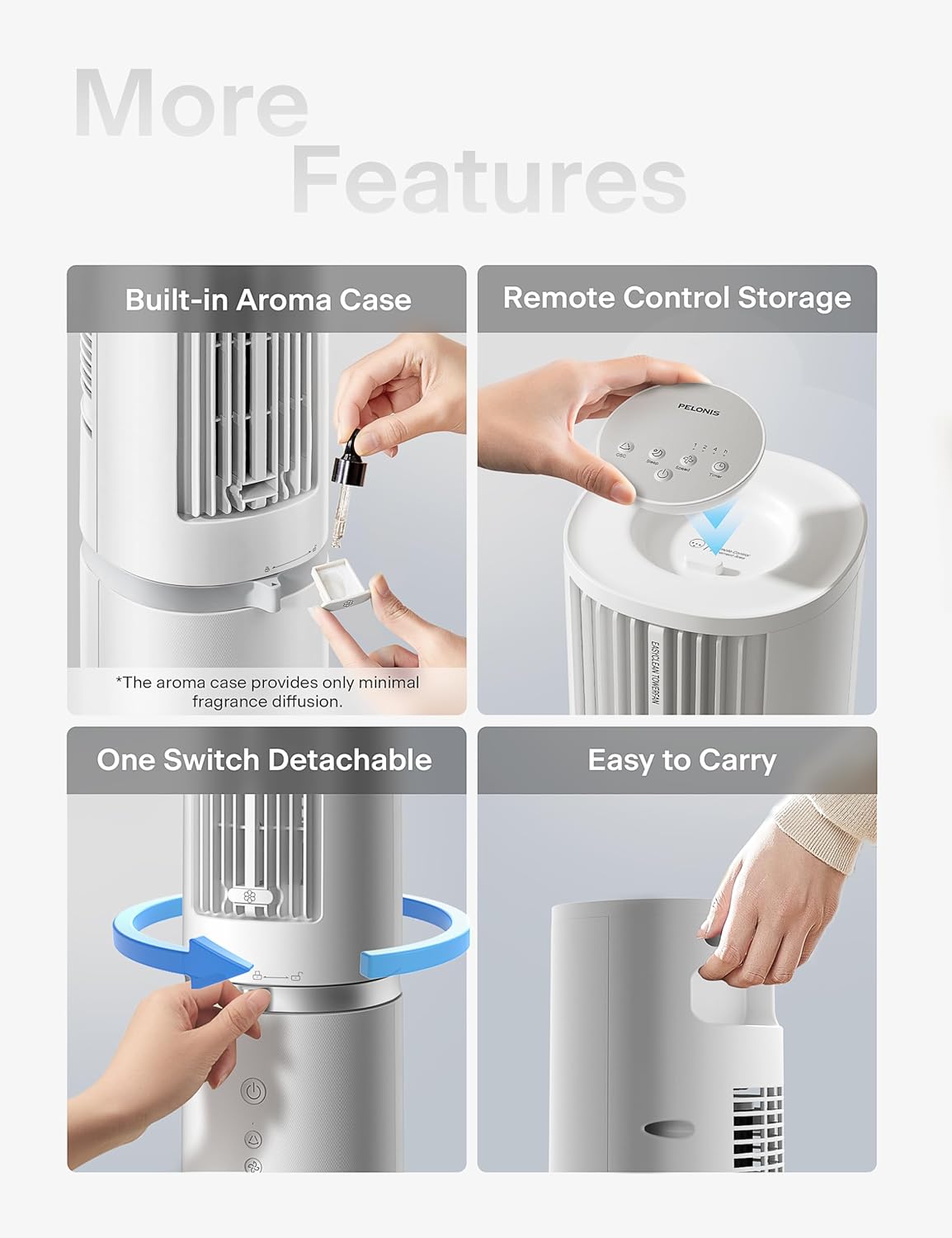
Figure 5: Additional Features including Aroma Case and Remote Storage
6. Údržba a čištění
The PELONIS Tower Fan features an innovative washable design for easy cleaning. Regular cleaning ensures optimal performance and extends the life of your fan.
Pokyny pro čištění:
- Odpojte ventilátor: Před čištěním se vždy ujistěte, že je ventilátor odpojený od elektrické zásuvky.
- Detach Upper Body: The fan's upper body is detachable for thorough cleaning. Twist the lock mechanism at the base of the upper section and lift it off the motor unit.
- Omyvatelné součásti: The detachable upper body, including the air outlet grille and internal components, can be washed directly with water. Use mild soap and a soft cloth or sponge if necessary. Ensure no electronic components are exposed to water.
- Důkladně vysušte: Allow all washed parts to air dry completely before reassembling. Ensure no moisture remains, especially in crevices.
- Wipe Base Unit: Wipe the motor base unit with a soft, damp tkanina. Neponořujte základní jednotku do vody.
- Znovu sestavit: Once all parts are dry, carefully reattach the upper body to the motor unit, ensuring it locks securely into place.
Note: The aroma case (if present) can be cleaned by wiping it with a damp tkanina. Nepoužívejte agresivní chemikálie.
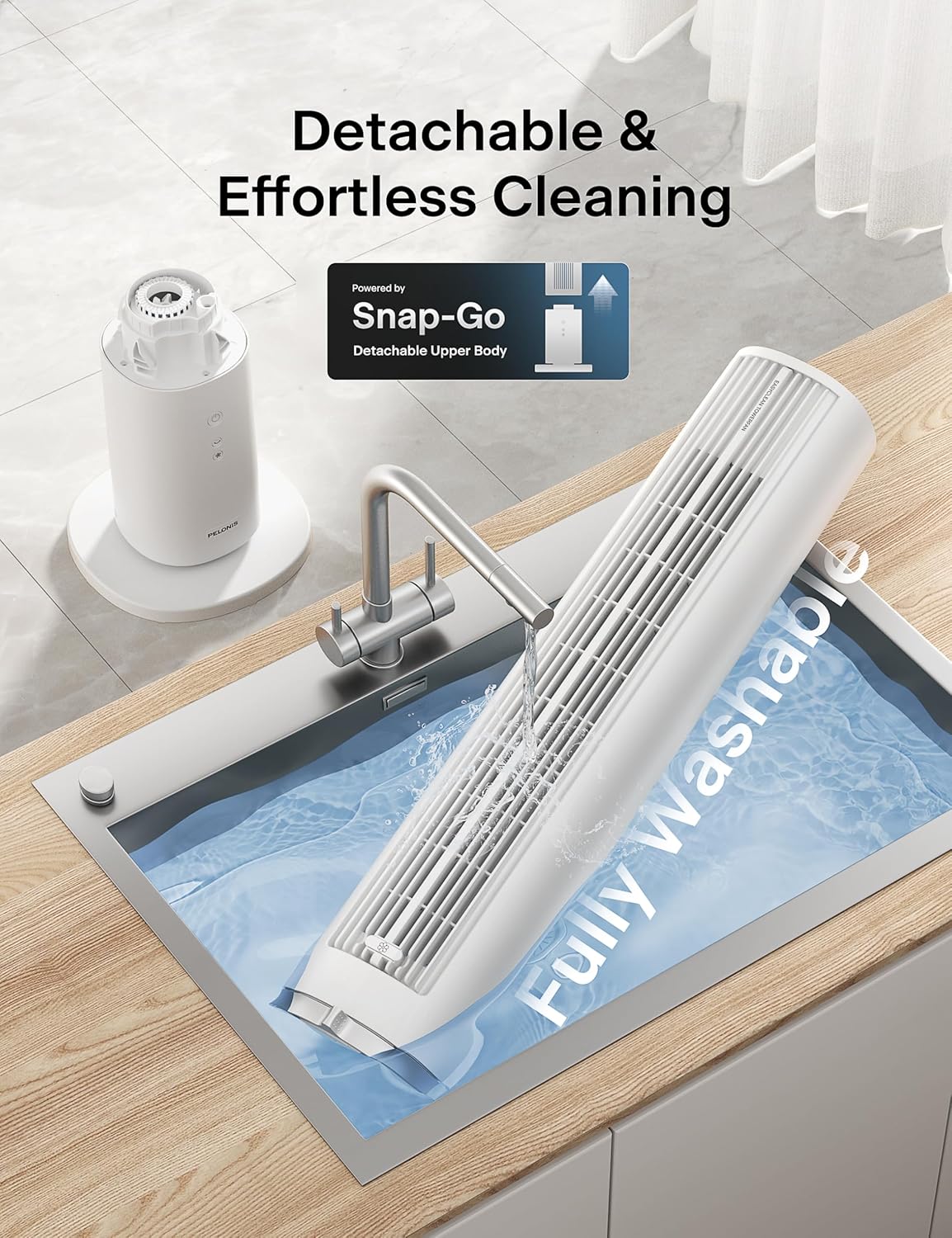
Figure 6: Detachable and Fully Washable Design

Figure 7: One-Twist Detachable Mechanism
7. Průvodce odstraňováním problémů
Pokud váš ventilátor nefunguje správně, podívejte se na následující běžné problémy a jejich řešení:
| Problém | Možná příčina | Řešení |
|---|---|---|
| Ventilátor se nezapne. | Není zapojeno do zásuvky; zásuvka nefunguje; tlačítko napájení není stisknuté. | Ujistěte se, že je ventilátor bezpečně zapojený do funkční zásuvky. Stiskněte tlačítko napájení. |
| Slabé nebo žádné proudění vzduchu. | Fan speed too low; air intake/outlet blocked; internal components dirty. | Increase fan speed. Check for obstructions. Clean the fan as per maintenance instructions. |
| Fan is noisy during operation. | Fan not on a level surface; internal components dirty; foreign object inside. | Place fan on a flat, stable surface. Clean the fan. If noise persists, contact support. |
| Dálkové ovládání nefunguje. | Baterie jsou vybité nebo nesprávně vložené; dálkový ovladač není namířen na přijímač. | Replace batteries. Ensure correct polarity. Point remote towards the fan's control panel. |
| Oscilace nefunguje. | Funkce oscilace není aktivována. | Stiskněte tlačítko oscilace na ovládacím panelu nebo dálkovém ovladači. |
8. Specifikace produktu
| Funkce | Detail |
|---|---|
| Značka | PELONIS |
| Název modelu | PSFZ40DR5ALG |
| Číslo modelu | PSFZ40DR5ALG |
| Barva | Bílý |
| Styl | Upgraded with Washable Design |
| Rozměry produktu (D x Š x V) | 10.82"H x 10.82"Š x 40.6"V |
| Hmotnost položky | 7.03 kg |
| Zdroj napájení | AC/DC |
| Wattage | 45 wattů |
| svtage | 120 voltů |
| Počet rychlostí | 4 |
| Větrné režimy | Normální, Spánek |
| Kmitání | 90° |
| Úroveň hluku | 23 decibelů |
| Proud vzduchu | 2000 kubických stop za minutu (CFM) |
| Rychlost vzduchu | 28 Feet Per Second (ft/s) |
| Časovač | Až 7 hodin |
| Kontrolní metoda | Ovládání tlačítky, Dálkové ovládání |
| Zahrnuté komponenty | Vzdálený |
| Vnitřní/venkovní použití | Krytý |
9. Záruka a zákaznická podpora
PELONIS products are manufactured to the highest quality standards. For specific warranty information, please refer to the warranty card included with your product or visit the official PELONIS webmísto.
If you encounter any issues or have questions regarding your PELONIS 40-Inch Tower Fan, please contact our customer support team:
- Online podpora: Navštivte Obchod PELONIS na Amazonu pro časté dotazy a informace o produktech.
- Kontaktní údaje: Refer to your product packaging or the official PELONIS website for direct customer service contact details (phone, email).
Please have your model number (PSFZ40DR5ALG) and purchase date ready when contacting support.