
1. Úvod
Děkuji za nákupasing the JVC XS-N3214PB Portable Bluetooth Party Speaker. This manual provides important information regarding the setup, operation, and maintenance of your speaker. Please read it thoroughly before using the product to ensure proper function and to maximize your listening experience. Keep this manual for future reference.
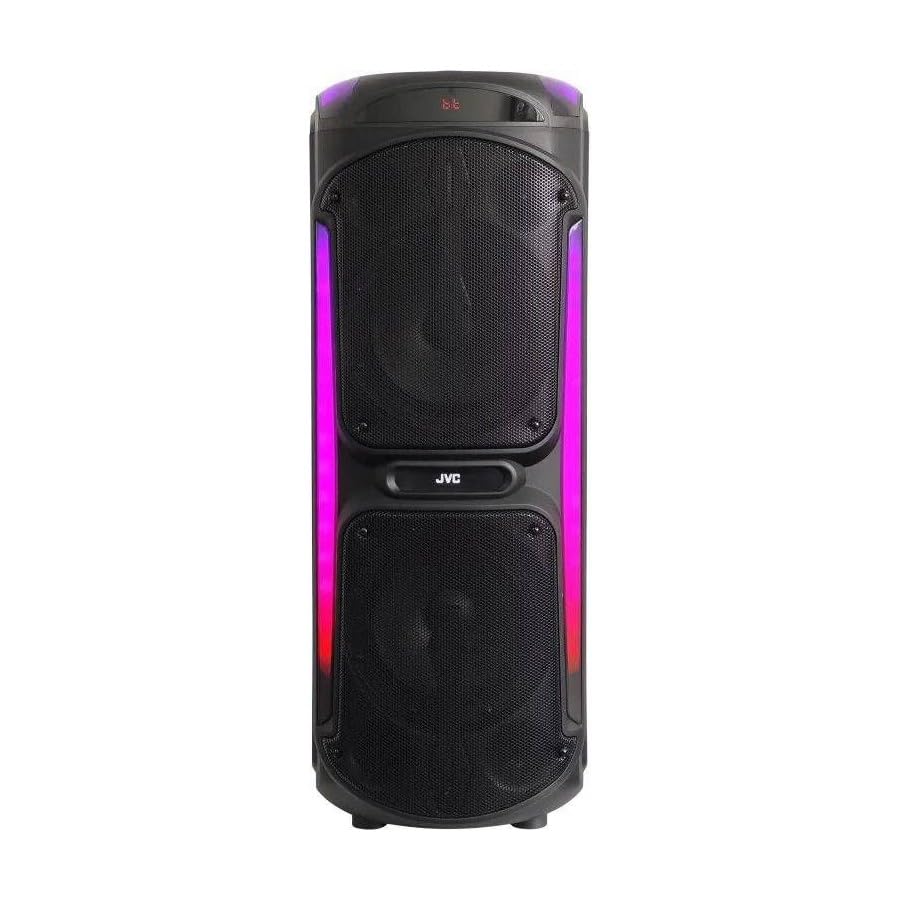
Image: The JVC XS-N3214PB Portable Bluetooth Party Speaker, shown with two microphones, highlighting its versatile connectivity options including Bluetooth, FM Radio, MP3 playback, AUX input, and USB input. The speaker features integrated LED lighting.
2. Bezpečnostní informace
Pro zajištění bezpečného provozu a prevenci poškození dodržujte prosím následující bezpečnostní opatření:
- Nevystavujte reproduktor vodě, vlhkosti ani extrémním teplotám.
- Nepokoušejte se reproduktor rozebírat ani upravovat. Veškerý servis svěřte kvalifikovanému personálu.
- Uchovávejte reproduktor mimo dosah zdrojů tepla, přímého slunečního záření a hořlavých materiálů.
- Používejte pouze určený nabíjecí adaptér.
- Nepokládejte na reproduktor těžké předměty.
- Reproduktor čistěte měkkým, suchým hadříkem. Nepoužívejte tekuté čisticí prostředky ani aerosoly.
- Během používání zajistěte dostatečné větrání kolem reproduktoru.
3. Obsah balení
Ověřte, zda jsou v balení přítomny všechny položky:
- JVC XS-N3214PB Portable Bluetooth Party Speaker (1 unit)
- Power Adapter/Charging Cable (1 unit)
- Dálkové ovládání (1 jednotka)
- Uživatelská příručka (tento dokument)
- (Optional: Microphone, if included with your specific purchase)
4. Konec produktuview
4.1. Vlastnosti
- Powerful 800W Audio Output
- Bezdrátové připojení Bluetooth
- Vestavěná dobíjecí baterie pro přenositelnost
- Integrated LED Party Lights
- FM rádio tuner
- USB přehrávání
- Vstup AUX
- Microphone Input for Karaoke
- Provoz dálkového ovládání
- Deep Bass Performance
4.2. Ovládací prvky a porty
Familiarize yourself with the speaker's control panel and connection ports. (Refer to diagrams in the full printed manual for exact locations).
- Vypínač: Zapíná/vypíná reproduktor.
- Tlačítko režimu: Přepíná mezi režimy Bluetooth, FM, USB a AUX.
- Ovládání hlasitosti: Upravuje hlavní hlasitost.
- Tlačítko Přehrát/Pozastavit: Ovládá přehrávání médií.
- Tlačítka předchozí/následující stopy: Procházení skladeb nebo FM stanic.
- Tlačítko LED světla: Toggles LED lighting effects.
- Ovládání hlasitosti/ozvěny mikrofonu: Adjusts microphone input and echo effect.
- USB port: Pro přehrávání z USB disku.
- AUX vstup (3.5 mm): Pro připojení externích audio zařízení.
- Vstup pro mikrofon (6.35 mm): For connecting a wired microphone.
- Port DC IN: For connecting the power adapter to charge the speaker.
5. Nastavení
5.1. Nabíjení reproduktoru
- Connect the power adapter to the DC IN port on the speaker.
- Zapojte druhý konec napájecího adaptéru do elektrické zásuvky.
- The charging indicator light will illuminate (color may vary) to show the speaker is charging.
- Allow approximately 4-6 hours for a full charge. The indicator light may change or turn off when fully charged.
- Disconnect the power adapter once charging is complete or when using the speaker on battery power.
5.2. Zapnutí/vypnutí
- Zapnutí: Stiskněte a několik sekund podržte tlačítko napájení, dokud se displej nerozsvítí.
- Vypnutí: Znovu stiskněte a několik sekund podržte tlačítko napájení, dokud se displej nevypne.
6. Návod k obsluze
6.1. Párování Bluetooth
- Power on the speaker. It will automatically enter Bluetooth pairing mode, indicated by a flashing Bluetooth icon or voice prompt.
- Na svém mobilním zařízení (chytrém telefonu, tabletu atd.) povolte Bluetooth a vyhledejte dostupná zařízení.
- Select "JVC XS-N3214PB" from the list of devices.
- Once paired, the speaker will confirm with an audible tone or a solid Bluetooth icon.
- Nyní můžete přehrávat zvuk ze zařízení přes reproduktor.
6.2. FM rádio
- Press the Mode button until "FM" is displayed.
- Stisknutím tlačítka Přehrát/Pozastavit automaticky vyhledáte a uložíte dostupné FM stanice.
- Mezi uloženými stanicemi se můžete pohybovat pomocí tlačítek Předchozí/Další skladba.
6.3. Přehrávání z USB
- Vložte USB flash disk (naformátovaný na FAT32) obsahující audio soubory MP3 filedo portu USB.
- The speaker will automatically switch to USB mode and begin playing the first track. If not, press the Mode button to select USB.
- Přehrávání ovládejte tlačítky Přehrát/Pozastavit a Předchozí/Další skladba.
6.4. Vstup AUX
- Připojte jeden konec 3.5mm audio kabelu (není součástí balení) do portu AUX IN na reproduktoru.
- Connect the other end of the cable to the audio output of your external device (e.g., MP3 player, laptop).
- Press the Mode button until "AUX" is displayed.
- Ovládejte přehrávání a hlasitost z externího zařízení.
6.5. Funkce mikrofonu a karaoke
- Connect a wired microphone (not included) to the Microphone Input port.
- Adjust the microphone volume and echo effect using the dedicated controls on the speaker.
- Play music via Bluetooth, USB, or AUX, and sing along through the microphone.
6.6. LED párty světla
Press the LED Light button to cycle through different lighting modes or to turn the lights off.
6.7. Dálkové ovládání
The included remote control allows for convenient operation of the speaker from a distance. Functions include power on/off, mode selection, volume adjustment, track control, and LED light control. Ensure the remote control has working batteries and is pointed towards the speaker's sensor.
7. Údržba
- Čištění: Wipe the speaker's exterior with a soft, dry, lint-free cloth. Do not use abrasive cleaners, waxes, or solvents.
- Skladování: If storing the speaker for an extended period, ensure it is fully charged, then power it off. Store in a cool, dry place away from direct sunlight. Recharge the battery every few months to maintain its lifespan.
- Péče o baterie: To prolong battery life, avoid fully discharging the speaker frequently. Charge it before the battery is completely depleted.
8. Řešení problémů
| Problém | Možná příčina | Řešení |
|---|---|---|
| Reproduktor se nezapne. | Baterie je vybitá. Napájecí kabel není připojen. | Charge the speaker. Ensure power cable is securely connected to both speaker and outlet. |
| Žádný zvuk. | Volume is too low. Incorrect mode selected. Device not paired (Bluetooth). AUX cable loose. | Increase volume on speaker and source device. Press Mode button to select correct input. Re-pair Bluetooth device. Check AUX cable connection. |
| Zařízení Bluetooth se nemůže spárovat. | Reproduktor není v režimu párování. Zařízení je příliš daleko. Rušení. | Ensure speaker is in Bluetooth mode and flashing. Move device closer to speaker. Turn off other Bluetooth devices. |
| Přehrávání z USB nefunguje. | USB drive not formatted correctly (FAT32). Unsupported file format. USB drive faulty. | Ensure USB drive is FAT32 and contains MP3 files. Zkuste jiný USB disk. |
| Dálkové ovládání nefunguje. | Batteries depleted. Obstruction between remote and speaker. | Replace remote control batteries. Ensure clear line of sight to speaker's IR sensor. |
9. Specifikace
| Číslo modelu | XS-N3214PB |
| Značka | JVC |
| Výstupní výkon | 800W (špička) |
| Konektivita | Bluetooth, USB, AUX (3.5mm), FM Radio, Microphone Input (6.35mm) |
| Režim zvukového výstupu | Stereo |
| Materiál | Plast |
| Typ montáže | Stojící na podlaze |
| Kontrolní metoda | Dálkový ovladač, tlačítko |
| Rozměry (D x Š x V) | 35 D x 31 W x 94 V centimetrů |
| Zahrnuté komponenty | 1 x JVC XS-N3214PB 800W Party Portable Bluetooth Speaker, Power Adapter, Remote Control, User Manual |
10. Záruka a podpora
10.1. Informace o záruce
This JVC XS-N3214PB speaker comes with a 1 rok záruka od data nákupu. Tato záruka se vztahuje na výrobní vady a vady zpracování při běžném používání. Nevztahuje se na škody způsobené nesprávným použitím, nehodami, neoprávněnými úpravami nebo běžným opotřebením. Uschovejte si prosím doklad o koupi pro případ uplatnění záruky.
10.2. Zákaznická podpora
For technical assistance, warranty claims, or product inquiries, please contact JVC customer support through the retailer where the product was purchased or visit the official JVC webweb s kontaktními informacemi specifickými pro váš region.