
1. Úvod
The NEJE R6 9-in-1 Rotary Attachment is a versatile accessory designed to enhance the capabilities of laser engravers, enabling precise engraving on cylindrical and irregularly shaped objects. This device features a 1:5 precision scaling ratio for clear engraving quality and supports a wide range of materials and shapes through its multi-functional design.
Mezi klíčové vlastnosti patří:
- Clearer Engraving Quality: Engineered with a 1:5 precision scaling ratio, this rotary device handles cylindrical objects up to 200mm, delivering laser-sharp engravings with stable rotary axis movement.
- Rychlá Clamping: Designed for single-hand operation, eliminating the need for a wrench to operate the chuck.
- Universal Workpiece Compatibility: A 90° rotatable angle accommodates a wider range of objects for engraving, including conical shapes.
- Enduring Steel Precision: The main structure is made of stainless steel and steel, ensuring wear-resistant and long-lasting performance combined with precision craftsmanship.
- Multi-Brand Compatible: Direct compatibility as an A-axis with NEJE series devices for coordinated operation. Stepper motor interfaces are compatible with other brands and models.
2. Nastavení
This section outlines the general setup procedures for the NEJE R6 Rotary Attachment. Specific steps may vary based on your laser engraver model.
2.1 Vybalení a kontrola
Carefully unpack all components and inspect for any damage. Ensure all parts listed in the packing list are present.
2.2 Připojení k laserovému gravírovacímu stroji
Connect the rotary attachment to your laser engraver's A-axis or stepper motor interface. Refer to your laser engraver's manual for specific connection instructions. The NEJE R6 is designed for direct compatibility with NEJE series devices.
2.3 Mounting Workpieces
The NEJE R6 features a quick-clamping mechanism for efficient workpiece mounting.

Image: The NEJE R6 Rotary Attachment with its various components and accessories, highlighting its 9-in-1 functionality.
- Ovládání jednou rukou: The chuck mechanism allows for single-handed operation, simplifying the process of securing objects.
- Tapered Jaws: Use the tapered jaws for securing rings and other small, delicate items. A flexible spring mechanism assists in quick and secure placement.
- Concave Jaws: Utilize the concave jaws for firmly gripping bracelets and similar curved objects.
- Spring-Loaded Tailstock: For spherical objects like golf balls, the spring-loaded tailstock ensures quick and stable handling.

Obrázek: Detailní záběr view demonstrating the one-handed operation of the chuck, securing a ring for engraving.
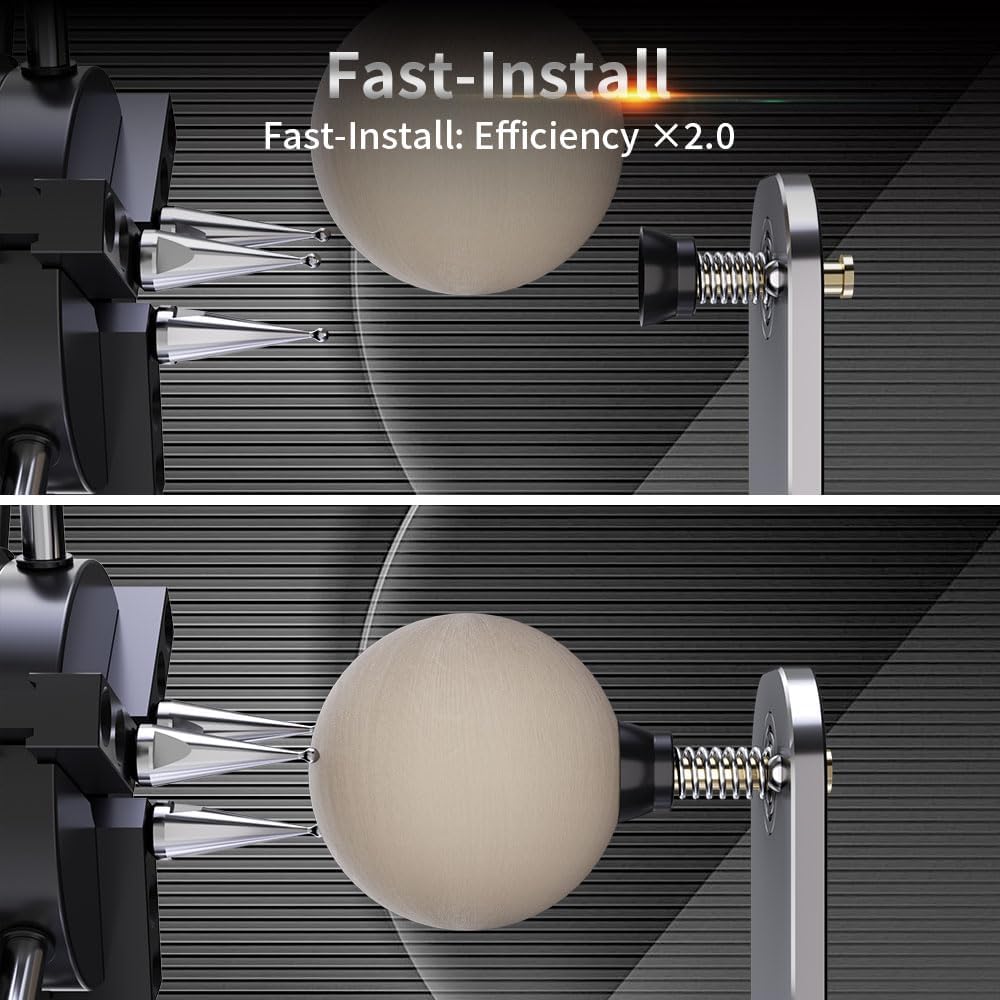
Image: The quick installation feature of the NEJE R6, demonstrating how a spherical object is secured between the chuck and the spring-loaded tailstock.
3. Návod k obsluze
The NEJE R6 offers 9 different configurations to accommodate a wide variety of objects. Adjust the setup based on the shape and size of your workpiece.
3.1 9-in-1 Quick Operation Modes
Refer to the diagram below for visual guidance on configuring the rotary attachment for different object types:

Image: A comprehensive diagram showcasing the nine different configurations for various objects, including rings, bangles, spheres, and different cylinder types.
- Rotační kroužek: For engraving on rings.
- Bangle-shaped Rotary: For engraving on bangles or similar items.
- Rotační koule: For engraving on spherical objects.
- Heavy Cylinder Rotary: For large, heavy cylindrical items.
- Cone Rotary: For conical objects, utilizing the 90° adjustable angle.
- Large Diameter Cylinder Rotary: For items like tumblers or large cups.
- Small-sized Cylinder Rotary: For smaller cylindrical objects.
- Disc Rotary: For flat, circular objects.
- Long Cylinder Rotary: For extended cylindrical items like baseball bats, using the adjustable dual-wheel bracket.
3.2 Adjusting for Irregular Materials
The 90° adjustable angle design allows for engraving on irregular materials, such as conical cups or objects that require an inclined position.

Image: The rotary attachment configured with its 90° adjustable angle, demonstrating its capability to hold and engrave on conical or irregularly shaped objects.
3.3 Long Cylindrical Engraving
For extended cylindrical objects, utilize the adjustable dual-wheel bracket to provide stable support during engraving.
Video: Demonstration of the NEJE R6 Rotary Attachment's various functions, including quick clamping, micro-level engraving, one-handed operation, and compatibility with different object shapes like rings, spheres, and long cylinders. This video is provided by NEJE Official.
4. Údržba
Regular maintenance ensures the longevity and optimal performance of your NEJE R6 Rotary Attachment.
- Čištění: Periodically clean the chuck jaws and other moving parts to remove dust, debris, and engraving residue. Use a soft, dry cloth.
- Mazání: Apply a small amount of light machine oil to the moving parts, such as the chuck threads and gear mechanisms, as needed to ensure smooth operation.
- Inspekce: Regularly inspect the belts, gears, and other components for wear or damage. Replace any worn parts promptly.
- Skladování: When not in use, store the rotary attachment in a clean, dry environment to prevent corrosion and damage.
5. Řešení problémů
If you encounter issues with your NEJE R6 Rotary Attachment, refer to the following common troubleshooting tips:
- Gravírování není vycentrované ani zkreslené:
- Ujistěte se, že je obrobek bezpečně třamped and properly aligned.
- Verify that the rotary settings in your laser software (e.g., LightBurn) are correctly configured for the NEJE R6 and the specific workpiece dimensions.
- Check for any loose connections between the rotary attachment and the laser engraver.
- Rotary attachment is not moving:
- Confirm that the power supply is connected and the rotary attachment is receiving power.
- Check the stepper motor cable connection. Ensure it is firmly seated.
- Verify that the A-axis is enabled and configured correctly in your laser software.
- Difficulty clamping objects:
- Ensure the correct jaws (tapered, concave, or flat) are installed for the workpiece type.
- Clean the jaws and chuck mechanism to remove any obstructions.
- For spherical objects, ensure the spring-loaded tailstock is properly engaged.
For further assistance, please contact NEJE customer support.
6. Specifikace
| Funkce | Detail |
|---|---|
| Rozměry produktu | 15.55 x 3.31 x 5.35 palce |
| Číslo modelu položky | NEJE01076 |
| Hmotnost položky | 5.72 libry |
| Výrobce | NEJE |
| Převodový poměr | 1:5 (for enhanced precision) |
| Materiál | Stainless Steel and Steel (main structure) |
| Kompatibilita | NEJE series devices, other brands with compatible stepper motor interfaces |
7. Záruka a podpora
The NEJE R6 Rotary Attachment comes with a standard manufacturer's warranty. Please refer to the warranty card included with your product for specific terms and conditions.
For technical support, troubleshooting assistance, or warranty claims, please contact NEJE customer service through their official webna webu nebo u prodejce, kde byl produkt zakoupen.