
JETBeam E26
Uživatelská příručka k svítilně JETBeam E26 EDC
Model: E26
1. Konec produktuview
The JETBeam E26 is a high-performance, compact Everyday Carry (EDC) flashlight featuring a dual light source with a powerful white LED and a precise green beam. Designed for versatility and durability, it is suitable for various applications from daily tasks to outdoor adventures.
- Duální světelný zdroj: Combines a 3000-lumen white light with a <5mW green beam, which can be used simultaneously or independently.
- Kompaktní EDC design: Tenký profíkfile (0.62” thin, 4 oz with battery) with a sturdy two-way clip for easy pocket, hat, or backpack carry.
- Více režimů: Features 5 brightness levels for white light (Ultra Low, Low, Medium, High, Highest) plus a strobe mode.
- Dobíjecí baterie: Equipped with a built-in 1700mAh Li-ion battery, offering up to 39 hours of runtime.
- Odolná konstrukce: IPX8 waterproof rating (submersible up to 2 meters) and 1.5-meter drop resistance, made from anodized aviation aluminum.
- Funkce paměti: Remembers the last used brightness level for convenience.
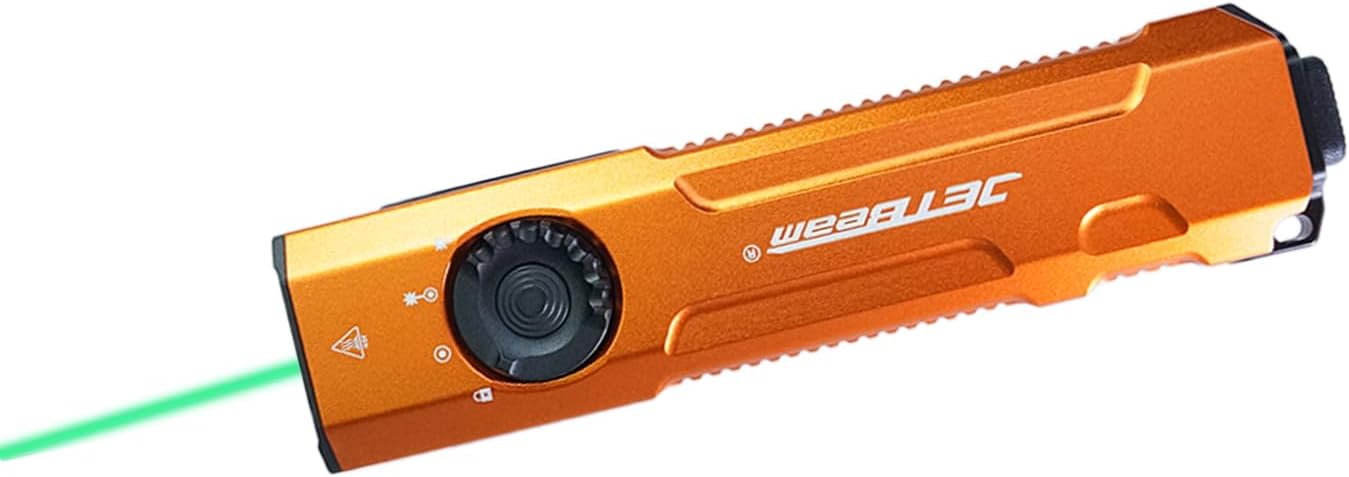
Image: The JETBeam E26 EDC Flashlight in orange, showcasing its slim design and the green beam in action.
2. Co je v krabici
Upon opening your JETBeam E26 package, you should find the following items:
- Svítilna E26 (baterie součástí balení) x 1
- Návod k použití x 1
- USB nabíjecí kabel x 1
- Šňůrka na krk x 1
3. Specifikace
| Funkce | Popis |
|---|---|
| Model | E26 |
| Světelný zdroj | LED (White Light & Green Beam) |
| Bílý jas | 3000 lumenů (max.) |
| Výstup zeleného paprsku | <5mW (520nm) |
| Vzdálenost paprsku | 885 stop (přibližně 270 metry) |
| Baterie | Vestavěná lithium-iontová baterie s kapacitou 1700 mAh |
| Maximální doba běhu | 39 hodin |
| Voděodolnost | IPX8 (Underwater 2 meters) |
| Odolnost proti nárazu | 1.5 metrů |
| Materiál | Anodized Aviation Aluminum |
| Rozměry (D x Š x V) | 0.6 cm x 1.25 cm x 5 cm |
| Hmotnost | 4 g (s baterií) |
| Teplota barev | 18300 Kelvinů |
4. Nastavení
4.1 Nabíjení baterie
The JETBeam E26 comes with a built-in rechargeable battery. Before first use, or when the power indicator shows low battery, charge the device using the provided USB charging cable.
- Na boku svítilny vyhledejte nabíjecí port USB-C.
- Connect the USB charging cable to the flashlight and to a compatible USB power source (e.g., computer, wall adapter).
- The power indicator light will show charging status.

Image: Close-up of the JETBeam E26 showing the USB-C charging port and the power indicator light. The indicator shows battery levels: 35%-100% (green), 15%-35% (orange), Less than 15% (red, requires charging).
The power indicator will automatically work when the flashlight turns on and will shut down after 5 minutes.
4.2 Initial Use - Moonlight Mode Access
To access the ultra-low moonlight mode from the off state:
- Press and hold the side switch for several seconds.
- Release the switch to turn on the moonlight mode.
- If you continue to press and hold, the brightness will adjust normally through the other modes.
5. Návod k obsluze
5.1 Power On/Off and Mode Switching (Side Switch)
The E26 features a side switch for primary control of the white light and green beam modes.
- Zapnutí/vypnutí: Jedním stisknutím bočního spínače zapnete nebo vypnete svítilnu.
- Nastavení jasu: When the white light is on, single press the side switch to cycle through the 5 lighting modes: Ultra Low (20 lm), Low (300 lm), Medium (700 lm), High (1300 lm), Highest (3000 lm).
- Funkce paměti: The flashlight will remember the last used brightness level when turned off and on again.

Image: Diagram illustrating the side switch and the 5 lighting modes (Ultra Low, Low, Medium, High, Highest) with their respective lumen outputs.
5.2 Tactical Tail Button Operation
The tactical tail button provides quick access to high output and strobe modes.
- Režim vysokého osvětlení: A heavy press of the tactical tail button will instantly activate the high light mode (3000 lumens). Release to turn off.
- Stroboskopický režim: Slightly press the tactical tail button twice to activate the strobe mode.

Image: Visual guide demonstrating the tactical tail button for instant high light output and strobe mode activation.
5.3 Green Beam and Dual Light Source Operation
The E26 features a dedicated green beam and the ability to combine it with white light.
- Pouze zelený paprsek: From the off state, press and hold the side switch to activate the green beam.
- White Light + Green Beam: When the white light is on, activate the green beam by pressing and holding the side switch. Both lights can be on simultaneously. You can adjust the brightness of the white light while both are active.

Image: Illustration showing the different light combinations: white light only (3000lm), white light + green beam (3000lm + ≤5mW), and green beam only (≤5mW).

Image: Demonstrates the accurate green beam (520nm, <5mW) for presentations or pet interaction.
5.4 Funkce uzamčení
The E26 features a locking mechanism to prevent accidental activation.
- Zamknout: From the off state, press and hold the side switch until the light flashes twice, indicating it is locked. All functions will be ineffective.
- Odemknutí: When the flashlight is locked, press and hold the side switch until the light flashes once, indicating it is unlocked. The flashlight will restore ultra-low brightness.
6. Údržba
Proper maintenance ensures the longevity and optimal performance of your JETBeam E26 flashlight.
- Čištění: Očistěte tělo svítilny měkkým hadříkemamp cloth. For the lens, use a lens cleaning cloth. Avoid harsh chemicals or abrasives.
- Voděodolnost: The E26 is IPX8 waterproof. Ensure the USB-C port cover is securely closed before exposing it to water.
- Péče o baterie: Recharge the battery regularly, especially if not used for extended periods, to maintain battery health. Avoid fully depleting the battery.
- Skladování: Uchovávejte svítilnu na chladném a suchém místě mimo přímé sluneční světlo a extrémní teploty.

Image: The JETBeam E26 demonstrating its IPX8 waterproof capability (submerged in water) and 1.5-meter drop resistance (impact on ground), highlighting its robust and durable design.
7. Řešení problémů
If you encounter issues with your JETBeam E26 flashlight, refer to the following common problems and solutions:
| Problém | Možná příčina / řešení |
|---|---|
| Svítilna se nezapne. |
|
| Světelný výstup je slabý nebo bliká. |
|
| Green beam not working. |
|
| Svítilna se během používání zahřívá. | This is normal, especially on higher brightness settings, due to the high lumen output. The E26 has a built-in temperature control module (ATR) to prevent overheating. |
8. Představení produktu
Watch the official product video for a visual guide on the JETBeam E26's features and operation.
Video: Official demonstration of the JETBeam E26 flashlight, showcasing its UV light (though not listed in product features), green beam, mode switching, tactical tail switch, waterproof capabilities, and impact resistance. This video is provided by Huida Lighting, the seller.
9. Záruka a podpora
For warranty information, technical support, or any inquiries regarding your JETBeam E26 flashlight, please contact the manufacturer or the seller directly.
prodejce: Huida Lighting
Uschovejte si prosím doklad o koupi pro případ reklamace.
Ask a question about this manual
Ask about setup, troubleshooting, compatibility, parts, safety, or missing instructions. Manuals+ will review the question and use this page’s manual context to help answer it.