
1. Úvod
This manual provides detailed instructions for the SONICAKE Pocket Master Multi-Effects Pedal (Model QME-10PK). It covers product features, setup procedures, operational guidelines, maintenance tips, troubleshooting, and technical specifications. Please read this manual thoroughly before using the device to ensure proper operation and to maximize its capabilities.
The SONICAKE Pocket Master is a portable multi-effects processor designed for guitar, bass, and acoustic instruments. It features advanced digital modeling technology, a wide range of built-in effects, amp models, IR cabinet simulations, and a USB audio interface with OTG support. Its compact size and rechargeable battery make it suitable for musicians on the go.
2. Konec produktuview
2.1 Obsah balení
- SONICAKE Pocket Master multiefektový pedál
- USB nabíjecí kabel
- Uživatelská příručka (tento dokument)
2.2 Rozložení zařízení
The SONICAKE Pocket Master features a clear LCD color screen, control knob, and two footswitches for navigation and effect control. Input and output jacks, along with USB ports, are located on the side.

Obrázek 2.2.1: Přední view of the SONICAKE Pocket Master, showing the LCD screen, control knob, and footswitches.

Obrázek 2.2.2: Strana view of the SONICAKE Pocket Master, illustrating the input (IN), output (OUT), headphones (PHONES), and USB ports (USB-C for data/power, USB-A for OTG).
Mezi klíčové komponenty patří:
- LCD obrazovka: Displays current preset, effect chain, battery status, and other operational information.
- Otočný knoflík VALUE/VOLUME: Used for navigating menus, adjusting parameters, and controlling output volume.
- Nožní spínače: For preset changes, looper control, tuner activation, and other functions.
- IN Jack: 1/4" input for connecting your instrument (guitar, bass, acoustic).
- OUT/PHONES Jack: 1/4" output for connecting to an ampzesilovač, mixážní pult nebo sluchátka.
- Port USB-C: For charging the device, firmware updates, and USB audio interface functionality.
- USB-A (OTG) Port: For connecting to mobile devices (iOS/Android) for direct audio streaming and app control.
3. Nastavení
3.1 Počáteční nabíjení
Before first use, fully charge the SONICAKE Pocket Master. Connect the supplied USB cable to the USB-C port (6) on the device and to a standard USB power adapter (not included) or a computer USB port. The battery indicator on the LCD screen will show charging status. A full charge provides approximately 4 hours of operation.
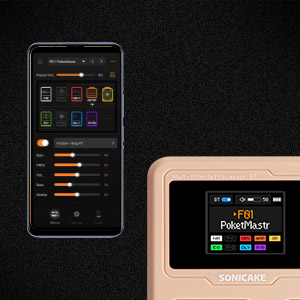
Obrázek 3.1.1: The Pocket Master features an internal rechargeable battery providing up to 4 hours of use.
3.2 Connecting Your Instrument and Output Device
- Připojte kytaru, baskytaru nebo akustický nástroj k IN jack (4) using a 1/4" instrument cable.
- Připojte OUT/TELEFONY jack (5) to your amplifier, audio interface, or headphones using a 1/4" cable.
3.3 Zapnutí/vypnutí
To power on the device, press and hold one of the footswitches until the LCD screen illuminates. To power off, press and hold one of the footswitches again until the screen turns off.
3.4 Instalace softwaru (volitelné)
For advanced sound editing and preset management, download the free SONICAKE software for Mac/Windows/iOS/Android from the official SONICAKE website. This software allows for deeper customization of effects and settings.

Obrázek 3.4.1: The Pocket Master supports connection to mobile devices and computers for software control and audio interface functions.
4. Provoz
4.1 Navigace v předvolbách
Use the footswitches to cycle through the 100 available presets. The LCD screen will display the current preset number and name.
4.2 Adjusting Effects and Parameters
The Pocket Master features an adjustable signal chain with up to 9 simultaneous effect blocks. Use the VALUE/VOL knob (2) to select and adjust parameters for individual effects. The LCD screen provides a visual representation of the effect chain and current settings.

Obrázek 4.2.1: Diagram showing the versatile effects matrix with up to 9 effect modules including Noise Reduction (NR), FX1, Drive (DRV), Amp, IR, EQ, FX2, Delay (DLY), and Reverb (RVB).
The device includes over 100 built-in guitar, bass, and acoustic effects, 20 legendary amp models, and 3rd party IR support (5 user slots).
4.3 Používání ladičky
Press and hold both footswitches simultaneously to activate the built-in tuner. The LCD screen will display the note and tuning accuracy. Press either footswitch again to exit tuner mode.
4.4 Drum Rhythms and Looper
The Pocket Master includes 99 built-in drum rhythms and a looper function. Refer to the on-screen interface for controls related to recording, playback, and drum pattern selection.

Obrázek 4.4.1: The LCD screen displaying the tuner, drum machine, and looper interfaces.
4.5 USB Audio Interface and OTG Function
Connect the device to a computer via the USB-C port (6) to use it as a stereo USB audio interface for recording or playback. The OTG (On-The-Go) function allows direct connection to iOS/Android mobile devices via the USB-A port (7) for audio streaming and app control.
4.6 Připojení Bluetooth
The Pocket Master supports Bluetooth audio connection. Activate Bluetooth on the device and pair it with your smartphone or tablet to stream backing tracks or control settings via the dedicated app.
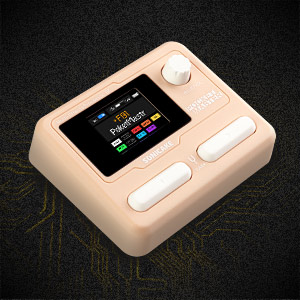
Obrázek 4.6.1: The companion app provides a user-friendly interface for deep editing and managing presets.
5. Údržba
5.1 Čištění
Wipe the device with a soft, dry cloth. Do not use liquid cleaners or abrasive materials, as these can damage the finish or internal components.
5.2 Skladování
Store the Pocket Master in a cool, dry place away from direct sunlight and extreme temperatures. If storing for an extended period, ensure the battery is partially charged (around 50%) to prolong its lifespan.
5.3 aktualizací firmwaru
Periodically check the official SONICAKE website for firmware updates. Updates can introduce new features, improve performance, or fix bugs. Follow the instructions provided with the firmware update package carefully.
6. Řešení problémů
| Problém | Možná příčina | Řešení |
|---|---|---|
| Žádný zvukový výstup. |
|
|
| Zařízení se nezapne. |
|
|
| Problémy s připojením Bluetooth. |
|
|
| Software/App not connecting. |
|
|
7. Specifikace
| Funkce | Detail |
|---|---|
| Číslo modelu | QME-10PK |
| Rozměry | 2.44 x 4.13 x 2.44 palce (6.2 x 10.5 x 6.2 cm) |
| Hmotnost položky | 7.3 unce (208 gramů) |
| Efekty | 100+ Built-in Guitar/Bass/Acoustic Effects, 20 Amp Models, 5 User IR Slots |
| Zpracování signálu | 24-bit 44.1 kHz |
| Bubnové rytmy | 99 Vestavěný |
| Looper | Yes (duration not specified in input, but reviews mention 10s) |
| Předvolby | 100 |
| Simultaneous Effect Blocks | Max 9 |
| Audio rozhraní | Stereo USB Audio Interface, OTG function for mobile devices |
| Konektivita | Bluetooth 5, USB-C, USB-A (OTG) |
| Životnost baterie | Až 4 hodin (nabíjecí) |
| svtage | 5 voltů |
| Softwarová podpora | Mac/Windows/iOS/Android for sound editing and preset management |
8. Záruka a podpora
8.1 Informace o záruce
SONICAKE products typically come with a limited manufacturer's warranty. For specific details regarding your product's warranty period and terms, please refer to the warranty card included with your purchase or visit the official SONICAKE webUschovejte si doklad o koupi pro případ reklamace.
8.2 Zákaznická podpora
For technical assistance, troubleshooting not covered in this manual, or other inquiries, please contact SONICAKE customer support. Contact information can usually be found on the official SONICAKE webmístě nebo na obalu produktu.
You can also refer to the official SONICAKE webstránky s dalšími zdroji a častými dotazy: www.sonicake.com