
1. Úvod
The VCOROS VR1 Motorcycle Helmet Headset is engineered to provide a high-quality audio experience for single riders. It integrates seamlessly into most full-face and open-face helmets, offering clear sound for music, navigation, and phone calls. Key features include dual noise cancellation, AI voice assistant compatibility, and IPX6 waterproofing, ensuring reliable performance in various riding conditions.
2. Co je v krabici
- VR1 Device (1)
- Speakers & Microphone (1)
- Clip-on Base (1)
- Velcro Package (1)
- Nabíjecí kabel typu C (1)
- Uživatelský manuál (1)
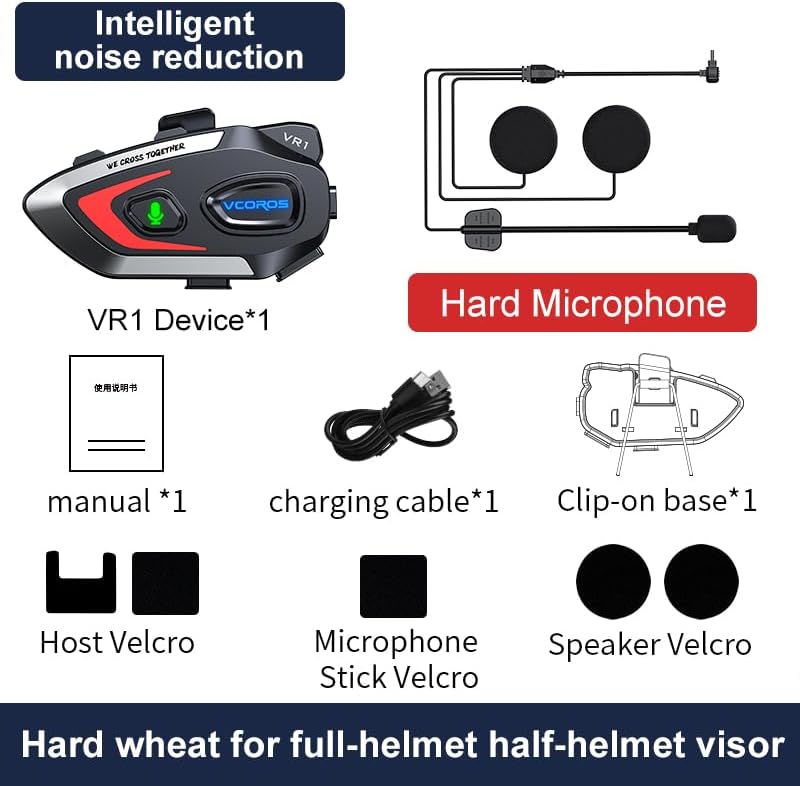
Figure 2.1: Package Contents for the VCOROS VR1 Hard Microphone model.
3. Konec produktuview
The VCOROS VR1 headset features an intuitive design for easy operation while riding. Familiarize yourself with the main unit and its components.

Figure 3.1: VCOROS VR1 Headset Controls and Ports.
Klíčové vlastnosti:
- Dlouhá výdrž baterie: Built-in 1000mAh battery provides up to 25 hours of music playback and 20 hours of talk time.
- Dvojité potlačení šumu: CVC + DSP system for clear audio by reducing wind and road noise.
- Hlasový asistent AI: Hands-free control for calls, music, and navigation.
- IPX6 Vodotěsnost: Designed to withstand rain, dust, and splashes.
- Bluetooth 5.3: Stable connection, low latency, and improved sound quality.

Obrázek 3.2: Výdrž baterieview.

Figure 3.3: Audio Components and Noise Cancellation.

Figure 3.4: Bluetooth 5.3 Wireless Chip.
4. Nastavení a instalace
Follow these steps to install your VCOROS VR1 headset into your motorcycle helmet. The installation process is designed for ease and a secure fit.
Kroky instalace:
- Připravte si helmu: Ensure the helmet's interior is clean and dry where the headset and speakers will be placed.
- Attach Velcro for Main Unit: Peel the backing from the large Velcro pad and firmly attach it to the side of your helmet where the main unit will be mounted.
- Attach Main Unit to Clip: Secure the VR1 main unit to the clip-on base.
- Montáž hlavní jednotky: Slide the clip-on base onto the edge of your helmet, ensuring it is securely fastened. Alternatively, use the adhesive Velcro for direct attachment to the helmet surface.
- Instalace reproduktorů: Identify the ear pockets inside your helmet. Attach the smaller circular Velcro pads to these areas. Peel the backing from the speaker Velcro and firmly press the speakers onto the helmet's interior, aligning them with your ears.
- Pozice mikrofonu: For the hard microphone, position it so that the microphone head is close to your mouth, typically along the chin bar of a full-face helmet. Use the provided Velcro to secure the microphone boom.
- Připojení komponent: Plug the speaker and microphone cables into the corresponding ports on the main VR1 unit.
- Trasa kabelů: Carefully tuck all excess cables under the helmet's padding to prevent interference and ensure comfort.
Video 4.1: Detailed installation guide for the VCOROS VR1 Motorcycle Helmet Headset.
5. Návod k obsluze
Zapnutí/vypnutí:
- Zapnutí: Stiskněte a podržte tlačítko napájení, dokud se nerozsvítí kontrolka.
- Vypnout: Stiskněte a podržte tlačítko napájení, dokud kontrolka nezhasne.
Bluetooth párování:
- Zkontrolujte, zda je náhlavní souprava vypnutá.
- Stiskněte a podržte tlačítko napájení, dokud kontrolka nezačne blikat modře a červeně, což signalizuje režim párování.
- On your smartphone, enable Bluetooth and search for "VCOROS VR1".
- Select "VCOROS VR1" to connect. The indicator light will turn solid blue once paired.
Přehrávání hudby:
- Přehrát/pozastavit: Krátce stiskněte tlačítko Přehrát/Pozastavit.
- Další skladba: Krátce stiskněte tlačítko pro zvýšení hlasitosti (+).
- Předchozí skladba: Krátce stiskněte tlačítko pro snížení hlasitosti (-).
- Nastavení hlasitosti: Long press the Volume Up (+) or Volume Down (-) button to increase or decrease volume.
Telefonní hovory:
- Přijmout hovor: Krátce stiskněte tlačítko Přehrát/Pozastavit.
- Ukončit hovor: Během hovoru krátce stiskněte tlačítko Přehrát/Pozastavit.
- Odmítnout hovor: Dlouze stiskněte tlačítko Přehrát/Pozastavit, když zvoní příchozí hovor.
- Znovu vytočit poslední číslo: Dvakrát stiskněte tlačítko Přehrát/Pozastavit.
- Automatická odpověď: The headset supports automatic call answering after a few rings. This feature can typically be toggled on/off via your phone's Bluetooth settings or specific headset commands (refer to the included user manual for specific toggling instructions if available).
Hlasový asistent AI:
The VR1 supports AI voice assistants (e.g., Siri, Google Assistant) for hands-free control.
- Aktivovat Voice Assistant: Short press the AI Assistant button (microphone icon).

Figure 5.1: AI Voice Assistant Functionality.
6. Údržba
- Čištění: Otřete náhlavní soupravu měkkým hadříkemamp tkanina. Nepoužívejte agresivní chemikálie nebo abrazivní čisticí prostředky.
- Skladování: Pokud sluchátka nepoužíváte, skladujte je na chladném a suchém místě mimo dosah přímého slunečního záření a extrémních teplot.
- Nabíjení: Use only the provided Type-C charging cable. Avoid overcharging the battery.
- Voděodolnost: While IPX6 waterproof, avoid submerging the device in water. Ensure the charging port cover is securely closed during wet conditions.

Figure 6.1: IPX6 Waterproof Rating.
7. Řešení problémů
| Problém | Možná příčina | Řešení |
|---|---|---|
| Sluchátka se nezapínají. | Slabá baterie. | Nabíjejte sluchátka alespoň 2.5 hodiny. |
| Nelze spárovat se smartphonem. | Headset not in pairing mode; Bluetooth off on phone; too far from phone. | Ensure headset is in pairing mode (flashing blue/red). Turn on phone's Bluetooth. Keep devices within 1 meter during pairing. |
| Žádný zvuk z reproduktorů. | Speakers not connected; volume too low; incorrect audio output selected on phone. | Check speaker connection to main unit. Increase volume. Ensure phone's audio is routed to the headset. |
| Špatná kvalita zvuku/šum. | Nesprávně umístěný mikrofon/reproduktory; vysoký hluk větru; rušení. | Adjust speaker and microphone position. Ensure microphone is not obstructed. Move away from sources of strong electromagnetic interference. |
| Hlasový asistent nereaguje. | Feature not enabled on phone; poor microphone connection. | Ensure voice assistant is enabled on your smartphone. Check microphone connection. |
8. Specifikace
| Funkce | Detail |
|---|---|
| Název modelu | VR1 |
| Technologie připojení | Bezdrátové připojení (Bluetooth 5.3) |
| Kapacita baterie | 1000 XNUMX mAh |
| Doba přehrávání hudby | Až 25 hodin |
| Doba hovoru | Až 20 hodin |
| Pohotovostní doba | 270 hodin |
| Doba nabíjení | Přibližně 2.5 hodiny (typ C) |
| Redukce šumu | CVC + DSP Dual Noise Cancellation |
| Hodnocení voděodolnosti | IPX6 |
| Velikost reproduktoru | 93mm x 35mm x 51mm (unit dimensions) |
| Hmotnost (holá jednotka) | 52 g |
| Typ mikrofonu | Pevný mikrofon |
9. Záruka a podpora
VCOROS products are manufactured to high standards and undergo rigorous quality control. For detailed warranty information, product registration, or technical support, please refer to the warranty card included in your product packaging or visit the official VCOROS webUschovejte si účtenku jako doklad o koupi pro případné reklamace.
For further assistance, you may contact VCOROS customer service through the contact information provided on their official webwebu nebo prostřednictvím prodejce, u kterého jste produkt zakoupili.