
1. Úvod
Děkuji za nákupasing the MONODEAL T23 3-Speed Turntable. This manual provides essential information for the safe and correct operation of your device. Please read it thoroughly before use and retain it for future reference.
2. Bezpečnostní informace
- Nevystavujte jednotku dešti ani vlhkosti, abyste předešli požáru nebo úrazu elektrickým proudem.
- Neotevírejte skříň. Servis svěřte pouze kvalifikovanému personálu.
- Ujistěte se, že napájecí adaptér odpovídá vaší místní síti.
- Place the unit on a stable, level surface away from direct sunlight, heat sources, and excessive dust or vibration.
- Uchovávejte mimo dosah dětí.
3. Obsah balení
Ověřte, zda jsou v balení přítomny všechny položky:
- 1 x MONODEAL T23 Record Player
- 1 x 5V 1.5A Power Cord
- 1 x Uživatelská příručka (tento dokument)
4. Konec produktuview
Familiarize yourself with the various parts and controls of your MONODEAL T23 Turntable.

Obrázek 4.1: Horní a zadní View of the MONODEAL T23 Turntable with labeled components including Power Switch, Headphone Jack, Mode button, LED Light, USB Port, Power Adapter Input, RCA Output Jacks, 45 RPM Fixator, Tone Arm Raise Lever, Auto Stop Switch, LP Speed Switch, and Stylus.
- Vypínač/Ovladač hlasitosti: Zapíná/vypíná přístroj a upravuje hlasitost.
- Sluchátkový jack: Pro soukromý poslech se sluchátky.
- Tlačítko režimu: Switches between different input modes (e.g., Phono, Bluetooth, USB).
- LED světlo: Indikuje napájení a stav režimu.
- USB port: Pro přehrávání z USB.
- Vstup napájecího adaptéru: Connects to the provided 5V 1.5A power cord.
- RCA Output Jacks (L/R): Připojuje se k externímu ampzesilovač nebo aktivní reproduktory.
- 45 RPM Fixator: Adapter for 7-inch records with large center holes.
- Tone Arm Raise Lever: Lifts and lowers the tone arm gently.
- Automatický vypínač: Povolí nebo zakáže funkci automatického zastavení.
- LP Speed Switch: Volí rychlost přehrávání (33, 45 nebo 78 otáček za minutu).
- Stylus: Jehla, která čte drážky desky.
5. Nastavení
- Rozbalení: Opatrně vyjměte gramofon z obalu. Obal si uschovejte pro budoucí přepravu nebo skladování.
- Umístění: Place the turntable on a stable, level surface. Ensure there is adequate ventilation around the unit.
- Připojení napájení: Connect the provided 5V 1.5A power cord to the DC IN port on the back of the turntable and then plug it into a wall outlet.
- Protiprachový kryt: The transparent dust cover can be opened or closed to protect the platter and stylus when not in use.
6. Návod k obsluze
6.1 Přehrávání vinylových desek
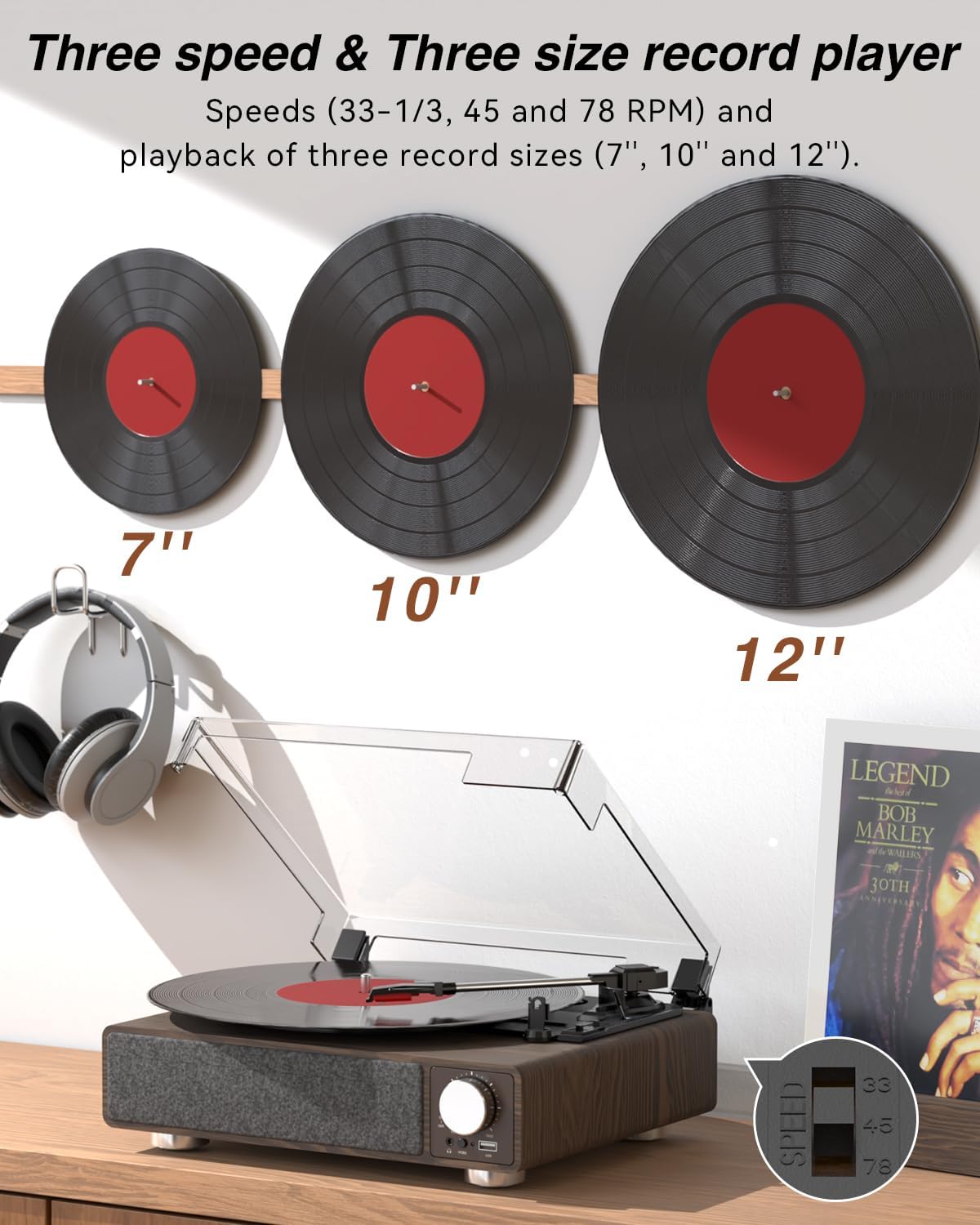
Obrázek 6.1: The MONODEAL T23 Turntable supports 3 speeds and 3 record sizes.
- Turn the Power Switch/Volume Knob clockwise to turn on the unit.
- Zvedněte protiprachový kryt.
- Place a vinyl record on the turntable platter. If playing a 7-inch record with a large center hole, place the 45 RPM fixator on the spindle first.
- Select the appropriate speed (33, 45, or 78 RPM) using the LP Speed Switch, matching the record you are playing.
- Push the Tone Arm Raise Lever up to lift the tone arm.
- Manually move the tone arm over the desired starting track of the record.
- Push the Tone Arm Raise Lever down to gently lower the tone arm onto the record. Playback will begin.
- Adjust the volume using the Power Switch/Volume Knob.
- Funkce automatického zastavení: If the Auto Stop Switch is set to ON, the turntable will automatically stop rotating when the record finishes playing. If set to OFF, it will continue to rotate.
- To stop playback, lift the tone arm using the lever and return it to the tone arm rest. Turn the Power Switch/Volume Knob counter-clockwise to turn off the unit.
6.2 Bluetooth Transmission (BT OUT)
This feature allows you to stream audio from the turntable to external Bluetooth speakers or headphones.

Obrázek 6.2: Bluetooth transmission from the turntable to external devices.
- Ensure the turntable is powered on and in Phono mode (playing a record).
- Press and hold the Mode button until the LED indicator flashes blue, indicating Bluetooth transmission pairing mode.
- Place your Bluetooth speaker or headphones in pairing mode.
- The turntable will automatically search for and connect to the nearest Bluetooth device. Once connected, the LED indicator will turn solid blue.
- Audio from the record will now play through your connected Bluetooth device.
6.3 Bluetooth Reception (BT IN)
This feature allows you to stream audio from your mobile device (phone, tablet) to the turntable's built-in speakers.
Obrázek 6.3: Bluetooth reception by the turntable from a smartphone.
- Zapněte gramofon.
- Press the Mode button repeatedly until the LED indicator flashes blue, indicating Bluetooth reception pairing mode.
- On your mobile device, enable Bluetooth and search for available devices. Select "MONODEAL T23" from the list.
- Po připojení bude LED indikátor svítit modře.
- Play audio on your mobile device, and it will sound through the turntable's speakers. Adjust volume using the turntable's volume knob or your mobile device.
6.4 Přehrávání z USB
The turntable supports playing audio files z USB flash disku.
- Vložte USB flash disk do USB portu na přední straně gramofonu.
- Press the Mode button to switch to USB mode. The LED indicator will change to reflect USB mode.
- The turntable will automatically begin playing audio files from the USB drive. Use the control buttons (if available, or refer to the specific model's USB control instructions) to navigate tracks.
6.5 RCA výstup
Připojte gramofon k externímu amplifier or powered speakers for enhanced sound.

Obrázek 6.4: RCA output for external speakers and headphone jack for private listening.
- Ensure the turntable and your external audio system are turned off.
- Connect an RCA cable (not included) to the RCA Output Jacks (L/R) on the back of the turntable.
- Connect the other end of the RCA cable to the corresponding audio input on your ampzesilovač nebo aktivní reproduktory.
- Turn on both the turntable and your external audio system.
- Play a record as described in Section 6.1. Audio will be routed through your external system. Adjust volume on both devices as needed.
6.6 Jack pro sluchátka
For private listening, connect headphones to the 3.5mm headphone jack on the front of the unit.
- Plug your 3.5mm headphones into the Headphone Jack.
- Adjust the volume using the Power Switch/Volume Knob.
7. Údržba
7.1 Čištění gramofonu
- Vnější povrch jednotky otřete měkkým, suchým hadříkem. Nepoužívejte abrazivní čisticí prostředky ani rozpouštědla.
- Pokud přístroj nepoužíváte, mějte protiprachový kryt zavřený, abyste zabránili hromadění prachu.
7.2 Péče o stylus
- Handle the stylus with extreme care. Avoid touching the stylus tip with your fingers.
- Periodicky čistěte stylus měkkým kartáčkem, jemně jej kartáčujte zezadu dopředu.
- A worn stylus can damage records and degrade sound quality. Replace the stylus when signs of wear appear (e.g., distorted sound, skipping).
7.3 Péče o záznamy
- Always hold records by their edges or center label.
- Desky skladujte svisle v obalech na chladném a suchém místě.
- Pravidelně čistěte desky speciálním kartáčkem nebo roztokem na čištění desek, abyste odstranili prach a statický náboj.
8. Řešení problémů
| Problém | Možná příčina | Řešení |
|---|---|---|
| Žádná síla | Power cord not connected; Power outlet not working; Unit not turned on. | Ensure power cord is securely connected; Try a different outlet; Turn the Power Switch/Volume Knob clockwise. |
| Žádný zvuk z vestavěných reproduktorů | Volume too low; RCA output connected; Bluetooth transmission active. | Increase volume; Disconnect RCA cables if not using external speakers; Ensure Bluetooth transmission is off if you want sound from built-in speakers. |
| Zvuk zkreslený nebo přeskakující | Record dirty or damaged; Stylus dirty or worn; Turntable not level; Excessive vibration. | Clean record; Clean or replace stylus; Place turntable on a stable, level surface; Ensure turntable is away from sources of vibration. |
| Párování Bluetooth se nezdařilo | Device too far; Device not in pairing mode; Interference. | Move devices closer; Ensure both devices are in pairing mode; Turn off other Bluetooth devices nearby. |
| Auto stop not working | Auto Stop Switch is OFF. | Set the Auto Stop Switch to ON. Note: Some records may stop prematurely or not at all due to variations in groove patterns. |
9. Specifikace
| Funkce | Specifikace |
|---|---|
| Název modelu | T23 |
| Značka | MONODEAL |
| Rozměry produktu | 11.81 x 9.84 x 4.31 palce (30 x 25 x 11 cm) |
| Hmotnost položky | 5.77 libry (2.62 kg) |
| Materiál | Dřevo |
| Rychlosti přehrávání | 33-1/3, 45, 78 ot./min |
| Podporované velikosti záznamů | 7", 10", 12" |
| Konektivita | Bluetooth (Reception & Transmission), USB, RCA Output, Headphone Jack |
| Zdroj napájení | Elektrický kabel (5 V 1.5 A) |
| Speciální funkce | Built-in Stereo Speakers, Auto Stop, Belt-Drive System |
10. Záruka a podpora
MONODEAL products are designed and manufactured to the highest quality standards. For warranty information and technical support, please refer to the warranty card included with your purchase or visit the official MONODEAL website. Please have your model number (T23) and purchase date available when contacting support.