
1. Úvod a konecview
Děkuji za nákupasing the Fenge G04D108-MAIN Adjustable Monitor Stand. This manual provides detailed instructions for assembly, operation, and maintenance to ensure optimal use and longevity of your product. This monitor stand is designed to enhance your workspace by providing adjustable height and width, integrated storage, and ergonomic benefits.

Image 1: The Fenge G04D108-MAIN monitor stand integrated into a modern desk setup, showcasing its storage drawer and adjustable design.
2. Bezpečnostní informace
- Ensure all components are securely fastened before placing any equipment on the stand.
- Nepřekračujte maximální nosnost 30 kg.
- Udržujte malé části mimo dosah dětí, abyste předešli nebezpečí udušení.
- Neumísťujte stojan na přímé sluneční světlo nebo do blízkosti zdrojů tepla, abyste zabránili degradaci materiálu.
- Use on a stable, flat surface to prevent tipping.
3. Obsah balení
Před zahájením montáže se prosím ujistěte, že jsou všechny díly přítomny. Pokud některé díly chybí nebo jsou poškozené, kontaktujte zákaznickou podporu.
- Main wooden top panels (adjustable sections)
- Support legs/frames
- Fabric storage drawer(s)
- Assembly hardware (screws, bolts, screwdriver/wrench if included)
- Návod k použití (tento dokument)
4. Nastavení a montáž
Follow these steps carefully to assemble your Fenge G04D108-MAIN monitor stand.
Step 1: Prepare the Drawers
Unfold the fabric storage drawers and insert the bottom reinforcement panels to give them shape.

Image 2: The fabric drawer provides convenient storage for small office supplies.
Step 2: Attach Handles to Drawers (if applicable)
If your drawers come with separate handles, attach them using the provided screws and a screwdriver. Ensure they are firmly secured.
Krok 3: Sestavte hlavní rám
Connect the support legs/frames to the main wooden panels using the provided hardware. Ensure all connections are tight and stable. The design allows for flexible arrangement of the sections.

Image 3: The stand's modular design allows for width adjustment from 78.3cm to 113cm and flexible arrangement of sections.
Referenční video o montáži:
Video 1: This short video demonstrates the assembly process of a Fenge monitor stand, showing how the components fit together.
5. Návod k obsluze
Adjusting Width and Configuration
The Fenge G04D108-MAIN monitor stand features an adjustable design. You can extend or retract the side panels to adjust the overall width from 78.3cm to 113cm, accommodating different desk sizes and monitor setups. The second tier can also be rotated to the left or right to suit your preference and workspace layout.
Využití úložných zásuvek
The integrated fabric drawer provides convenient storage for small office supplies such as pens, smartphones, and notebooks, helping to keep your desk tidy. The space beneath the monitor stand can also be used to store keyboards, mice, and other peripherals, maximizing your work area.
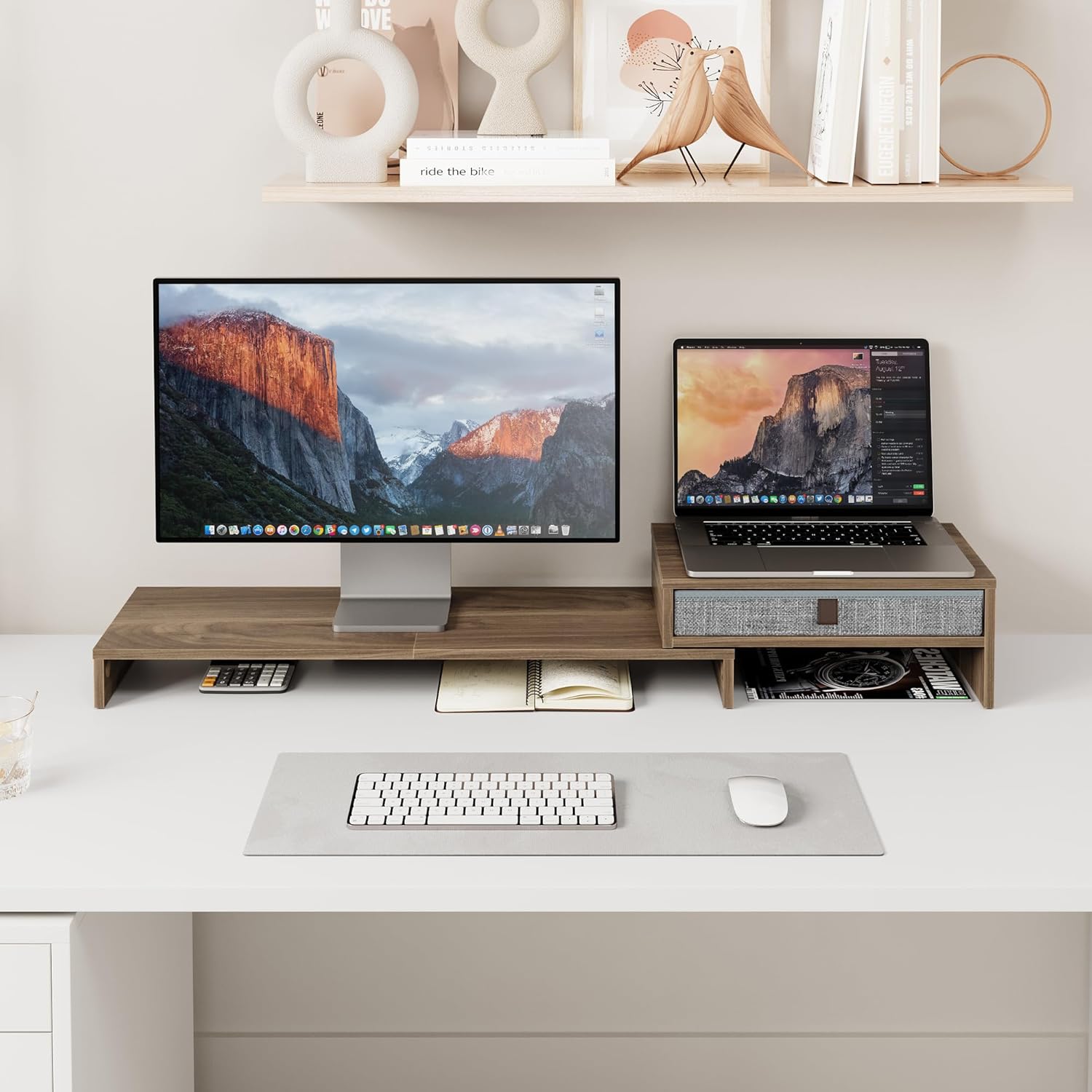
Obrázek 4: Bývalýample of a dual-screen setup with a laptop and monitor, utilizing the stand's storage capabilities.
Ergonomic Benefits
Placing your monitor on the stand raises your eye level by 7.35-15.9cm, promoting a natural and correct posture. This helps to alleviate strain on your neck and back during long working hours. When using a computer and laptop simultaneously, the stand allows both monitors to be at a similar height, improving work efficiency.
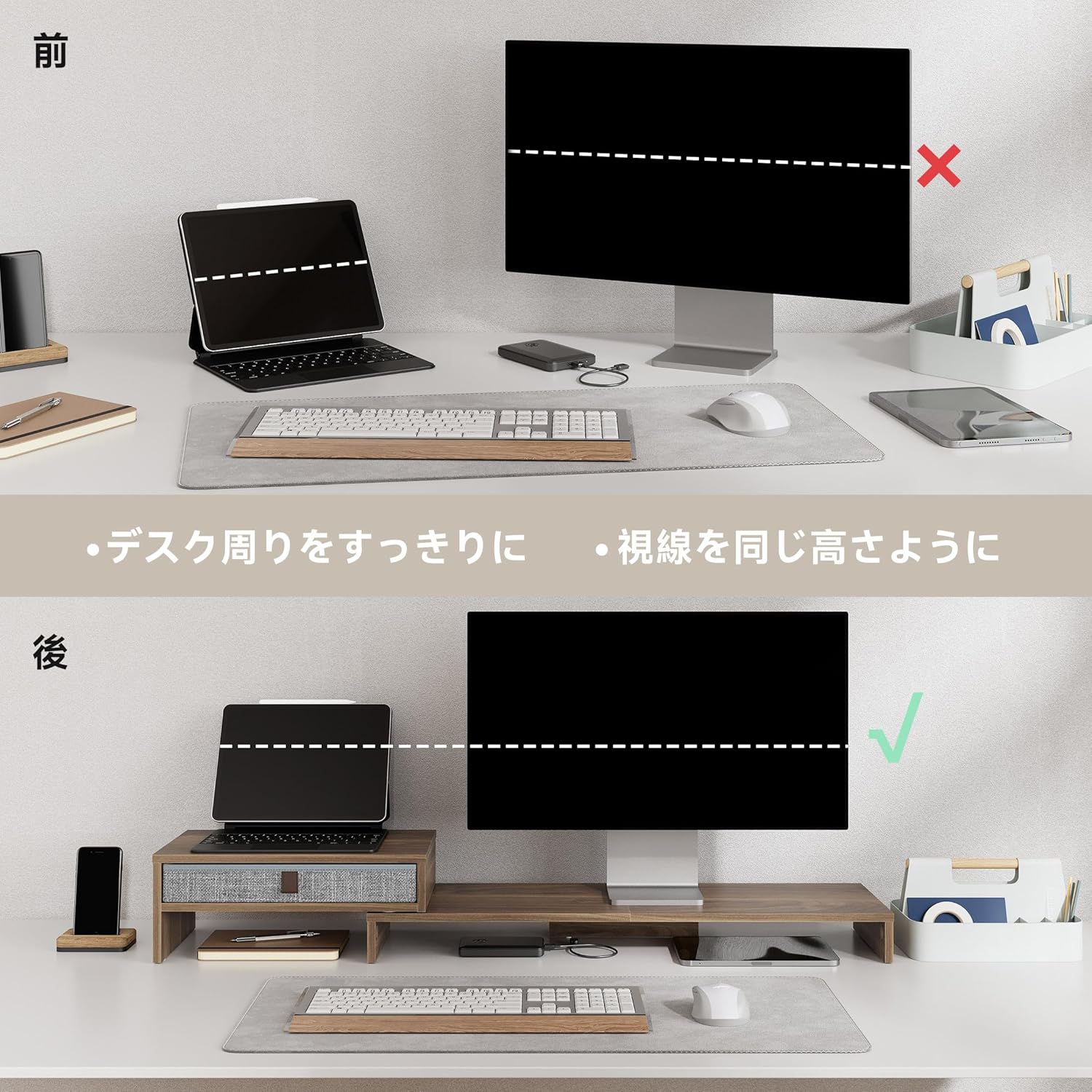
Image 5: Visual comparison demonstrating how the monitor stand elevates the screen to an ergonomic height, improving user posture.
Všestranné aplikace
The second tier of the PC stand is not only for aligning laptops and computers but can also be used to place telephones, printers, stereos, or decorative items like potted plants and flowers, adding color to your work environment.

Image 6: Various ways to utilize the monitor stand, from supporting office equipment to displaying personal decorations.
Konec produktuview Video:
Video 2: This brief video demonstrates the Fenge monitor stand in use, highlighting its organizational and ergonomic benefits.
Video 3: Toto video poskytuje obecný přehledview of Fenge monitor stands, demonstrating their features and versatility in various desk setups.
Video 4: An introductory video for Fenge monitor stands, illustrating different models and their functional aspects.
6. Údržba
- Čištění: Dřevěné povrchy otřete měkkým,amp hadříkem. Nepoužívejte agresivní chemikálie nebo abrazivní čisticí prostředky, které by mohly poškodit povrchovou úpravu.
- Péče o zásuvky: The fabric drawers can be removed for easy cleaning. Gently wipe with a damp cloth and allow to air dry completely before reinserting.
- Inspekce: Pravidelně kontrolujte všechny šrouby a spoje, zda jsou pevně utažené. V případě potřeby je dotáhněte.
7. Řešení problémů
- Stojan se kymácí: Ensure all assembly screws are tightened. Check that the stand is placed on a flat, stable surface.
- Zásuvka se neposouvá hladce: Check for any obstructions inside the drawer compartment. Ensure the drawer is correctly inserted and the bottom reinforcement panel is flat.
- Difficulty adjusting width: Ensure no items are obstructing the sliding mechanism. Gently apply even pressure when adjusting.
8. Specifikace
| Funkce | Detail |
|---|---|
| Číslo modelu | G04D108-MAIN |
| Značka | Fenge |
| Barva | Hnědý |
| Nastavitelná šířka | 78.3cm - 113cm (783-1130MM) |
| Hloubka | 23.5cm (235MM) |
| Výška | 7.35cm / 15.9cm (73.5/159MM) |
| Maximální nosnost | 30 kg |
| Hmotnost balení | Přibl. 4.8 kg |
| Montáž Vyžadována | Ano |
9. Záruka a podpora
Informace o záruce
This product comes with a 12-month quality warranty from the date of purchase. The warranty covers defects in materials and workmanship under normal use. It does not cover damage caused by misuse, accidents, unauthorized modifications, or normal wear and tear.
Zákaznická podpora
For any questions, concerns, or warranty claims, please contact Fenge customer support through the retailer where you purchased the product. Please have your purchase receipt and product model number (G04D108-MAIN) ready when contacting support.