
HK-HW-033
Uživatelská příručka pro akční kameru 4K
Model: HK-HW-033 | Brand: Generic
Zavedení
This manual provides detailed instructions for the operation, maintenance, and troubleshooting of your 4K Action Camera. Please read this manual thoroughly before using the product to ensure proper function and safety.
Konec produktuview
The 4K Action Camera is a versatile 4K Ultra HD action camera designed for capturing high-quality video and photos in various environments, including underwater. It features WiFi connectivity for remote control and easy sharing.
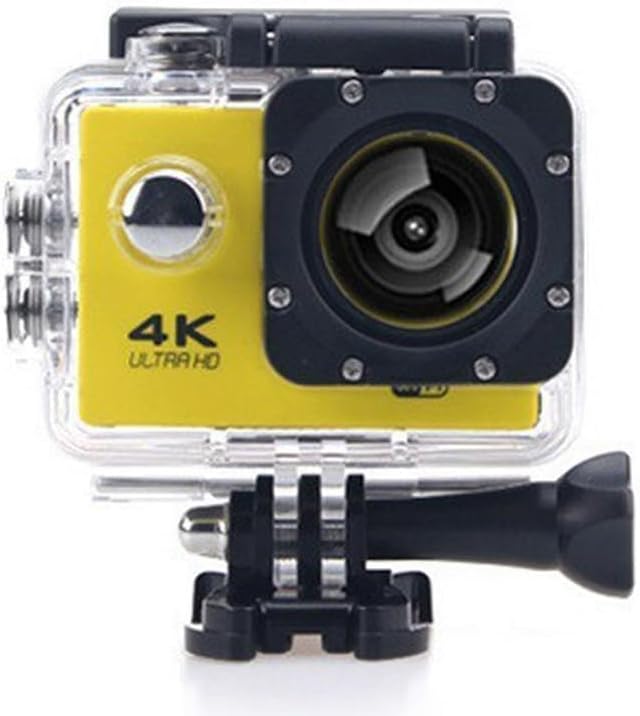
Obrázek 1: Přední strana view of the Yellow 4K Action Camera in its transparent waterproof housing, displaying the lens, '4K ULTRA HD' branding, and control buttons.
Klíčové vlastnosti:
- 4K Ultra HD Video Recording
- Waterproof up to 30 meters (98 feet) with included housing
- Built-in WiFi for smartphone control
- Širokoúhlý objektiv
- Kompaktní a odolný design
Obsah balení:
- Akční kamera
- Vodotěsné pouzdro
- USB kabel
- Montážní příslušenství
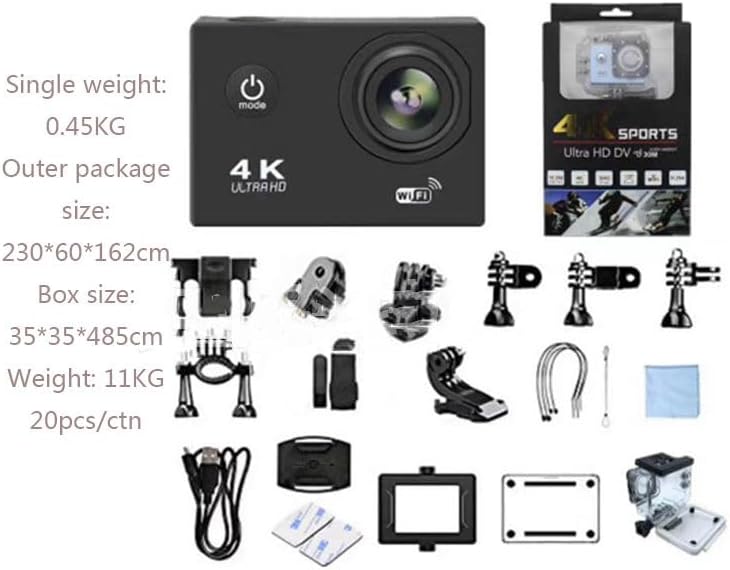
Figure 2: Illustration of the complete package contents, including the camera, waterproof housing, USB cable, and a variety of mounting accessories.
Nastavení
1. Nabíjení baterie
Before first use, fully charge the camera battery. Connect the camera to a USB power source using the provided USB cable. The charging indicator light will illuminate during charging and turn off when fully charged.
2. Vložení karty Micro SD
A Micro SD card (not included) is required for recording. Insert the Micro SD card into the designated slot until it clicks into place. Ensure the card is formatted before first use (refer to the Operating section for formatting instructions).
3. Připevnění vodotěsného pouzdra
For underwater use or protection against dust and impact, place the camera inside the waterproof case. Ensure the case is securely latched and the rubber seal is clean and free of debris to prevent leaks.

Figure 3: The action camera encased in its waterproof housing, partially submerged in water, illustrating its capability for underwater use.
Návod k obsluze
1. Zapnutí/vypnutí
Stiskněte a podržte tlačítko Napájení/Režim (obvykle na přední nebo horní straně) po dobu 3 sekund pro zapnutí nebo vypnutí fotoaparátu.
2. Výběr režimu
Press the Power/Mode button repeatedly to cycle through different modes: Video Recording, Photo Mode, Playback Mode, and Settings Mode.
3. Nahrávání videa / Pořizování fotografií
- Nahrávání videa: In Video Recording mode, press the OK/Shutter button (usually on top) to start recording. Press again to stop.
- Režim fotografie: In Photo Mode, press the OK/Shutter button to take a photo.
4. WiFi připojení
Pro připojení přes WiFi:
- Turn on the camera's WiFi function (usually via a dedicated button or through the settings menu). The WiFi indicator light will blink.
- On your smartphone, download and install the dedicated camera app (refer to the product packaging or manufacturer's website for app name).
- Go to your phone's WiFi settings and connect to the camera's WiFi network (SSID and password usually displayed on the camera screen or in the manual).
- Open the camera app on your smartphone to control the camera, preview footage a převod files.

Figure 4: A smartphone displaying the camera's companion app, illustrating the wireless control and live preview capabilities via WiFi.
5. Formatting Micro SD Card
It is recommended to format the Micro SD card regularly to ensure optimal performance and prevent data corruption.
- Navigate to the Settings menu on the camera.
- Select "Format SD Card" or a similar option.
- Confirm the action. All data on the card will be erased.
Údržba
Čištění fotoaparátu a pouzdra
- K čištění objektivu a obrazovky fotoaparátu použijte měkký hadřík, který nepouští vlákna.
- After using the waterproof case in saltwater, rinse it with fresh water and allow it to air dry.
- Regularly check the waterproof seal for any debris or damage.
Péče o baterie
- Pokud fotoaparát nepoužíváte, uchovávejte jej na chladném a suchém místě.
- Nevystavujte baterii extrémním teplotám.
- Pokud baterii skladujete delší dobu, nabijte ji přibližně na 50 % její kapacity.
Odstraňování problémů
| Problém | Možná příčina | Řešení |
|---|---|---|
| Fotoaparát se nezapne. | Baterie je vybitá. | Baterii plně nabijte. |
| Nelze nahrávat video/fotit. | Není vložena karta Micro SD nebo je karta plná/poškozená. | Insert a Micro SD card. Format the card or use a new one. |
| Problémy s připojením k Wi-Fi. | Incorrect WiFi password; camera WiFi not enabled; app issues. | Ensure correct password. Enable camera WiFi. Restart camera and phone app. |
| Špatná kvalita obrazu/videa. | Objektiv je znečištěný; nedostatečné osvětlení; nesprávné nastavení. | Vyčistěte objektiv. Zajistěte dostatečné osvětlení. Upravte nastavení rozlišení. |
Specifikace
| Funkce | Detail |
|---|---|
| Rozlišení videa | 4K Ultra HD, 1080p |
| Vodotěsná hloubka | Až 30 metrů (98 stop) s vodotěsným pouzdrem |
| Konektivita | WiFi, Wireless |
| Velikost obrazovky | 2 palce |
| Technologie fotosenzoru | CMOS |
| Skladování | Micro SD (není součástí balení) |
| Rozměry | 1.2 x 4 x 3 palce |
| Hmotnost položky | 1 liber |
| Číslo modelu | HK-HW-033 |
Záruka a podpora
For warranty information and technical support, please refer to the documentation included with your purchase or contact the seller directly. Keep your proof of purchase for warranty claims.
prodejce: UTRON GLOBAL
Ask a question about this manual
Ask about setup, troubleshooting, compatibility, parts, safety, or missing instructions. Manuals+ will review the question and use this page’s manual context to help answer it.