
Zavedení
This manual provides essential information for the setup, operation, maintenance, and troubleshooting of your Protectli Vault Pro VP2430-4 Port Micro Appliance/Mini PC. Please read these instructions carefully before using the device to ensure proper functionality and longevity.
Nastavení
Follow these steps to set up your Protectli Vault Pro VP2430-4.
1. Vybalení a kontrola komponent
Opatrně vybalte všechny součásti z krabice. Zkontrolujte, zda jsou všechny položky přítomny:
- Protectli Vault Pro VP2430-4 unit
- Napájecí adaptér a kabel
- Mounting bracket and screws (if included)
- USB Type-C console cable
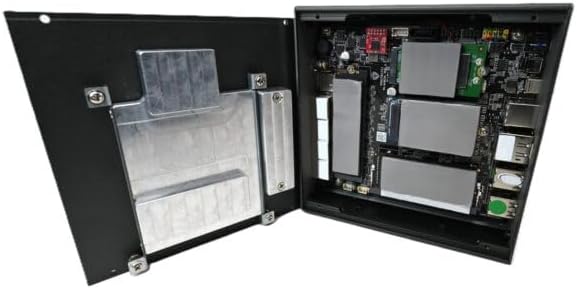
Image: Included accessories, including the power adapter, mounting bracket, screws, and USB console cable.
2. Fyzická připojení
Connect the necessary cables to the device ports. Refer to the image below for port identification.

Image: Rear panel of the Protectli Vault Pro VP2430-4, displaying various ports including USB, HDMI, DisplayPort, and USB-C console port.
- Moc: Connect the power adapter to the DC 12V input port and then to a power outlet.
- Síť: Connect Ethernet cables to the 2.5G NIC ports (labeled 1-4) as required for your network configuration.
- Zobrazit: If a display is needed for initial setup or monitoring, connect a monitor to the HDMI or DisplayPort output.
- Zařízení USB: Connect any necessary USB peripherals (keyboard, mouse) to the USB 2.0 or USB 3.2 Type C ports.
- Utěšit: For serial console access, connect the provided USB Type-C console cable to the console port and your computer.
3. První spuštění
After all connections are made, press the power button located on the front panel. The device will power on. Since no operating system is pre-installed, you will need to install your preferred firewall or operating system software.
Návod k obsluze
The Protectli Vault Pro VP2430-4 is designed as a micro appliance for network security and mini PC applications. It does not come with a pre-installed operating system, allowing for maximum flexibility.
Softwarová kompatibilita
This hardware is tested for compatibility with various open-source firewall software solutions, including OPNsense, pfSense, and VyOS. It also supports other popular open-source software solutions. The device ships with AMI BIOS.
Typické scénáře použití
- Firewall/router: Utilize the multiple 2.5G NICs to create a robust and secure network gateway.
- Mini PC: Install a lightweight operating system for various computing tasks.
- Virtualizace: Deploy hypervisors for running virtual machines.
Údržba
Pravidelná údržba zajistí optimální výkon a dlouhou životnost vašeho zařízení.
Čištění
To clean the exterior of the device, use a soft, dry cloth. Avoid using liquid cleaners or solvents, as these can damage the finish or internal components. Ensure the device is powered off and unplugged before cleaning.
Aktualizace firmwaru
Periodically check the Protectli website for BIOS/firmware updates. Updating the firmware can improve stability, performance, and security. Follow the instructions provided with the firmware update package carefully.
Hardware Upgrades (RAM/Storage)
The Protectli Vault Pro VP2430-4 supports upgrades for RAM and M.2 SATA SSD storage. To perform an upgrade:
- Vypněte zařízení a odpojte všechny kabely.
- Carefully remove the screws securing the bottom cover.
- Gently lift the cover to expose the internal components.

Obrázek: Interní view of the Protectli Vault Pro VP2430-4, showing the motherboard, RAM slots, and M.2 SSD slots.
Locate the SODIMM DDR5 RAM slots and M.2 SATA SSD slot. Install or replace components according to their respective instructions. Ensure components are seated correctly before reattaching the cover and screws.
Odstraňování problémů
Tato část se zabývá běžnými problémy, se kterými se můžete setkat.
Žádná síla
- Ujistěte se, že je napájecí adaptér bezpečně připojen k zařízení a k funkční zásuvce.
- Ověřte funkčnost elektrické zásuvky zapojením jiného zařízení.
- Zkontrolujte napájecí adaptér, zda nevykazuje viditelné poškození.
Žádný výstup displeje
- Confirm the monitor is powered on and correctly connected to the device's HDMI or DisplayPort.
- Zkuste jiný kabel displeje nebo monitor.
- Ujistěte se, že je na monitoru vybrán správný vstupní zdroj.
Problémy s připojením k síti
- Check that Ethernet cables are securely connected to both the device and your network equipment.
- Verify the status indicator lights on the Ethernet ports.
- Ensure your installed operating system or firewall software is correctly configured for network interfaces.
Specifikace
| Model | VP2430 |
| CPU | Intel N150 Quad Core (up to 3.6GHz, 6MB Cache) |
| BERAN | 32GB RAM SO-DIMM DDR5 |
| Skladování | 1000GB NVMe SSD, 32GB eMMC on-board |
| Síťová rozhraní | 4x Intel I226-V 2.5G NICs |
| USB porty | 2x USB 3.2 Type C with DisplayPort, 4x USB 2.0 Type A, 1x USB Type C Console |
| Video výstup | 1x HDMI, 1x DisplayPort (via USB-C) |
| Grafický koprocesor | Grafická karta Intel UHD Graphics 630 |
| Hardwarová platforma | PC |
| Rozměry (DxŠxV) | 5.67 x 5.63 x 2.17 palce |
| Hmotnost | 4.1 libry |
| Zdroj napájení | DC |
| Baterie | Vyžaduje 1 baterii CR2 (součástí balení) |
Záruka a podpora
Informace o záruce
Your Protectli Vault Pro VP2430-4 comes with a 30-day money-back guarantee. For specific warranty terms and conditions, please refer to the official Protectli webwebu nebo kontaktujte zákaznickou podporu.
Zákaznická podpora
Protectli offers US-based customer support to assist you with any questions or issues. Our dedicated team is available to provide technical assistance and guidance.
Pro podporu prosím navštivte Protectli Store or refer to the contact information provided with your product documentation.