
FREEWOLF T96
Uživatelská příručka k bezdrátové herní klávesnici a myši FREEWOLF T96
Model: T96
Zavedení
This user manual provides detailed instructions for the FREEWOLF T96 Smart Display Wireless Gaming Keyboard and Mouse Combo. This combo is designed for a seamless and responsive experience across various devices and applications, from gaming to office work.
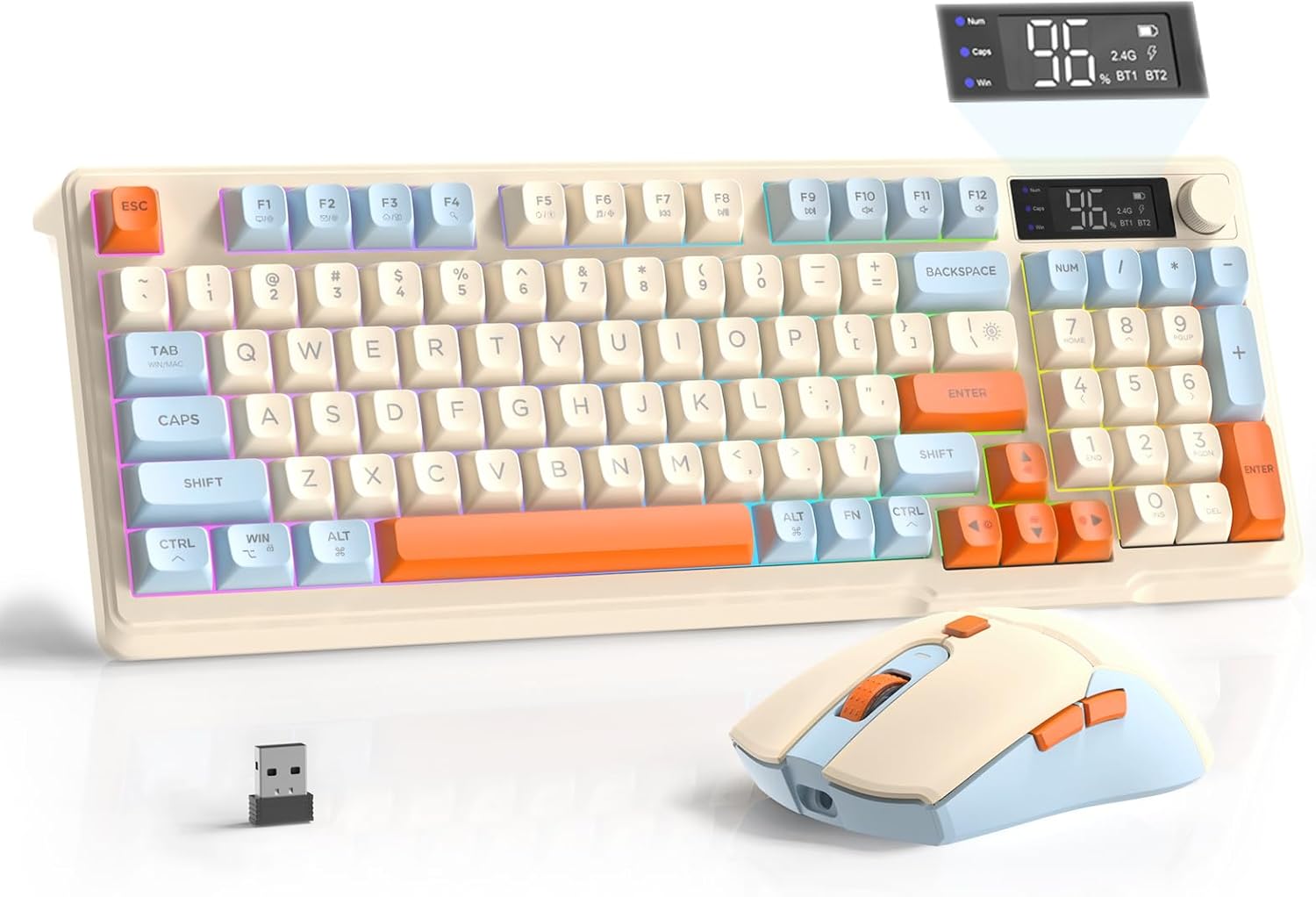
Image: The FREEWOLF T96 Wireless Gaming Keyboard and Mouse Combo, featuring the keyboard, mouse, and USB receiver.
Obsah balení
Ujistěte se, že v balení jsou přítomny všechny položky:
- 1 x T96 Membrane Keyboard
- 1 x T96 Wireless Mouse
- 1 x USB-C kabel
- 1 x USB Receiver (stored in mouse bottom slot)
- 1 x Uživatelská příručka
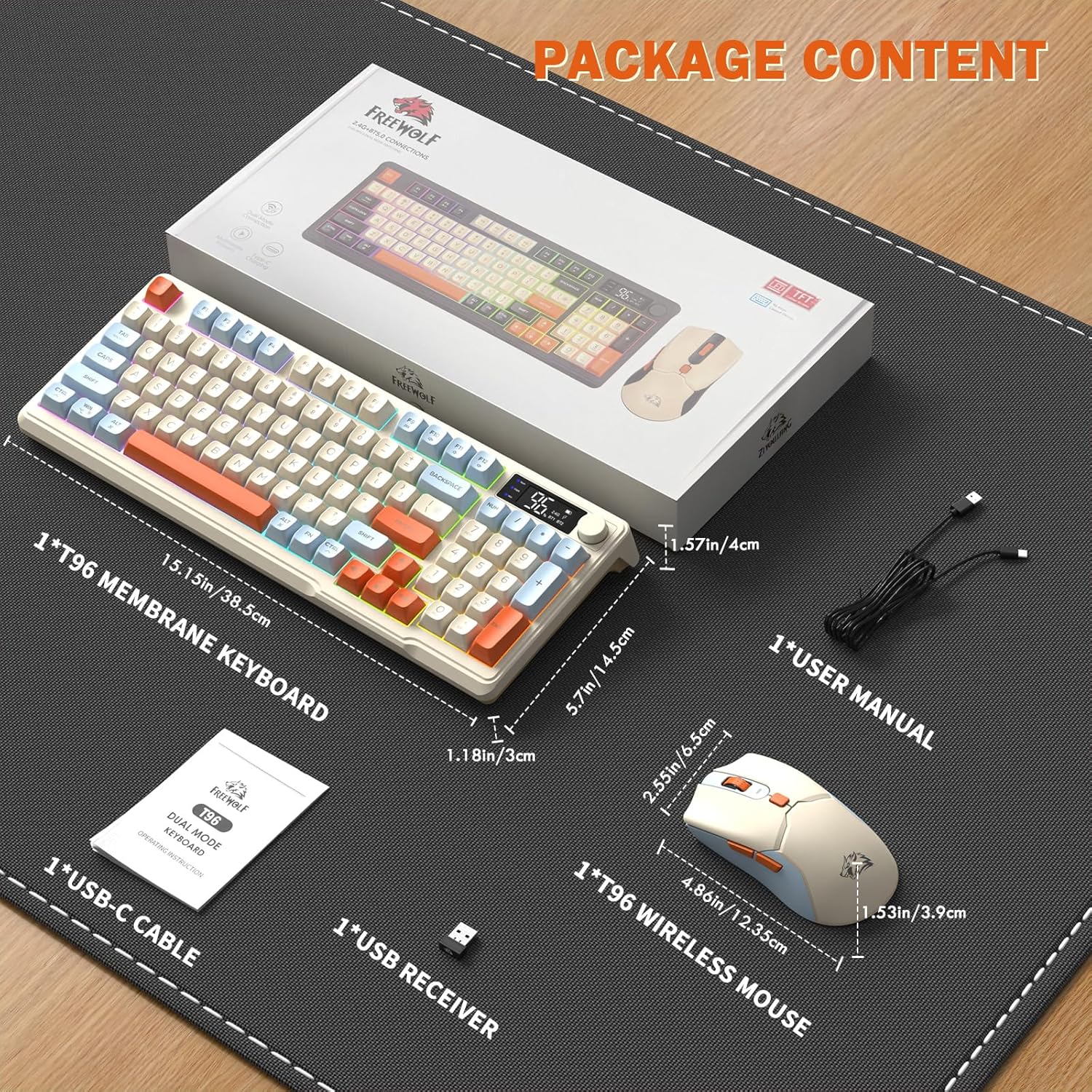
Image: A visual representation of the package contents, including the keyboard, mouse, USB-C cable, USB receiver, and user manual.
Nastavení
Možnosti připojení
The T96 combo supports dual-mode wireless connectivity:
- Bezdrátové připojení 2.4G: Utilizes the included USB receiver for a stable, plug-and-play connection.
- Bluetooth Connections (BT1/BT2): Allows pairing with up to two Bluetooth-enabled devices, enabling seamless switching.
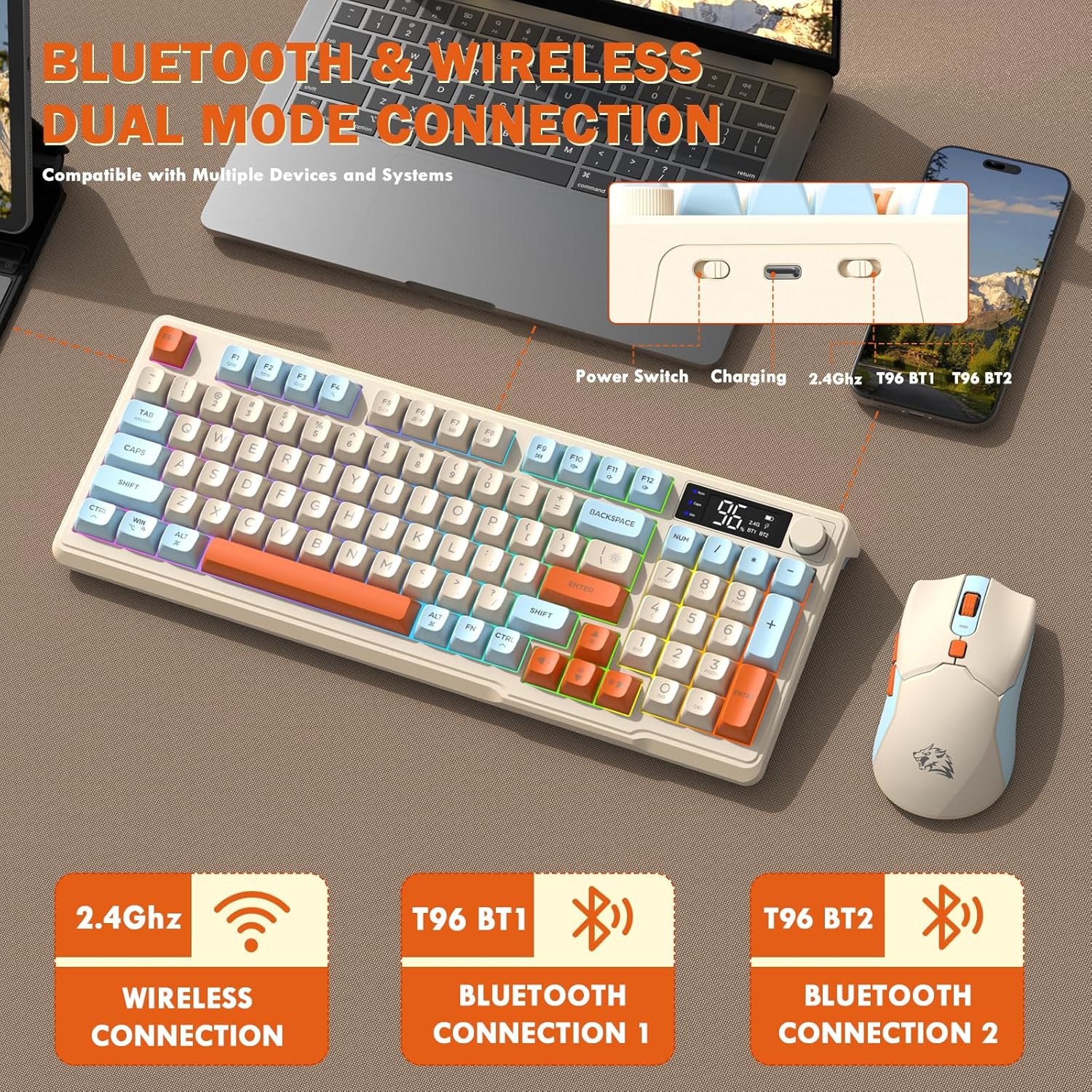
Image: Diagram illustrating the dual-mode connection options (2.4GHz, Bluetooth 1, Bluetooth 2) and the location of the power switch, charging port, and connection indicators on the keyboard.
Počáteční kroky nastavení
- Nabíjecí zařízení: Before first use, fully charge both the keyboard and mouse using the provided USB-C cable. The keyboard has a 2000mAh battery, and the mouse has a 500mAh battery. The smart display on the keyboard will show charging progress.
- Vyhledejte USB přijímač: The USB receiver for 2.4G wireless connection is stored in a slot on the bottom of the mouse. Remove it for use.
- Zapnutí: Zapněte klávesnici a myš pomocí příslušných vypínačů.
- Connect via 2.4G Wireless:
- Vložte USB přijímač do volného USB portu na vašem počítači.
- Ensure the keyboard and mouse are set to 2.4G mode (indicated on the keyboard's smart display). They should connect automatically.
- Připojení přes Bluetooth:
- Switch the keyboard and mouse to BT1 or BT2 mode.
- On your device (PC, laptop, tablet, smartphone), open Bluetooth settings.
- Hledat "T96 Keyboard" and "T96 Mouse" in the list of available devices and pair them.
- The smart display will indicate the active Bluetooth connection (BT1 or BT2).
Návod k obsluze
Ovládání klávesnice
The T96 keyboard features a 94-key compact layout with various functions to enhance your experience.
Funkce inteligentního displeje
Inteligentní LED displej poskytuje informace v reálném čase:
- Stav baterie: Zobrazuje zbývající procenta baterietage.
- Režim připojení: Indicates active connection (2.4G, BT1, BT2).
- Průběh nabíjení: Displays charging status when connected to power.
- Caps Lock/Num Lock/Win Lock Indicators: Shows status of these keys.
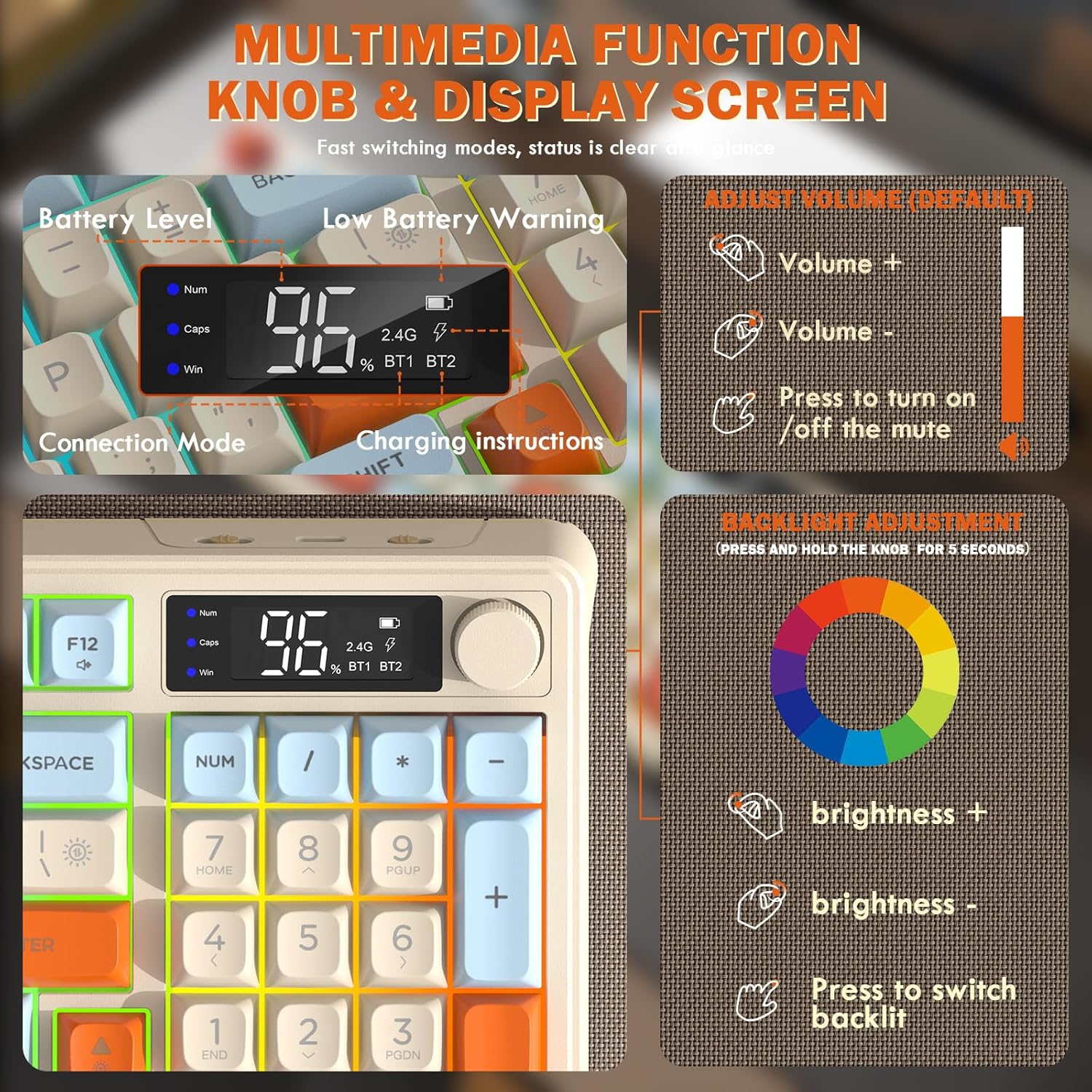
Image: Close-up of the keyboard's smart display showing battery level, connection mode, and charging instructions. Also details the multimedia knob's functions for volume and backlight control.
Ovládací knoflík multimédií
Located on the top right of the keyboard, this knob offers quick control:
- Střídat: Adjusts system volume (clockwise for volume up, counter-clockwise for volume down).
- Stiskněte: Toggles mute on/off.
- Stiskněte a podržte (5 sekund): Activates backlight adjustment mode. Rotate to change brightness, press to switch light effects.
Multimedia Hotkeys (FN Combinations)
The keyboard includes 12 dedicated multimedia hotkeys accessible via the FN klíč:
- FN + F1–F12: Access various multimedia and system functions (e.g., media playback, volume, browser, email). Refer to keycap legends for specific functions.
Ovládání podsvícení
The keyboard features vibrant rainbow LED backlighting. Control it using the following combinations:
- FN + šipka nahoru: Zvyšte jas podsvícení.
- FN + šipka dolů: Snižte jas podsvícení.
- FN + šipka vpravo: Zvyšte rychlost podsvícení.
- FN + šipka doleva: Snižte rychlost podsvícení.
- FN + \|: Switch between different lighting modes (e.g., always on, breathing, off).
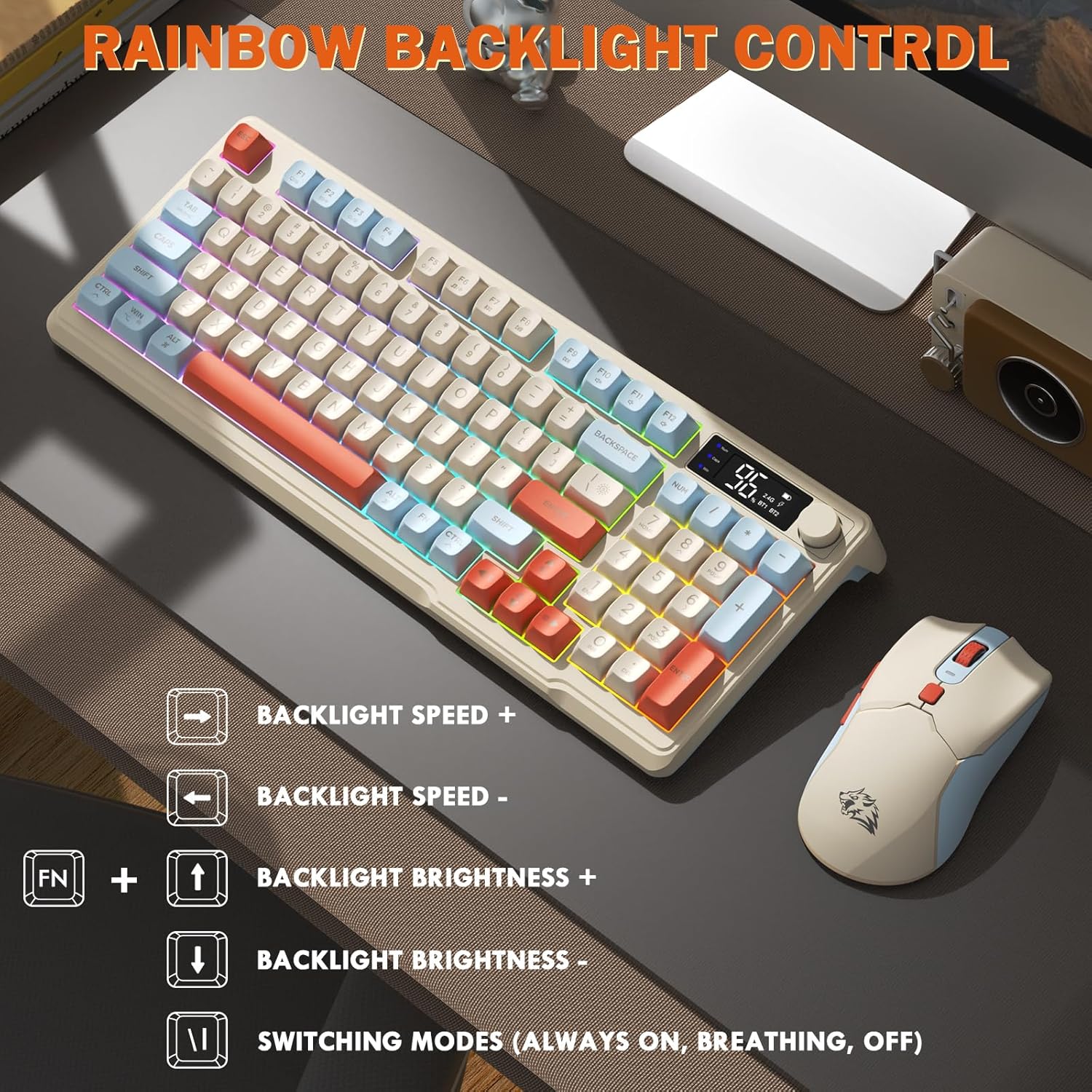
Image: Visual guide for controlling the rainbow LED backlight, showing key combinations for brightness, speed, and mode switching.
Anti-Ghosting
The keyboard supports 26-key rollover anti-ghosting technology, ensuring accurate registration of multiple simultaneous key presses, crucial for gaming.
Ovládání myši
The T96 gaming mouse is designed for precision and comfort.
Úprava DPI
Adjust the mouse sensitivity (DPI) to suit your preference:
- Stiskněte tlačítko Tlačítko DPI (located behind the scroll wheel) to cycle through available DPI settings: 800 / 1600 / 2400 / 4000 DPI.
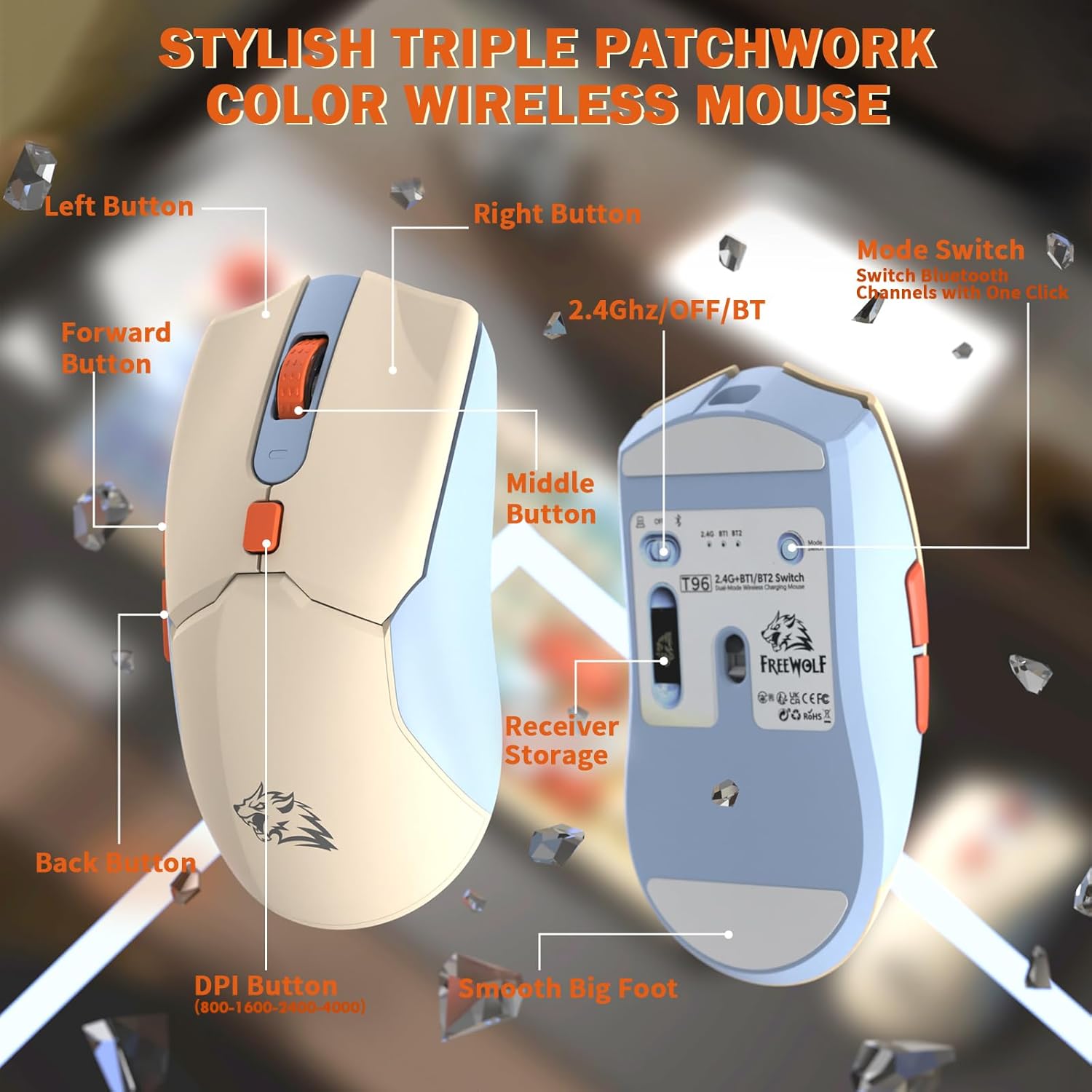
Obrázek: Podrobný view of the T96 wireless mouse, highlighting its buttons (Left, Right, Middle, Forward, Back, DPI) and the receiver storage compartment on the bottom.
Programovatelná tlačítka
The mouse features six programmable buttons. Refer to specific software (if applicable, not mentioned in data) or operating system settings for customization options.
Volební sazby
The mouse operates at different polling rates depending on the connection mode:
- Bluetooth (BT): 115 Hz
- Bezdrátové 2.4G: 125 Hz
Údržba
Čištění
- K čištění povrchů klávesnice a myši používejte měkký, suchý hadřík.
- Pro odolnou špínu lehceampnavlhčete hadřík vodou nebo jemným neabrazivním čisticím prostředkem.
- Nepoužívejte agresivní chemikálie, rozpouštědla nebo abrazivní materiály, protože by mohly poškodit povrchovou úpravu.
- Neponořujte zařízení do vody ani žádné kapaliny.
Péče o baterie
Pro maximalizaci výdrže a výkonu baterie:
- Recharge the devices when the low battery indicator appears on the keyboard's smart display.
- Vyhněte se častému úplnému vybíjení baterie.
- Pokud zařízení delší dobu nepoužíváte, skladujte je na chladném a suchém místě.
- The devices feature smart power-saving modes: the keyboard enters sleep mode after 3 minutes of inactivity, and the mouse after 2 minutes. They wake instantly upon touch.

Image: Illustration showing the 2000mAh battery capacity of the keyboard and 500mAh battery capacity of the mouse, emphasizing long-lasting power.
Odstraňování problémů
If you encounter issues with your T96 combo, refer to the following common solutions:
| Problém | Možná příčina | Řešení |
|---|---|---|
| Klávesnice/myš nereaguje | Low battery; Incorrect connection mode; USB receiver not connected (2.4G); Bluetooth not paired. |
|
| Zpoždění nebo přerušované připojení | Rušení; Vzdálenost od přijímače/zařízení; Slabá baterie. |
|
| Podsvícení nefunguje nebo je slabé | Backlight turned off; Brightness set too low; Low battery. |
|
| Mouse DPI not changing | Tlačítko DPI nebylo správně stisknuto. |
|
Specifikace
| Funkce | Detail |
|---|---|
| Značka | SVOBODNÝ VLK |
| Model | T96 |
| Technologie připojení | 2.4Ghz Wireless, Bluetooth (BT1, BT2) |
| Typ klávesnice | Membrane, 94-Key Compact Layout |
| Klíčenky | PBT Triple-Tone Spherical Keycaps |
| Podsvícení | Rainbow LED Backlight |
| Anti-Ghosting | 26-Key Rollover |
| Kapacita baterie klávesnice | 2000 XNUMX mAh |
| DPI myši | 800 / 1600 / 2400 / 4000 DPI (nastavitelné) |
| Mouse Polling Rate (BT) | 115 Hz |
| Mouse Polling Rate (2.4G) | 125 Hz |
| Kapacita baterie myši | 500 XNUMX mAh |
| Kompatibilní zařízení | Notebook, herní konzole, počítač, tablet, chytrý telefon |
| Operační systémy | Windows, macOS, Linux, iOS, Android |
| Hmotnost položky | 2.12 libry (přibližně 0.96 kg) |
| Rozměry balení | 16.26 x 8.78 x 1.85 palců (přibližně 41.3 x 22.3 x 4.7 cm) |
Záruka a podpora
Informace týkající se záruky na produkt a zákaznické podpory nebyly v dostupných datech uvedeny. Viz obal produktu nebo oficiální informace od výrobce. webPodrobnosti o záručním krytí a o tom, jak kontaktovat zákaznickou podporu, naleznete na webu.
Ask a question about this manual
Ask about setup, troubleshooting, compatibility, parts, safety, or missing instructions. Manuals+ will review the question and use this page’s manual context to help answer it.