1. Úvod
This manual provides comprehensive instructions for the safe and effective use, maintenance, and troubleshooting of your Thunder A380-4 Electronic Personal Massager. Please read this manual thoroughly before operating the device and retain it for future reference.
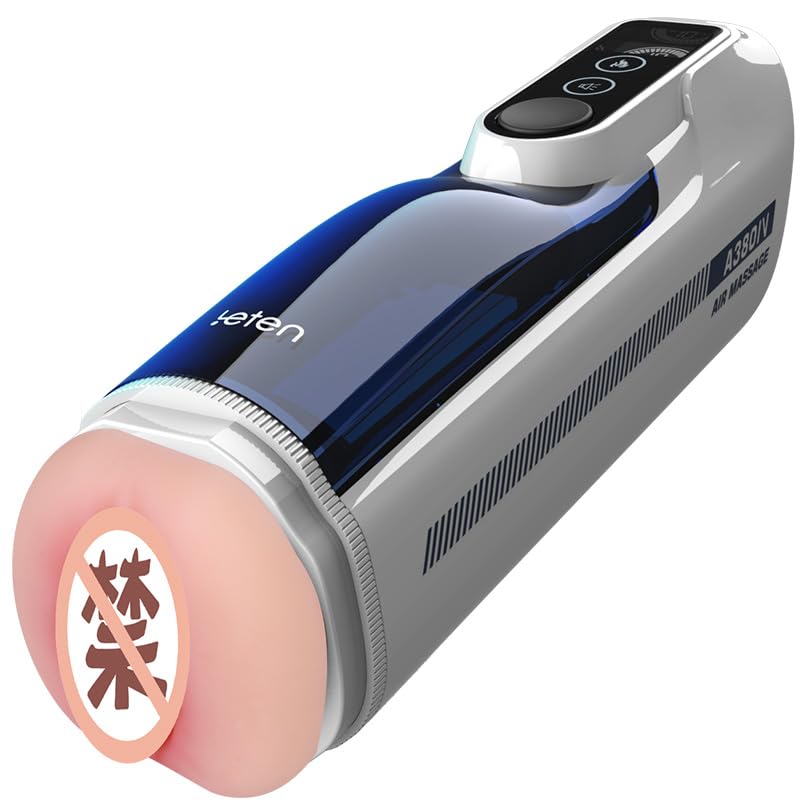
Figure 1.1: The Thunder A380-4 device, showcasing its white and navy blue design.
2. Důležité bezpečnostní informace
Pro zajištění bezpečného provozu a prevenci zranění nebo poškození dodržujte prosím následující bezpečnostní opatření:
- Do not immerse the electronic components of the device in water.
- Udržujte zařízení mimo dosah dětí.
- Pokud pocítíte jakékoli nepohodlí nebo bolest, okamžitě přestaňte přípravek používat.
- Consult a healthcare professional if you have any pre-existing medical conditions before using this device.
- Prohlášení týkající se doplňků stravy nebyla hodnocena FDA a jejich účelem není diagnostikovat, léčit, léčit nebo předcházet jakékoli nemoci nebo zdravotnímu stavu.
- Používejte pouze dodaný nabíjecí kabel a adaptér.
- Přístroj skladujte na chladném a suchém místě mimo dosah přímého slunečního záření a extrémních teplot.
3. Obsah balení
Ověřte, zda jsou v balení přítomny všechny položky:
- Thunder A380-4 Electronic Personal Massager Unit
- USB nabíjecí kabel
- Uživatelská příručka

Figure 3.1: The Thunder A380-4 device displayed alongside its retail packaging.
4. Konec produktuview
The Thunder A380-4 is an electronic personal massager featuring a white and navy blue exterior with a digital control interface. It is designed for comfortable handling and offers multiple intensity settings and customizable modes.
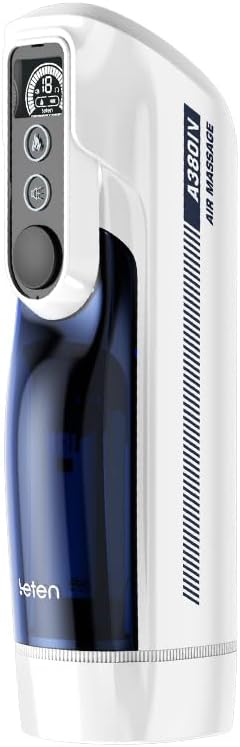
Obrázek 4.1: Detailní čelní strana view of the Thunder A380-4, highlighting the digital display and control buttons.
4.1 Klíčové vlastnosti
- Digital Control Interface: Intuitive operation with an LED display.
- Více nastavení: Adjustable intensity and pattern modes.
- Nabíjecí: Bezdrátový provoz pro pohodlí.
- Ergonomický design: Comfortable grip for ease of use.

Figure 4.2: An illustration of the internal mechanism of the A380-4, demonstrating its operational structure.
5. Nastavení
5.1 Nabíjení zařízení
Before first use, fully charge the device. The device features a rechargeable battery for cordless operation.
- Najděte nabíjecí port na zařízení.
- Connect the provided USB charging cable to the device and a compatible USB power source (e.g., wall adapter, computer USB port).
- The digital display will indicate the charging status. A full charge typically takes approximately [Insert Charging Time, if known, otherwise omit].
- Po úplném nabití odpojte nabíjecí kabel.
5.2 Počáteční příprava
Before the first use, clean the device according to the 'Maintenance and Care' section to ensure hygiene.
6. Návod k obsluze
6.1 Zapnutí/vypnutí
- To power on the device, press and hold the power button (usually indicated by a power symbol) on the control panel.
- The digital display will illuminate, indicating the device is active.
- Chcete-li zařízení vypnout, znovu stiskněte a podržte tlačítko napájení, dokud se displej nevypne.
6.2 Úprava nastavení
The device features a digital interface for adjusting various settings:

Obrázek 6.1: Podrobný view of the device's digital interface, including power, mode, and intensity buttons.
- Ovládání intenzity: Use the '+' and '-' buttons to increase or decrease the intensity level. The current level will be shown on the digital display.
- Výběr režimu: Press the 'Mode' button (or similar icon) to cycle through available operational modes or patterns. Each press will switch to a different mode, which will be indicated on the display.
- Air Pressure/Temperature Control: If applicable, use dedicated buttons to activate or adjust air pressure or temperature settings. Refer to the display for current status.

Figure 6.2: The digital display indicating current operational settings and battery level.
6.3 Použití
Position the device as desired and adjust settings to your preference. The ergonomic design ensures a comfortable grip during use.
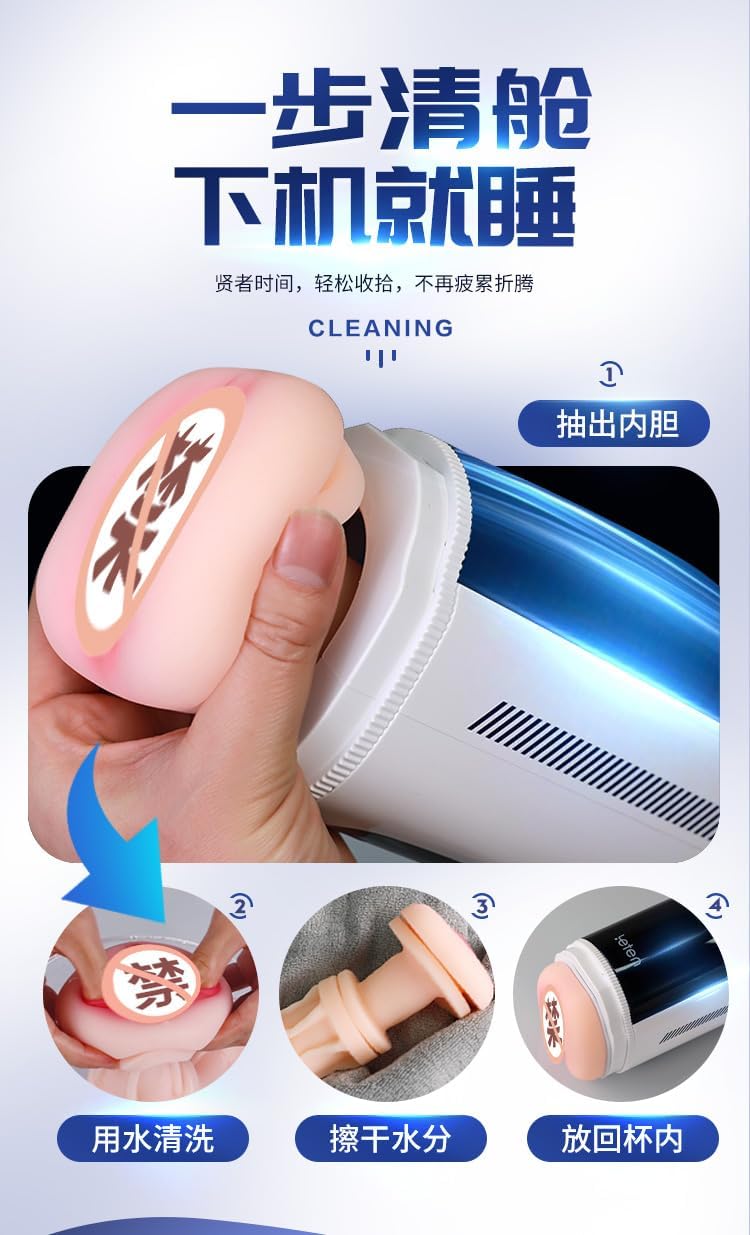
Figure 6.3: An animated diagram depicting the internal piston movement and rotation features of the device.
7. Údržba a péče
7.1 Čištění
Proper cleaning after each use is essential for hygiene and device longevity.
- Ujistěte se, že je zařízení vypnuté a odpojené od jakéhokoli zdroje nabíjení.
- Carefully remove the inner sleeve from the main unit.
- Wash the inner sleeve thoroughly with mild soap and warm water.
- Rinse the sleeve completely to remove all soap residue.
- Allow the inner sleeve to air dry completely before reinserting it into the main unit.
- Otřete vnější povrch hlavní jednotky čisticím prostředkem.amp hadříkem. Nepoužívejte abrazivní čisticí prostředky ani neponořujte hlavní jednotku do vody.

Figure 7.1: Visual instructions demonstrating the cleaning process, including removal of the inner sleeve, washing, drying, and reinsertion.
7.2 Skladování
Store the device in a cool, dry place, away from direct sunlight and extreme temperatures. Ensure it is clean and fully dry before storage.
8. Řešení problémů
If you encounter any issues with your device, refer to the table below for common problems and solutions:
| Problém | Možná příčina | Řešení |
|---|---|---|
| Zařízení se nezapne. | Slabá baterie nebo žádný proud. | Zařízení plně nabijte pomocí dodaného kabelu USB. |
| Zařízení přestane fungovat během používání. | Baterie je vybitá. | Nabijte zařízení. |
| Ovládací prvky nereagují. | Dočasná softwarová závada. | Vypněte zařízení, počkejte několik sekund a poté jej znovu zapněte. |
| Snížený výkon. | Device requires cleaning. | Clean the device thoroughly as per the 'Maintenance and Care' section. |
9. Specifikace
| Funkce | Detail |
|---|---|
| Rozměry produktu | 3.46 x 12.68 x 4.13 palce; 3.31 libry |
| Baterie | Vyžaduje 1 12V baterii (součástí balení) |
| Výrobce | Leten |
| ASIN | B0F3864Z9P |
| Barva | Černá/Modrá |
| Materiál | ABS plast |
| Značka | Obecný |
| Název modelu | Thunder Cannon King Luxury Edition (A380-4) |
| Styl | Elektronický |
10. Záruka a podpora
This product comes with a standard manufacturer's warranty. For specific warranty details, please refer to the packaging or contact the retailer where the product was purchased. For technical support or further assistance, please contact the manufacturer's customer service.


