
1. Úvod
The Sandberg Survivor DAB Radio All-in-1 4500, Model 421-17, is a versatile and robust portable radio designed for various environments. It features DAB, FM, and AM radio reception, a built-in flashlight, and multiple power options including solar charging. This manual provides detailed instructions for setup, operation, maintenance, and troubleshooting to ensure optimal performance of your device.
2. Konec produktuview
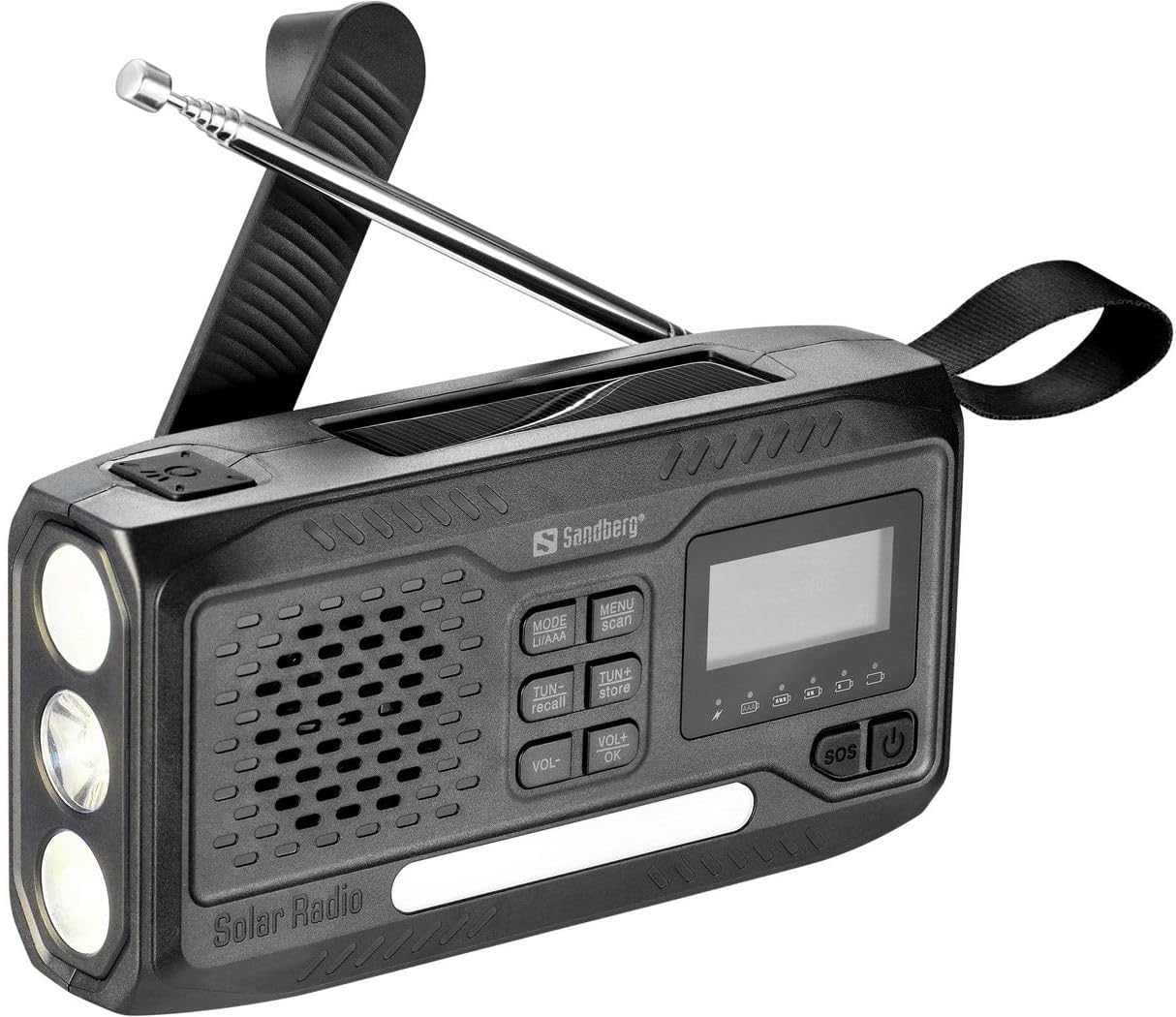
Obrázek 1: Přední strana view of the Sandberg Survivor DAB Radio All-in-1 4500.
The Sandberg Survivor DAB Radio All-in-1 4500 is a multi-functional device. The front panel (as shown in Figure 1) features a speaker grille, a digital display, and an array of control buttons. On the left side, three LED bulbs serve as a flashlight. An extendable telescopic antenna is located at the top for enhanced radio reception. A durable carrying strap is attached to the right side for portability.
Klíčové komponenty:
- Digitální displej: Shows radio frequency, mode, battery status, and other relevant information.
- Ovládací tlačítka:
- MODE (LI/AAA): Switches between radio bands (DAB, FM, AM) and potentially battery types.
- MENU (scan): Accesses menu options and initiates station scanning.
- TUN- (recall): Tunes down frequency or navigates menu; recalls stored stations.
- TUN+ (store): Tunes up frequency or navigates menu; stores stations.
- HLASITOST- / HLASITOST+: Adjusts volume levels.
- OK: Potvrzuje výběry v nabídce.
- SOS: Activates emergency alarm/light function.
- Vypínač: Zapíná nebo vypíná zařízení.
- Reproduktor: Pro audio výstup.
- Svítilna: Three LED lights for illumination.
- Teleskopická anténa: Pro lepší příjem rádiového signálu.
- Solární panel: (Located on top, not visible in this specific image but indicated by 'Solar Radio' text) For solar charging.
- Pomocný port: For connecting external audio devices (e.g., headphones, smartphones, MP3 players).
3. Nastavení
3.1 Počáteční nabíjení
Before first use, fully charge the internal rechargeable battery. Connect the radio to a USB power source using a compatible cable (not specified if included, assume standard USB). The charging indicator on the display will show progress. Alternatively, place the radio with its solar panel facing direct sunlight for solar charging.
3.2 Prodloužení antény
For optimal radio reception, fully extend the telescopic antenna when listening to FM or DAB radio. For AM reception, the internal antenna is typically sufficient, but adjusting the radio's orientation may improve signal.
4. Návod k obsluze
4.1 Zapnutí/vypnutí
Stiskněte a podržte Moc button (⏻) located on the right side of the control panel to turn the radio on or off.
4.2 Radio Functions (DAB/FM/AM)
- Vyberte režim: Stiskněte tlačítko MODE button repeatedly to cycle through DAB, FM, and AM radio bands. The selected mode will be displayed on the screen.
- Vyhledávání stanic: V režimu DAB nebo FM stiskněte tlačítko MENU button, then select 'Scan' (if available) or press and hold the MENU/scan tlačítko pro automatické prohledávání a ukládání dostupných stanic.
- Ruční ladění: Použijte KÁĎ- a TUN+ buttons to manually tune to specific frequencies.
- Uložit předvolby: To store a station, tune to the desired frequency, then press and hold the TUN+ (store) button. Follow the on-screen prompts to select a preset number and confirm with OK.
- Vyvolat předvolby: Chcete-li vyvolat uloženou stanici, stiskněte tlačítko TUN- (recall) tlačítko a použijte KÁĎ- or TUN+ to navigate through your presets. Confirm with OK.
4.3 Ovládání hlasitosti
Upravte úroveň zvukového výstupu pomocí VOL- a VOL+ tlačítka.
4.4 Funkce svítilny
The radio is equipped with a flashlight. The activation method is typically a dedicated button or a long press of the power button when the radio is off. Refer to the quick start guide for the exact flashlight activation sequence.
4.5 Funkce SOS
V případě nouze stiskněte tlačítko SOS button. This will typically activate a loud siren and a flashing light to attract attention. Press the SOS znovu stiskněte tlačítko pro deaktivaci.
4.6 Pomocný vstup
Connect headphones, a smartphone, or an MP3 player to the auxiliary port (usually a 3.5mm jack) to listen to audio privately or from an external source. When an auxiliary device is connected, the radio's internal speaker may be muted.
5. Údržba
- Čištění: Use a soft, dry cloth to clean the radio's exterior. Avoid abrasive cleaners or solvents.
- Péče o baterie: To prolong battery life, avoid fully discharging the battery frequently. If storing the radio for an extended period, charge it to approximately 50% and recharge every few months.
- Skladování: Rádio skladujte na chladném a suchém místě mimo dosah přímého slunečního záření a extrémních teplot.
6. Řešení problémů
| Problém | Možná příčina | Řešení |
|---|---|---|
| Rádio se nezapne. | Baterie je vybitá. | Charge the radio using a USB power source or solar panel. |
| Špatný příjem rádia. | Anténa není vysunutá, slabý signál, rušení. | Plně vysuňte teleskopickou anténu. Přemístěte rádio na místo s lepším signálem. Vyhněte se zdrojům elektronického rušení. |
| Z reproduktoru není slyšet žádný zvuk. | Hlasitost je příliš nízká, připojena sluchátka. | Increase volume using VOL+. Disconnect any headphones from the auxiliary port. |
| Tlačítka nereagují. | Dočasná softwarová závada. | Try turning the radio off and on again. If possible, perform a factory reset (refer to specific product documentation if available). |
7. Specifikace
- Značka: Sandberg
- Číslo modelu: 421-17
- Technologie připojení: Pomocný
- Technologie ladění: DAB
- Podporovaná rádiová pásma: AM/FM
- Kompatibilní zařízení: Headphones, smartphone, MP3 player
- Dobíjecí baterie: Ano
- Barva: Černý
8. Záruka a podpora
For warranty information and technical support, please refer to the documentation provided with your purchase or visit the official Sandberg webUschovejte si doklad o koupi pro případné reklamace.