
Zavedení
This manual provides detailed instructions for the installation, operation, and maintenance of your Multi-Language DS-KV6113-WPE1 IP Doorbell. Please read this manual thoroughly before using the device to ensure proper functionality and safety.
Konec produktuview
The DS-KV6113-WPE1 IP Doorbell is a multi-language, WiFi-enabled video intercom system designed for enhanced home security and communication. It features a waterproof design, IC card unlock capability, and supports direct calls to HIK-CONNECT without an indoor monitor.

Image: The DS-KV6113-WPE1 IP Doorbell unit shown with six yellow IC card key fobs. The doorbell unit is black and silver, enclosed in a clear protective rain cover.
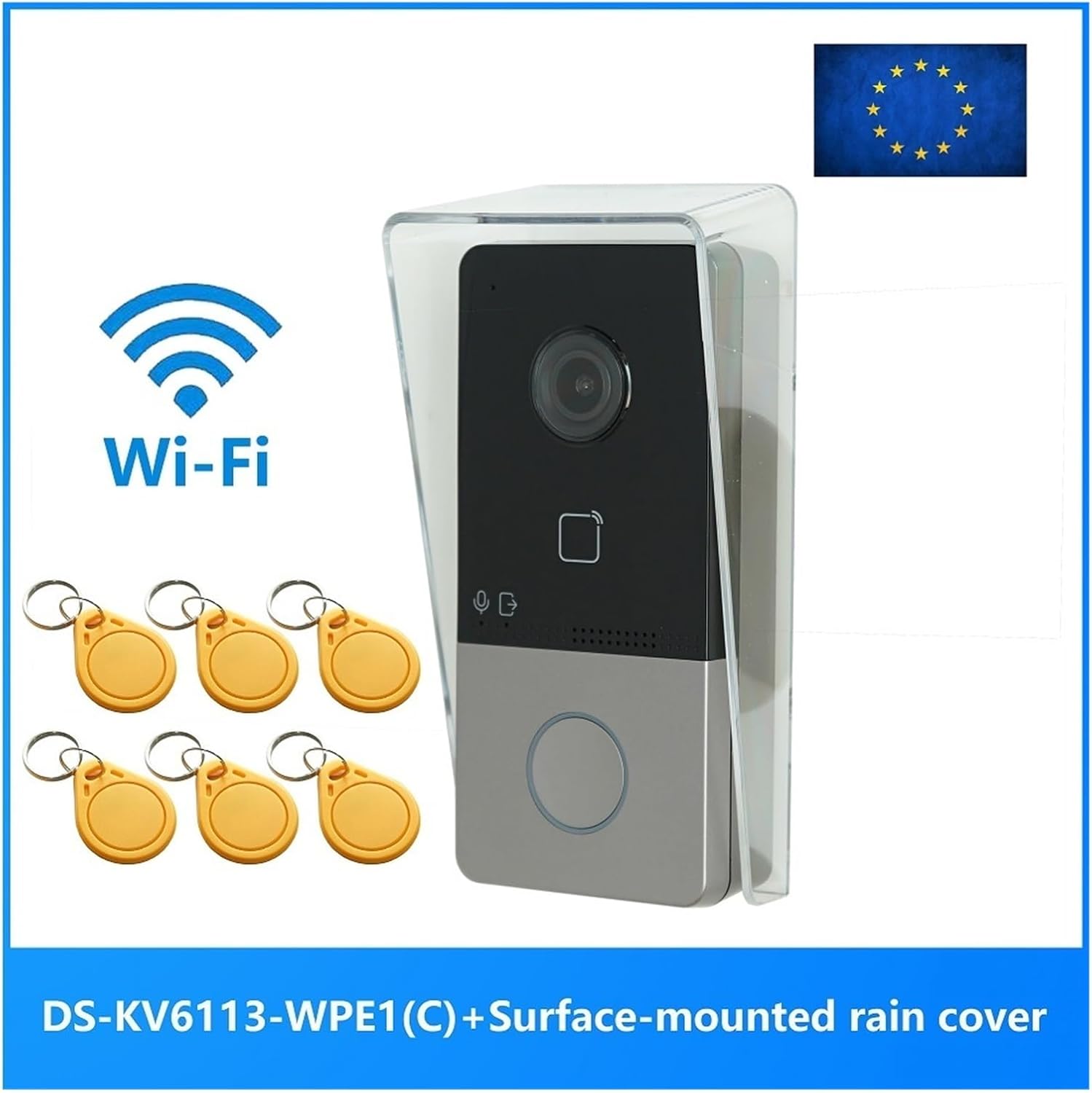
Image: The DS-KV6113-WPE1 IP Doorbell unit with a prominent Wi-Fi logo and the text "DS-KV6113-WPE1 (C) + Surface-mounted rain cover" indicating its features and included accessories. An EU flag is visible in the top right corner.
Obsah balení
Ověřte, zda jsou v balení přítomny všechny položky:
- DS-KV6113-WPE1 IP Doorbell Unit
- Surface-mounted rain cover
- IC Card Key Fobs (quantity may vary)
- Montážní šrouby a kotvy
- Stručný průvodce (pokud je k dispozici)
Specifikace
| Kategorie | Parametr | Hodnota |
|---|---|---|
| Systémové parametry | Operační systém | Vestavěný Linux |
| ROM | 32 MB | |
| BERAN | 256 MB | |
| CPU | Embedded MCU Processor | |
| Parametry videa | Resolution (Main Stream) | 1920 × 1080p, 720p |
| Resolution (Sub Stream) | 704 × 576 | |
| FOV | Horizontální: 131°, Vertikální: 78° | |
| WDR | Skutečné WDR | |
| Doplňkové světlo | IR supplement | |
| Komprese videa | H.264 | |
| Audio parametry | Komprese zvuku | G.711 U |
| Zvukový vstup | Vestavěný všesměrový mikrofon | |
| Zvukový výstup | Vestavěný reproduktor | |
| Kvalita zvuku | Potlačení hluku a potlačení ozvěny | |
| Kapacita | Uživatelská kapacita | 2000 |
| Kapacita karty | 10000 | |
| Síťové parametry | Komunikační protokol | TCP/IP, RTSP |
| Kabelová síť | 10 / 100 Mbps Ethernet | |
| Fyzikální specifikace | Rozměry (cca) | 149.78 mm (V) x 79.56 mm (Š) x 48.63 mm (H) |
| Hodnocení voděodolnosti | Ano |

Obrázek: Boční view of the DS-KV6113-WPE1 IP Doorbell with its clear rain cover, showing approximate dimensions: 149.78mm in height and 79.56mm in width.

Obrázek: Přední strana view of the DS-KV6113-WPE1 IP Doorbell, highlighting the camera lens, IC card reader area, microphone, speaker, and call button.

Image: Angled side profile of the DS-KV6113-WPE1 IP Doorbell, showing the depth of the unit and the clear protective cover.
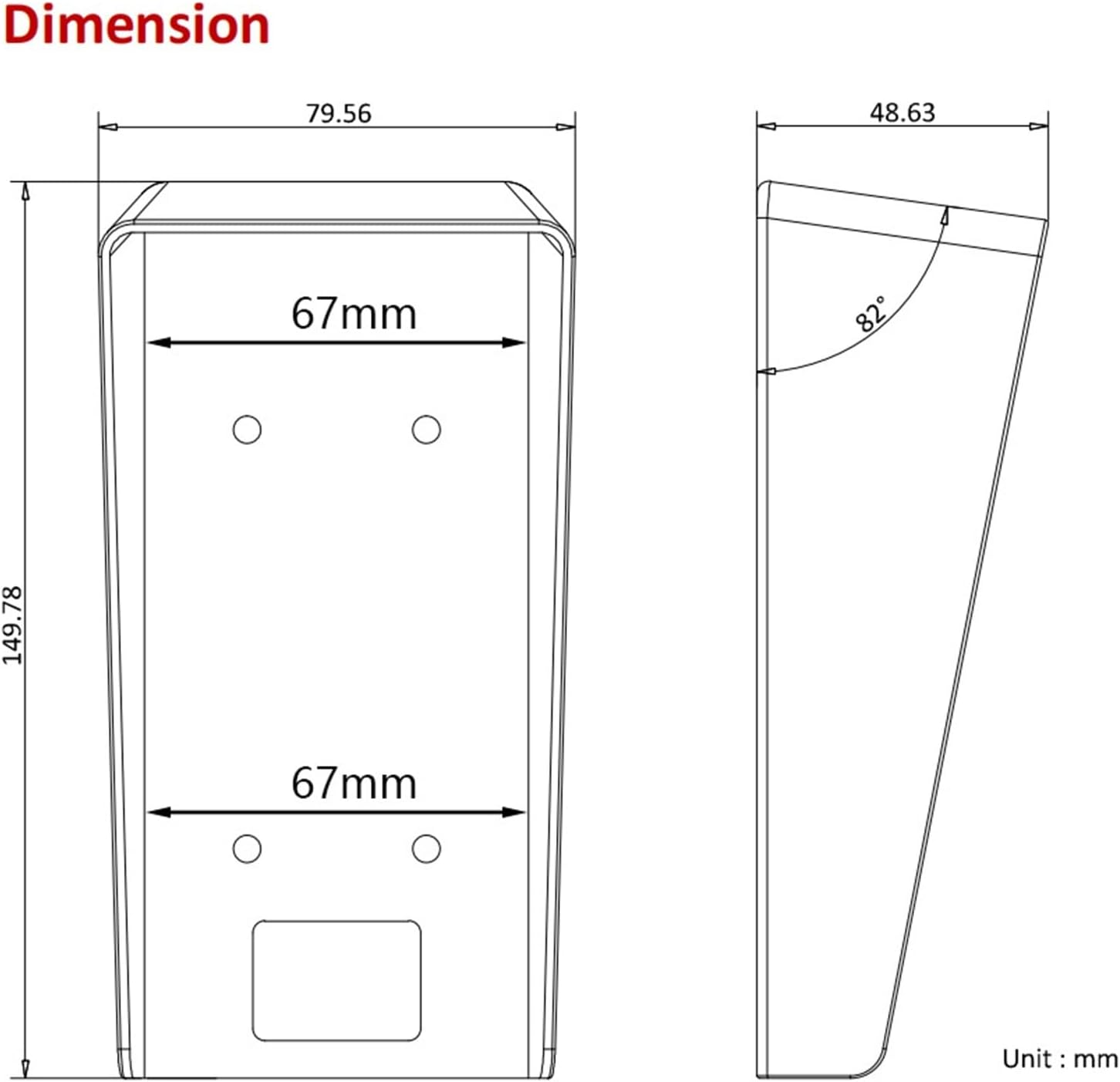
Image: Technical diagram showing the top and side dimensions of the DS-KV6113-WPE1 IP Doorbell unit, including measurements like 79.56mm width, 149.78mm height, and a 82° angle for the rain cover.

Obrázek: Zadní view of the DS-KV6113-WPE1 IP Doorbell, displaying the various ports (power, RS485, alarm in, lock, LAN) and overall dimensions of 138mm height, 65mm width, and 27mm depth for the main body.
Nastavení a instalace
1. Výběr lokality
Choose a suitable location for installation, typically near the main entrance. Ensure the area is protected from direct heavy rain and extreme temperatures, although the unit is waterproof.
2. Montáž jednotky
- Mark the drilling points on the wall using the mounting template (if provided) or by holding the rain cover in place.
- Vyvrtejte otvory a vložte do nich hmoždinky.
- Secure the surface-mounted rain cover to the wall using the provided screws.
- Carefully insert the DS-KV6113-WPE1 doorbell unit into the rain cover, ensuring it clicks securely into place.
3. Připojení vodičů
Connect the necessary cables to the ports on the rear of the unit:
- Moc: Connect to a suitable power supply. This unit supports PoE (Power over Ethernet) if connected to a compatible PoE switch.
- LAN: Pro připojení k pevné síti připojte ethernetový kabel.
- Zámek: Connect to an electronic door lock for remote unlock functionality.
- Alarm In: Connect to external alarm sensors if desired.
- RS485: For advanced communication with other devices (if applicable).
4. Konfigurace sítě (Wi-Fi)
For WiFi connectivity:
- Zapněte zařízení.
- Access the device's configuration interface via a connected PC or mobile app.
- Navigate to the network settings and select your WiFi network.
- Enter the WiFi password and save the settings.
Návod k obsluze
1. Uskutečnění hovoru
To initiate a call, a visitor presses the call button on the doorbell unit. The call will be routed to your configured indoor monitor or the HIK-CONNECT mobile application.
2. Přijetí hovoru
Když je přijat hovor:
- Na vnitřním monitoru: Tap the answer button to establish two-way audio and video communication.
- On HIK-CONNECT App: Accept the incoming call notification to view the live feed and communicate with the visitor.
3. Odemčení dveří
During an active call, you can unlock the connected door remotely:
- On Indoor Monitor/App: Locate and tap the unlock icon. Confirm the action if prompted.
4. Odemknutí IC karty
To unlock the door using an IC card:
- Ensure IC cards are registered with the doorbell system. Refer to the system's administration guide for card registration procedures.
- Present a registered IC card to the card reader area on the doorbell unit.
- The door will unlock momentarily upon successful card recognition.
5. Nastavení jazyka
Zařízení podporuje více jazyků. Chcete-li jazyk změnit:
- Access the device's settings menu (via indoor monitor or app).
- Navigate to "System Settings" or "Language".
- Select your preferred language from the available options (English, French, Portuguese, Spanish, Russian, German, Italian, Polish, Arabic, Turkish, Vietnamese, Hungarian, Dutch, Romanian, Czech, Bulgarian, Ukrainian, Croatian, Serbian, Greek, Slovenian, Portuguese (Brazil), Estonian, Finnish, Hebrew, Lithuanian, Latvian, Mongolian, Norwegian, Slovak, Danish, Traditional Chinese, Uzbek, Kazakh).
Údržba
- Čištění: Regularly wipe the camera lens and front panel with a soft, damp hadříkem. Nepoužívejte abrazivní čisticí prostředky ani rozpouštědla.
- Aktualizace firmwaru: Periodically check for official firmware updates to ensure optimal performance and security. Updates can typically be performed via the HIK-CONNECT app or web rozhraní.
- Ochrana životního prostředí: While waterproof, avoid prolonged exposure to extreme weather conditions or direct high-pressure water jets.
Odstraňování problémů
Žádné napájení / Zařízení se nezapíná
- Zkontrolujte všechna připojení napájení.
- Ensure the power adapter or PoE switch is functioning correctly.
No Video / Poor Video Quality
- Verify network connectivity (wired or WiFi).
- Vyčistěte čočku fotoaparátu.
- Check network bandwidth and signal strength for WiFi.
Žádný zvuk / Špatná kvalita zvuku
- Ujistěte se, že mikrofon a reproduktor nejsou zakryty.
- Check audio settings in the device configuration.
- Ověřte stabilitu sítě.
IC Card Not Unlocking Door
- Ensure the IC card is properly registered with the system.
- Verify the card is being presented correctly to the reader.
- Check the connection to the electronic door lock.
Nelze se připojit k Wi-Fi
- Zkontrolujte znovu heslo k Wi-Fi.
- Ensure the doorbell is within range of your WiFi router.
- Restart the doorbell unit and your WiFi router.
Informace o záruce
Tento produkt je dodáván s a Záruka 3 měsíců od data nákupu. Tato záruka se vztahuje na výrobní vady a poruchy při běžném používání. Nevztahuje se na škody způsobené nesprávným použitím, nehodami, neoprávněnými úpravami nebo nesprávnou instalací.
For warranty claims, please contact your retailer or the manufacturer with your proof of purchase.
Zákaznická podpora
For further assistance or technical support, please refer to the official website of the manufacturer or contact their customer service department. Keep your product model number (DS-KV6113-WPE1) and purchase details ready when seeking support.