
Tuya Smart WiFi Video Doorbell
Tuya Smart WiFi Video Doorbell User Manual
Model: Tuya Smart WiFi Video Doorbell
1. Úvod
This manual provides comprehensive instructions for the installation, operation, and maintenance of your Tuya Smart WiFi Video Doorbell. Please read this manual thoroughly before using the product to ensure proper functionality and safety.
The Tuya Smart WiFi Video Doorbell is designed to enhance your home security with features such as 1080P/3MP video, two-way audio, PIR motion detection, and remote access via smartphone applications.
2. Vlastnosti produktu
- 4.3-inch high-definition LCD screen for clear indoor viewIng.
- 1080P (2MP) or 3MP (2304×1296 Pixels) video resolution options.
- Built-in 5000mAh rechargeable lithium battery for extended standby time (up to 6 months).
- PIR motion detection with automatic capture and alarm notifications.
- Two-way audio communication with noise cancellation.
- Infrared (IR) LEDs for clear night vision.
- Support for multiple mobile applications: Tuya, Smart Life, YCC365 Plus, iCam365.
- Local storage via TF card (up to 128GB, FAT32 format required) and cloud storage function.
- Quick access via app, waking up within 3 seconds and responding within 1 second.
- Easy installation with WiFi connection, no complex wiring required.
3. Obsah balení
Ověřte, zda jsou všechny níže uvedené položky součástí balení. Pokud některé položky chybí nebo jsou poškozené, kontaktujte zákaznickou podporu.
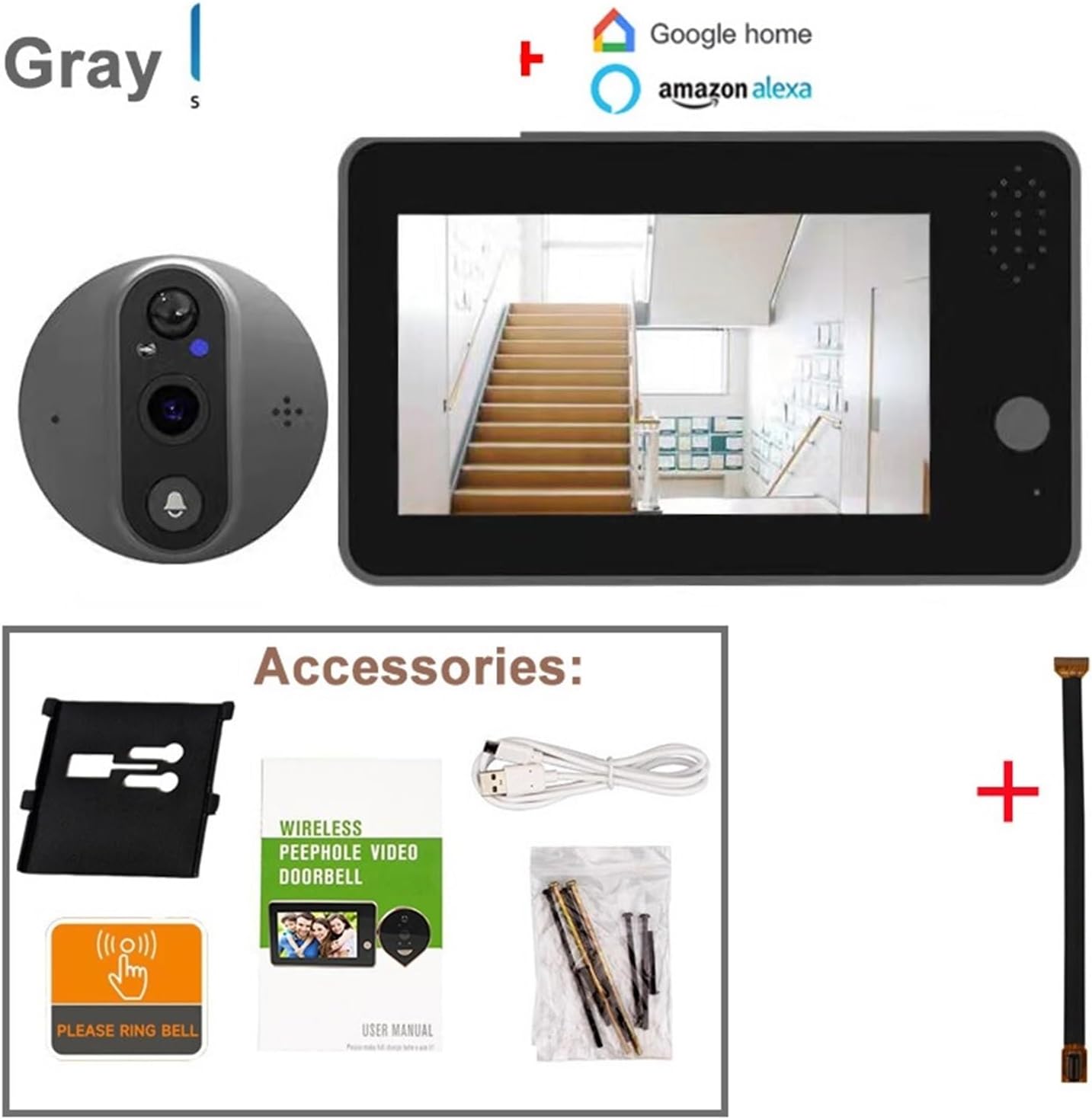
Image: The package includes the indoor monitor, outdoor doorbell unit, mounting bracket, USB charging cable, screws, a 'Please Ring Bell' sticker, and the user manual. An extension cable is also shown.
- Vnitřní monitorovací jednotka (s 4.3palcovým LCD displejem)
- Outdoor Doorbell Unit (Peephole Camera)
- Montážní konzola
- USB nabíjecí kabel
- Montážní šrouby a kotvy
- "Please Ring Bell" Sticker
- Uživatelská příručka
- Extension Cable (for connecting indoor and outdoor units)
4. Konec produktuview a Rozměry
Familiarize yourself with the components and dimensions of your video doorbell system.

Image: This diagram shows the indoor monitor with its screen, button, and speaker. The outdoor unit displays the PIR motion detector, speaker, microphone, IR lamp, and doorbell button. Dimensions for both units are provided, indicating the indoor monitor is approximately 137mm x 84mm x 20mm, and the outdoor unit is 67mm x 67mm x 15mm with a 55mm peephole extension.
Indoor Monitor Unit:
- 4.3 inch LED Screen: Zobrazuje se živě view a nahrané jídlotage.
- Tlačítko na obrazovce: Pro navigaci a výběr.
- Reproduktor: For two-way audio and alerts.
- Slot pro kartu Micro SD / TF: Pro lokální ukládání videa (podporuje až 128 GB, formát FAT32).
- Micro USB port: Pro nabíjení vestavěné baterie.
- Vypínač napájení: Pro zapnutí nebo vypnutí zařízení.
Venkovní zvonek:
- PIR Motion Detect Sensor: Detekuje lidský pohyb.
- Reproduktor: Pro obousměrný zvuk.
- MIKROFON (Mikrofon): Pro obousměrný zvuk.
- IR Lamp: Infračervené světlo pro noční vidění.
- Tlačítko zvonku: Activates the doorbell and initiates a call.
5. Instalační příručka
Follow these steps carefully to install your Tuya Smart WiFi Video Doorbell.
5.1 Kontrola kompatibility
- The doorbell is suitable for door thicknesses between 40 mm a 120 mm.
- The peephole diameter should be between 16 mm a 50 mm.
- The cable installation length is 11 cm.
- Nevhodné pro: double doors, doors with small windows or steel mesh, soft-packed doors, or doors without existing peepholes (a peephole must be drilled if none exists).
5.2 Fyzická instalace
- Odstraňte stávající kukátko: Carefully unscrew and remove your current peephole viewod dveří.
- Insert Outdoor Unit: Insert the cable of the outdoor doorbell unit through the peephole hole from the outside of the door. Ensure the unit is flush against the door.
- Připevněte montážní držák: From the inside of the door, thread the mounting bracket onto the cable. Secure it with the provided screws, ensuring it is tight and stable.
- Připojení vnitřního monitoru: Connect the cable from the outdoor unit to the corresponding port on the back of the indoor monitor.
- Montáž vnitřního monitoru: Slide the indoor monitor onto the mounting bracket until it clicks securely into place.
5.3 Initial Power Up and Charging

Image: This image highlights the built-in 5000mAh rechargeable lithium battery, emphasizing its low power consumption and power-saving design, allowing for a standby time of approximately 3 months on a single charge.
The device comes with a built-in 5000mAh lithium battery. Before first use, fully charge the device using the provided USB cable and a standard USB power adapter (not included).
- Connect the USB cable to the Micro USB port on the indoor monitor.
- Připojte druhý konec ke zdroji napájení USB.
- Indikátor nabíjení bude ukazovat stav nabíjení.
- A full charge can last up to 6 months under normal usage conditions.
6. Nastavení aplikace a připojení k WiFi
To utilize the smart features, you need to connect the doorbell to your home WiFi network and set it up with a compatible mobile application.

Image: This graphic illustrates the doorbell's compatibility with various mobile applications including YCC365 Plus, Tuya, iCam365, and Smart Life. It also visually represents the two-way audio feature, allowing users to communicate with visitors remotely.
- Stáhnout aplikaci: Download and install one of the compatible applications: Tuya Smart, Chytrý život, YCC365 Plusnebo iCam365 z obchodu s aplikacemi vašeho chytrého telefonu (Google Play Store pro Android, Apple App Store pro iOS).
- Registrace/Přihlášení: Otevřete aplikaci a zaregistrujte si nový účet, nebo se přihlaste, pokud již nějaký máte.
- Přidat zařízení: Follow the in-app instructions to add a new device. Select "Video Doorbell" or "Smart Camera" category.
- WiFi připojení:
- The doorbell only supports 2.4GHz WiFi sítě. It is not compatible with 5GHz WiFi.
- If your router broadcasts both 2.4GHz and 5GHz networks, temporarily disable the 5GHz network during the initial setup process.
- Enter your 2.4GHz WiFi network name (SSID) and password when prompted by the app.
- The app will guide you through connecting the doorbell to WiFi, often involving scanning a QR code displayed on your phone screen with the doorbell camera.
- Kompletní nastavení: Once connected, you can name your device and configure additional settings within the app. You can re-enable your 5GHz WiFi network after successful connection.
7. Návod k obsluze
7.1 Živě View a obousměrný zvuk

Image: This image displays the complete video doorbell system, featuring the outdoor peephole camera unit and the indoor monitor. The monitor's screen shows a live feed, demonstrating its function as a door viewehm.
- Vnitřní monitor: Press the screen button on the indoor monitor to view živý přenos z venkovní kamery.
- Mobilní aplikace: Open the connected app on your smartphone. Select your doorbell device to access the live view.
- Obousměrný zvuk: Zatímco v přímém přenosu view or during a doorbell call, use the microphone icon in the app or on the indoor monitor (if available) to speak with the visitor. The doorbell's built-in speaker will transmit your voice, and its microphone will capture the visitor's response.
7.2 Doorbell Call Function
- When a visitor presses the doorbell button on the outdoor unit, the indoor monitor will ring and display the live view.
- Simultaneously, a notification will be sent to your connected smartphone app.
- You can answer the call from either the indoor monitor or your smartphone to engage in two-way communication.
7.3 PIR detekce pohybu

Image: This image details the Smart PIR Motion Detection feature, showing detection ranges (low sensitivity at 0.5m, middle at 1.5m, high at 3m). It also highlights the HD Night Vision with 3 high-power IR LED lights and the 3MP HD camera resolution.
- The built-in PIR sensor detects human movement near your door.
- Upon detection, the doorbell will automatically capture a picture or record a video clip.
- An alarm notification will be pushed to your mobile phone.
- You can adjust the sensitivity of the PIR detection (low, middle, high) within the app settings to minimize false alarms.
7.4 Noční vidění
- The doorbell is equipped with 2 or 3 high-power IR LEDs and a built-in IR-CUT filter.
- It automatically switches between day and night modes, providing clear visibility even in low-light or dark conditions.
8. Ukládání a přehrávání

Image: This graphic illustrates the two primary storage options: Micro TF Card for local video data and Cloud Storage Service. It notes that the Micro TF card needs to be purchased separately and that recorded videos can be viewed on the mobile app or exported to a computer, but not directly on the device's screen.
8.1 TF Card Storage (Local)
- The device supports a Micro TF card up to 128GB (not included).
- Důležité: The TF card must be formatted to FAT32. For cards above 64GB, you may need to convert the format on your computer.
- Vložte TF kartu do určeného slotu na vnitřním monitoru.
- Recorded videos (from doorbell presses or motion detection) will be saved to the TF card.
- TF card videos can be played back directly on the mobile app or exported to a computer for viewing. They cannot be played back on the device's screen.
8.2 Cloudové úložiště (volitelné)
- The doorbell supports cloud storage functionality. This service typically requires a subscription through the app.
- Cloud storage provides a secure backup of your video recordings.
- Tuya app supports 30-day cycle storage of cloud image messages. YCC365 Plus/iCam365 typically support 3 days of cloud storage.
- Cloud videos can be played back directly from the app.
8.3 Přehrávání
- Access recorded videos through the "Playback" or "History" section within your chosen mobile application.
- Můžete view historical records and abnormal situation captures at any time.
9. Údržba a péče
- Čištění: Use a soft, dry cloth to clean the indoor monitor and outdoor unit. Do not use abrasive cleaners or solvents.
- Baterie: Recharge the battery when the low battery indicator appears. Avoid completely draining the battery frequently to prolong its lifespan.
- Aktualizace firmwaru: Periodically check the app for firmware updates for your doorbell. Updates can improve performance and add new features.
- Provozní teplota: Ensure the device operates within its specified temperature range to prevent damage.
10. Řešení problémů
| Problém | Možná příčina | Řešení |
|---|---|---|
| Zařízení se nezapne. | Baterie je vybitá. | Nabijte zařízení pomocí kabelu USB. |
| Nelze se připojit k Wi-Fi. | Nesprávné pásmo WiFi (5 GHz). Nesprávné heslo k Wi-Fi. Slabý signál WiFi. | Ensure you are connecting to a 2.4GHz WiFi network. Temporarily disable 5GHz on your router during setup. Double-check password. Move router closer or use a WiFi extender. |
| No notifications on phone. | Oznámení aplikací jsou zakázána. Aplikace neběží na pozadí. Problémy se sítí. | Check app notification settings on your phone. Ensure app has necessary permissions. Verify internet connection. |
| PIR motion detection is too sensitive/not sensitive enough. | Nastavení citlivosti PIR. | Adjust PIR sensitivity (low, middle, high) in the app settings. |
| TF card not recognized or recording. | Incorrect format. Card full or faulty. | Ensure TF card is FAT32 formatted. Try reformatting or using a different card. |
| Špatná kvalita videa. | Lens obstruction. Slabé světelné podmínky. Network bandwidth. | Clean the camera lens. Ensure IR LEDs are not obstructed. Check your internet speed. |
11. Specifikace
| Funkce | Detail |
|---|---|
| Velikost displeje LCD | 4.3 palců |
| Image Sensor Solution | OV9712 CMOS Sensor + Hi3518E SoC |
| Ohnisková vzdálenost | 1.7 mm |
| Úhel View | 120 degrees wide angle |
| Zvuk | Built-in microphone & speaker, 2-way audio with noise cancellation |
| Komprese videa | H.265 |
| Rezoluce | 1920*1080P@25fps (2MP) or 2304x1296 (3MP) depending on model variant |
| Proud | Double stream |
| Baterie | Vestavěná lithiová baterie 5000mAh |
| Skladování | Max 128GB TF card (FAT32 format), Cloud storage |
| WiFi | pouze 2.4 GHz |
| Kompatibilita tloušťky dveří | 40-120 mm |
| Kompatibilita průměru kukátka | 16-50 mm |
| Výrobce | YUD5DAS |
| Země původu | Čína |
12. Záruka a podpora
Informace o záruce a technickou podporu získáte na kontaktních údajích poskytnutých vaším prodejcem nebo oficiálním zástupcem výrobce. webwebu. Uschovejte si účtenku jako doklad o koupi.
Manufacturer: YUD5DAS
Ask a question about this manual
Ask about setup, troubleshooting, compatibility, parts, safety, or missing instructions. Manuals+ will review the question and use this page’s manual context to help answer it.