
1. Úvod
This manual provides essential information for the setup, operation, maintenance, and troubleshooting of the EC Buying STM32H743XIH6 STM32 Development Board. Please read these instructions carefully before using the product to ensure proper functionality and to maximize its potential.
2. Konec produktuview
The STM32H743XIH6 Development Board is a high-performance core board designed for various embedded applications. It features a powerful STM32H743XIH6 microcontroller with a 480MHz main frequency, 2MB Flash memory, and 1M SRAM, complemented by 32MB SDRAM for enhanced data handling. The board offers extensive connectivity and expansion options, making it suitable for complex projects.
Klíčové vlastnosti:
- Mikrokontrolér: STM32H743XIH6 (480MHz, 2MB Flash, 1M SRAM)
- Externí paměť: 32MB SDRAM (16-bit wide), W25Q64 Flash
- Napájení: 5V via USB Type-C interface
- I/O porty: 83 general-purpose input/output (GPIO) ports
- Integrované komponenty: 3.3V objtage regulator, Reset button, BOOT button, User LED
- Rozhraní displeje: SPI LCD (0.96 to 2.0 inches), RGB LCD (larger than 4.3 inches)
- Rozhraní fotoaparátu: 8-bit DCMI driver compatible
- Provozní teplota: -40 °C až 85 °C
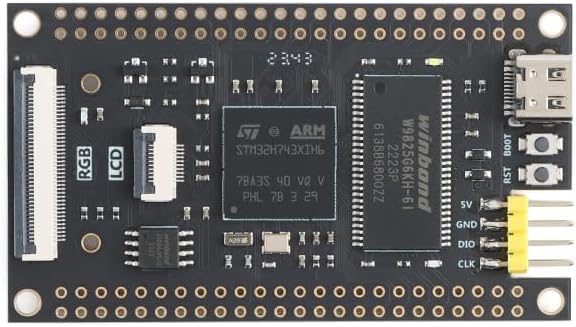
Obrázek 2.1: Nahoře view of the STM32H743XIH6 Development Board, highlighting key components.

Obrázek 2.2: Spodní část view of the STM32H743XIH6 Development Board, featuring expansion interfaces.
3. Pokyny k nastavení
Follow these steps to set up your STM32H743XIH6 Development Board:
- Připojení napájení: Connect the board to a 5V power source using a USB Type-C cable. The Type-C port is located on the board's edge. Ensure the power supply is stable.
- Instalace ovladače: Depending on your operating system and development environment, you may need to install specific USB drivers for the STM32 microcontroller. Refer to the STMicroelectronics official website or your chosen Integrated Development Environment (IDE) documentation for driver details.
- Nastavení vývojového prostředí: Install a suitable IDE such as STM32CubeIDE, Keil MDK, or IAR Embedded Workbench. These environments provide tools for compiling code, flashing firmware, and debugging.
- Periferní připojení: For connecting external components like SPI LCDs, RGB LCDs, or cameras, refer to the board's pinout diagram (if available from the seller) to identify the correct GPIO pins and interfaces. Ensure all connections are secure before powering on.
- Počáteční programování: Use the BOOT button and Reset button in conjunction with your IDE to enter programming mode and upload your first firmware. Typically, holding BOOT while pressing and releasing Resetujte a poté uvolněteasing BOOT, will put the board into DFU (Device Firmware Upgrade) mode.

Figure 3.1: STM32H743XIH6 Development Board with pin headers for expansion.
4. Návod k obsluze
Once the board is set up and programmed, its operation will depend on the specific application firmware loaded onto the microcontroller. General operational guidelines include:
- Zapnutí: Connect the USB Type-C cable to a 5V power source. The onboard user LED may illuminate, indicating power.
- Resetovací funkce: Press the Reset button to restart the microcontroller and execute the loaded program from the beginning.
- Ladění: Utilize the debugging features of your IDE, typically via a SWD (Serial Wire Debug) interface, to monitor program execution, set breakpoints, and inspect variables.
- Peripheral Interaction: Interact with connected peripherals (LCDs, sensors, etc.) as defined by your firmware.
5. Údržba
To ensure the longevity and reliable operation of your development board, observe the following maintenance practices:
- Zacházení: Handle the board by its edges to avoid touching sensitive components, which can be damaged by static electricity or contaminants.
- Skladování: Pokud desku nepoužíváte, skladujte ji v suchém a antistatickém prostředí.
- Čištění: V případě potřeby desku jemně očistěte měkkým, suchým kartáčem nebo stlačeným vzduchem, abyste odstranili prach. Nepoužívejte kapaliny ani abrazivní materiály.
- Podmínky prostředí: Operate the board within its specified temperature range of -40°C to 85°C. Avoid extreme humidity or direct exposure to moisture.
6. Řešení problémů
If you encounter issues with your STM32H743XIH6 Development Board, consider the following troubleshooting steps:
- Není napájení/LED dioda nesvítí:
- Verify the USB Type-C cable is securely connected to both the board and a functional 5V power source.
- Test the power source with another device to confirm it is supplying power.
- Deska nebyla počítačem rozpoznána:
- Ensure all necessary USB drivers are installed correctly on your computer.
- Zkuste jiný port USB nebo kabel.
- Confirm the board is in the correct mode (e.g., DFU mode for programming) if applicable.
- Program neběží:
- Check your code for errors and ensure it has been successfully compiled and flashed to the board.
- Press the Reset button to restart the program.
- Use debugging tools to step through your code and identify execution issues.
- Peripheral Not Functioning:
- Double-check all wiring connections to the peripheral.
- Verify that the peripheral is correctly initialized and configured in your firmware.
- Consult the peripheral's datasheet and any available pinout diagrams for the STM32H743XIH6 board.
For more detailed technical support or specific documentation, it is recommended to contact the seller or manufacturer directly.
7. Specifikace
| Funkce | Detail |
|---|---|
| Značka | EC Buying |
| Název modelu | STM32H743XIH6 |
| Procesor | STMicroelectronics ARMv7 (STM32H743XIH6) |
| Rychlost procesoru | 480 MHz |
| Flash paměť | 2 MB |
| SRAM | 1 MB |
| SDRAM | 32 MB (16-bit wide) |
| Externí blesk | W25Q64 |
| I/O porty | 83 |
| Napájení | 5V (via USB Type-C) |
| Konektivita | USB Type-C, SPI |
| Kompatibilní zařízení | SPI LCDs, Camera, RGB LCDs |
| Provozní teplota | -40 °C až 85 °C |
| Rozměry | Viz obrázek 7.1 |

Figure 7.1: STM32H743XIH6 Development Board dimensions.
8. Záruka a podpora
For warranty information, technical support, or to obtain additional documentation such as detailed pinout diagrams or example code, please contact EC Buying directly through their official channels or the platform where the product was purchased. Providing your product model number (STM32H743XIH6) and purchase details will assist in a quicker resolution.