
1. Úvod
This manual provides detailed instructions for the installation, operation, and maintenance of your VicoSafe VicoHome X81 Wireless Outdoor Security Camera. The X81 is a 2K battery-powered WiFi security camera designed for outdoor use, featuring smart motion detection, color night vision, two-way audio, and IP65 weatherproofing. Please read this manual thoroughly before using the product to ensure proper function and safety.
2. Co je v krabici
Ověřte, zda jsou v balení přítomny všechny komponenty:
- 1 × VicoHome X81 Wireless Security Camera
- 1 × montážní konzola
- Šrouby pro montáž
- 1 × nabíjecí kabel USB
- 1 × Stručný průvodce

Image: Contents of the VicoHome X81 package, including the camera, mounting bracket, and USB charging cable.
3. Konec produktuview
The VicoHome X81 camera is designed for robust outdoor surveillance. Key features include:
- 2K Ultra HD Video (5 MP): Zachycuje jasné a detailní snímky jídlatage.
- Plně barevné noční vidění: Poskytuje barevný obraz i za špatných světelných podmínek.
- Wire-Free & Battery-Powered: Rechargeable 9000mAh battery for flexible placement.
- Detekce pohybu s umělou inteligencí: Differentiates between people, vehicles, pets, and packages to reduce false alarms.
- Obousměrný zvuk: Umožňuje komunikaci v reálném čase prostřednictvím kamery.
- IP65 Odolnost proti povětrnostním vlivům: Navrženo tak, aby odolalo různým povětrnostním podmínkám.
- Cloud & SD Storage: Offers flexible options for video recording storage.
- Kompatibilní s Alexou: Integrates with Alexa-enabled devices for voice control and live viewIng.

Obrázek: Přední strana view of the VicoHome X81 camera, showing the lens, sensors, and dual antennas.
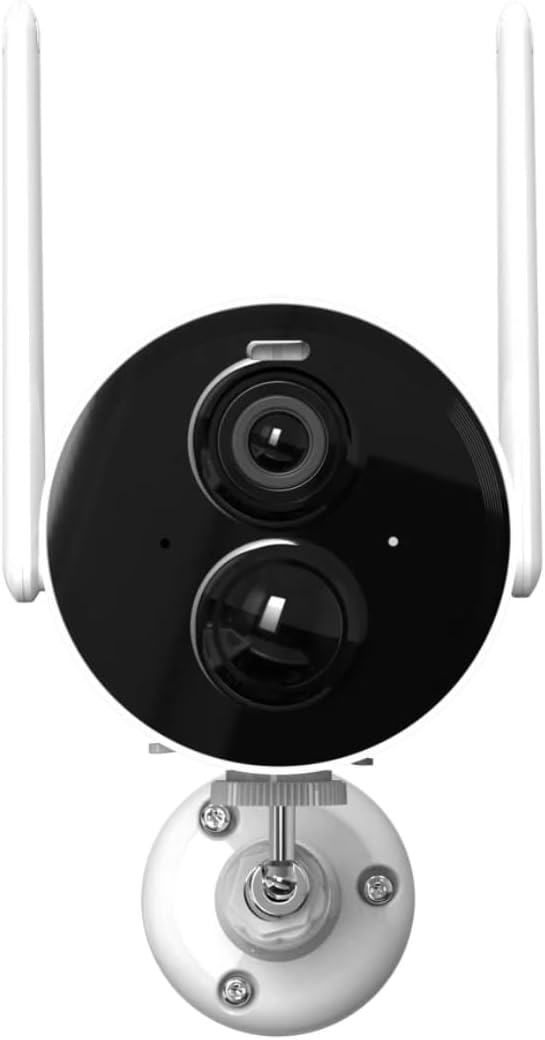
Image: The VicoHome X81 camera highlighting its wire-free design, large capacity battery, low power consumption, full-color day & night vision, and IP65 waterproof rating.
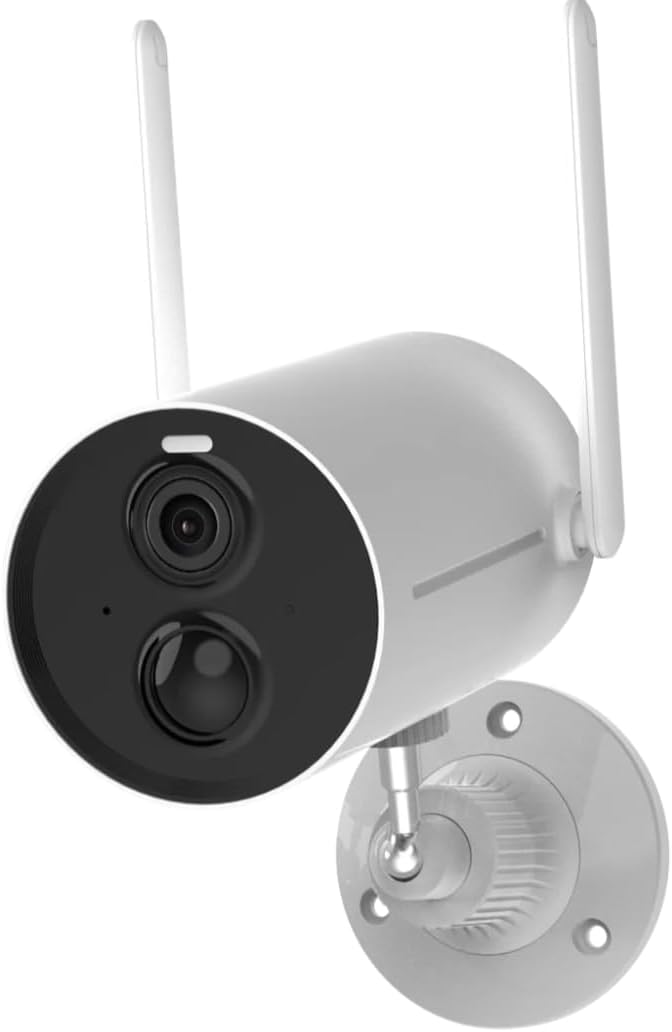
Image: The VicoHome X81 camera operating reliably in rainy conditions, illustrating its IP65 waterproof and dustproof capabilities.
4. Nastavení a instalace
4.1 Nabíjení fotoaparátu
Before initial use, fully charge the camera using the provided USB charging cable. Connect the cable to the camera's charging port and a standard USB power adapter (not included). The charging indicator light will show the charging status.
4.2 Stažení aplikace a vytvoření účtu
Download the "VicoHome" app from your smartphone's app store (iOS or Android). Follow the in-app instructions to create an account and log in.
4.3 Připojení k Wi-Fi
- Open the VicoHome app and tap "Add Device" or the "+" icon.
- Select your camera model (X81) from the list.
- Follow the on-screen prompts to connect the camera to your 2.4GHz Wi-Fi network. Note: The VicoHome X81 only supports 2.4GHz Wi-Fi, not 5GHz.
- Po zobrazení výzvy naskenujte QR kód zobrazený na telefonu objektivem fotoaparátu.
- Once connected, the camera will indicate successful pairing.
4.4 Montáž fotoaparátu
Choose a suitable outdoor location for mounting. Consider the desired viewing angle, Wi-Fi signal strength, and proximity to charging access if using a solar panel (sold separately).
- Position the mounting bracket against the wall or surface.
- Označte otvory pro šrouby.
- V případě potřeby vyvrtejte vodicí otvory.
- Upevněte montážní držák pomocí dodaných šroubů.
- Připevněte kameru k montážnímu držáku a podle potřeby upravte úhel.

Image: The VicoHome X81 camera securely mounted on an exterior wall, demonstrating its outdoor placement.
5. Ovládání fotoaparátu
5.1 Živě View a Nahrávání
Access the VicoHome app to view živé footage from your camera. You can manually record video or take screenshots directly from the live view rozhraní.
5.2 Detekce pohybu a upozornění
The X81 features advanced AI motion detection. Configure detection sensitivity and zones within the app. The camera can identify people, vehicles, pets, and packages, sending specific alerts to your smartphone.

Image: Diagram illustrating the AI Smart Technology of the VicoHome X81, showing detection capabilities for humans, pets, vehicles, and packages.

Obrázek: Přamples of smart push notifications from the VicoHome app, showing alerts for human activity, pet activity, package activity, and vehicle activity.
5.3 Obousměrný zvuk
Use the two-way audio feature to communicate with visitors or deter unwanted guests. Tap the microphone icon in the live view mluvit a poslouchat přes reproduktor kamery.
5.4 Noční vidění
The VicoHome X81 provides full-color night vision, offering clear and detailed images even in complete darkness. This is achieved through advanced infrared and white light technology.

Image: A comparison showing the difference between traditional infrared night vision (monochrome) and the VicoHome X81's full-color night vision, highlighting improved detail and color retention.
5.5 Možnosti úložiště
Kamera podporuje dva způsoby ukládání nahraných fotografiítage:
- Cloudové úložiště: Includes 3 days of rolling cloud video storage via the VicoHome app. Optional subscription plans are available for extended storage.
- Micro SD karta: Supports up to 128GB Micro SD card (not included). Insert the card into the designated slot on the camera.
5.6 Integrace s Alexou
To integrate with Alexa, enable the VicoHome skill in your Alexa app. You can then use voice commands to view živé přenosy na kompatibilních zařízeních s podporou Alexy.
6. Údržba
6.1 Správa baterie
The X81 camera is powered by a rechargeable battery. Monitor the battery level through the VicoHome app. Recharge the camera when the battery is low using the provided USB cable. For continuous power, a compatible solar panel (sold separately) can be connected.
6.2 Čištění
Pravidelně čistěte objektiv a kryt fotoaparátu měkkým hadříkemamp cloth to ensure optimal image quality and prevent debris buildup. Avoid using harsh chemicals or abrasive materials.
6.3 aktualizací firmwaru
Ensure your camera's firmware is up to date for the best performance and security. The VicoHome app will notify you of available updates. Follow the in-app instructions to perform firmware upgrades.
7. Řešení problémů
- Fotoaparát se nepřipojuje k Wi-Fi:
- Ujistěte se, že vaše Wi-Fi síť je 2.4 GHz. Kamera nepodporuje Wi-Fi 5 GHz.
- Zkontrolujte sílu signálu Wi-Fi v místě, kde se kamera nachází.
- Ověřte, zda je heslo k Wi-Fi zadané v aplikaci správné.
- Restartujte router a kameru.
- Špatná kvalita obrazu:
- Vyčistěte čočku fotoaparátu.
- Ensure adequate lighting for optimal color night vision.
- Zkontrolujte rychlost svého internetového připojení.
- Motion alerts are too frequent or not triggering:
- Adjust motion detection sensitivity in the VicoHome app.
- Configure detection zones to focus on specific areas.
- Ensure AI detection settings (human, vehicle, pet, package) are correctly configured.
- Rychlé vybíjení baterie:
- Frequent motion detection and live view usage can consume more battery.
- Ujistěte se, že je fotoaparát plně nabitý.
- Zvažte nákupasing a solar panel for continuous charging.
- Obousměrný zvuk nefunguje:
- Check microphone and speaker permissions for the VicoHome app on your smartphone.
- Ujistěte se, že mikrofon a reproduktor kamery nejsou nic blokovány.
- Verify volume settings in the app.
8. Specifikace
| Název modelu | VicoHome X81-Pro |
| Značka | VicoSafe |
| Rozlišení záznamu videa | 2K (5 MP effective still resolution) |
| Technologie připojení | 2.4 GHz Wi-Fi (IEEE 802.11b/g/n) |
| Zdroj napájení | Dobíjecí baterie (9000mAh) |
| Odolnost vůči povětrnostním vlivům | IP65 (vodotěsný a prachotěsný) |
| Noční vidění | Full-Color Night Vision, Infrared |
| Možnosti úložiště | Cloudové úložiště, karta Micro SD (až 128 GB, není součástí balení) |
| Zvuk | Obousměrný zvuk (vestavěný mikrofon a reproduktor) |
| Chytré funkce | AI Motion Detection (Human, Vehicle, Pet, Package), Alexa Compatible |
| Rozměry | 7.32 x 2.64 x 2.64 palce |
| Hmotnost | 1.76 libry |
Poznámka: Specifikace se mohou změnit bez předchozího upozornění.
9. Záruka a podpora
VicoSafe is committed to providing quality products and customer satisfaction. As an authorized VicoHome distributor, we offer dedicated customer support for the VicoHome X81 camera.
For technical assistance, troubleshooting, or warranty inquiries, please refer to the contact information provided in your Quick Start Guide or visit the official VicoSafe webstránky. Uschovejte si prosím doklad o koupi pro případ reklamace.