
1. Úvod
This manual provides essential information for setting up, operating, and maintaining your SVITOO 10-inch Android Tablet. Please read through these instructions carefully to ensure optimal performance and longevity of your device. This tablet is designed for a wide range of uses, from entertainment and learning to productivity, featuring an advanced Android 16 operating system and robust hardware.
2. Co je v krabici
Upon unboxing your SVITOO tablet, please verify that all the following items are included:
- Tablet (SVITOO 10-inch Android Tablet)
- Protective Cover Case with Magnetic Bracket
- Nabíjecí kabel USB-C
- Uživatelská příručka (tento dokument)
- Dárková krabička (obal)
Image: Contents of the SVITOO 10-inch Android Tablet packaging, showing the tablet, protective case, USB-C charging cable, and user manual.
Video: An unboxing video demonstrating the contents of the SVITOO 10-inch Android Tablet package, including the tablet, protective case, and charging accessories.
3. Nastavení
- Nabijte tablet: Before first use, fully charge the tablet using the provided USB-C cable and power adapter. Connect the USB-C cable to the tablet's charging port and the adapter to a power outlet.
- Zapnutí: Press and hold the Power ON/OFF button located on the top edge of the tablet until the screen lights up.
- Průvodce počátečním nastavením: Postupujte podle pokynů na obrazovce a dokončete počáteční nastavení. To obvykle zahrnuje:
- Výběr jazyka.
- Připojování k síti Wi-Fi.
- Přihlášení pomocí účtu Google (nebo vytvoření nového).
- Setting up screen lock (PIN, pattern, or facial recognition).
- Install MicroSD Card (Optional): If you wish to expand storage, insert a MicroSD card (up to 1TB, sold separately) into the dedicated slot on the side of the tablet.

Obrázek: Podrobný view of the SVITOO tablet's side, highlighting the USB-C port, headphone jack, volume buttons, power button, and MicroSD card slot.
Video: A demonstration of the SVITOO tablet's features, including its responsive touchscreen and pre-installed Google apps, showcasing the ease of initial setup and navigation.
4. Návod k obsluze
4.1 Základní navigace
- Gesta na dotykové obrazovce: Klepnutím vyberete, přejetím prstem posouváte, přiblížením rozevřením prstů.
- Domovská obrazovka: Access your apps and widgets. Swipe left or right to navigate between screens.
- Oznámení: Přejeďte prstem dolů z horní části obrazovky na view oznámení a rychlé nastavení.
- Nedávné aplikace: Tap the square (Recent Apps) button to view a přepínání mezi naposledy použitými aplikacemi.
4.2 Split-Screen Multitasking
The tablet supports split-screen mode for using two applications simultaneously:
- Otevřete první aplikaci, kterou chcete použít.
- Tap the square (Recent Apps) button.
- Tap the app icon at the top of one of the windows.
- Select "Split screen" from the menu.
- Choose the second app to open alongside the first.

Image: A visual guide demonstrating the steps to activate and use the split-screen dual-mode display feature on the SVITOO tablet.
4.3 Rodičovská kontrola
Utilize Google Family Link for parental controls to manage device usage and app access for children:
- Set screen time limits.
- Block harmful apps and webstránky.
- Approve or deny app downloads.
- Track your child's location.
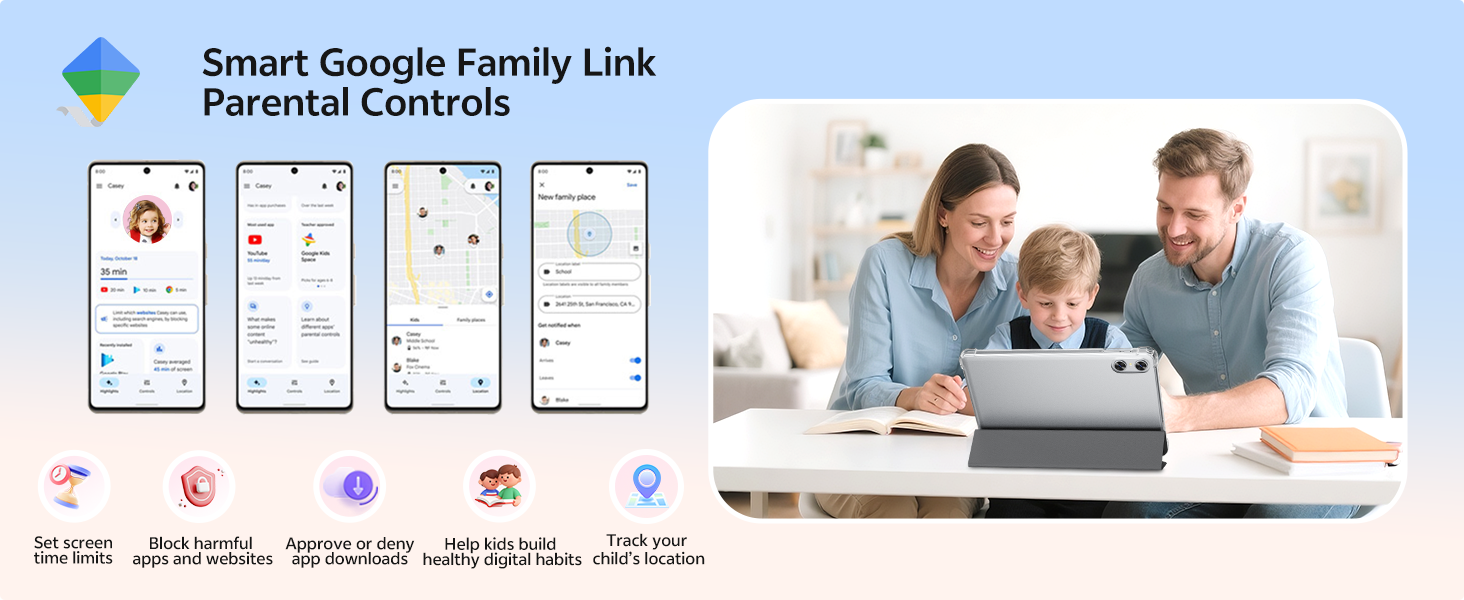
Image: An illustration of the Smart Google Family Link Parental Controls interface, showing various options for managing a child's tablet usage.
4.4 Eye Protection Night Mode
Activate Night Mode for a better reading experience and reduced eye strain, especially in low-light conditions. This feature adjusts screen colors to warmer tones.
4.5 Odemknutí obličejem
Configure facial recognition technology for quick and secure unlocking of your device. This can be set up in the Security settings.
5. Klíčové vlastnosti
5.1 Zobrazení a vizuální prvky
- 10.1palcový HD IPS displej: Enjoy crisp visuals with a 1280 x 800 resolution and a 16:10 aspect ratio, providing a wide field of view and vibrant colors.
- Certifikace Widevine L1: Supports HD streaming on platforms like Netflix, Prime Video, Disney+, and Hulu.

Image: The SVITOO 10.1-inch HD IPS screen showcasing vibrant colors and clear detail, with logos of streaming services like YouTube, Disney+, Prime Video, Hulu, and Netflix, indicating Widevine L1 support.
Video: Komplexní přehledview of the SVITOO Android Tablet, highlighting its 10-inch display, octa-core processor, and expandable storage, demonstrating its suitability for various tasks.
5.2 Výkon a úložiště
- Osmijádrový procesor: Equipped with a Unisoc T7250 octa-core CPU (or T606 in some variants), ensuring smooth multitasking and efficient performance.
- 20GB RAM (4GB + 16GB): Ample memory for running multiple applications without lag.
- 128GB interní úložiště: Generous storage for apps, media, and documents.
- 1TB MicroSD Expandable: Expand storage up to 1TB using a MicroSD card (sold separately).
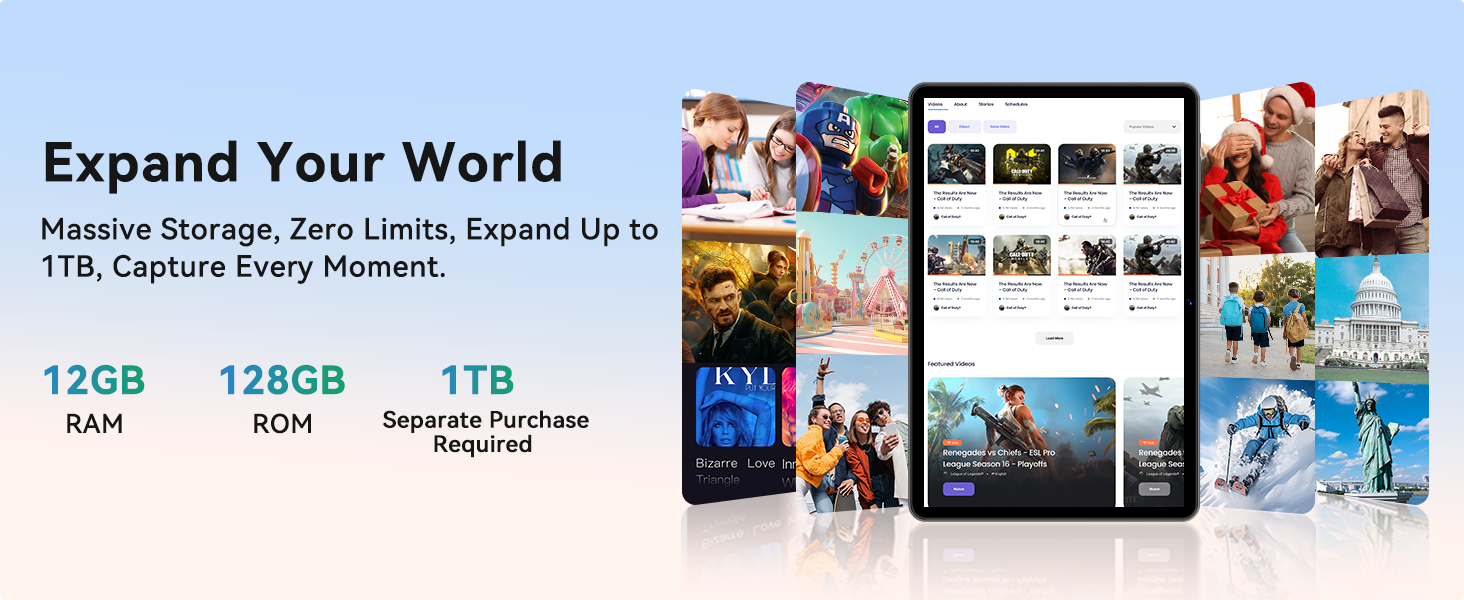
Image: A graphic detailing the SVITOO tablet's memory and storage, showing 12GB RAM, 128GB ROM, and 1TB expandable storage (MicroSD card sold separately).
5.3 Připojení a baterie
- Dvoupásmová Wi-Fi: Supports 2.4/5 GHz Wi-Fi bands for stable and fast internet connections.
- Bluetooth 5.0: Enables seamless pairing with external devices like speakers and headphones.
- 6600mAh vysokokapacitní baterie: Provides extended usage for entertainment, work, and learning, with up to 12 hours of video playback or browsing, and 56 days of standby.
- Vestavěná GPS: For reliable navigation and location tracking.
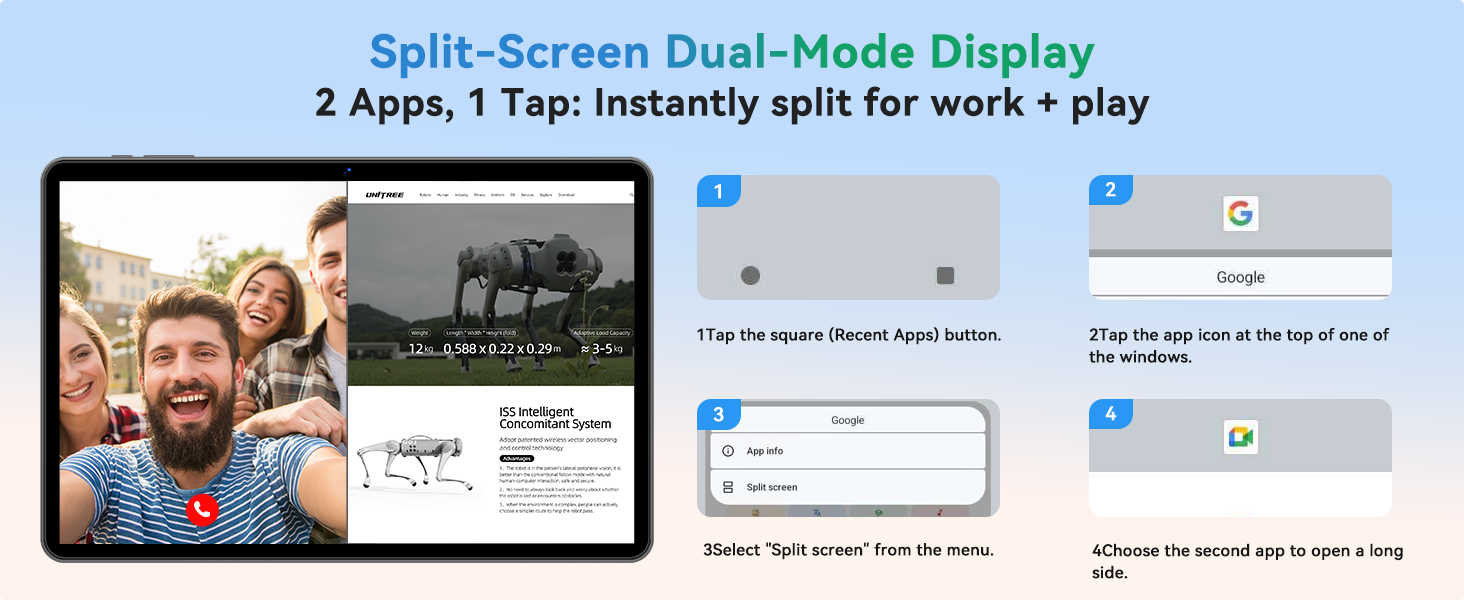
Image: An infographic highlighting the SVITOO tablet's 6600mAh battery, showing estimated usage times for video, music, and browsing, along with Type-C charging and Night Mode features.
5.4 Kamery a zvuk
- Zadní kamera: 8MP with autofocus for high-quality photos and videos.
- Přední kamera: 2MP pro ostré videohovory a selfie.
- Dual-Box Speakers: Provides enhanced audio experience.
- 3.5mm audio jack: For wired headphone connections.
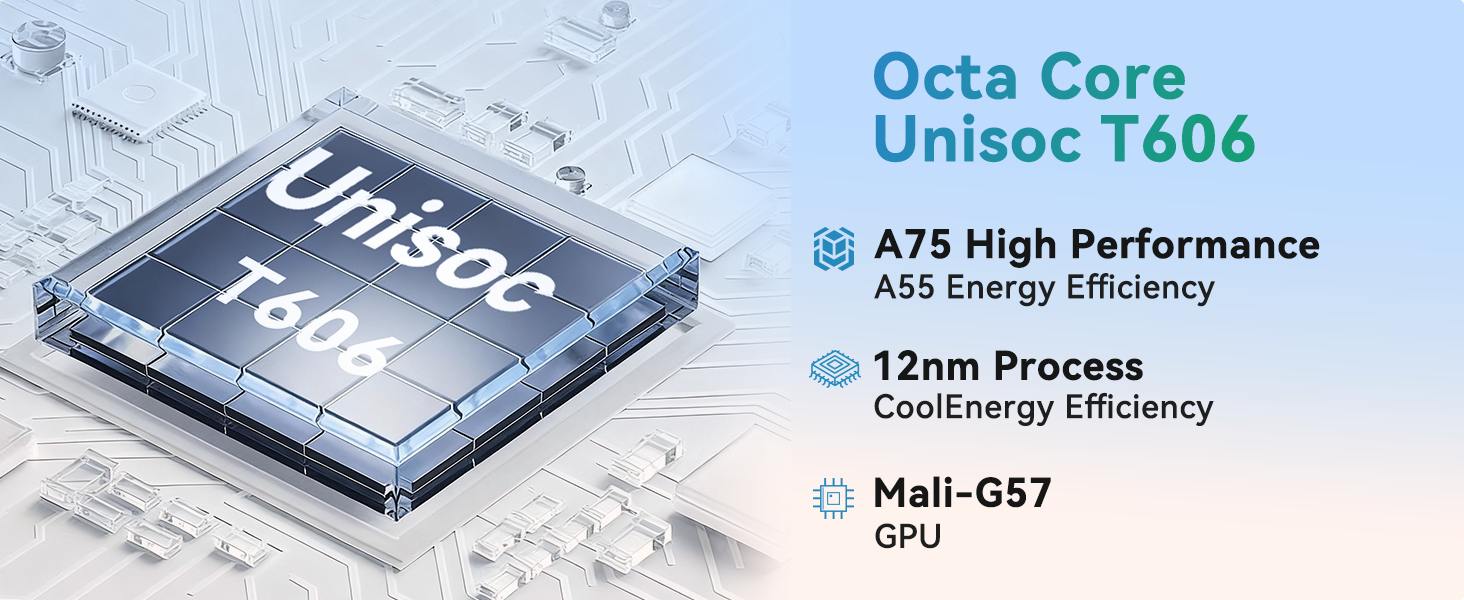
Image: A visual representation of the SVITOO tablet's camera capabilities, featuring a 2MP front camera and an 8MP rear camera, alongside the Smart Google Lens and Face Unlock features.
6. Údržba
- Čištění: K čištění obrazovky a těla přístroje používejte měkký hadřík, který nepouští vlákna. Nepoužívejte abrazivní čisticí prostředky ani rozpouštědla.
- Aktualizace softwaru: Pravidelně kontrolujte a instalujte aktualizace systému, abyste zajistili optimální výkon a zabezpečení. Přejděte na Nastavení > Systém > Aktualizace systému.
- Péče o baterie: To prolong battery life, avoid extreme temperatures and do not let the battery fully drain frequently.
- Správa úložiště: Pravidelně odstraňujte nepotřebné files and apps to maintain performance. Use the built-in Storage Manager (Nastavení > Úložiště) to free up space.
- Ochranné pouzdro: Keep the tablet in its protective case to guard against drops and scratches.
7. Řešení problémů
| Problém | Řešení |
|---|---|
| Tablet se nezapne | Ensure the tablet is fully charged. Press and hold the power button for 10-15 seconds to perform a force restart. |
| Pomalý výkon | Close unused apps, clear cache, or free up storage space. Consider a factory reset if the issue persists (back up data first). |
| Problémy s připojením Wi-Fi | Restartujte tablet a Wi-Fi router. Zapomeňte na síť a znovu se připojte. Ujistěte se, že jste v dosahu. |
| Aplikace padají | Clear the app's cache and data (Settings > Apps > [App Name] > Storage). Update the app or reinstall it. |
| Baterie se rychle vybíjí | Reduce screen brightness, disable unused features (Bluetooth, GPS), close background apps, or check for rogue apps consuming power. |
8. Specifikace
| Funkce | Detail |
|---|---|
| Číslo modelu | SVITOO Tab 10 GMS Certified 1060T |
| Operační systém | Android 16 |
| Velikost displeje | 10.1 palce |
| Rozlišení obrazovky | 1280 x 800 pixelů (HD IPS) |
| Procesor | Osmijádrový Unisoc T7250 (až 1.8 GHz) |
| BERAN | 20GB (4GB + 16GB) |
| Interní úložiště | 128 GB |
| Rozšiřitelné úložiště | Až 1 TB přes kartu MicroSD (prodává se samostatně) |
| Kapacita baterie | 6600mAh (up to 12 hours average life) |
| Zadní kamera | 8MP Auto-Focus |
| Přední kamera | 2 MP |
| Konektivita | Dual-Band Wi-Fi (802.11ac, b, g, n), Bluetooth 5.0, GPS |
| Porty | USB-C, 3.5mm Audio Jack, MicroSD Card Slot |
| Rozměry (DxŠxV) | 9.7 x 6.4 x 0.4 palce |
| Hmotnost položky | 2.31 libry |
9. Záruka a podpora
Your SVITOO tablet comes with a 12-month product support period. Amazon offers a 30-day return and exchange policy. If the Amazon return window has passed, please contact SVITOO directly for support.
How to Contact SVITOO Support:
- Through Your Order: Log in to Amazon, go to "Your Orders", find the item, and click "Contact Seller".
- Through the Product Page: On the product page, click the seller’s name, then click "Contact Seller".
Note: Product support does not cover damage caused by human error, natural disasters, or other force majeure events.