
1. Úvod
This manual provides essential information for the safe and efficient use of your paitanry Android Tablet 10 Inch. Designed for children and family use, this tablet combines robust features with parental control options to ensure a secure and engaging digital experience. Please read this manual thoroughly before operating the device.

Image: paitanry 10.1 inch Android 15 Kids Tablet with children enjoying the device.
2. Co je v krabici
Upon opening your paitanry Android Tablet package, you should find the following items:
- 1x Kids Tablet (Pink EVA Case)
- 1x Nabíječka
- 1x nabíjecí kabel typu C
- 1x OTG Adapter
- 1x Uživatelská příručka
Video: Unboxing the paitanry Kids Tablet, showing included accessories.
3. Nastavení
3.1 První zapnutí
- Remove the protective film from the screen, starting at the corner.
- Stiskněte a podržte tlačítko napájení, dokud se obrazovka nezapne.
- If the tablet does not power on, charge it for 2 hours and then try again.
- Wait for 1-3 minutes during initial startup until instructions for setting the language appear.
- Complete setup by following on-screen instructions. Your device is ready to use!
3.2 Wi-Fi připojení
Připojení k síti Wi-Fi:
- Přejít na Nastavení > Síť a internet > Wi-Fi.
- Přepnout Wi-Fi On.
- Vyberte požadovanou síť ze seznamu.
- Zadejte heslo, pokud se zobrazí výzva, a klepněte na Připojit.
3.3 Google Kids Space & Parental Controls Setup
The tablet comes pre-installed with Google Kids Space. To set it up:
- Follow the on-screen prompts to create a Google account for your child or add an existing one.
- Utilize Google Family Link to manage screen time, filter content, and set learning goals.

Image: Google Kids Space interface on the paitanry tablet.
Video: Konecview of the paitanry Kids Tablet features, including Google Kids Space.
4. Návod k obsluze
4.1 Základní funkce
- Vypínač: Press and hold to power on/off. Short press to sleep/wake.
- Tlačítka hlasitosti: Upravte hlasitost zvuku.
- Sluchátkový jack: Připojte 3.5 mm sluchátka.
- Port USB-C: Pro nabíjení a přenos dat.
- Slot pro microSD kartu: Vložte kartu MicroSD pro rozšíření úložiště.

Image: Diagram illustrating the location of ports and buttons on the tablet.
4.2 Navigace
The tablet uses standard Android touch gestures:
- Klepněte na: Vyberte položku nebo otevřete aplikaci.
- Výpad: Procházení stránek nebo seznamů.
- Štípání: Přiblížení nebo oddálení.
4.3 Použití kamery
The tablet features front and rear cameras. To use:
- Klepněte na Fotoaparát ikona aplikace.
- V případě potřeby přepínejte mezi přední a zadní kamerou.
- Klepnutím na tlačítko spouště můžete pořídit fotografie nebo spustit/zastavit nahrávání videa.
5. Vlastnosti
- Operační systém: Android 15 for a stable and efficient user experience.
- Procesor: High-performance Octa-Core A523 CPU.
- Zobrazit: 10.1-inch fully laminated 1280x800 HD screen with wide viewing angles. Features anti-blue light design and automatic brightness adjustment for eye protection.
- Paměť a úložiště: 8GB RAM (4GB+4GB) and 64GB ROM. Expandable up to 1TB with a MicroSD card (sold separately).
- Konektivita: Dual-Band WiFi 6 (2.4GHz + 5GHz) for smooth online activities.
- Baterie: 5000mAh long-lasting battery, providing 8-10 hours of continuous use.
- Ochranné pouzdro: Durable EVA case with anti-drop corners and a built-in stand for hands-free viewIng.

Obrázek: Vizuální přesview of the tablet's key features.

Image: Close-up of the 10.1-inch HD IPS display with eye protection features.
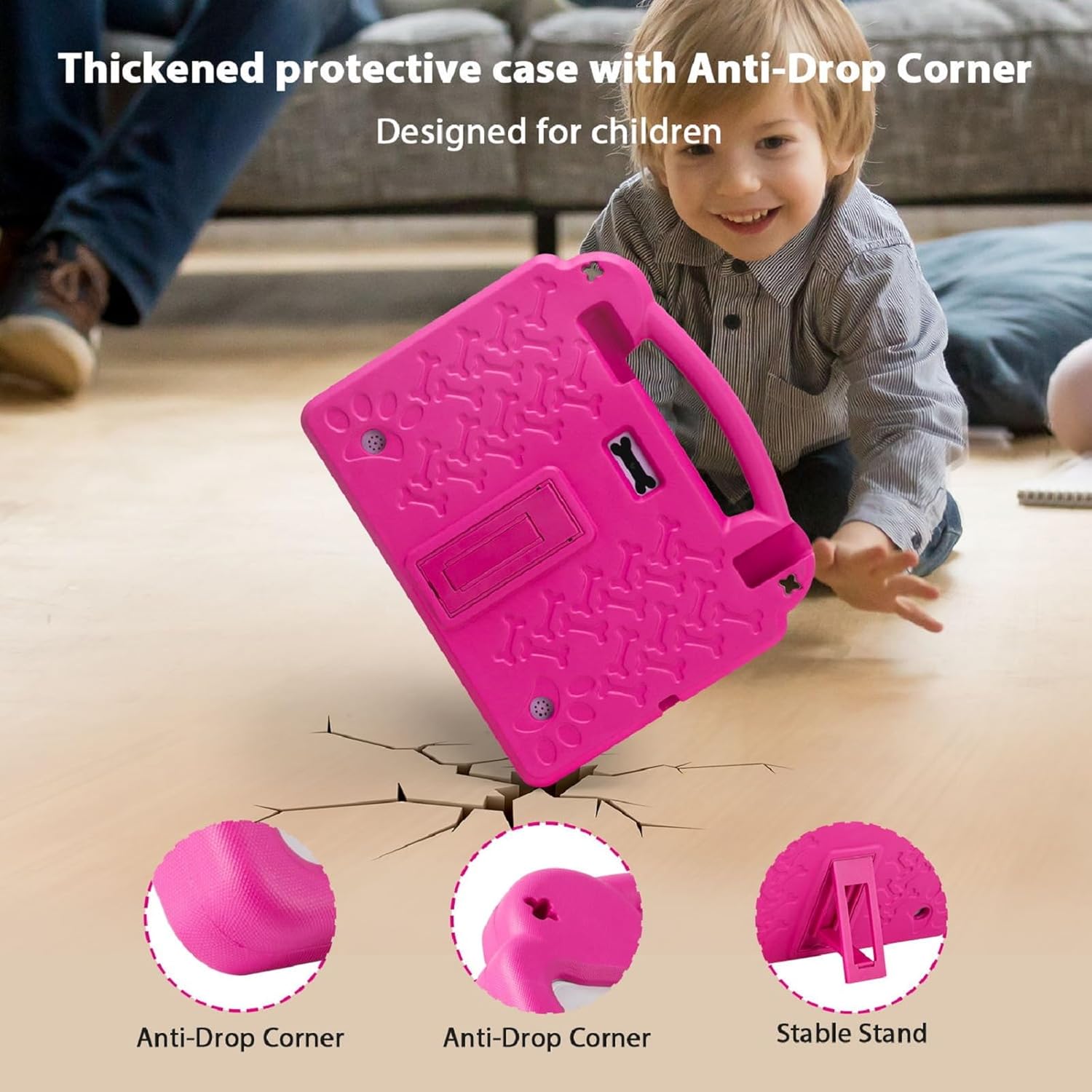
Image: The thickened protective EVA case highlighting anti-drop corners and the stable stand.

Image: Illustration of the 5000mAh battery capacity and usage times.
6. Údržba
6.1 Čištění
- Use a soft, lint-free cloth to clean the screen. Avoid abrasive materials.
- For the case, a damp cloth with mild soap can be used, then wipe dry.
6.2 Péče o baterii
- Nevystavujte tablet extrémním teplotám.
- Nedovolte, aby se baterie často úplně vybila.
- Use the provided charger for optimal battery life.
6.3 Aktualizace softwaru
Pravidelně kontrolujte a instalujte aktualizace softwaru, abyste zajistili optimální výkon a zabezpečení. Přejděte na Nastavení > Systém > Aktualizace systému.
7. Řešení problémů
7.1 Tablet se nezapíná
- Ensure the tablet is fully charged. Connect the charger and wait for at least 15 minutes before attempting to power on again.
- Stiskněte a podržte tlačítko napájení po dobu 10–15 sekund pro provedení vynuceného restartu.
7.2 Pomalý výkon
- Zavřete nepotřebné aplikace na pozadí.
- Vymažte data mezipaměti často používaných aplikací.
- Ensure sufficient storage space is available. Delete old files or transfer them to expandable storage.
- Tablet pravidelně restartujte.
7.3 Problémy s připojením k Wi-Fi
- Zkontrolujte, zda je v Nastavení.
- Restartujte Wi-Fi router.
- Zapomeňte na síť a znovu se připojte zadáním hesla.
- Ujistěte se, že je tablet v dosahu signálu Wi-Fi.
8. Specifikace
| Funkce | Specifikace |
|---|---|
| Velikost stálé obrazovky | 10.1 palce |
| Rozlišení obrazovky | 1280 x 800 pixelů |
| Maximální rozlišení obrazovky | 1280*800 pixelů |
| Procesor | 2.4 GHz Octa-Core A523 |
| Značka čipové sady | ARM (Allwinner) |
| BERAN | 8 GB (4 GB + 4 GB) |
| Velikost flash paměti (ROM) | 64 GB |
| Rozšiřitelné úložiště | Up to 1TB with MicroSD card (sold separately) |
| Bezdrátový typ | 802.11ax (Dual-Band WiFi 6: 2.4G+5G) |
| Bluetooth | 4.2 |
| Průměrná životnost baterie | 5-10 Hours (5000mAh) |
| Operační systém | Android |
| Hmotnost položky | 2.42 libry |
| Rozměry produktu | 10.5 x 1.1 x 8.9 palce |
| Barva | Růžový |
| Zadní WebRozlišení vačky | 5 MP |
| Přední WebRozlišení vačky | 2 MP |
9. Záruka a podpora
Your paitanry Android Tablet 10 Inch comes with a one-year free replacement warranty covering all quality-related issues from the date of purchase. Please inspect the package upon arrival and contact our professional after-sales team immediately if anything is missing or damaged.
For any questions regarding setup, daily use, or technical support, please contact our customer service team. We are dedicated to providing peace of mind for parents and endless fun for kids.
Contact information for support can typically be found on the product packaging or the official paitanry webmísto.