
1. Úvod
Thank you for choosing the Turtlebox Original Gen 3 Portable Outdoor Bluetooth Speaker. This speaker is engineered for exceptional durability and sound performance in outdoor environments. It features an ultra-loud output, IP67 waterproof rating, impact resistance, and an extended battery life. This manual provides essential information for setting up, operating, maintaining, and troubleshooting your device to ensure optimal performance and longevity.
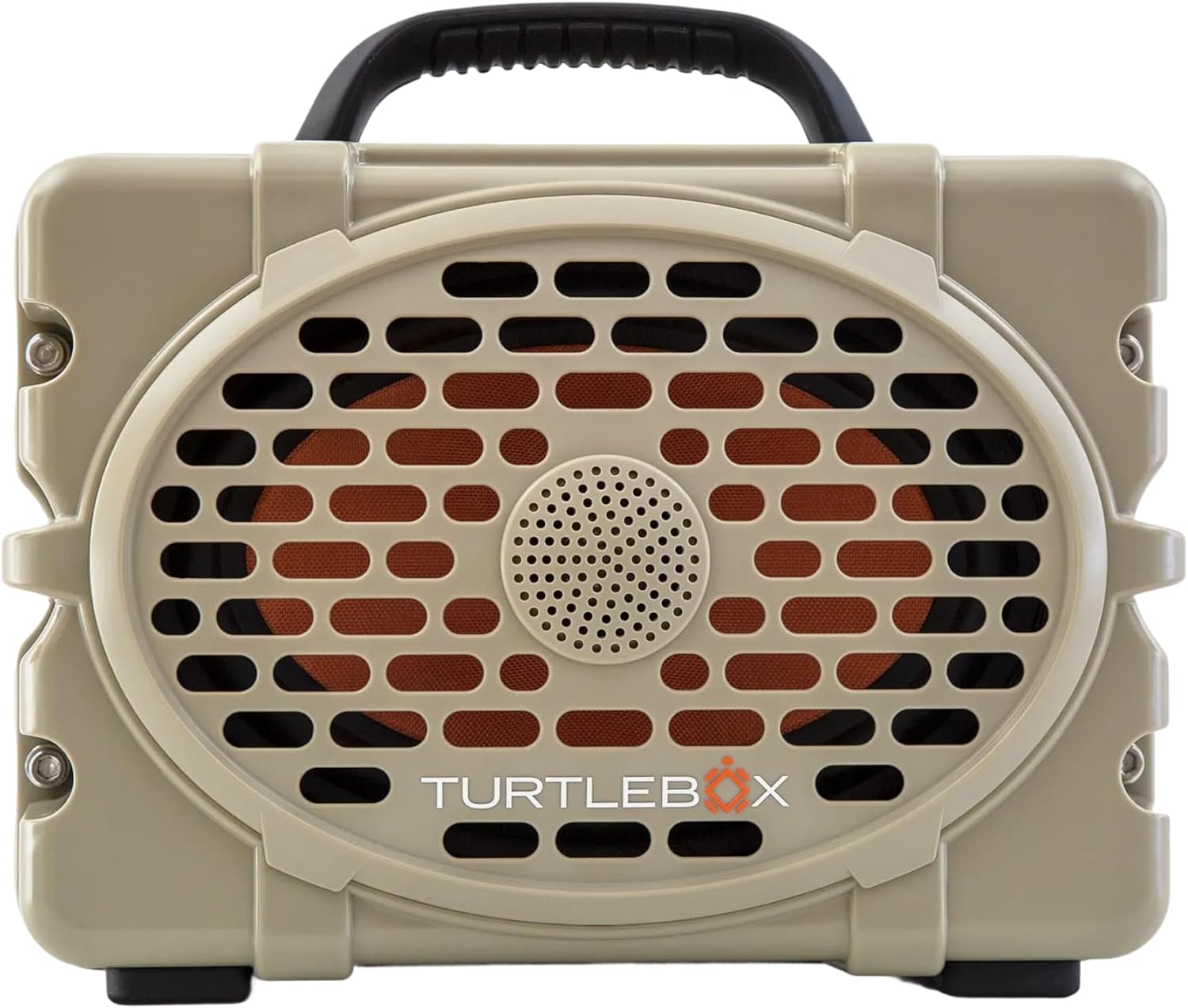
Obrázek 1: Přední strana view of the Turtlebox Original Gen 3 speaker.
2. Bezpečnostní informace
- Do not attempt to disassemble, repair, or modify the speaker. This may void the warranty and pose a safety risk.
- Ensure all port covers are securely closed before exposing the speaker to water to maintain its IP67 waterproof rating.
- Use only the provided charger or a certified equivalent to prevent damage to the battery.
- Avoid prolonged exposure to extreme temperatures (hot or cold) as this can affect battery life and speaker performance.
- Do not operate the speaker while it is charging if it is exposed to water.
3. Obsah balení
Ověřte, zda jsou v balení přítomny všechny položky:
- Turtlebox Original Gen 3 Speaker
- Nabíječka
4. Konec produktuview
4.1. Ovládací panel
The control panel is located on the top of the speaker, providing easy access to essential functions.

Figure 2: Control Panel with labeled buttons.
- Vypínač: Stisknutím zapnete nebo vypnete reproduktor.
- Volume Buttons (-/+): Upravte hlasitost přehrávání.
- Track Control Buttons (|<|): Přechod na předchozí nebo další skladbu.
- Tlačítko Bluetooth: Zahájí režim párování Bluetooth.
- Tlačítko režimu párty: Activates Party Mode for multi-speaker synchronization.
4.2. Porty a připojení
The rear panel features protected ports for charging and external audio connections.
Video 1: Konecview of the Turtlebox speaker's side and ports, demonstrating the waterproof cover.
- Nabíjecí port: For connecting the power adapter to charge the speaker.
- AUX IN: 3.5mm audio vstup pro kabelové připojení.
- MIC IN: Input for connecting a microphone.
- USB-C OUT: Výstupní port pro nabíjení externích zařízení.
4.3. Fyzikální vlastnosti
- Integrovaná rukojeť: Pro snadnou přenositelnost.
- Stainless Steel Tie-Downs: Secure the speaker to a UTV or boat.
- Robustní Casing: Provides drop, crush, and dust-proof protection.
5. Nastavení
5.1. Počáteční nabíjení
Before first use, fully charge your Turtlebox speaker. Connect the provided charger to the charging port on the rear panel and plug it into a power outlet. The battery indicator lights on the control panel will show charging progress.
5.2. Zapnutí/vypnutí
- To power on, press and hold the Power Button on the control panel until the indicator lights illuminate.
- Chcete-li zařízení vypnout, znovu stiskněte a podržte tlačítko napájení, dokud kontrolky nezhasnou.
5.3. Párování Bluetooth
Připojení zařízení přes Bluetooth:
- Ensure the Turtlebox speaker is powered on.
- Press the Bluetooth Button on the control panel. The Bluetooth indicator light will flash, indicating pairing mode.
- On your audio device (e.g., smartphone, tablet), navigate to Bluetooth settings and select "Turtlebox Gen 3" from the list of available devices.
- Po připojení se kontrolka Bluetooth na reproduktoru rozsvítí nepřetržitě.
6. Návod k obsluze
6.1. Základní přehrávání zvuku
- Nastavení hlasitosti: Použijte tlačítka „+“ a „-“ na ovládacím panelu.
- Navigace po trati: Use the '|<' and '>|' buttons to skip tracks.
6.2. Party Mode (Multi-Speaker Pairing)
Party Mode allows you to connect multiple Turtlebox Original Gen 3 speakers for an expanded sound experience. Note: The Original Gen 3 does not pair with Gen 1 or Gen 2 Turtlebox speakers.
- Ensure all speakers are powered on and not currently connected to a Bluetooth device.
- On the primary speaker (the one you want to connect to your device), press the Bluetooth Button to enter pairing mode. Connect your audio device to this speaker.
- On the primary speaker, press the Party Mode button. The Party Mode indicator will flash.
- On each additional speaker, press the Party Mode button. They will automatically search for and connect to the primary speaker.
- Once connected, all speakers will play audio from your device.
6.3. Použití AUX vstupu
For wired audio connections, open the rear port cover and connect a 3.5mm audio cable from your device to the AUX IN port. The speaker will automatically switch to AUX input mode.
6.4. Using Microphone Input
To use a microphone, open the rear port cover and connect your microphone to the MIC IN port. Adjust microphone volume as needed from the connected microphone or audio source.
6.5. Nabíjení externích zařízení
The USB-C OUT port can be used to charge compatible external devices. Open the rear port cover and connect your device's charging cable to the USB-C OUT port.
7. Údržba
7.1. Čištění
Vyčistěte reproduktor reklamouamp cloth. For stubborn dirt, use mild soap and water. Ensure all port covers are closed during cleaning. Do not use abrasive cleaners or solvents.
7.2. Waterproof Seal Check
Regularly inspect the rubber seals around the port cover for any signs of wear or damage. A compromised seal can affect the speaker's waterproof integrity. Always ensure the port cover is firmly closed with an audible "click" before exposing the speaker to water.
7.3. Péče o baterie
To maximize battery life, avoid fully discharging the battery frequently. Store the speaker in a cool, dry place when not in use for extended periods. Charge the battery at least once every three months to prevent deep discharge.
7.4. Skladování
When storing the speaker, especially for long durations, ensure it is clean, dry, and all port covers are securely fastened. Store in a location away from direct sunlight and extreme temperatures.
8. Řešení problémů
- Bez napájení: Ensure the battery is charged. Connect the speaker to the charger and allow it to charge for at least 30 minutes before attempting to power on again.
- Bluetooth se nepřipojuje: Ensure the speaker is in pairing mode (flashing Bluetooth light). Turn off and on your device's Bluetooth. Move the speaker closer to your device. If issues persist, try forgetting the device in your Bluetooth settings and re-pairing.
- Žádný zvuk: Zkontrolujte úroveň hlasitosti na reproduktoru i na připojeném zařízení. Ujistěte se, že je vybrán správný vstupní zdroj (Bluetooth nebo AUX).
- Party Mode Issues: Ensure all speakers are Gen 3 models. Confirm all speakers are in Party Mode pairing. Try resetting all speakers and re-initiating Party Mode from the primary speaker.
- Zkreslený zvuk: Snižte hlasitost reproduktoru i zařízení. Ujistěte se, že zdroj zvuku je kvalitní.
9. Specifikace
| Funkce | Specifikace |
|---|---|
| Název modelu | Turtlebox Gen 3 |
| Materiál | Fiberglass, Stainless Steel, Titanium |
| Typ reproduktoru | Tweeter, Bass Driver |
| Speciální funkce | 120 decibels of sound, 1” Titanium tweeter, 6” x 9” woofer, 85Wh Lithium-ion battery, Powerful Class D digital ampdoživotní |
| Kompatibilní zařízení | iPhone, Android |
| Konfigurace kanálů prostorového zvuku | 2.0 |
| Barva | Tan / Black |
| Rozměry produktu | 12"H x 8.75"Š x 7"V |
| Úroveň odolnosti proti vodě | IP67 Vodotěsný |
| Baterie | 1 Lithium Ion battery (included), up to 3 days playtime |
| Kontrolní metoda | Dotek |
| Technologie bezdrátové komunikace | Bluetooth |
| Maximální výstupní výkon reproduktoru | 100 wattů |
| Hmotnost položky | 11.88 libry |
| UPC | 850024307742 |
10. Záruka a podpora
The Turtlebox Original Gen 3 speaker comes with a 1-Year Manufacturer Warranty. For warranty claims, technical support, or additional product information, please refer to the official Turtlebox webnebo se obraťte přímo na jejich zákaznický servis. Uschovejte si doklad o koupi pro ověření záruky.