
1. Úvod
Thank you for choosing the ONIKUMA X31 Wired Gaming Headset. This manual provides essential information for the proper setup, operation, and maintenance of your new headset. Please read this manual thoroughly before use to ensure optimal performance and longevity of the product. The ONIKUMA X31 is designed to deliver an immersive audio experience for PC and Xbox gaming, featuring RGB lighting and surround sound capabilities.
2. Bezpečnostní informace
- Vyhněte se delšímu poslechu při vysoké hlasitosti, abyste předešli poškození sluchu.
- Nevystavujte sluchátka extrémním teplotám, vlhkosti ani přímému slunečnímu záření.
- Keep the headset away from water and other liquids. It is not water-resistant.
- Nepokoušejte se rozebírat ani upravovat sluchátka. Zrušíte tak platnost záruky.
- Handle the cable with care to prevent damage.
- Uchovávejte mimo dosah dětí.
3. Obsah balení
Ověřte, zda jsou v balení přítomny všechny položky:
- ONIKUMA X31 Wired Gaming Headset
- Uživatelská příručka
- Audio Splitter Cable (if included, for separate mic/audio ports)
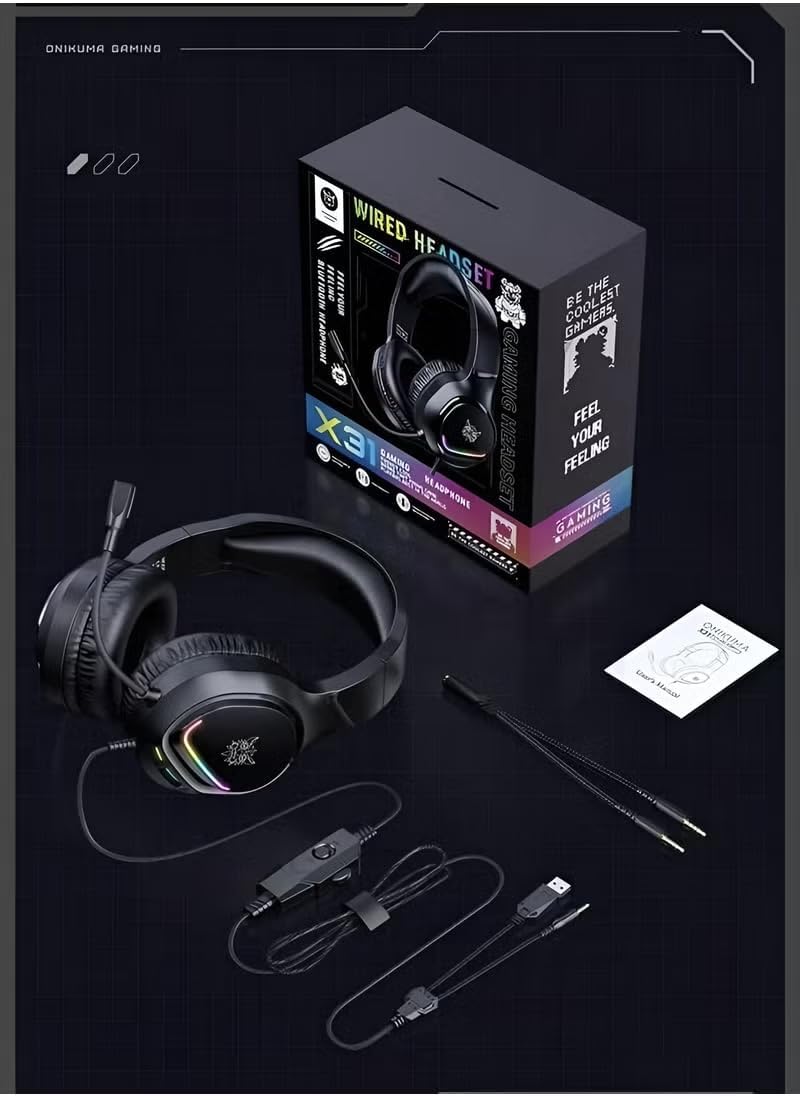
Image: Contents of the ONIKUMA X31 Gaming Headset package.
4. Konec produktuview
The ONIKUMA X31 Gaming Headset is engineered for an enhanced gaming experience. Key features include:
- Pohlcující zvuk: Equipped with surround sound technology and high-quality 50mm audio drivers for detailed and engaging audio.
- Dynamické RGB osvětlení: Features vibrant RGB lighting effects that add a visual flair to your gaming setup.
- Pohodlný design: Padded headband and cushioned over-ear earcups ensure lasting comfort during extended gaming sessions.
- Flexibilní mikrofon: A 360° rotatable and bendable microphone allows for clear in-game communication.
- Integrované ovládání: Conveniently located controls for volume adjustment and microphone mute.
- Aktivní potlačení hluku: Provides noise control for focused audio.

Image: The headset's RGB colorful lighting.
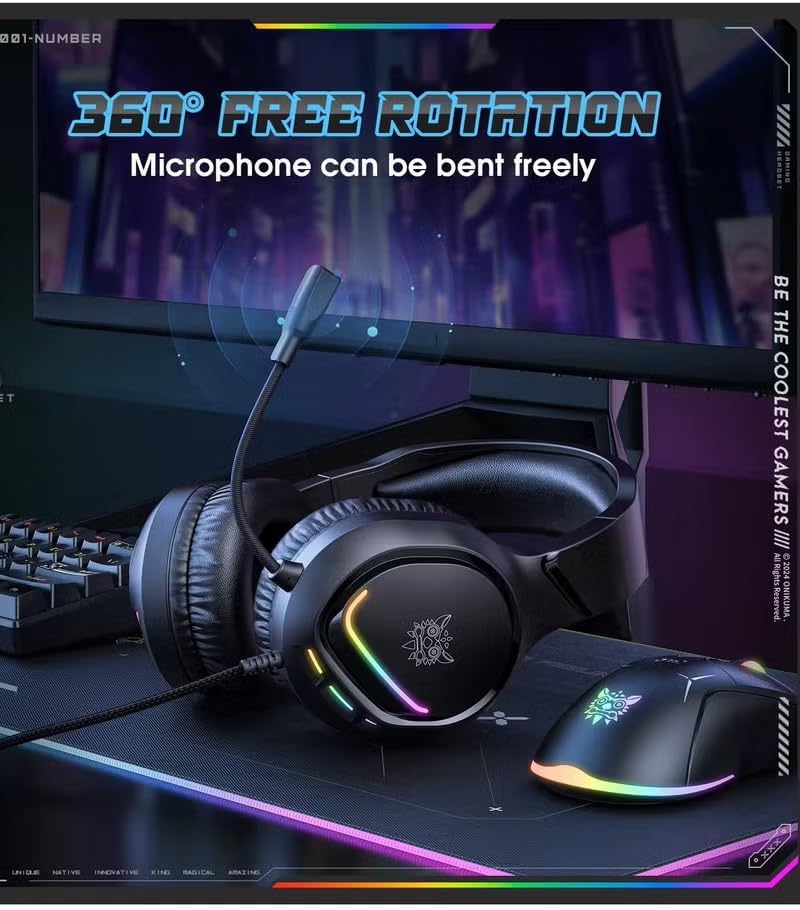
Image: The flexible, 360-degree rotatable microphone.

Image: Illustration of the 50mm large speaker for clear sound.

Image: The headset's comfortable fit for various ear shapes.
5. Nastavení
5.1 Connecting to PC/Xbox
The ONIKUMA X31 headset connects via a wired USB connection. For devices requiring separate audio and microphone jacks, use the included splitter cable.
- For PC (USB Audio): Plug the USB connector directly into an available USB port on your computer. The system should automatically detect and install the necessary drivers.
- For PC (3.5mm Audio/Mic with Splitter): If your PC has separate 3.5mm ports for audio and microphone, connect the headset's 3.5mm jack to the included splitter cable. Then, plug the green connector of the splitter into your PC's audio output jack and the red connector into the microphone input jack. The USB connector is for RGB lighting power.
- For Xbox: Connect the 3.5mm jack of the headset into the 3.5mm port on your Xbox controller. The USB connector is for RGB lighting power and may require a separate USB power source or adapter if the controller port does not provide sufficient power.
5.2 Nastavení náhlavní soupravy
- Upravte si čelenku tak, aby vám pohodlně seděla na hlavě.
- Position the earcups so they fully cover your ears, ensuring a snug fit for optimal sound isolation and comfort.
- Bend and rotate the microphone boom to bring the microphone close to your mouth for clear voice pickup.
6. Návod k obsluze
6.1 Ovládání hlasitosti
The headset features an integrated volume control wheel on the cable. Rotate the wheel up to increase volume and down to decrease volume.
6.2 Použití mikrofonu
An integrated switch on the cable allows you to mute or unmute the microphone. Ensure the microphone is unmuted for voice communication. Adjust the microphone's position for optimal clarity.
6.3 RGB osvětlení
The RGB lighting on the earcups will illuminate automatically when the USB connector is powered. There are no user-adjustable controls for the lighting patterns; they are dynamic gradient lights.
7. Údržba
- Čištění: K čištění sluchátek s mikrofonem používejte měkký, suchý hadřík. Nepoužívejte abrazivní čisticí prostředky ani rozpouštědla.
- Skladování: Store the headset in a cool, dry place when not in use. Avoid placing heavy objects on it.
- Péče o kabely: Do not pull on the cable forcefully or wrap it too tightly, as this can damage the internal wires.
8. Řešení problémů
| Problém | Možná příčina | Řešení |
|---|---|---|
| Z sluchátek se nehlásí žádný zvuk |
|
|
| Mikrofon nefunguje |
|
|
| RGB podsvícení nefunguje |
|
|
| Sound quality is poor or low volume |
|
|
9. Specifikace
| Funkce | Detail |
|---|---|
| Název modelu | X31 (Item Model Number: B780) |
| Značka | ONIKUMA |
| Technologie připojení | Kabelové (USB) |
| Jack pro sluchátka | USB (for RGB power and potentially audio) |
| Umístění uší | Přes ucho |
| Sluchátka Form Factor | Přes ucho |
| Kompatibilní zařízení | PC, Xbox |
| Typ ovládání | Integrated (Volume, Mic Mute) |
| Kontrola hluku | Aktivní potlačení hluku |
| Citlivost | 108 dB |
| Funkce kabelu | RGB osvětlení |
| Materiály | Plast |
| Hmotnost položky | 1 kilogram |
| Úroveň odolnosti proti vodě | Není odolný vůči vodě |
| Barva | Černý |
10. Záruka a podpora
Informace o záruce a technickou podporu získáte od oficiálního zástupce společnosti ONIKUMA. website or contact your retailer. Keep your purchase receipt as proof of purchase for any warranty claims. Specific warranty terms and conditions may vary by region and retailer.