
1. Úvod
Thank you for choosing the HUANUO Dual Monitor Stand with Integrated Power Outlet. This manual provides detailed instructions for assembly, operation, and maintenance of your new monitor stand. Please read this manual thoroughly before installation to ensure correct setup and safe use. This stand is designed to enhance your workspace by providing ergonomic monitor positioning and convenient power access.
The stand features a robust design with a 1.57" x 2.76" rectangular post and thicker steel construction for enhanced stability, supporting up to 22 lbs per arm. It includes an integrated power outlet with one USB-A port, one USB-C port, and three AC outlets, along with a 6.5 ft power cord to reduce desktop clutter.

Image: Reinforced Frame for Stability. This image highlights the stand's wider pole and thicker steel construction, indicating improved stability and durability compared to other models.
2. Bezpečnostní informace
- Přečtěte si všechny pokyny: Ensure you understand all assembly and safety instructions before installation.
- Nosnost: Do not exceed the maximum weight capacity of 22 lbs (10 kg) per monitor arm. Exceeding this limit may result in instability and potential injury.
- Velikost monitoru: This stand supports monitors from 13" to 32" in landscape mode and up to 29" in portrait mode.
- Kompatibilita VESA: Ujistěte se, že vaše monitory mají montážní šablony VESA 75x75 mm nebo 100x100 mm.
- Tloušťka stolu: Pro C-clamp installation, your desk thickness must be between 0.39" and 3.35". For grommet mount, desk thickness must be between 0.39" and 1.77" with a hole diameter of 0.43"-0.87".
- Elektrická bezpečnost: The integrated power outlet is rated for 120V/12A. Do not overload the outlets. Ensure the power cord is properly routed and not pinched.
- Shromáždění: Assemble the product on a soft, non-abrasive surface to prevent scratches. Two people are recommended for assembly.
- Utáhněte šrouby: Ensure all screws are securely tightened before use. Periodically check and re-tighten screws as needed.
- Děti: Udržujte malé části mimo dosah dětí.
3. Obsah balení
Please verify that all components are present and undamaged before proceeding with assembly. If any parts are missing or damaged, contact customer service for assistance.
- Main Pole with Integrated Power Outlet
- Dvojitá monitorovací ramena
- C-Clamp Shromáždění
- Grommet Mount Assembly
- Desky VESA (2x)
- Sada hardwaru (různé šrouby, podložky, distanční podložky)
- Allenovy klíče
- Klipy pro správu kabelů
- Návod k použití
4. Nastavení a instalace
4.1 VESA Compatibility Check
Before installation, ensure your monitors are VESA compatible. This stand supports VESA patterns of 75x75mm and 100x100mm. If your monitor does not have VESA holes, a VESA adapter (sold separately) may be required.

Image: Wide Compatibility and VESA Patterns. This image illustrates the supported VESA patterns (75x75mm, 100x100mm), maximum load (22 lbs per arm), and screen size compatibility (Max 32" landscape, Max 29" portrait).
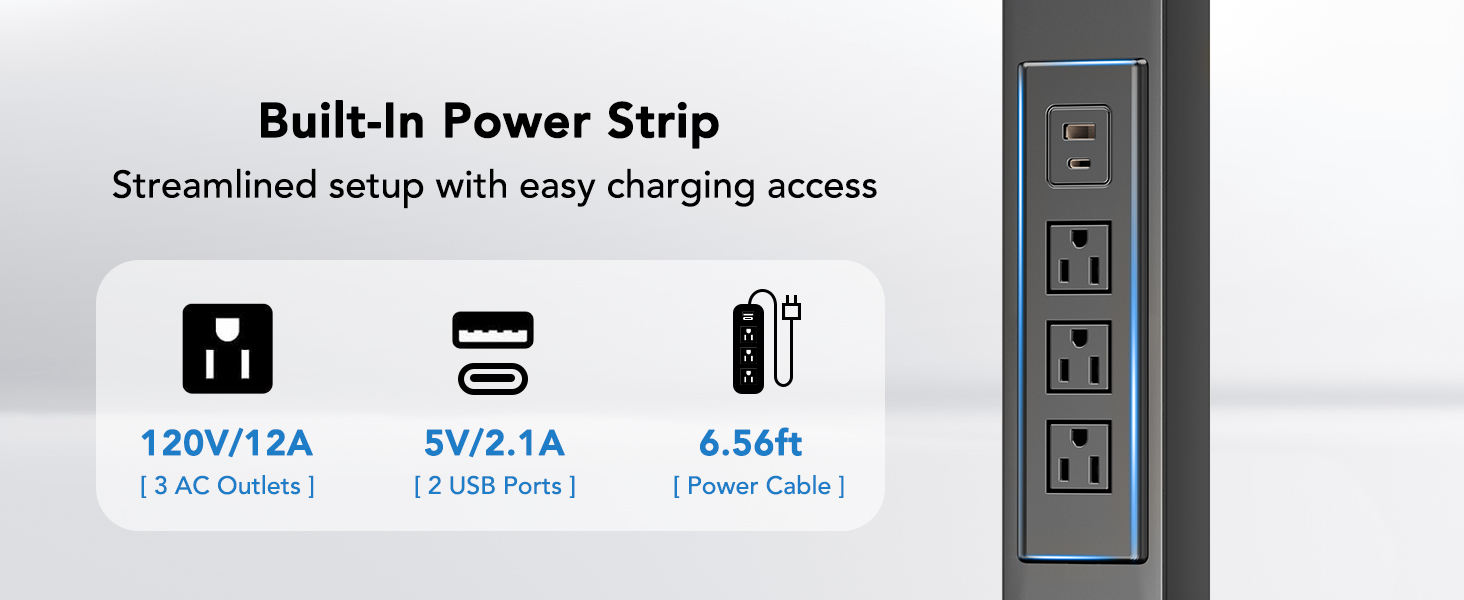
Image: Monitor with VESA Holes. This image shows the standard VESA hole patterns on the back of a monitor.
4.2 Výběr možnosti montáže
The HUANUO Dual Monitor Stand offers two installation methods: C-Clamp and Grommet Mount. Select the method best suited for your desk.
Image: Two Ways to Mount. This image displays both the C-Clamp and Grommet Hole mounting options, along with their respective desk thickness and hole diameter requirements.
4.2.1 C-Clamp Instalace
- Připojte C-clamp bracket to the bottom of the main pole using the provided screws.
- Position the stand on your desk edge. Ensure the desk thickness is between 0.39" and 3.35".
- Utáhněte C-clamp šroubujte, dokud není stojan bezpečně upevněn ke stolu. Ujistěte se, že je stabilní a nekýve se.
4.2.2 Instalace průchodkového držáku
- If your desk has an existing grommet hole, ensure its diameter is between 0.43" and 0.87". If not, drill a hole within this range.
- Attach the grommet base plate to the bottom of the main pole.
- Vložte hlavní tyč otvorem v průchodce.
- From underneath the desk, secure the stand using the grommet plate and tightening knob. Ensure the desk thickness is between 0.39" and 1.77".
4.3 Připevnění ramen monitoru a monitorů
- Slide the monitor arms onto the main pole at your desired height. Secure them with the provided screws.
- Attach the VESA plates to the back of your monitors using the appropriate screws and spacers from the hardware kit. Ensure a snug fit.
- Carefully slide the monitors (with VESA plates attached) onto the monitor arms. Secure them with the locking screws.
- Connect the power cord from the integrated power outlet to a wall socket.
5. Návod k obsluze
5.1 Nastavení polohy monitoru
The HUANUO Dual Monitor Stand offers full motion adjustability for optimal viewpohodlí.
- Nastavení výšky: The stand provides four levels of height adjustment, ranging from 9.27" to 15.26" from the desk surface. Loosen the arm clamp on the main pole, adjust to the desired height, and re-tighten.
- Náklon: Adjust your monitor tilt by ±45° to reduce glare and find the best viewúhel.
- Otočný: Swivel your monitors ±90° for collaborative work or to change viewsměr.
- Otáčení: Otočte monitory o 360° pro přepínání mezi orientací na šířku a na výšku.
- Protažení paže: The arms can extend up to 31.5" to position your monitors at the ideal distance.

Image: Arm with Flexible Movement. This image demonstrates the tilt (±45°), swivel (±90°), and 360° rotation capabilities of the monitor arms.

Image: Ergonomic Height Adjustment. This image illustrates the adjustable height range (Min. 9.27" to Max. 15.26") and the ergonomic benefits of proper screen height.
5.2 Používání integrované zásuvky
The stand features a built-in power strip for convenient device charging and power access.
- AC zásuvky: Three standard AC outlets (120V/12A) are available for powering monitors, laptops, or other devices.
- Port USB-A: One USB-A port (5V/2.1A) for charging compatible devices.
- Port USB-C: One USB-C port (5V/2.1A) for charging compatible devices.
- Napájecí kabel: The integrated 6.56 ft power cord connects the stand to a wall outlet.

Image: Easy Access to Power. This image details the specifications of the built-in power strip, including 3 AC outlets (120V/12A), 2 USB ports (5V/2.1A), and the 6.56ft power cable.
5.3 Správa kabelů
Utilize the integrated cable management clips along the arms and pole to route your monitor and power cables neatly, reducing clutter and maintaining a clean workspace.

Image: Clean Space with Integrated Power. This image shows how cables can be routed through the stand for a tidy setup.
6. Údržba
- Čištění: Otřete stojan měkkým hadříkemamp hadříkem. Nepoužívejte abrazivní čisticí prostředky ani rozpouštědla, která by mohla poškodit povrchovou úpravu.
- Pravidelné kontroly: Pravidelně kontrolujte všechny šrouby a spoje, zda jsou pevně utažené a bezpečné. V případě potřeby je dotáhněte.
- Správa kabelů: Ensure cables are not pinched or stressed, which could lead to damage.
7. Řešení problémů
- Stojan se kymácí: Zajistěte, aby C-clamp or grommet mount is securely tightened to the desk. Check that all screws connecting the pole and arms are tight.
- Monitors are sagging/not holding position: The monitor arms may need tension adjustment. Refer to the assembly instructions for adjusting arm tension. Ensure monitors do not exceed the 22 lbs per arm weight limit.
- Nefunkční elektrické zásuvky: Ensure the main power cord is securely plugged into a functional wall outlet. Check for any tripped circuit breakers. Do not overload the power strip.
- Difficulty with installation screws: Ensure you are using the correct screws for each step as indicated in the assembly guide. Do not force screws; if a screw does not thread easily, re-check alignment or contact support.
- Monitors not fitting VESA plate: Verify your monitor's VESA pattern (75x75mm or 100x100mm). Use appropriate screws and spacers. If your monitor lacks VESA holes, a VESA adapter is required.
8. Specifikace
| Funkce | Specifikace |
|---|---|
| Typ montáže | Tabletop Mount (C-Clamp nebo průchodka) |
| Typ pohybu | Tilt, Swivel, Rotation |
| Materiál | Kov |
| Barva | Černý |
| Kompatibilní zařízení | Monitor |
| Maximum Supported Screen Size | 32 Inches (Landscape), 29 Inches (Portrait) |
| Minimum Supported Screen Size | 13 palce |
| Maximální nosnost | 22 liber (10 kg) na paži |
| Kompatibilita VESA | 75x75mm, 100x100mm |
| Úhel náklonu | ± 45 stupně |
| Úhel otočení | ± 90 stupně |
| Otáčení | 360 stupňů |
| Rozsah nastavení výšky | 9.27" až 15.26" |
| Integrovaná zásuvka | 3x AC Outlets (120V/12A), 1x USB-A (5V/2.1A), 1x USB-C (5V/2.1A) |
| Délka napájecího kabelu | 6.56 stop |
| C-Clamp Tloušťka stolu | 0.39" - 3.35" |
| Grommet Mount Desk Thickness | 0.39" - 1.77" |
| Průměr otvoru průchodky | 0.43" - 0.87" |

Image: Product Dimensions. This image provides key measurements of the monitor stand, including arm extension (31.5"), pole height (16.9"), and details for both grommet and clamp mount desk thickness compatibility.
9. Záruka a podpora
This HUANUO product comes with a 3-year warranty. For any questions, missing parts, or technical assistance, please contact HUANUO customer service. Our team is available to help with any inquiries you may have regarding your monitor stand.
Uschovejte si prosím doklad o koupi pro uplatnění záruky.