
Zavedení
Thank you for choosing the zelotes T80 Ergonomic Gaming Mouse. This wired optical mouse is designed for both gaming and office use, offering adjustable DPI, customizable LED lighting, and a comfortable ergonomic design for extended use. Please read this manual carefully to ensure proper setup and operation of your new mouse.
Vlastnosti produktu
- 7 Buttons & Quick Fire Button: Includes forward, backward, and a rapid fire (double click) button for enhanced control in gaming and productivity.
- 5 Adjustable DPI Levels: Easily switch between 1000/1600/2400/3200/7200 DPI to match your speed and precision needs.
- 7 LED Backlit Modes: Personalize your setup with various lighting effects.
- Ergonomický design: Crafted for comfort with skin-friendly material, sweat-resistant, and anti-slip features to prevent fatigue during long sessions.
- Široká kompatibilita: Compatible with Windows 11/10/8/7 and Mac OS, suitable for various applications including MMD, FPS games, and office tasks.
Obsah balení
- 1 x zelotes T80 Wired Gaming Mouse
- 1 x Návod k použití
Nastavení
- Rozbalit: Carefully remove the mouse and its accessories from the packaging.
- Odstraňte ochrannou fólii: Before use, please remove the protective film from the mouse's foot pads.
- Připojit: Plug the USB cable of the zelotes T80 Gaming Mouse into an available USB port on your computer (PC or Laptop).
- Instalace ovladače: The mouse is plug-and-play. Your operating system will automatically detect and install the necessary drivers. No additional software installation is typically required for basic functionality.
Návod k obsluze
Tlačítka Vysvětlení
The zelotes T80 mouse features 7 buttons for versatile control:
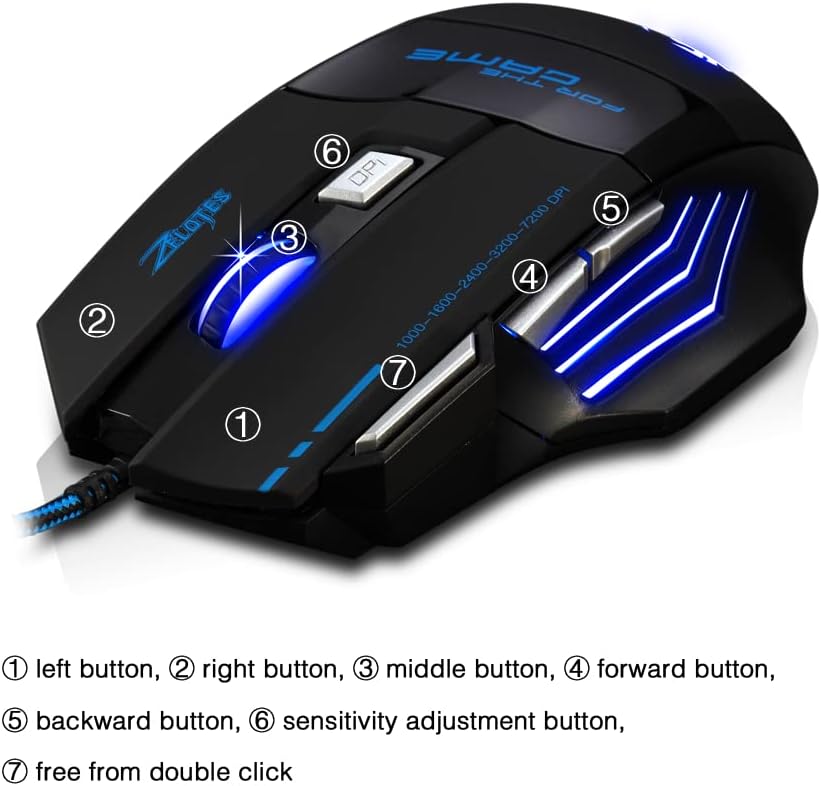
- Levé tlačítko (1): Standardní funkce levého kliknutí.
- Pravé tlačítko (2): Standardní funkce kliknutí pravým tlačítkem myši.
- Middle Button / Scroll Wheel (3): Scrolls up/down. Pressing it acts as a middle-click.
- Forward Button (4): Naviguje vpřed web prohlížeče popř file průzkumníci.
- Backward Button (5): Naviguje zpět web prohlížeče popř file průzkumníci.
- Tlačítko DPI (6): Adjusts mouse sensitivity (DPI) and changes LED colors.
- Rapid Fire Button (7): Functions as a double-click of the left button, useful for continuous firing in games.
Úprava DPI
The mouse offers 5 adjustable DPI levels to suit different tasks and preferences:
- 1000 DPI
- 1600 DPI
- 2400 DPI
- 3200 DPI
- 7200 DPI
Stiskněte tlačítko Tlačítko DPI (6) to cycle through these sensitivity levels. Each change will be indicated by a corresponding LED color change.
Ovládání LED osvětlení
The mouse features 7 LED lighting modes. To change the LED color, long press the DPI button (6). The LED will flash rapidly 7 times and then remain constant on the selected color.

Údržba
- Čištění: K čištění povrchu myši použijte měkký, suchý hadřík. V případě odolných nečistot použijte lehceamp Lze použít hadřík, abyste zajistili, že se do myši nedostane žádná tekutina.
- Péče o kabely: Abyste předešli poškození, vyhněte se ostrým ohybům nebo nadměrnému tahání za kabel USB.
- Skladování: Myš skladujte na suchém a chladném místě mimo dosah přímého slunečního záření a extrémních teplot.
Odstraňování problémů
Myš nereaguje
- Ujistěte se, že je kabel USB bezpečně zapojený do funkčního portu USB.
- Zkuste zapojit myš do jiného USB portu na počítači.
- Vyzkoušejte myš na jiném počítači, abyste zjistili, zda je problém s myší nebo s počítačem.
LED Lights Not Working/Changing
- Zkontrolujte, zda je myš správně připojena k počítači.
- Ensure you are long-pressing the DPI button to cycle through colors. A short press changes DPI.
DPI se nemění
- Ensure you are short-pressing the DPI button to cycle through DPI levels.
- If the issue persists, try reconnecting the mouse.
Specifikace
| Funkce | Detail |
|---|---|
| Číslo modelu | T80 |
| Tlačítka | 7 (with scroll wheel) |
| Nastavitelný DPI | 1000/1600/2400/3200/7200 DPI |
| LED osvětlení | 7 režimů svícení |
| Konektivita | Kabel USB |
| Sledovací systém | Optický |
| Ergonomický design | Ano |
| Přepnout život | 5 milionů cyklů |
| Rozměry | 130 x 105 x 45 mm |
| Hmotnost | 160 ± 5 g |
| Délka USB kabelu | 1.5 m |
| Kompatibilita | Win11, Win10, Win8, Win7, Mac OS |
Záruka a podpora
For warranty information and technical support, please refer to the product packaging or contact zelotes customer service through the retailer where the product was purchased. Keep your purchase receipt for warranty claims.