
1. Úvod
This manual provides detailed instructions for the setup, operation, and maintenance of your ATTACK SHARK X11 Wireless Gaming Mouse and X60 HE Magnetic Switch Gaming Keyboard Combo. Please read this manual thoroughly before using the product to ensure optimal performance and longevity.
2. Obsah balení
Ověřte, zda jsou v balení přítomny všechny položky:
- ATTACK SHARK X60 HE Magnetic Switch Gaming Keyboard
- ATTACK SHARK X11 Wireless Gaming Mouse
- Kabel USB-C na USB-A (pro nabíjení a kabelové připojení)
- 2.4GHz USB přijímací adaptér
- RGB Charging Dock for X11 Mouse
- Uživatelská příručka (tento dokument)

3. Konec produktuview
3.1. ATTACK SHARK X60 HE Keyboard
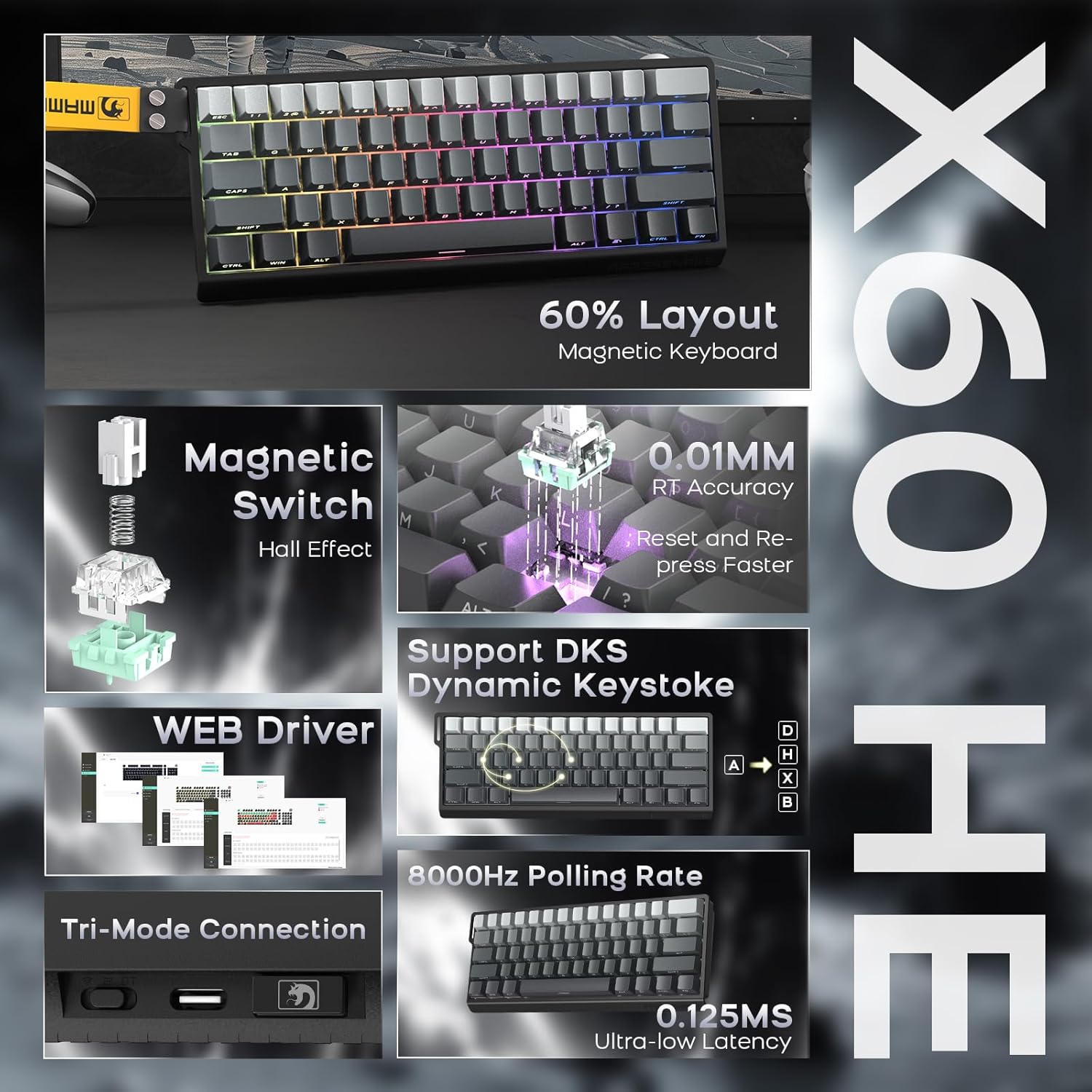
The X60 HE is a 60% layout magnetic switch keyboard designed for high-performance gaming. It features Hall effect switches with adjustable actuation points, rapid trigger functionality, and an 8000Hz polling rate for ultra-low latency response.
- Magnetické spínače: Hall effect switches with adjustable actuation from 0.1mm to 3.2mm.
- Rychlé spouštění: Enables faster key resets and re-presses.
- Frekvence dotazování 8000 Hz: Provides 0.125ms response time in wired mode.
- Dynamický úhoz (DKS): Supports advanced key functionalities.
- Třírežimové připojení: USB-C wired, 2.4GHz wireless, and Bluetooth.
- RGB podsvícení: Customizable 16.8 million color RGB effects.
- Vyměnitelné za provozu: Allows switch replacement without soldering.
- Baterie: Integrovaná dobíjecí baterie s kapacitou 4000 mAh.

3.2. ATTACK SHARK X11 Mouse
The X11 is a lightweight wireless gaming mouse equipped with a high-precision PAW3311 optical sensor and tri-mode connectivity. It features a magnetic charging dock that also functions as a 2.4GHz wireless receiver hub.
- Senzor: PAW3311 optical sensor.
- DPI: Rozlišení až 22,000 DPI s 6 nastavitelnými úrovněmi.
- Míra hlasování: 1000 Hz.
- Hmotnost: Approximately 62g for effortless control.
- Přepínače: HUYU switches with 20 million+ click lifespan.
- Třírežimové připojení: USB-C wired, 2.4GHz wireless, and Bluetooth.
- Nabíjení: Magnetic fast charging via RGB dock.
- Životnost baterie: Up to 65 hours of interval usage.


4. Nastavení
4.1. Počáteční nabíjení
Before first use, it is recommended to fully charge both the keyboard and mouse.
- Klávesnice: Připojte kabel USB-C ke klávesnici a zdroji napájení (např. k portu USB počítače, adaptéru USB do zásuvky).
- Myš: Place the X11 mouse onto its RGB charging dock. Connect the USB-C cable to the charging dock and a power source. The dock will also serve as the 2.4GHz wireless receiver hub.

4.2. Režimy připojení
Both the X60 HE keyboard and X11 mouse support three connection modes: 2.4GHz wireless, Bluetooth, and USB-C wired.

4.2.1. Bezdrátový režim 2.4 GHz
- Klávesnice: Ensure the keyboard is in 2.4GHz mode (check indicator light). Plug the 2.4GHz USB receiver dongle into an available USB port on your computer.
- Myš: The 2.4GHz USB receiver dongle is integrated into the RGB charging dock. Connect the charging dock to your computer via the USB-C cable. Ensure the mouse is in 2.4GHz mode.
4.2.2. Režim Bluetooth
- Klávesnice: Switch the keyboard to Bluetooth mode. Activate Bluetooth on your device (computer, tablet, etc.) and search for available devices. Select "ATTACK SHARK X60 HE" to pair.
- Myš: Switch the mouse to Bluetooth mode. On your device, search for and select "ATTACK SHARK X11" to pair. The X11 mouse supports connecting to two Bluetooth devices (BT1/BT2) and can be switched between them.
4.2.3. Drátový režim USB-C
- Klávesnice: Connect the USB-C cable directly from the keyboard to your computer. The keyboard will automatically switch to wired mode and begin charging.
- Myš: Connect the USB-C cable directly from the mouse to your computer. The mouse will automatically switch to wired mode and begin charging.
5. Provoz
5.1. X60 HE Keyboard Functions
- Nastavitelný bod aktivace: Use the dedicated software (web driver) to customize the actuation distance of each magnetic switch from 0.1mm to 3.2mm.
- Rychlé spouštění: This feature allows keys to activate and deactivate based on movement rather than a fixed point, enabling faster repeated inputs. Configure via the web řidič.
- Dynamický úhoz (DKS): Assign up to four different actions to a single keypress based on how far the key is pressed.
- RGB podsvícení: Cycle through various preset RGB lighting effects using keyboard shortcuts (refer to the keyboard's specific function key combinations) or customize extensively via the web řidič.
- Web Řidič: Přístup k webřidič na adrese www.gmk.top for advanced customization of key functions, actuation points, DKS, macros, and lighting effects.

5.2. X11 Mouse Functions
- Nastavení DPI: The mouse features a DPI button (usually on the bottom or top) to cycle through 6 preset DPI levels: 800, 1600, 2400, 3200, 5000, and 22000 DPI.
- Tri-Mode Switching: Use the switch on the bottom of the mouse to select between 2.4GHz, Bluetooth (BT1/BT2), and wired modes.
- RGB Charging Dock: The dock provides magnetic charging and features customizable RGB lighting. It also acts as the 2.4GHz receiver.
- X11 Driver Software: Download the dedicated X11 driver software for advanced customization, including button remapping, macro creation, DPI fine-tuning, polling rate adjustment, and RGB lighting control.

6. Údržba
Proper maintenance ensures the longevity and performance of your gaming combo.
- Čištění: K otření klávesnice a myši použijte měkký, suchý hadřík. V případě odolné nečistoty použijte lehceamp cloth with mild soap can be used, ensuring no liquid enters the devices. Use compressed air to clear debris from between keycaps.
- Péče o baterie: Avoid fully discharging the batteries frequently. For optimal battery health, charge the devices when the battery level is low, but avoid leaving them plugged in for extended periods after reaching full charge.
- Skladování: Zařízení skladujte na chladném a suchém místě mimo dosah přímého slunečního záření a extrémních teplot.
7. Řešení problémů
Pokud narazíte na problémy, podívejte se na následující běžná řešení:
| Problém | Možné řešení |
|---|---|
| Device not connecting wirelessly |
|
| Zpoždění nebo vstupní zpoždění |
|
| RGB podsvícení nefunguje |
|
| Keyboard keys not responding |
|
If the problem persists, please contact ATTACK SHARK customer support.
8. Specifikace
8.1. ATTACK SHARK X60 HE Keyboard
- Typ přepínače: Hall Effect Magnetic Switches (Linear)
- Akční bod: Adjustable 0.1mm - 3.2mm (via software)
- Míra hlasování: 8000 Hz (kabelové), 1000 Hz (2.4 GHz bezdrátové/Bluetooth)
- Konektivita: USB-C Wired, 2.4GHz Wireless, Bluetooth
- Baterie: Dobíjecí 4000mAh
- Speciální vlastnosti: Rapid Trigger, Dynamic Keystroke (DKS), RGB Backlighting, Hot-Swappable
8.2. ATTACK SHARK X11 Mouse
- Senzor: Optický senzor PAW3311
- DPI: Up to 22,000 (6 adjustable levels: 800/1600/2400/3200/5000/22000)
- Míra hlasování: 1000 Hz
- Hmotnost: Přibl. 62 g
- Přepínače: HUYU (20 Million+ Clicks)
- Konektivita: USB-C Wired, 2.4GHz Wireless, Bluetooth
- Životnost baterie: Up to 65 hours (interval usage)
- Nabíjení: Magnetic Fast Charging Dock (with RGB)
8.3. Obecné specifikace
- Rozměry balení: 14.75 x 7 x 4.75 palce
- Hmotnost položky: 2.94 libry
- Kompatibilní zařízení: Personal Computer, Laptop, Tablet (Windows, macOS, Switch, Xbox, PlayStation)
- Výrobce: ÚTOČNÉHO ŽRALOKA
9. Záruka a podpora
For warranty information or technical support, please contact the seller or visit the official ATTACK SHARK webwebu. Uschovejte si účtenku jako doklad o koupi.
prodejce: ATTACK SHARK US
Oficiální Webmísto: Obchod ATTACK SHARK na Amazonu