
1. Úvod
The AFERIY P210 Portable Power Station is a robust and versatile energy solution designed to provide reliable power for various applications, including home backup, outdoor camping, RV adventures, and emergency situations. With a powerful 2400W output and a long-lasting 2048Wh LiFePO4 battery, it ensures your essential devices remain powered.
Key features include fast dual charging (AC + Solar), pure sine wave output for sensitive electronics, a built-in Uninterruptible Power Supply (UPS) for seamless power transfer, and mobile app control for convenient management.
2. Obsah balení
Upon receiving your AFERIY P210 Portable Power Station, please ensure all items listed below are included in the package:
- AFERIY P210 Portable Power Station
- AC nabíjecí kabel
- MC4-to-XT90 Solar Cable
- Ochranný kryt
- Uživatelská příručka
- Taška na nářadí

Image: The package contents of the AFERIY P210 Portable Power Station, including the unit, cables, cover, manual, and tool bag.
3. Konec produktuview: Ports and Features
The AFERIY P210 is equipped with a comprehensive array of ports and features to meet diverse power needs.
Přední panel
- DC výstupy: 12V/10A (cigarette lighter port), 12V/3A (x2), 12V/25A (XT60).
- USB výstupy: QC 3.0 (x2), PD 20W (x3), PD 100W (x1).
- Displej: Ukazuje procento baterietage, vstupní/výstupní hodnotatage, time remaining, and various status indicators.
- Vypínač: Zapnutí/vypnutí jednotky.
- Světelné tlačítko: To activate the built-in LED light with multiple modes.
Zadní panel
- AC výstupy: 6 x 100V-120V AC outlets (Pure Sine Wave, 2400W total).
- AC vstup: For wall charging (1100W Max).
- DC(XT90) Input: For solar charging (11.5-50V, 500W Max).
- Ochrana proti přetížení: Reset button for circuit breaker.
Horní panel
- Úložný prostor: Conveniently store cables and small accessories.
- Integrované rukojeti: Pro snadnou přenositelnost.

Obrázek: Podrobný view of the AFERIY P210's front panel, highlighting the various DC, USB, and display features.

Image: AFERIY P210 connected to a laptop and controlled via a smartphone app, demonstrating remote monitoring capabilities.
4. Nastavení
Rozbalení
The AFERIY P210 is securely packaged in a double-boxed container with ample Styrofoam padding to protect the unit during transit. Carefully remove all components from the packaging.
Počáteční nabíjení
It is recommended to fully charge the power station before its first use to optimize battery performance and longevity.
AC nástěnné nabíjení
Connect the provided AC charging cable to the AC input port on the rear panel of the power station, then plug the other end into a standard wall outlet. The unit supports up to 1100W AC charging, allowing a full charge in approximately 2 hours.
Solární nabíjení
The AFERIY P210 supports solar charging via its DC(XT90) input port, accepting up to 500W. Use the provided MC4-to-XT90 solar cable to connect compatible solar panels. Ensure the input voltage does not exceed 50V to prevent damage and maintain warranty validity. For faster charging, you can combine AC and solar input simultaneously for a full charge in just 1.5 hours.

Image: Visual representation of various charging methods for the AFERIY P210, including AC, solar, and car charging.
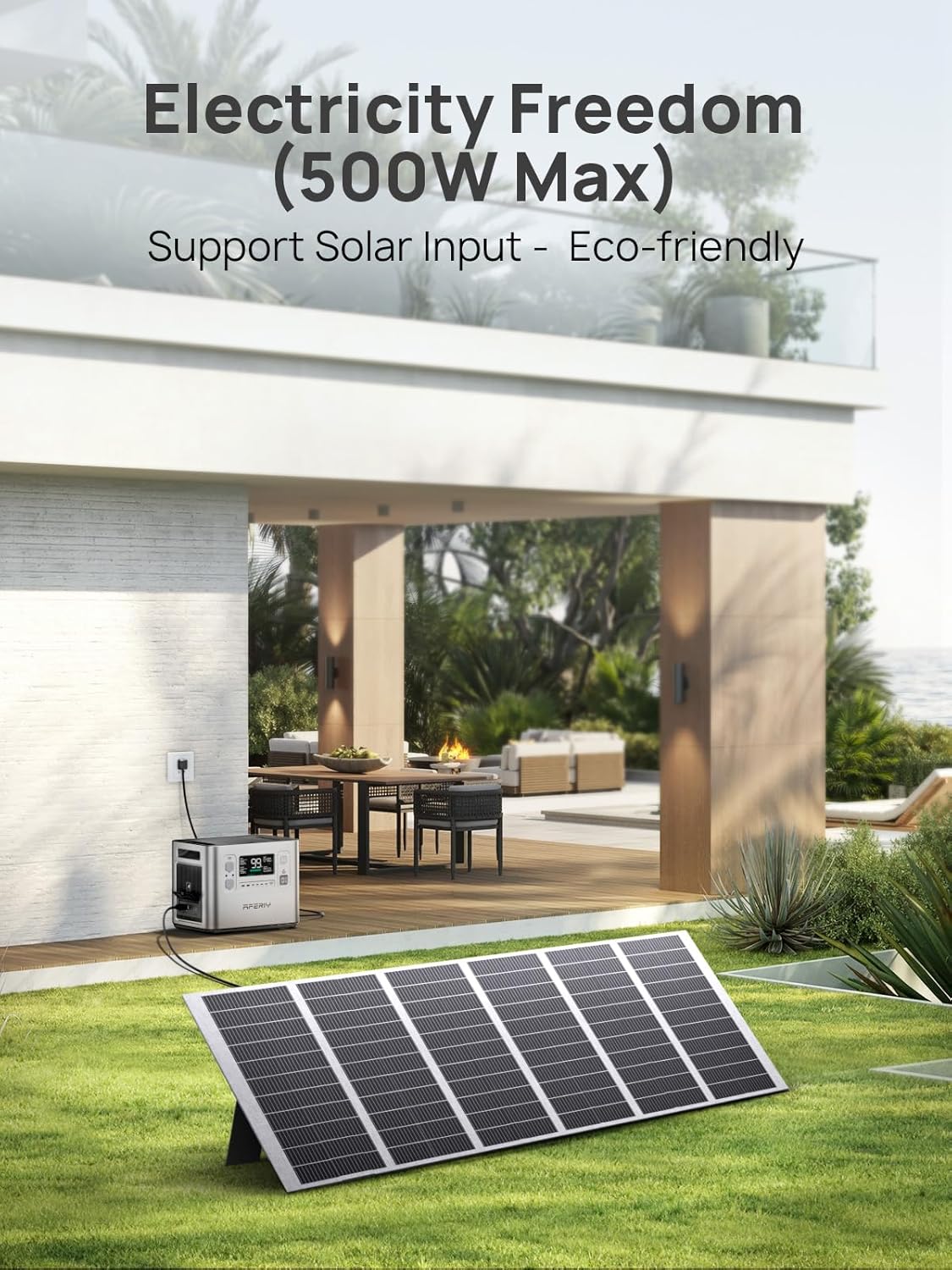
Image: The AFERIY P210 being charged by a solar panel in an outdoor setting, emphasizing eco-friendly power generation.

Image: Infographic showing charging times for the AFERIY P210 using 500W solar, 1100W AC, and combined AC+solar methods.
5. Návod k obsluze
Zapnutí/vypnutí
Press and hold the main Power button on the front panel to turn the unit on or off. The display screen will illuminate, showing the current battery status.
Použití střídavých výstupů
To activate the AC outlets, press the AC button located near the AC output ports on the rear panel. The display will indicate AC output is active. The P210 provides a pure sine wave output, ensuring stable and safe power for sensitive electronics.
Using DC Outputs
Press the DC button on the front panel to enable the DC output ports (12V/10A, 12V/3A, 12V/25A). The display will show DC output is active.
Using USB Outputs
The USB-A (QC 3.0) and USB-C (PD 20W, PD 100W) ports are automatically active when the unit is powered on. Simply plug in your devices to begin charging.
Zobrazení informací
The digital display provides real-time information including battery charge level, input wattage, výstupní vodatage, and estimated time remaining for charging or discharging.
Built-In UPS Function
In the event of a power failure, the built-in UPS system automatically switches power within 10 milliseconds, ensuring uninterrupted operation for connected devices like computers, servers, and medical equipment.
Ovládání mobilní aplikace
Download the BrightEMS mobile app to monitor battery status, manage power settings, and control the power station remotely via wireless connection.

Image: AFERIY P210 powering various devices like a camping light, laptop, phone, and electric kettle in an outdoor setting.

Image: Infographic detailing the AFERIY P210's 10ms UPS, intelligent BMS, and pure sine wave inverter for stable power.

Image: A family using the AFERIY P210 to power kitchen appliances during an outage, demonstrating its reliable backup power.

Image: A person using the AFERIY P210 to power power tools in a workshop, illustrating its utility for work and daily tasks.

Image: People enjoying outdoor entertainment powered by the AFERIY P210, showcasing its use for car fridges, coffee makers, and electric grills.

Image: The AFERIY P210 providing emergency power to a home office setup, ensuring critical devices remain operational during outages.

Image: A smartphone displaying the AFERIY mobile app interface, demonstrating wireless control and monitoring of the power station.
6. Bezpečnost a ochrana
The AFERIY P210 is built with advanced safety features to protect both the device and your connected electronics.
- LiFePO4 baterie: Equipped with a durable and safe LiFePO4 battery, rated for over 4000 charge cycles.
- Výstup čisté sinusové vlny: Delivers stable and clean power, preventing damage to sensitive devices.
- Vestavěný systém správy budov (BMS): The intelligent Battery Management System (BMS) provides 6 layers of protection:
- Over-Voltage Ochrana
- Ochrana proti zkratu
- Ochrana proti nadproudu
- Ochrana proti nadměrnému vybití
- Ochrana proti přetížení
- Ochrana proti přebití
- Overload Protection Reset: A dedicated button on the rear panel allows for easy resetting in case of an overload.

Image: Infographic illustrating the six types of battery protection provided by the AFERIY P210's intelligent BMS.
7. Údržba
To ensure the longevity and optimal performance of your AFERIY P210 Portable Power Station, follow these maintenance guidelines:
- Čištění: Regularly wipe the exterior with a soft, dry cloth. Avoid using harsh chemicals or abrasive materials.
- Skladování: Přístroj skladujte na chladném a suchém místě mimo dosah přímého slunečního záření a extrémních teplot.
- Správa kabelů: Utilize the built-in top compartment for convenient storage of power cables and accessories, keeping them organized and protected.
- Frekvence nabíjení: For prolonged storage, it is recommended to charge the unit to 50-80% every 3-6 months to maintain battery health.

Image: The AFERIY P210's top storage compartment with cables, illustrating its design for easy organization and practicality.
8. Řešení problémů
If you encounter any issues with your AFERIY P210, please refer to the following common troubleshooting steps:
- Jednotka se nezapne: Ujistěte se, že je baterie nabitá. Pokud ne, připojte ji k elektrické zásuvce nebo solárnímu panelu.
- Žádný výstup z portů: Verify that the specific output (AC, DC, USB) is enabled via its respective button. Check the display for any error indicators.
- Spuštěna ochrana proti přetížení: If an overload occurs, the unit may shut down. Disconnect some devices and press the Overload Protection reset button on the rear panel.
- Problémy s nabíjením: Ensure all charging cables are securely connected. For solar charging, check panel placement and sunlight exposure. Verify input voltage je v daném rozsahu (11.5–50 V).
- Konektivita aplikace: Ensure Bluetooth/Wi-Fi is enabled on your mobile device and the power station is within range.
Pro další pomoc se prosím obraťte na zákaznickou podporu.
9. Specifikace
| Funkce | Specifikace |
|---|---|
| Model | AF-P210 |
| Kapacita baterie | 2048Wh (40Ah/51.2V) LiFePO4 |
| Vstup AC nabíjení | 1100W Max (100V-120V~50/60Hz) |
| Vstup stejnosměrného proudu (XT90) | 11.5-50V 500W Max |
| Výstup USB-A | QC3.0 18W Max (x2) |
| Výstup USB-C | PD 20W Max (x3), PD 100W Max (x1) |
| Výstup XT60 | 12V/25A |
| Výstup 12 V DC | 12V/3A (x2) |
| Výstup Car Port | 12V/10A |
| LED světlo | 1W |
| AC výstup | 100V-120V~50/60Hz (Rated 2400W Total) |
| Režim UPS | Jmenovitý výkon 1100 W, vrchol 2200 W. |
| Hmotnost položky | 54 libry |
| Rozměry produktu | 15.43 cm D x 10.98 cm Š x 12.72 cm V |
| Materiál | ABS |
10. Záruka a podpora
The AFERIY P210 Portable Power Station comes with a comprehensive warranty and dedicated customer support.
- Standardní záruka: Enjoy peace of mind with a 5-year warranty.
- Prodloužená záruka: The warranty can be extended to 7 years upon successful registration.
- Doživotní zákaznická podpora: Benefit from lifetime customer support from our expert US-based team.
- Kontaktujte podporu: For any after-sales issues or technical assistance, please email podpora@aferiy.com.