
Oilsky M303
Oilsky M303 Android 9.0 MP3 Player User Manual
Model: M303
1. Úvod
The Oilsky M303 is a versatile digital audio and video player running on Android 9.0. It features a 4-inch full-touch screen, 8-core processor, 2GB RAM, 16GB internal storage (expandable with a 64GB microSD card included), Wi-Fi, and Bluetooth connectivity. This manual provides essential information for operating your device.
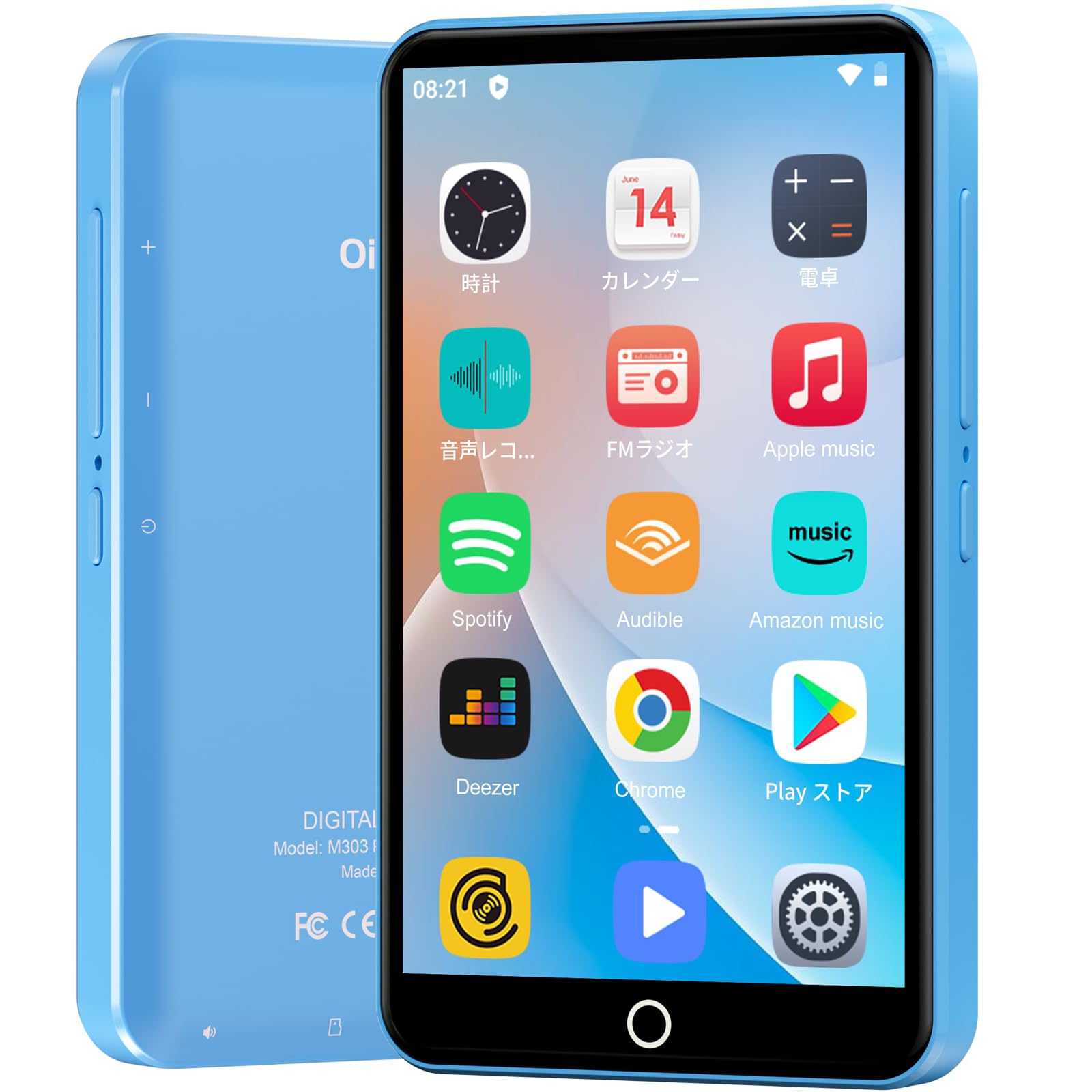
Obrázek: Přední strana view of the Oilsky M303 MP3 Player, showcasinjeho kompaktní design a dotykové rozhraní.
2. Co je v krabici
Zkontrolujte prosím, zda jsou v balení obsaženy všechny následující položky:
- Oilsky M303 Main Unit
- Sluchátka
- Datový kabel typu C
- Protective Film (one pre-installed, one spare)
- Multi-language User Manual (including Japanese)
- Silikonové ochranné pouzdro
- Paměťová karta 64GB

Image: All included accessories for the Oilsky M303 MP3 Player, neatly arranged.
3. Konec produktuview
Familiarize yourself with the device's physical features and controls.
3.1. Uspořádání zařízení

Obrázek: Boční view of the Oilsky M303, highlighting the volume buttons, power button, and USB-C port.
- Vypínač: Stisknutím a podržením zapnete/vypnete zařízení nebo restartujete. Krátkým stisknutím zapnete/vypnete obrazovku.
- Tlačítka hlasitosti: Upravte hlasitost zvuku.
- Port USB-C: Pro nabíjení a přenos dat.
- 3.5mm konektor pro sluchátka: Connect wired earphones.
- Slot pro microSD kartu: Vložte kartu microSD pro rozšíření úložiště.
- Vestavěný reproduktor: Pro přehrávání zvuku bez sluchátek.
4. Nastavení
4.1. Počáteční nabíjení
Before first use, fully charge the device. Connect the provided Type-C data cable to the player and a USB power adapter (not included). A full charge takes approximately 3 hours. The device has a 2000mAh battery for extended use.
4.2. Zapnutí/vypnutí
- Zapnutí: Stiskněte a podržte tlačítko Napájení, dokud se nerozsvítí obrazovka.
- Vypnutí: Stiskněte a podržte tlačítko napájení a poté z možností vyberte možnost „Vypnout“.
- Zapnutí/vypnutí obrazovky: Short press the Power button to turn the screen on or off.
4.3. Nastavení jazyka
Upon first boot, you may need to set the language. Navigate to Nastavení > Systém > Jazyky a vstup > Jazyky to select your preferred language, such as English or Japanese.
4.4. Připojení Wi-Fi
Pro přístup k online funkcím a stahování aplikací se připojte k síti Wi-Fi:
- Přejít na Nastavení > Síť a internet > Wi-Fi.
- Přepnout Wi-Fi On.
- Vyberte požadovanou síť ze seznamu a v případě potřeby zadejte heslo.
4.5. Google Play Store
The Oilsky M303 supports Google Play Store, allowing you to download various applications.
- Ujistěte se, že jste připojeni k Wi-Fi.
- Otevřete Obchod Play aplikaci z domovské obrazovky.
- Přihlaste se pomocí svého účtu Google.
- Hledat and install desired applications like YouTube, Spotify, or other streaming services.

Image: The Oilsky M303 screen showing the Google Play Store interface with various app icons.
5. Návod k obsluze
5.1. Přehrávání hudby
The device supports various audio formats including MP3, WMA, WAV, FLAC, OGG, AAC, APE, and M4A.
- Přenos hudby: Connect the player to your computer using the Type-C cable and transfer audio files to the device's internal storage or the microSD card.
- Přehrát hudbu: Open the Music app. You can browse by artist, album, song, or create custom playlists.
- Ekvalizér: Adjust sound settings using the built-in equalizer for a personalized audio experience.
- Online Lyrics: The player supports displaying online lyrics for songs.

Image: The Oilsky M303 displaying its music playback interface, showing options for song classification, search, playlist creation, and equalizer settings.
5.2. Přehrávání videa
Enjoy videos on the 4-inch IPS full-touch screen with 480x800px resolution, supporting up to 1080P Full HD video playback. Supported formats include RM, AVI, RMVB, FLV, MP4, DAT, MKV, MPG, MOV, TS.
- Transfer Videos: Přenos videa filez vašeho počítače do zařízení.
- Přehrát videa: Open the Video app and select your desired video.
- Možnosti přehrávání: Features include loop or random playback, variable speed playback, sleep timer, and gesture controls for zoom.

Image: The Oilsky M303 displaying a video on its 4-inch screen, illustrating its video playback capabilities.
5.3. Připojení Bluetooth
Connect your player to Bluetooth headphones, speakers, or car audio systems.
- Přejít na Nastavení > Připojená zařízení > Bluetooth.
- Přepnout Bluetooth On.
- Make sure your Bluetooth accessory is in pairing mode.
- Vyberte příslušenství ze seznamu dostupných zařízení, která chcete spárovat.

Image: The Oilsky M303 demonstrating its Bluetooth connectivity with various audio devices like speakers and headphones.
5.4. FM rádio
The device includes an FM radio function. Connect wired earphones to act as an antenna for optimal reception.
5.5. Hlasový záznamník
Use the built-in voice recorder for capturing audio notes or lectures. Open the Záznam zvuku app to start recording.
5.6. File Řízení
The player comes with 16GB of internal storage and a 64GB microSD card, providing a total of 80GB usable storage. This can be expanded further up to 512GB using a larger microSD card. Use the File Manager app to organize your media and documents.
6. Údržba
- Čištění: K čištění zařízení používejte měkký, suchý hadřík. Nepoužívejte tekuté čisticí prostředky ani abrazivní materiály.
- Skladování: Přístroj skladujte na chladném a suchém místě mimo dosah přímého slunečního záření a extrémních teplot.
- Péče o baterie: Pro prodloužení životnosti baterie se vyvarujte častého úplného vybíjení. Pravidelně ji nabíjejte.
- Aktualizace softwaru: Check for system updates periodically in Nastavení > Systém > Pokročilé > Aktualizace systému aby byl zajištěn optimální výkon a bezpečnost.
7. Řešení problémů
| Problém | Možné řešení |
|---|---|
| Zařízení se nezapne. | Ujistěte se, že je baterie nabitá. Před opětovným zapnutím připojte zařízení k nabíječce alespoň na 30 minut. |
| Nelze se připojit k Wi-Fi. | Check if Wi-Fi is enabled in settings. Ensure the password is correct. Restart the device and your Wi-Fi router. |
| Připojení Bluetooth je nestabilní nebo se odpojuje. | Ensure the player and Bluetooth accessory are within close range. Avoid areas with strong electromagnetic interference. Try re-pairing the devices. |
| Aplikace jsou pomalé nebo nereagují. | Close unnecessary background applications. Clear app cache (Settings > Apps & notifications > See all apps > [App Name] > Storage & cache > Clear cache). Restart the device. |
| Zařízení se během používání zahřívá. | It is normal for the device to warm up during intensive use (e.g., video playback, gaming). If it becomes excessively hot, close applications and let it cool down. |
| Cannot charge with USB-C PD charger. | The device may not support USB-C Power Delivery (PD) protocols. Use a standard USB-A to USB-C cable with a compatible USB-A power adapter (5V, up to 900mA). |
8. Specifikace
| Značka | Oilsky |
| Model | M303 |
| Operační systém | Android 9.0 |
| Obrazovka | 4-inch Full-touch IPS LCD (480x800px) |
| Procesor | 8-core (MTK 8-Core) |
| BERAN | 2 GB |
| Interní úložiště | 16 GB |
| Rozšiřitelné úložiště | MicroSD card up to 512GB (64GB card included) |
| Baterie | 2000 XNUMX mAh |
| Konektivita | Wi-Fi, Bluetooth |
| Podporované zvukové formáty | MP3, WMA, WAV, FLAC, OGG, AAC, APE, M4A |
| Podporované video formáty | RM, AVI, RMVB, FLV, MP4, DAT, MKV, MPG, MOV, TS (up to 1080P) |
| Rozměry (D x Š x V) | 1 x 6.1 x 10.3 cm |
| Vlastnosti | Touchscreen, Voice Recorder, Built-in Speaker, Video Playback, FM Radio, Calculator, Calendar, Alarm |
| Původ | Čína |
9. Záruka a podpora
The Oilsky M303 MP3 Player comes with a 1-letá záruka od data nákupu. Uschovejte si prosím doklad o koupi pro případné reklamace.
For technical support or warranty inquiries, please contact the retailer or manufacturer directly. Refer to the contact information provided in the packaging or on the official Oilsky webmísto.
Ask a question about this manual
Ask about setup, troubleshooting, compatibility, parts, safety, or missing instructions. Manuals+ will review the question and use this page’s manual context to help answer it.