
1. Konec produktuview
The Hisense 65E7Q QLED Smart TV offers a premium viewing experience with its 65-inch QLED display. This television integrates advanced technologies such as Dolby Vision and Dolby Atmos for immersive audio-visuals, AI Smooth Motion for fluid images, and dedicated modes for gaming and sports. Powered by the VIDAA operating system, it provides easy access to a wide range of streaming content and smart features, including voice control.

Přední view of the Hisense 65E7Q QLED Smart TV.
Klíčové vlastnosti:
- Barva QLED: Experience rich, vibrant, and realistic colors.
- Plynulý pohyb s umělou inteligencí: Advanced MEMC and 3D Noise Reduction for fluid, blur-free images.
- Dolby Vision & Dolby Atmos: Cinematic picture and immersive sound for an enhanced entertainment experience.
- Herní režim Plus: Reduces input lag to 16ms, with 60Hz VRR and ALLM for ultra-fluid gaming.
- Sportovní režim s umělou inteligencí: Optimizes picture and sound for sports content, reducing motion blur and enhancing stadium-like audio.
- Zvyšování rozlišení na 4K s umělou inteligencí: Enhances blurry images to near-4K quality.
- VIDAA Smart TV OS: Fast, secure, and intuitive operating system with access to popular streaming applications.
- Hlasové ovládání: Integrated Alexa and VIDAA Voice for convenient operation.
2. Bezpečnostní informace
Please read all safety instructions carefully before using your TV. Keep this manual for future reference. Always ensure the TV is placed on a stable surface to prevent tipping. Do not expose the TV to rain or moisture. Refer to the full safety guidelines in the included safety manual.
3. Obsah balení
Ověřte, zda jsou v krabici přítomny všechny položky:
- Chytrá televize Hisense 65E7Q QLED
- Napájecí kabel
- Dálkové ovládání (s 1 baterií AAAA součástí balení)
- TV stolek (2 kusy)
- Šrouby pro montáž stojanu
- Uživatelská příručka (tento dokument)
- Záruční list
4. Nastavení
4.1 Sestavení stojanu
- Televizor opatrně položte obrazovkou dolů na měkký, rovný povrch, abyste předešli jeho poškození.
- Zarovnejte díly stojanu s odpovídajícími otvory na spodní straně televizoru.
- Zajistěte díly stojanu pomocí dodaných šroubů. Ujistěte se, že jsou pevně utažené.

Diagram illustrating TV dimensions and stand installation points.
4.2 Montáž na stěnu
If you plan to wall mount your TV, ensure you use a VESA-compatible wall mount kit (not included). The Hisense 65E7Q supports a VESA mounting standard of 600 x 400 mm. Follow the instructions provided with your wall mount kit for safe installation.
4.3 Připojení periferních zařízení
Connect your external devices to the TV's ports as needed. Refer to the port diagram below:

Zadní view showing available ports and connections.
- HDMI porty (x3): Connect Blu-ray players, game consoles, and other HDMI devices. One port supports eARC for enhanced audio return.
- USB porty (x2): Connect USB flash drives for media playback. (1x USB 3.0, 1x USB 2.0)
- Anténní vstupy (x2): Připojte pozemní nebo kabelovou anténu.
- Ethernet (LAN): Pro kabelové síťové připojení.
- Optický audio výstup: Připojte se k soundbaru nebo audio receiveru pro digitální zvuk.
- Sluchátkový jack: Pro soukromý poslech.
- AV vstupy: Pro připojení starších zařízení pomocí kompozitních video a stereo audio kabelů.
4.4 Počáteční zapnutí
- Připojte napájecí kabel k televizoru a poté do elektrické zásuvky.
- Stiskněte tlačítko napájení na dálkovém ovladači nebo na televizoru.
- Postupujte podle pokynů na obrazovce a dokončete počáteční nastavení, včetně výběru jazyka, síťového připojení a vyhledávání kanálů.
5. Ovládání vašeho televizoru
5.1 Dálkové ovládání
The included remote control allows you to navigate the TV's features. Insert the provided AAAA battery into the remote. The remote supports voice control for convenient operation.
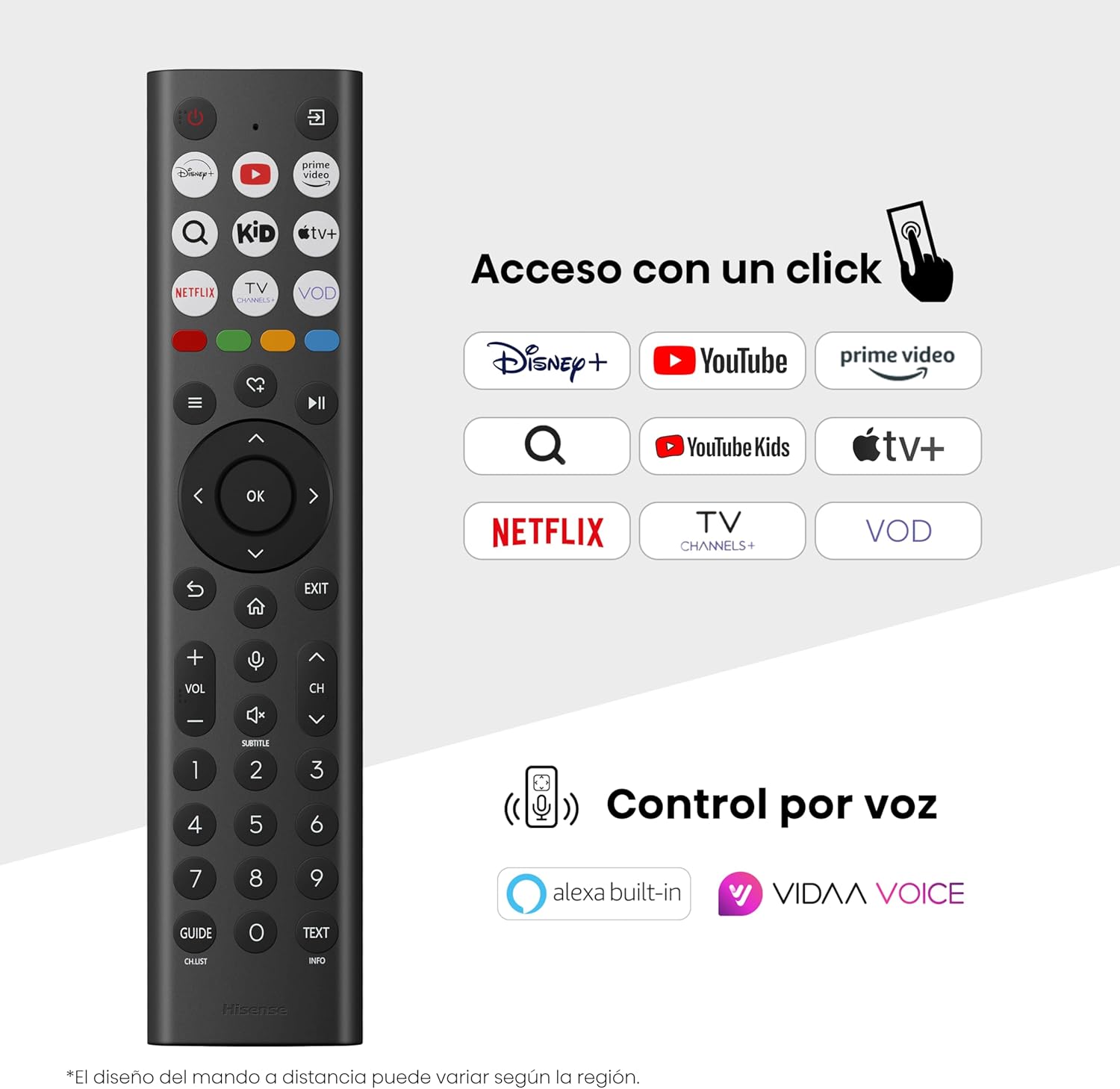
Hisense Smart TV remote control with dedicated app buttons and voice control.
5.2 Funkce Smart TV (OS VIDAA)
Your Hisense TV runs on the VIDAA operating system, offering a user-friendly interface for accessing various applications and services.

The VIDAA Smart TV interface with popular streaming applications.
- Aplikace: Získejte přístup k předinstalovaným aplikacím, jako jsou Netflix, YouTube, Prime Video a další.
- Hlasové ovládání: Use the remote's voice function to search for content, adjust settings, or interact with Alexa built-in and VIDAA Voice.
- Screen Mirroring (AirPlay): Share content from your Apple devices directly to the TV.
- Sdílet na televizi: Easily send content from your mobile devices to the TV.
5.3 Nastavení obrazu
Optimalizujte své viewing experience with various picture enhancement technologies:
- Barva QLED: Delivers over a billion shades of vibrant, lifelike colors.
- Zvyšování rozlišení na 4K s umělou inteligencí: Automaticky vylepšuje obsah s nižším rozlišením na kvalitu blížící se 4K.
- Plynulý pohyb s umělou inteligencí: Reduces motion blur in fast-paced scenes, ensuring clear and fluid visuals.
- Dolby Vision: Provides stunning brightness, contrast, and color for a dramatic visual experience.
- Režim filmaře: Preserves the original aspect ratio, colors, and frame rates to display movies as intended by the director.
- Světelný senzor s umělou inteligencí: Intelligently adjusts screen brightness based on ambient light for optimal viewa energetická účinnost.
- Režim péče o zrak: Snižuje vyzařování modrého světla pro minimalizaci namáhání očí.
- Režim úspory energie: Optimizes power consumption without significantly compromising picture quality.

QLED technology delivers over a billion vibrant color tones.

AI 4K Upscaler enhances lower resolution content to near 4K clarity.

AI Smooth Motion ensures fluid images without blur, especially in fast-moving scenes.

Filmmaker Mode presents content exactly as the director intended.
5.4 Nastavení zvuku
Vylepšete si zvukový zážitek pomocí:
- Dolby Atmos: Immersive, multi-dimensional sound that fills your room.
- Integrovaný reproduktor: Built-in speakers with a maximum output of 1 Watt per channel.
- EzPlay: Seamlessly control compatible Hisense soundbars directly from your TV screen.

Dolby Vision and Dolby Atmos combine for a spectacular audio-visual experience.
5.5 Herní funkce
Pro hráče televize nabízí:
- Herní režim Plus: Reduces input lag to 16ms, ensuring responsive gameplay.
- 60Hz VRR (variabilní obnovovací frekvence): Synchronizes the TV's refresh rate with the game console's output to prevent screen tearing.
- ALLM (automatický režim nízké latence): Automatically switches the TV to low-latency mode when a game is detected.
- Herní lišta: An integrated control center for quick access to game settings and real-time performance monitoring.

Game Mode Plus provides ultra-fluid, lag-free gaming.

The Game Bar offers centralized control for game settings.
5.6 Sportovní funkce
- Sportovní režim s umělou inteligencí: Automatically detects sports content and optimizes picture and sound settings for a stadium-like experience, enhancing clarity and audio effects.
6. Údržba
6.1 Čištění televizoru
- Před čištěním vždy odpojte televizor ze zásuvky.
- Use a soft, dry, lint-free cloth to gently wipe the screen and TV body.
- Na odolné skvrny lehceampOtřete hadřík vodou nebo specializovaným čističem obrazovek (nestříkejte přímo na obrazovku).
- Nepoužívejte abrazivní čisticí prostředky, alkohol, benzen ani ředidla, protože by mohly poškodit povrch televizoru.
6.2 Aktualizace softwaru
Váš televizor může pravidelně dostávat aktualizace softwaru, které zlepšují jeho výkon a přidávají nové funkce. Pro získání těchto aktualizací se ujistěte, že je váš televizor připojen k internetu. Aktualizace můžete obvykle zkontrolovat ručně v nabídce nastavení televizoru.
7. Řešení problémů
Pokud narazíte na problémy s televizorem, podívejte se na následující běžná řešení:
- Bez napájení: Zkontrolujte, zda je napájecí kabel bezpečně připojen a zda je zásuvka funkční. Zkuste jinou zásuvku.
- Žádný obraz/zvuk: Ujistěte se, že je vybrán správný vstupní zdroj. Zkontrolujte všechna kabelová připojení (HDMI, anténa).
- Dálkové ovládání nefunguje: Check the battery (1 AAAA battery). Ensure there are no obstructions between the remote and the TV.
- Problémy s připojením k síti: Ověřte heslo k Wi-Fi nebo připojení ethernetového kabelu. Restartujte router.
- Špatná kvalita obrazu: Upravte nastavení obrazu (jas, kontrast, ostrost). Ujistěte se, že vstupní zdroj poskytuje vysoce kvalitní signál.
- Zkreslení zvuku: Check audio settings. If using external speakers, ensure they are connected correctly.
For more detailed troubleshooting, consult the full electronic user manual or contact Hisense customer support.
8. Specifikace
Podrobné technické specifikace chytré televize Hisense 65E7Q QLED:
| Funkce | Specifikace |
|---|---|
| Číslo modelu | 65 7 EXNUMXQ |
| Velikost obrazovky | 65 palce |
| Technologie displeje | QLED |
| Rezoluce | 4K (3840 x 2160) |
| Obnovovací frekvence | 60 Hz |
| Podpora formátu HDR | Dolby Vision |
| Motion Enhancement Technology | Plynulý pohyb s umělou inteligencí |
| Vylepšení kvality obrazu | AI 4K Upscaler, AI Smooth Motion, QLED Colour |
| Doba odezvy | 100 milisekund |
| Konfigurace podsvícení | Direct Illumination, Dimming |
| Popis reproduktoru | Integrated speaker with Dolby Atmos |
| Maximální výstupní výkon reproduktoru | 1 Wattů |
| Audio kanály | Vícekanálový |
| Surround Sound Format | Dolby Atmos |
| Operační systém | VIDAA |
| Kapacita paměti | 1 GB |
| Kontrolní metoda | Hlas |
| Technologie připojení | Bluetooth, HDMI, Wi-Fi |
| Internet Applications | Netflix, YouTube, Prime Video, AirPlay 2 |
| HDMI porty | 3 (including HDMI 2.1 with eARC) |
| USB porty | 2 (1x USB 3.0, 1x USB 2.0) |
| Bezdrátová technologie | Wi-Fi |
| Screen Mirroring Technology | AirPlay |
| Standardní montáž VESA | 600 x 400 mm |
| Rozměry produktu (DxŠxV) | 7.6 x 145.3 x 83.8 cm |
| Hmotnost produktu | 15.2 kg (se stojanem) |
| Třída energetické účinnosti | E |
| Roční spotřeba energie | 84 kWh/1000h (SDR), 160 kWh/1000h (HDR) |
| Moc | 1 Watt (standby) |
| svtage | 100-240 VCA 50-60 Hz |
| Zahrnuté komponenty | Napájecí kabel, dálkové ovládání, stojan |
| Modelový rok | 2025 |
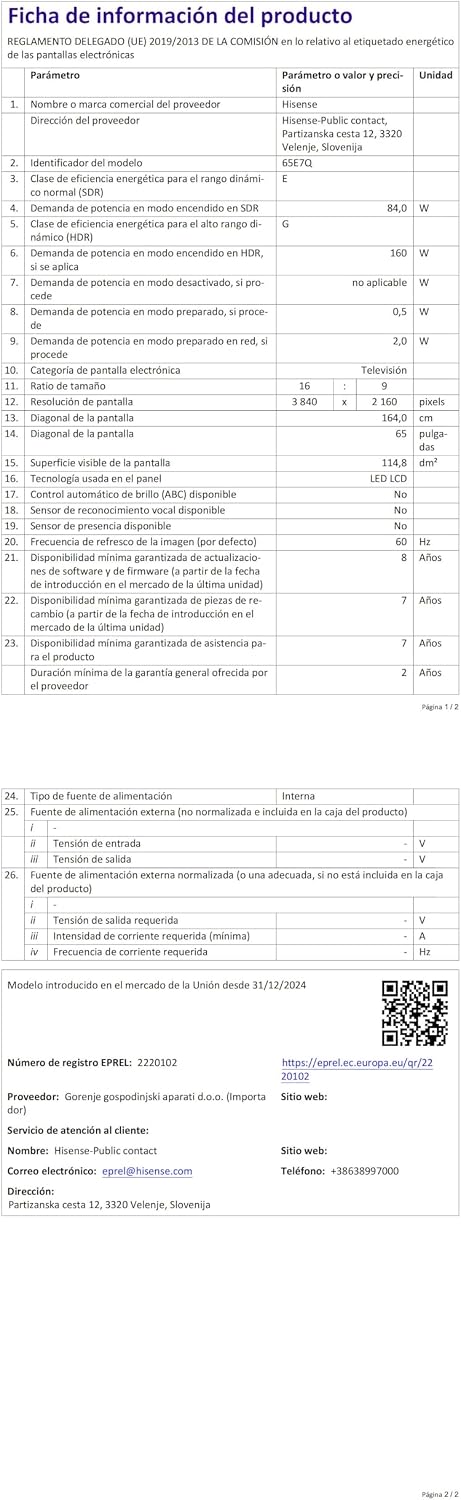
Energy label for the Hisense 65E7Q TV.
Pro podrobnější informace o produktech se prosím podívejte do databáze EPREL: https://eprel.ec.europa.eu/qr/2220102
9. Záruka a podpora
9.1 Záruka na produkt
Tato televize Hisense je dodávána s 3letá záruka na produktUschovejte si prosím doklad o koupi pro případ reklamace.
9.2 Dostupnost náhradních dílů
Spare parts for this model are guaranteed to be available in the EU for a duration of 10 roky from the product's market introduction.
9.3 Zákaznická podpora
For technical assistance, troubleshooting, or warranty service, please contact Hisense customer support. Refer to the contact information provided in your warranty card or visit the official Hisense webstránky pro váš region.