
Zavedení
This manual provides detailed instructions for the installation, operation, and maintenance of your SIXTOP 7-inch Double Din Car Stereo. Please read this manual thoroughly before using the product to ensure proper function and to prevent damage. Keep this manual for future reference.
Obsah balení
Ověřte, zda jsou v balení obsaženy všechny níže uvedené položky:
- 1 x Dvoudinové rádio
- 1 x napájecí kabel
- 1 x kabel klaksonu
- 2 x demontážní nástroje
- 1 x Uživatelská příručka

Figure 1: Package contents and unit dimensions. The image displays the 7-inch head unit, its rear connections, and the included cables, disassembly tools, and user manual.
Nastavení a instalace
Pro toto autorádio se doporučuje profesionální instalace. Před zahájením instalace se ujistěte, že je vozidlo odpojeno od napájení.
Rozměry a přizpůsobení
The unit is a standard 7-inch double din size. Installation dimensions are approximately 180mm (L) x 103mm (H) / 7.0 inches (L) x 4.0 inches (H). Please verify your vehicle's dashboard opening before installation.
Připojení vodičů
Connect the power cable, horn cable, and other necessary audio/video cables (RCA, 3.5mm Jack, ISO) to the corresponding ports on the back of the unit and your vehicle's wiring harness. Refer to the wiring diagram provided in the separate wiring guide (if applicable) or consult a professional installer.
Montáž
Use the provided disassembly tools and mounting brackets to secure the unit into your vehicle's double din slot.
Návod k obsluze
Základní operace
- Zapnutí/vypnutí: Press the power button (usually a rotary knob or dedicated button) to turn the unit on or off.
- Ovládání hlasitosti: Rotate the volume knob or use the volume buttons to adjust the audio level.
- Navigace v nabídce: Use the touchscreen or physical buttons to navigate through menus and select functions.
Bluetooth Hands-Free Calls and Music Streaming
Pair your smartphone with the car stereo via Bluetooth for hands-free calling and wireless music streaming.
- Povolte na svém smartphonu Bluetooth.
- Na autorádiu přejděte do nabídky Bluetooth.
- Hledat available devices on your phone and select "SIXTOP Car Stereo" (or similar name).
- Potvrďte párování na obou zařízeních.
- Once paired, you can make/receive calls and stream audio from your phone.
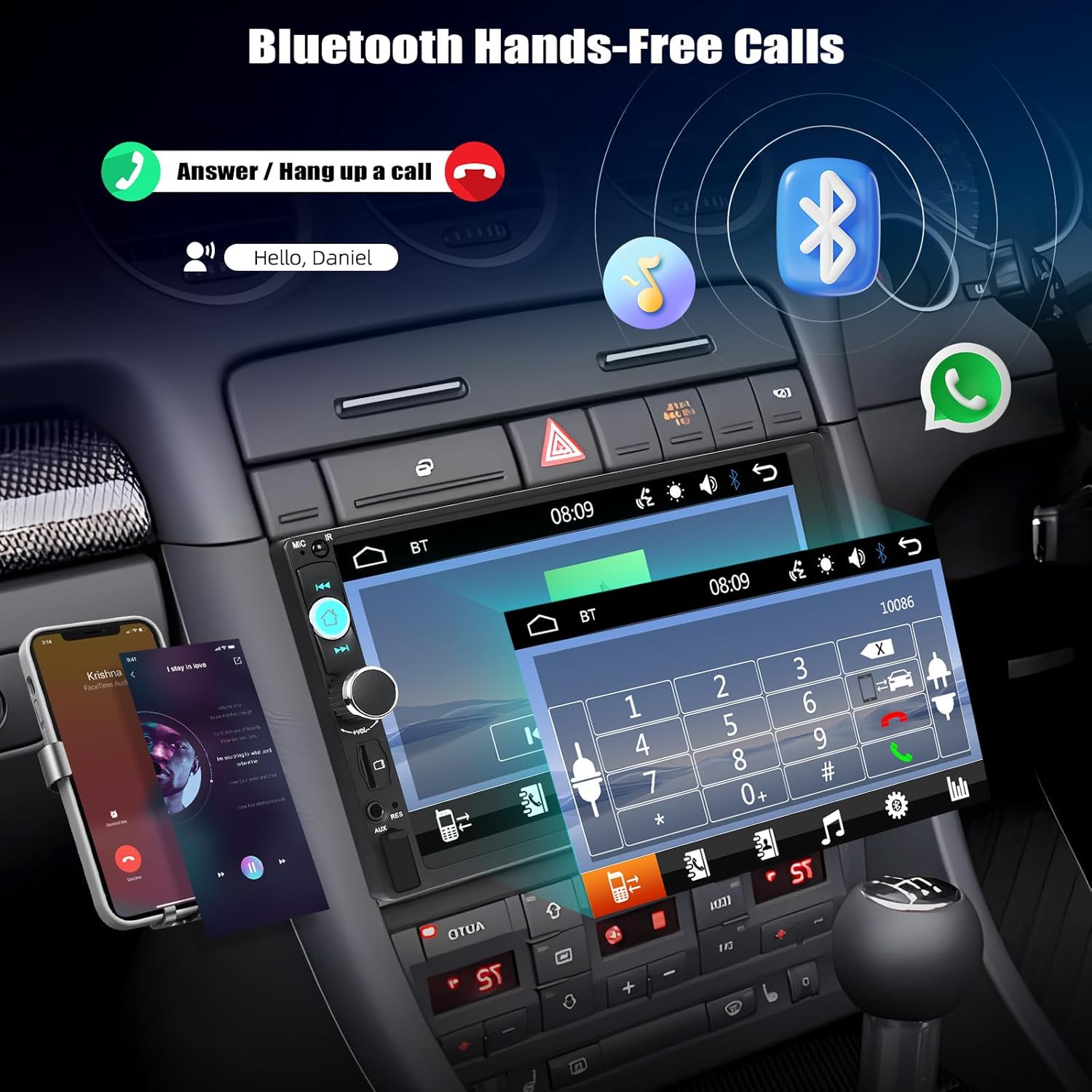
Figure 2: Bluetooth hands-free calling interface. The image illustrates how to answer or hang up calls and stream music via Bluetooth.
Funkce zrcadlového propojení
The Mirror Link feature allows you to display your smartphone's screen on the car stereo's display. This unit supports wired Mirror Link for both iOS and Android devices.
- Connect your smartphone to the car stereo using an original USB data cable.
- Follow the on-screen prompts on both your phone and the car stereo to establish the connection.
- Once connected, your phone's screen content will be mirrored on the stereo display.

Figure 3: Mirror Link for iOS and Android. This image demonstrates how a smartphone's display is replicated on the car stereo screen via USB connection.
Provoz FM rádia
Přístup k FM rozhlasovým stanicím a jejich naladění.
- Navigate to the FM Radio mode.
- Use the scan function for automatic station search or manually tune to desired frequencies (87.5-108MHz).
- Uložte si své oblíbené stanice do předvoleb pro rychlý přístup.

Figure 4: FM Radio interface. The image shows the radio frequency display and preset station buttons.
Multimedia Playback (USB/TF Card/AUX)
Přehrávání zvuku a videa files z různých zdrojů.
- USB: Vložte USB disk do USB portu. Přístroj automaticky detekuje a přehraje kompatibilní média. files.
- TF karta: Insert a TF (MicroSD) card into the TF card slot. The unit will detect and play compatible media files.
- Vstup AUX: Connect an external audio device using a 3.5mm AUX cable to the AUX input. Select AUX mode on the stereo.
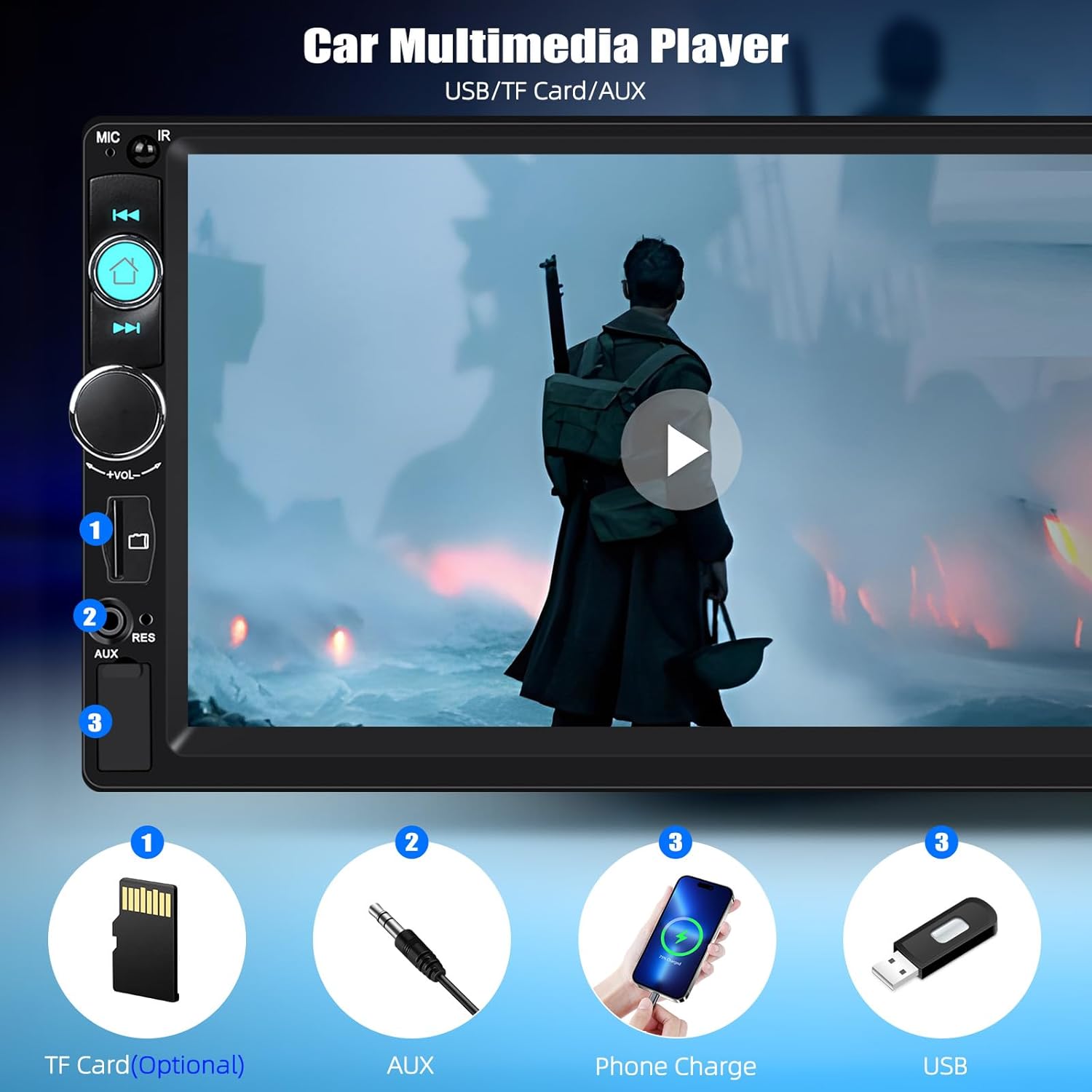
Figure 5: Multimedia input options. This image highlights the TF Card slot, AUX input, and USB port for media playback and phone charging.
Ovládání na volantu (SWC)
The unit supports original steering wheel button control. Connect the SWC wires from your vehicle to the stereo's SWC input. Configuration may be required in the stereo's settings menu.
Nastavení ekvalizéru (EQ)
Customize your audio experience with the multi-band EQ settings. Access the EQ menu to select preset sound modes or adjust individual frequency bands.
Key Backlight Color Adjustment
Personalize the appearance of your stereo by changing the key backlight color. The unit offers a cycle of 7 colors: red, green, blue, yellow, cyan, purple, and white.

Figure 6: Customizable key backlight colors. The image displays the stereo with different button illumination options.
Multiple Wallpaper Options
Change the background wallpaper of the stereo display to suit your preference. Access the settings menu to select from various pre-installed wallpapers or potentially upload your own (if supported).

Figure 7: Multiple wallpaper options. This image illustrates various background designs available for the stereo display.
Údržba
Abyste zajistili dlouhou životnost a optimální výkon vašeho autorádia, dodržujte tyto pokyny pro údržbu:
- Čištění: K čištění obrazovky a vnějšího povrchu použijte měkký, suchý hadřík. V případě odolných skvrn lehceamphadřík vodou. Nepoužívejte agresivní chemikálie ani abrazivní čisticí prostředky.
- Teplota: Nevystavujte jednotku extrémním teplotám, delšímu přímému slunečnímu záření nebo vysoké vlhkosti.
- Spojení: Pravidelně kontrolujte všechna kabelová připojení, abyste se ujistili, že jsou bezpečná.
Odstraňování problémů
Pokud narazíte na problémy s autorádiem, podívejte se na následující běžné problémy a jejich řešení:
- Bez napájení:
Check power cable connections. Ensure the vehicle's ignition is on. Check vehicle fuses. - Žádný zvuk:
Verify speaker connections. Check volume level and mute settings. Ensure the correct audio source is selected. - Bluetooth se nepřipojuje:
Ensure Bluetooth is enabled on both devices. Delete previous pairings and try pairing again. Restart both the stereo and your phone. - Zrcadlový odkaz nefunguje:
Ensure you are using an original USB data cable. Check for any required app installations on your phone. Verify phone settings allow USB debugging or file převod. - Špatný příjem rádia:
Check antenna connection. Ensure the antenna is fully extended (if applicable). Try scanning for stations again.
Pokud problém přetrvává i po vyzkoušení těchto řešení, kontaktujte zákaznickou podporu.
Specifikace
| Značka | SIXTOP |
| Číslo modelu | 92dead35-1a95-4b1f-b1dd-135857655b8b |
| Systém | 8600 |
| svtage | 12 V |
| Rozlišení obrazovky | 800 x 480 |
| Typ obrazovky | Odolný dotykový displej |
| Maximální výstupní výkon | 4*45W (180 Watts total) |
| Zrcadlový odkaz | Supports wired only (iOS/Android) |
| Rozhlasové pásmo | FM |
| Rádiová frekvence | 87.5-108 MHz |
| Zvukové formáty | MP3/AAC/OGG/FLAC/APE |
| Video formáty | AVI/3GP/MP4/MOV/MPG/MKV/VOB/RMVB/RM |
| Technologie připojení | Bluetooth, USB, TF Card, AUX-in, RCA, ISO |
| Typ ovladače | Touch Screen, Original Steering Wheel Control |
| Rozměry produktu | 8H x 18Š x 10.3V centimetrů |
| Podporované jazyky | English, Chinese, Japanese, Portuguese, Russian, German, Spanish, Turkish, Italian, French, Polish, Hebrew, Slovenia |
Záruka a podpora
For warranty information or technical support, please refer to the documentation included with your purchase or contact SIXTOP customer service directly. Keep your purchase receipt as proof of purchase.